1. Introduktion
This manual provides detailed instructions for the assembly, operation, and maintenance of your VIVO Electric Corner L-Shaped Standing Desk. Please read this manual thoroughly before beginning assembly or operation to ensure safe and correct usage. This desk is designed to provide a versatile and ergonomic workspace, allowing seamless transitions between sitting and standing positions.
2. Sikkerhedsoplysninger
ADVARSEL:
This desk has a weight limit of 225 lbs. Improper assembly or misuse may result in instability or injury. Electric components should be handled with care to avoid electrical shock.
- Sørg for, at alle forbindelser er sikre, før du betjener skrivebordet.
- Hold børn og kæledyr væk fra skrivebordet under drift.
- Placer ikke hænder eller andre genstande i nærheden af bevægelige dele.
- Avoid overloading the desk beyond its maximum weight capacity.
3. Produktfunktioner
- Create Instant Active Standing: Go from sitting to standing in one smooth motion with this complete corner workstation providing comfortable viewing angles and customized user heights. Perfect for a corner desk or office space divider.
- L-Shape with 3-Part Top: Includes a spacious main desk and return desk, accommodating a variety of monitor and laptop setups along with important work materials, supplies, and decor. When fully assembled, the outside surface measures 84.6" x 63".
- Kraftig elmotor: Enjoy a height range of 28.5” to 46.8” with the powerful single motor and strong 2.4” wide legs using precise telescopic height adjustment.
- Strong 225 lbs Support: With an all-steel frame and sturdy particle board table tops, this desk supports up to 225 lbs with maximum stability. Its modern appearance blends with a variety of home and office environments.
- Hukommelsescontroller: The easy-to-use push button controller features memory presets to save your preferred height settings.
4. Specifikationer
| Mærke | VIVO |
| Modelnummer | DESK-E3CTBB-84 |
| Form | L-form |
| Produktdimensioner | 63" D x 84.6" B x 28.5" H |
| Farve | Black Top / Black Frame |
| Stil | Moderne |
| Grundmateriale | Legeret stål |
| Top materialetype | Konstrueret træ |
| Finish Type | Lamineret |
| Speciel funktion | Elektrisk |
| Maksimal vægtanbefaling | 225 pund |
| Minimum højde | 28.5 tommer |
| Maksimal højde | 46.8 tommer |
| Bordpladetykkelse | 0.8 tommer |
| Løftemekanisme | Elektrisk |
5. Opsætning og montering
The VIVO Electric Corner L-Shaped Standing Desk arrives in two separate boxes. Please note that these boxes may arrive 1-2 days apart. Ensure all parts are present before beginning assembly.

Image: Desk components packaged in two separate boxes, indicating separate delivery.
Assembly typically takes approximately 1.5 to 2 hours. The instruction manual provides clear, user-friendly directions. The desk can be configured for either a left-side or right-side extension to suit your office layout.
Monteringstips:
- Pak alle komponenter ud, og verificer dem i forhold til reservedelslisten i den medfølgende manual.
- Organize parts by type (legs, supports, screws) to streamline the process.
- Følg de trinvise diagrammer og instruktioner i manualen.
- Consider having a second person assist with lifting and positioning the desktop sections.

Image: The VIVO Electric Corner L-Shaped Standing Desk fully assembled in a workspace, showcasing its spacious design with multiple monitors and accessories.
6. Betjeningsvejledning
Your VIVO Electric Corner L-Shaped Standing Desk features an intuitive control panel for height adjustment and memory presets.
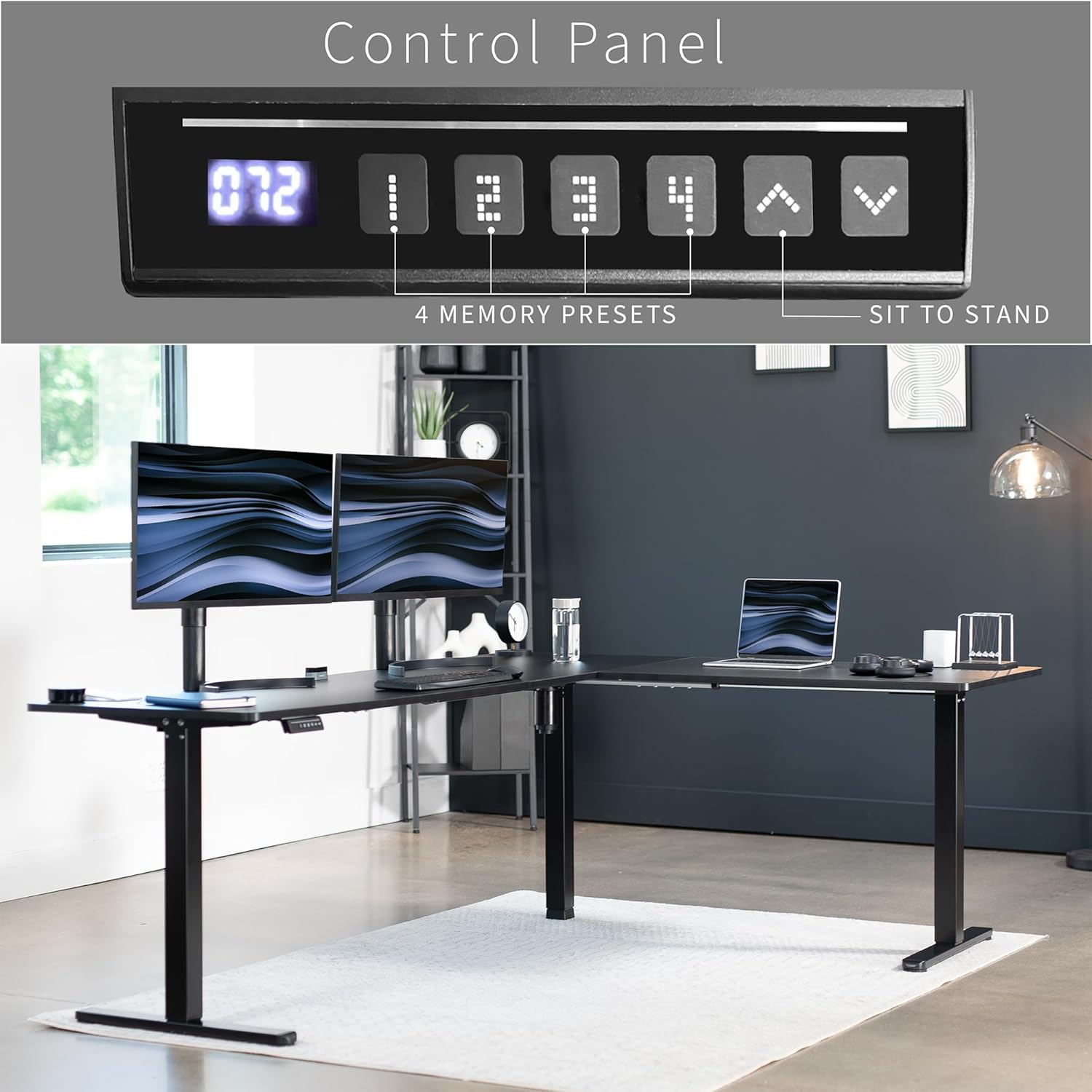
Billede: Et nærbillede view of the desk's control panel, showing the LED height display and buttons for up/down adjustment and four memory presets.
Højdejustering:
- Brug Op (▲) og Ned (▼) arrow buttons on the control panel to manually adjust the desk height. The desk can be adjusted from 28.5 inches to 46.8 inches.
- The powerful single motor ensures smooth and precise telescopic height adjustment.
Hukommelsesforudindstillinger:
The control panel features four memory preset buttons (1, 2, 3, 4) to save your preferred sitting and standing heights.
- Juster skrivebordet til den ønskede højde ved hjælp af Op/Ned-knapperne.
- Tryk på "S" button, then immediately press one of the number buttons (1, 2, 3, or 4) to save the current height to that preset.
- For at genkalde en gemt højde skal du blot trykke på den tilsvarende nummerknap. Bordet flytter automatisk til den gemte position.
Video: An official VIVO product video demonstrating the height adjustment and memory preset functions of the electric corner desk.

Image: A person standing comfortably at the VIVO L-shaped desk, demonstrating the desk's ergonomic standing height capability in a modern office environment.

Image: A graphic representation highlighting the desk's height adjustment range, from a minimum of 28.5 inches to a maximum of 46.8 inches, with features like powerful motor, collision protection, and 1 inch per second speed.
7. Vedligeholdelse
- Rensning: Tør skrivebordets overflader af med en blød,amp cloth. Avoid abrasive cleaners that may damage the laminated finish.
- Kabelstyring: Regularly check and organize cables to prevent tangles and interference with the desk's movement.
- Inspektion: Periodically inspect all screws and connections to ensure they remain tight. Tighten as necessary.
8. Fejlfinding
- Skrivebordet bevæger sig ikke: Check all power connections. Ensure the power cord is securely plugged into both the desk and a working wall outlet.
- Ujævn bevægelse: Ensure the desk is placed on a level surface. Check that all leg components are properly assembled and tightened.
- Fejlkoder på displayet: Refer to the detailed troubleshooting section in your included manual for specific error code interpretations and solutions. Often, a simple power cycle (unplugging for 30 seconds and plugging back in) can resolve minor issues.
- Støj under drift: A slight motor hum is normal. Excessive or unusual noises may indicate loose components or an obstruction. Discontinue use and inspect the desk.
9. Garanti og support
The VIVO Electric Corner L-Shaped Standing Desk comes with a Limited Warranty. Please refer to the warranty information provided with your product for specific terms and conditions.
For customer support, technical assistance, or warranty claims, please contact VIVO directly. Contact information can typically be found on the VIVO webwebstedet eller i din produktemballage.
Image: A graphic indicating VIVO's U.S.-based support and product protection.


