Indledning
The Angelcare AC25-1 Baby Movement Monitor with Video & Sound provides reassurance for parents by monitoring a baby's movements, video, and sound. This system features a wireless Movement Sensor Pad that detects micro-movements, alerting parents if no movement is detected after 20 seconds. Designed for security, it operates contact-free and without Wi-Fi. This manual provides essential information for setup, operation, and maintenance of your monitor.

Figure 1: Angelcare AC25-1 Baby Movement Monitor System Components.
This image displays the complete Angelcare AC25-1 system, featuring the parent unit with a screen, the baby unit (camera), and the wireless movement sensor pad. The parent unit shows a baby sleeping in a crib, illustrating its primary function.
Sikkerhedsoplysninger
Please read and understand all safety warnings and instructions before using the Angelcare AC25-1 monitor. Failure to follow these instructions could result in serious injury or damage.
- Kvælningsfare: Keep all cords and cables out of reach of children. Never place the baby unit or sensor pad within reach of the baby.
- Kvælningsfare: Ensure the camera unit and its power cord are at least 3 feet (1 meter) away from the crib.
- Kvælningsfare: Small parts. Keep out of reach of children.
- Batterisikkerhed: Use only the specified batteries. Do not mix old and new batteries. Dispose of batteries properly.
- Vand og fugt: Do not expose the monitor to water or moisture. Use only in dry environments.
- Varmekilder: Keep the monitor away from heat sources such as radiators, heat registers, stoves, or other appliances that produce heat.
- Interferens: This product operates on radio frequencies. Be aware that other devices using similar frequencies may cause interference.
- Not a Medical Device: This monitor is not intended to replace adult supervision and is not a medical device.
Pakkens indhold
Bekræft at alle varer er til stede i din pakke:
- Parent Unit (with 4.3" LCD screen)
- Babyenhed (kamera)
- Trådløs bevægelsessensorpude
- 2 Power Adapters (for Parent Unit and Baby Unit)
- Rechargeable Lithium Ion Battery (pre-installed in Parent Unit)
- Brugervejledning (dette dokument)
Opsætning
Follow these steps to set up your Angelcare AC25-1 monitor:
- Install the Movement Sensor Pad:
Place the wireless Movement Sensor Pad directly under the crib mattress, centered beneath where the baby will sleep. Ensure the mattress is firm and flat on the sensor pad for accurate movement detection. The pad should be placed on a solid, flat surface, not directly on springs or slats.

Figure 2: Installing the Movement Sensor Pad.
This image shows a person placing the white square sensor pad underneath a crib mattress, illustrating the first step of installation. The text overlay indicates "Fit the movement sensor pad once, it's ready to monitor babies movements day & night."

Figure 3: Sensor Pad Coverage.
This image depicts a baby sleeping in a crib, with blue dots at the corners of the mattress, visually representing that the sensor pad monitors movement from every corner of the mattress. The text overlay states "Sensor pad monitors every movement from every corner of the mattress."
- Position the Baby Unit (Camera):
Place the Baby Unit on a flat surface at least 3 feet (1 meter) away from the crib. Ensure it has a clear view of the baby and is out of the baby's reach. Adjust the camera angle as needed.

Figure 4: Baby Unit (Camera) Side View.
Dette billede viser en sideprofile of the white Angelcare baby unit, highlighting its compact design and adjustable stand.
- Tilslut strøm:
Connect the power adapters to the Baby Unit and Parent Unit, then plug them into a wall outlet. The Parent Unit has a rechargeable battery for portability, but it should be charged before first use.
- Tænd:
Press and hold the power button on both the Parent Unit and Baby Unit to turn them on. They should automatically link. If not, refer to the troubleshooting section.
Betjeningsvejledning
Learn how to use the key features of your Angelcare AC25-1 monitor:
Forældreenhed overview

Figure 5: Parent Unit Front View.
This image displays the front of the Angelcare parent unit, showing its 4.3-inch LCD screen and the control buttons for navigation and settings.
- 4.3" LCD-skærm: Displays live video feed from the Baby Unit, room temperature, and menu options.
- Navigationsknapper: Use the directional pad to navigate menus and adjust settings.
- Menu-knap: Access monitor settings.
- Talk-Back Button: Tryk og hold nede for at tale til din baby via babyenheden.
- Lydstyrkekontrol: Adjust the sound level of the Parent Unit.
Movement Monitoring
The wireless Movement Sensor Pad detects your baby's micro-movements. If no movement is detected for 20 seconds, an alarm will sound on the Parent Unit.
- Følsomhedsniveauer: The sensor pad has 4 adjustable sensitivity levels. Adjust as needed based on mattress type and baby's weight to minimize false alarms.
- Alarmindikation: When the movement alarm sounds, the Parent Unit screen will display an alarm icon (bell).

Figure 6: Movement Alarm on Parent Unit.
This image shows the Angelcare parent unit screen displaying a large bell icon, indicating that an alarm has been triggered due to no movement detected. The text overlay states "An alarm only sounds if no movement is detected after 20 seconds."
Video and Sound Monitoring
- Live video feed: View your baby in real-time on the Parent Unit's 4.3" LCD screen.
- Nattesyn: The Baby Unit automatically switches to infrared night vision in low-light conditions for clear viewing.
- Two-Way Talk-Back: Press and hold the talk-back button on the Parent Unit to soothe your baby remotely.
- Visning af rumtemperatur: The Parent Unit displays the current room temperature from the Baby Unit.
Yderligere funktioner
- Natlys: The Baby Unit includes a handy nightlight.
- Vuggeviser: Choose from 4 soothing lullaby options to play through the Baby Unit.
- Rækkevidde: Effective up to 150 meters (approx. 492 feet) in open field conditions.
- No Wi-Fi Required: The monitor operates on a secure, closed system, ensuring privacy and security without relying on Wi-Fi.

Figure 7: Baby Unit Nightlight.
This image shows the Angelcare baby unit (camera) with its top portion illuminated by a soft blue light, demonstrating the nightlight feature. The text overlay states "Handy night light and 4 soothing lullaby options."
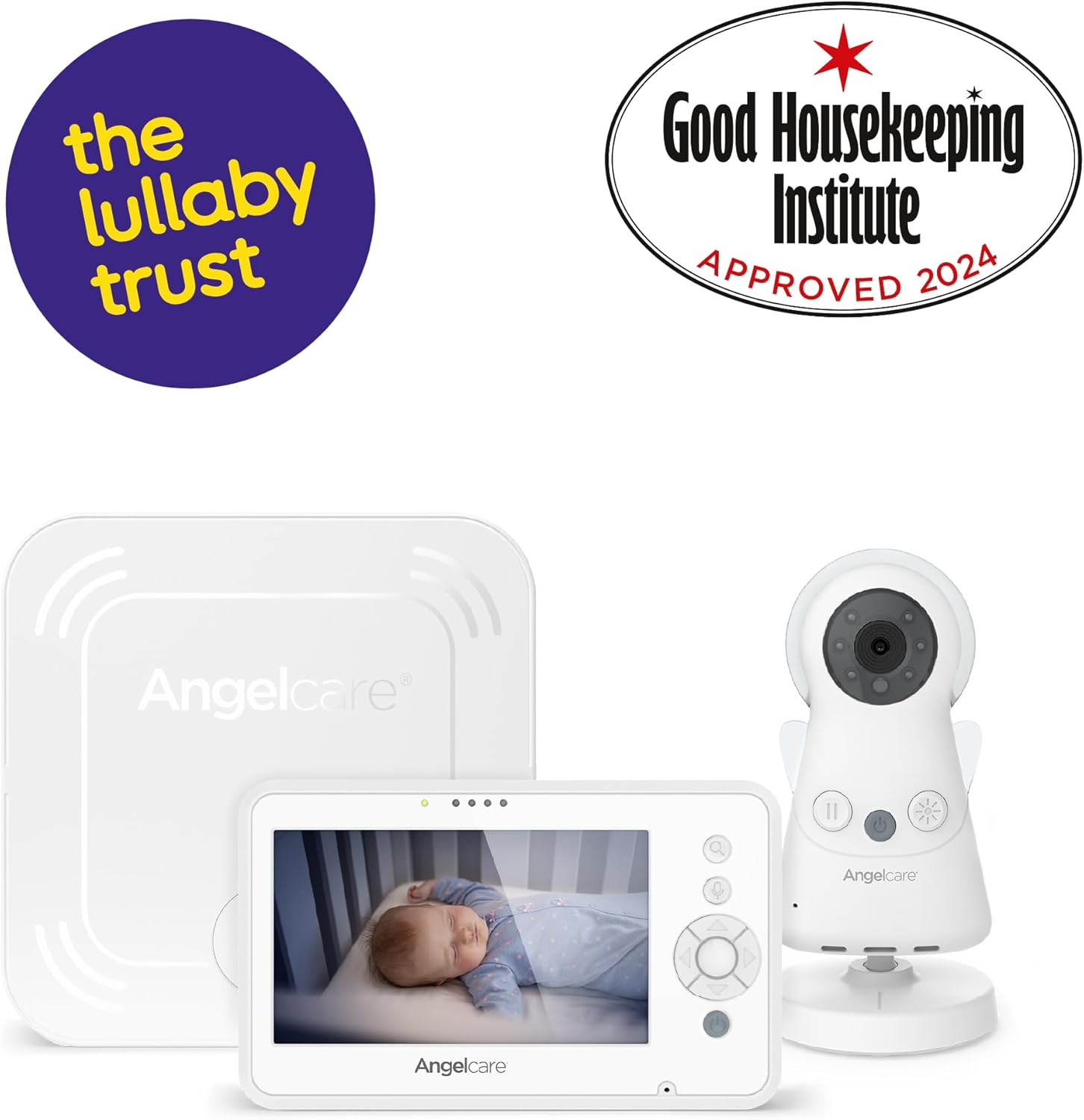
Figure 8: Peace of Mind with Angelcare.
This image shows a parent holding the Angelcare parent unit, looking at the screen which displays a baby in a crib. It conveys the sense of reassurance provided by the monitor. The text overlay states "Less worry, more time to enjoy the moments that matter the most."
Opretholdelse
Korrekt pleje sikrer din skærms levetid og optimale ydeevne:
- Rensning: Wipe the units with a dry, soft cloth. Do not use abrasive cleaners or solvents.
- Batteripleje: For the Parent Unit, fully charge the battery before first use. If storing for extended periods, charge the battery every 3 months to maintain its life.
- Sensor Pad: Keep the sensor pad clean and dry. Do not immerse in water.
- Opbevaring: Opbevar skærmen på et køligt, tørt sted, når den ikke er i brug.
Fejlfinding
Se dette afsnit for almindelige problemer og løsninger på disse:
| Problem | Mulig årsag | Løsning |
|---|---|---|
| No video/sound on Parent Unit | Units not powered on, out of range, or not paired. | Ensure both units are plugged in and powered on. Move Parent Unit closer to Baby Unit. Re-pair units if necessary (refer to pairing instructions in full manual). |
| Movement alarm sounds frequently (false alarms) | Sensor pad sensitivity too high, or not placed correctly. | Adjust sensor pad sensitivity to a lower level. Ensure sensor pad is on a firm, flat surface directly under the mattress. Remove any external vibrations. |
| Movement alarm does not sound | Sensor pad sensitivity too low, or not connected/powered. | Increase sensor pad sensitivity. Ensure sensor pad is properly connected and has power (if applicable). Test the sensor pad regularly. |
| Poor video quality / Night vision issues | Low light, camera lens obstructed, or out of range. | Ensure adequate lighting or that the room is dark enough for night vision to activate. Clean camera lens. Move units closer. |
| Forældreenhedens batteri aflades hurtigt | Battery life cycle, frequent use of features, or screen brightness too high. | Reduce screen brightness. Ensure battery is fully charged. Consider replacing battery if it's old and no longer holds a charge. |
Specifikationer
| Feature | Detalje |
|---|---|
| Modelnummer | AC25-1 |
| Skærmstørrelse | 4.3 tommer LCD |
| Bevægelsessensor | Wireless Movement Sensor Pad (4 sensitivity levels) |
| Bevægelsesalarm | Sounds after 20 seconds of no detected movement |
| Forbindelse | Secure, closed system (No Wi-Fi required) |
| Rækkevidde | Op til 150 meter (åbent felt) |
| Tovejs-samtale | Ja |
| Nattesyn | Infrared automatic activation |
| Temperatur display | Yes (on Parent Unit) |
| Nightlight & Lullabies | Yes (on Baby Unit) |
| Forældreenhedens batteri | 1 lithium-ion batteri (medfølger) |
| Produktdimensioner | 8.6 x 2.1 x 14 cm; 850 g (ca.) |
| Materiale | Plast |
Garanti og support
Angelcare products are manufactured to the highest quality standards. For warranty information and technical support, please refer to the warranty card included in your package or visit the official Angelcare webwebsted. Gem din købsbevis til garantikrav.
For further assistance, you may contact Angelcare customer service through their official channels. Details are typically provided in the product packaging or on the manufacturer's webwebsted.


