1. Introduktion
Thank you for choosing the Alvar 4K Smart Projector. This manual provides essential information for setting up, operating, and maintaining your projector to ensure optimal performance and longevity. Please read this manual thoroughly before using the product and retain it for future reference.
The Alvar V800P is designed to deliver a premium home entertainment experience with its 1000 ANSI lumens brightness, native 1080P resolution with 4K support, integrated Netflix, Prime Video, and YouTube apps, and advanced audio features including Dolby Audio and DBX-TV Total Sonics. It also boasts AI-powered auto-focus, auto-keystone correction, auto-obstacle avoidance, and auto-screen alignment for effortless setup.
2. Sikkerhedsoplysninger
To prevent fire, electric shock, or injury, always follow these basic safety precautions:
- Udsæt ikke projektoren for regn eller fugt.
- Åbn ikke projektoren casing. Overlad al service til kvalificeret personale.
- Sørg for tilstrækkelig ventilation. Bloker ikke ventilationsåbningerne.
- Brug kun den strømadapter, der følger med projektoren.
- Undgå direkte øjenkontakt med projektorlinsen, når lamp er tændt.
- Hold projektoren væk fra varmekilder og direkte sollys.
- Tag stikket ud af projektoren under tordenvejr eller når den ikke bruges i længere perioder.
3. Pakkens indhold
Bekræft at alle varer er inkluderet i din pakke:
- 1 × Alvar Smart Projector
- 1 × netledning
- 1 × HDMI-kabel
- 1 × Remote Control (Requires 2 AAA batteries, not included)
- 1 × Brugermanual (dette dokument)
4. Produktet er slutview
Familiarize yourself with the components of your Alvar V800P projector.

Figur 4.1: Forside view of the Alvar 4K Smart Projector, showcasing the main lens and sleek design.

Figur 4.2: Bagside view of the projector, highlighting the various connectivity ports including USB, HDMI (x2), and AV port.
4.1. Projektorkomponenter
- Projektionsobjektiv: Udsender billedet.
- Power knap: Tænder/slukker projektoren.
- Kontrolpanel: Touch-sensitive buttons for basic navigation.
- Ventilationsgitre: Vigtig for varmeafledning. Må ikke blokeres.
- Indgangsporte:
- HDMI (x2): Connects to external devices like laptops, gaming consoles, streaming sticks.
- USB: For connecting USB drives to play media.
- 3.5 mm hovedtelefonstik: Til ekstern lydudgang.
- AV-port: Til ældre analoge enheder.
- Indbyggede højttalere: 30W HiFi speakers with Dolby Audio and DBX-TV Total Sonics.
5. Opsætning
5.1. Placering
Choose a suitable location for your projector. The Alvar V800P supports various installation methods:
- Bordplademontering: Placer på en flad, stabil overflade.
- Loftmontering: Use the four holes on the bottom of the projector (covered by rubber fillers) for ceiling installation.
- Vægbeslag: Securely mount to a wall.
For optimalt viewing, ensure the projector is positioned perpendicular to the projection surface. The recommended projection distance for a 300-inch screen is approximately 19.6 feet (6 meters), and for a 50-inch screen, it's about 4.9 feet (1.5 meters).

Figure 5.1: The projector automatically adjusts the image for optimal display, even when placed at an angle.
5.2. Strømtilslutning
- Tilslut netledningen til projektorens strømindgang.
- Sæt den anden ende af netledningen i en stikkontakt.
5.3. Initial Setup and Automatic Adjustments
Upon powering on, the Alvar V800P utilizes advanced AI features for quick and precise image adjustment:
- AI Auto Focus: Automatically sharpens the image within 3 seconds.
- Automatisk keystone-korrektion: Corrects distorted images to a perfect rectangle.
- Undgåelse af forhindringer automatisk: Adjusts the projection to avoid objects on the wall.
- Automatisk skærmjustering: Automatically fits the image within your projection screen boundaries.

Figure 5.2: The projector's intelligent features ensure a perfect display with minimal effort.
6. Betjeningsvejledning
6.1. Tænd/sluk
- For at tænde: Tryk på tænd/sluk-knappen på projektoren eller fjernbetjeningen.
- For at slukke: Press the power button again. A confirmation prompt may appear; select "Power Off".
6.2. Fjernbetjening og navigation
The projector comes with a Bluetooth/Infrared remote control and a touch pad for easy navigation.
- Use the directional buttons on the remote or touch pad to navigate menus.
- Press the "OK" or "Enter" button to confirm selections.
- The remote also features dedicated buttons for Netflix, Prime Video, and YouTube for quick access.
6.3. Tilslutning af eksterne enheder
The Alvar V800P offers extensive connectivity options:
- HDMI: Connect laptops, gaming consoles (PS5, Switch), Roku, Fire TV Stick, etc., using an HDMI cable. Select the corresponding HDMI input from the projector's source menu.
- USB: Insert a USB flash drive into the USB port to play local media files (videoer, fotos, musik).
- Bluetooth 5.2 (tovejs):
- Sendertilstand: Connect the projector to external Bluetooth speakers or headphones for enhanced audio.
- Modtagertilstand: Connect your smartphone or tablet to the projector to use its powerful 30W speakers as a standalone Bluetooth speaker.
- WiFi 6: Connect to your home network for streaming content from built-in apps or mirroring your device screen.

Figure 6.1: The projector supports a wide range of external devices for versatile entertainment.

Figure 6.2: Bi-directional Bluetooth allows flexible audio configurations.
6.4. Using Built-in Smart Apps
The Alvar V800P comes preloaded with officially licensed streaming applications:
- Netflix
- Prime video
- YouTube
Access these apps directly from the home screen. Ensure the projector is connected to a stable internet connection via WiFi 6 for optimal streaming performance.

Figure 6.3: Enjoy popular streaming services directly from your projector.
6.5. Justering af indstillinger
Få adgang til indstillingsmenuen for at tilpasse din viewing and audio experience:
- Billedindstillinger: Adjust brightness, contrast, color temperature, and aspect ratio. The projector supports HDR10 for vibrant colors.
- Lydindstillinger: Control volume, activate DBX-TV Total Sonics for enhanced audio, and manage Dolby Audio settings.
- Zoom funktion: Adjust the screen size from 100% down to 50% without moving the projector. This feature is accessible via the setup menu and remote control.
- Netværksindstillinger: Configure WiFi and Bluetooth connections.
- Systemindstillinger: Language, date/time, software updates, and factory reset options.

Figure 6.4: Experience ultra-bright and vibrant colors, even in well-lit environments.
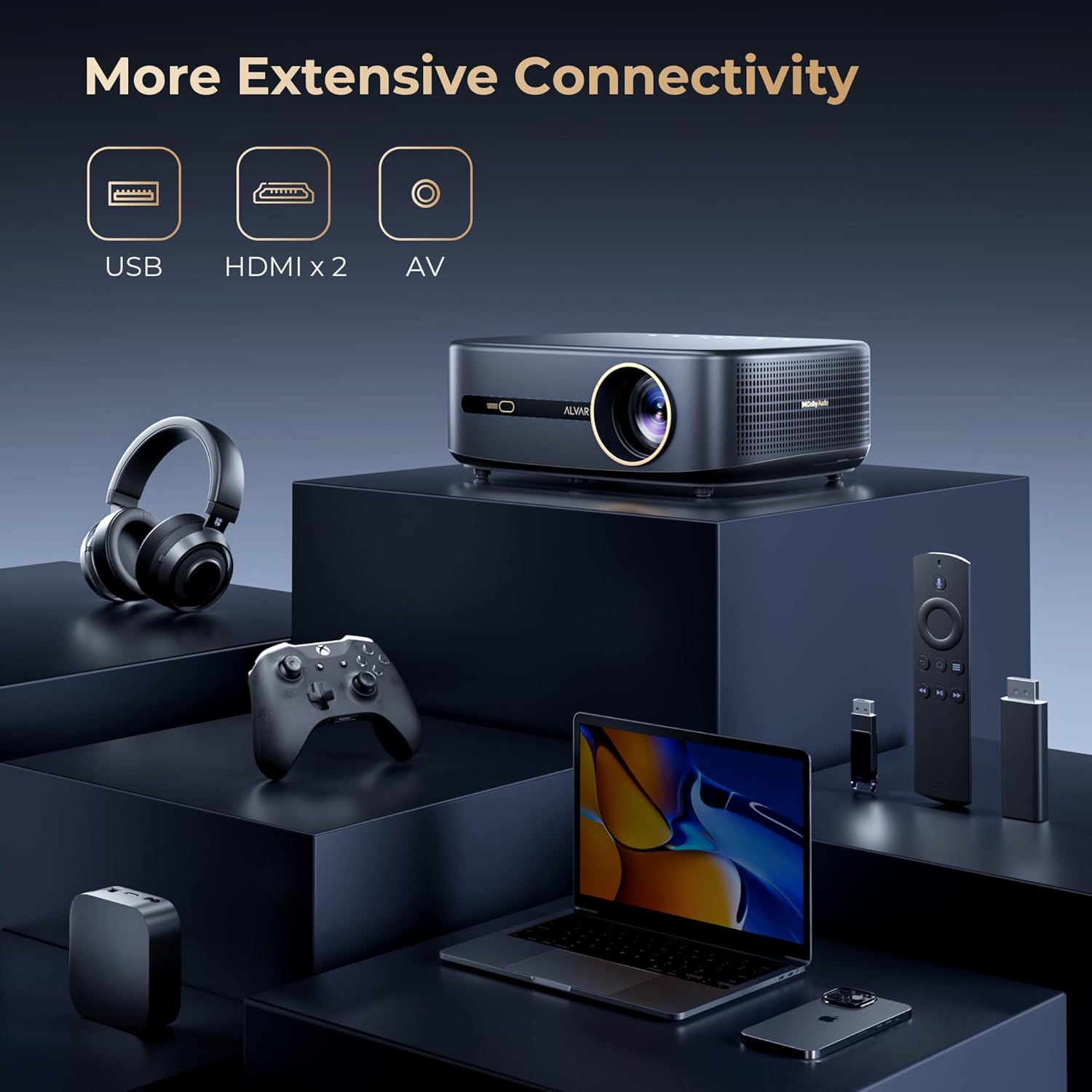
Figure 6.5: Adjust the projection size to fit any space, from 50 to 300 inches.
7. Vedligeholdelse
7.1. Rensning
- Linse: Brug en blød, fnugfri klud, der er specielt designet til optiske linser. Brug ikke slibende rengøringsmidler eller opløsningsmidler.
- Casing: Tør projektorens yderside af med en blød, tør klud. Tør let på genstridige mærker.ampen klud med vand.
- Ventilation: Periodically check and gently clean the ventilation grilles to prevent dust buildup, which can affect performance and lifespan.
7.2. Opbevaring
Når projektoren ikke er i brug i længere perioder, skal den opbevares køligt og tørt, væk fra direkte sollys og ekstreme temperaturer. Det anbefales at bruge den originale emballage eller et beskyttende etui for at forhindre støv og skader.
8. Fejlfinding
If you encounter issues with your Alvar V800P projector, refer to the following common problems and solutions:
| Problem | Mulig årsag | Løsning |
|---|---|---|
| Intet billede eller sløret billede | Power issue, incorrect input source, focus/keystone not adjusted. | Ensure power is connected. Select correct input source. Allow auto-focus/keystone to complete or manually adjust. |
| Ingen lyd | Volume too low, incorrect audio output, external device audio settings. | Increase volume. Check audio output settings on projector and connected device. Ensure Bluetooth audio is correctly paired. |
| Fjernbetjening virker ikke | Batteries low/dead, remote not paired, obstruction. | Replace AAA batteries. Ensure remote is paired via Bluetooth. Remove any obstructions between remote and projector. |
| Kan ikke oprette forbindelse til WiFi/Bluetooth | Incorrect password, out of range, network issue. | Verify password. Move projector closer to router/device. Restart projector and router. |
| Apps not loading/crashing | Poor internet connection, app cache, outdated app version. | Check internet connection. Clear app cache in settings. Update apps if available. Restart projector. |
If the problem persists, please contact Alvar customer support.
9. Specifikationer
| Feature | Detalje |
|---|---|
| Mærke | Alvar |
| Modelnummer | V800P |
| Lysstyrke | 1000 ANSI Lumens |
| Indfødt opløsning | 1920 x 1080 (1080P) |
| Understøttet opløsning | Up to 4K (60Hz) |
| Farveskala | 100 % NTSC |
| HDR-understøttelse | HDR10 |
| Lydteknologi | Dolby Audio, DBX-TV Total Sonics |
| Højttalere | 30W HiFi Speakers |
| Forbindelse | WiFi 6, Bluetooth 5.2 (Bi-directional), 2x HDMI, 1x USB, 1x 3.5mm Headphone Jack, AV Port |
| Smarte funktioner | Netflix, Prime Video, YouTube (Officially Licensed), AI Auto Focus, Auto Keystone, Auto Obstacle Avoidance, Auto Screen Alignment |
| Projektionsstørrelse | 50-300 inches (100%-50% Zoom) |
| Dimensioner | 11.8 x 9 x 3.93 tommer |
| Vægt | 5.24 pund |
10. Garanti og support
Alvar offers comprehensive support for your projector:
- Garanti: 1-year replacement warranty and 3-year repair service.
- Kundesupport: For any questions or issues, please contact Alvar customer service. Provide your order ID and a description (or image/video) of the issue for quicker assistance. Support typically replies within 12 business hours.
- Kontaktoplysninger: Refer to the contact details provided on the product packaging or the official Alvar webwebsted.
For mere information, besøg Alvar Store on Amazon.


