1. Introduktion
Thank you for choosing the pecron E3600LFP Portable Power Station. This manual provides essential information for the safe and efficient operation, maintenance, and troubleshooting of your device. The E3600LFP is a high-capacity portable power solution designed for various applications, from outdoor adventures to emergency home backup.
Key features include a 3072Wh LiFePO4 battery, 3600W AC output, and expandability up to 15360Wh with additional EP3000-48V batteries. It offers multiple output options and fast charging capabilities to keep your devices powered wherever you are.
2. Opsætning
Before first use, ensure your pecron E3600LFP is fully charged. The unit comes with necessary cables for various charging methods.
2.1 Udpakning og første inspektion
Fjern forsigtigt alle komponenter fra emballagen. Kontroller, at alle medfølgende dele er til stede:
- pecron E3600 LFP Power Station (x1)
- EP3000-48V Extension battery (x1)
- 15A AC cable (x1)
- 30A AC cable (x1)
- Single port XT60 to MC4 solar charging cable (x1)
- Parallel dual port XT60 to MC4 solar charging cable (x1)
- Bilopladningskabel (x1)
- Ligekærvskruetrækker (x1)
- Tilbehørstaske (x1)
- User Instruction (x1)
2.2 Connecting the Extended Battery
To expand the capacity of your E3600LFP, connect the EP3000-48V Extension Battery using the provided cable. Ensure a secure connection for optimal performance.

Figure 2.1: pecron E3600LFP Power Station connected to its extended battery.
2.3 Opladning af kraftværket
The E3600LFP supports multiple charging methods:
- AC opladning: Fully charge in 1.3 hours with 3200W AC charge or 2 hours with 1800W AC charge. Use the appropriate AC cable provided.
- Opladning af solpanel: Achieve a full charge in approximately 1.5 hours with 8*300W solar panels (2400W total). Use the XT60 to MC4 solar charging cables.
- Bilopladning: Charge the unit using the included Car Charging Cable.

Figure 2.2: Illustration of the three primary charging methods for the E3600LFP.
3. Betjeningsvejledning
The pecron E3600LFP offers versatile power output options for a wide range of devices.
3.1 Output Options
The power station features 16 output options to meet diverse charging needs:
- 4 x AC Output (100V-120V, 3600W Max)
- 1 x TT30-R Output
- 4 x USB-A-porte
- 2 x 100W USB-C Ports
- 1 x XT60-F Output
- 1 x Cigar Port
- 1 x DC5525 Output
- 2 x Wireless Charger Pads

Figur 3.1: Overview of the 16 output options on the E3600LFP.
3.2 Strømforsyning til enheder
Connect your devices to the appropriate output ports. The E3600LFP can power a variety of electronics and appliances, including smartphones, tablets, laptops, cameras, RVs, and more.
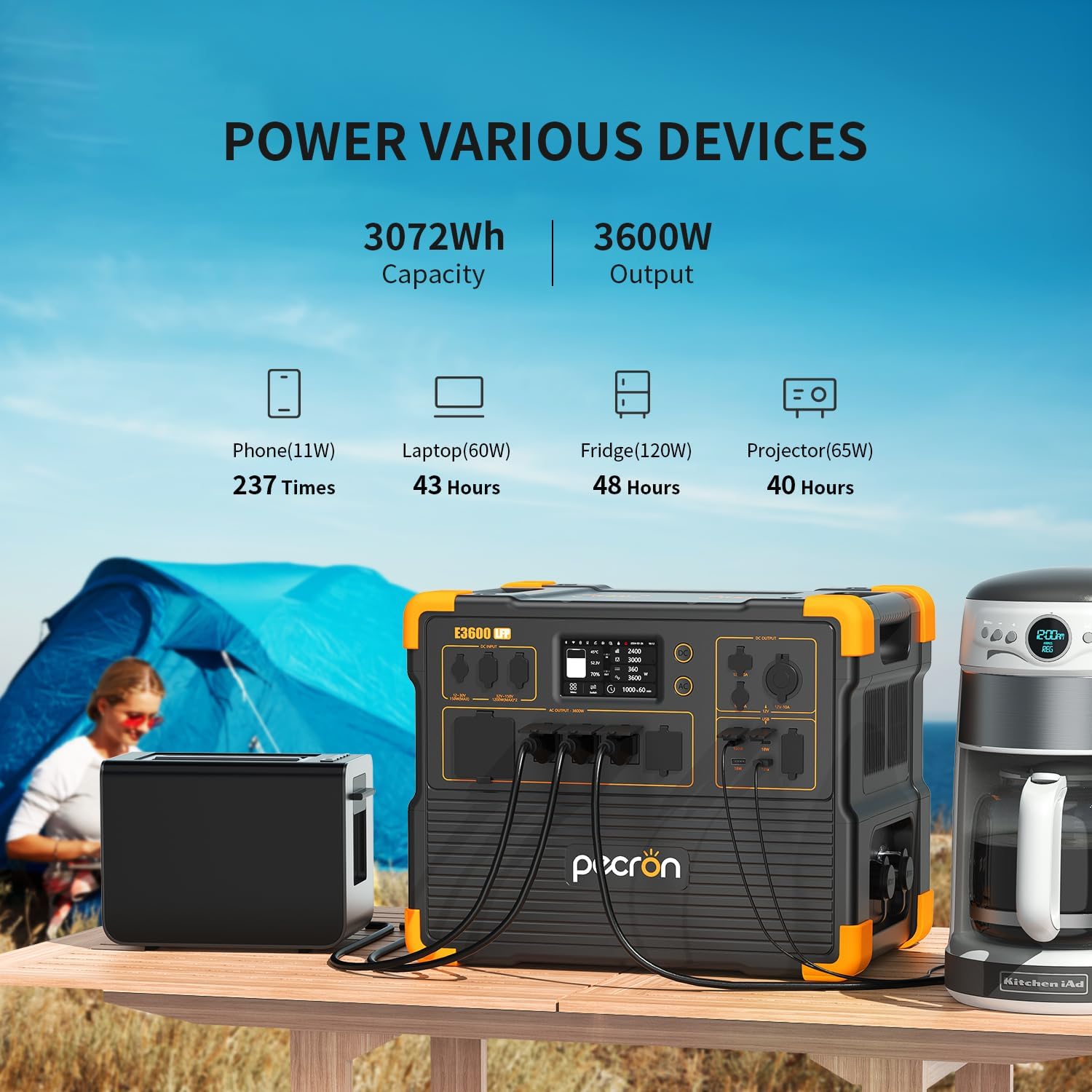
Figur 3.2: Eksamples of devices powered by the E3600LFP and estimated usage times.
3.3 App Smart Control
Manage and monitor your power station remotely using the pecron app. The app allows you to:
- View power levels (input/output)
- Customize charging power
- Overvåg batteristatus
- Control various settings via Wi-Fi and Bluetooth

Figure 3.3: The pecron app provides smart control and monitoring capabilities.
4. Vedligeholdelse
Proper maintenance ensures the longevity and optimal performance of your pecron E3600LFP.
4.1 Pleje af batterier
The E3600LFP utilizes a durable LiFePO4 battery, designed for long-term use. It can retain 80% of its original capacity after 3500 complete charge cycles.
- Opbevar kraftværket på et køligt, tørt sted væk fra direkte sollys.
- Undgå ekstreme temperaturer.
- For long-term storage, charge the battery to approximately 50-80% and recharge every 3-6 months.

Figure 4.1: The E3600LFP features a long-lasting LiFePO4 battery.
4.2 Sikkerhedsfunktioner
The power station is equipped with a built-in Battery Management System (BMS) to ensure safety and provide stable power support. The BMS protects against:
- Kortslutninger
- Overbelaste
- Overophedning

Figure 4.2: The integrated BMS ensures safe and reliable operation.
5. Fejlfinding
If you encounter issues with your pecron E3600LFP, refer to the following common troubleshooting tips:
5.1 Ingen effekt
- Ensure the power station is turned on and the specific output ports (AC/DC) are activated.
- Check the battery level. Recharge if the battery is low.
- Verify that the connected device is working correctly and its power requirements do not exceed the power station's output limits.
- Inspect cables for damage and ensure they are securely connected.
5.2 Langsom opladning
- Confirm that you are using the correct charging cable and adapter (e.g., 30A AC cable for fastest charging).
- For solar charging, ensure panels are clean, optimally angled towards the sun, and not shaded. Verify the total wattage of connected solar panels.
- Check the charging speed setting in the pecron app, if applicable.
5.3 Overload Protection Activated
- If the power station shuts down or displays an overload warning, disconnect some devices.
- Reduce the total power draw to below the rated output (3600W).
- Restart the power station.
5.4 Problemer med app-forbindelse
- Ensure Bluetooth and Wi-Fi are enabled on your mobile device.
- Make sure the power station is within range.
- Restart both the power station and the app.
- Tjek for appopdateringer.
6. Specifikationer
| Mærke | pecron |
| Modelnavn | E3600LFP |
| Kapacitet | 3072Wh (Expandable to 15360Wh with EP3000-48V) |
| AC udgang | 3600W (Rated), 100V-120V Pure Sine Wave |
| Batteritype | LiFePO4 |
| Cyklus liv | 3500+ cyklusser til 80% kapacitet |
| Fast Charging (AC) | 1.3 Hrs (3200W), 2 Hrs (1800W) |
| Solar opladning | 1.5 Hrs (8*300W Solar Panel Charging) |
| Samlet strømudtag | 16 |
| Varens vægt | 79 pund |
| Produktdimensioner | 17.5 cm L x 12.1 cm B x 13.8 cm H |
| Særlige funktioner | Portable, Fast Charging, Large Capacity, Long Last, Safety, Smart Control, UPS |
7. Garanti og support
pecron offers a comprehensive warranty and dedicated customer service for your peace of mind.
7.1 Garantioplysninger
Your pecron E3600LFP Portable Power Station comes with a 2+3 years worry-free warranty. This includes an initial 2-year warranty, with an additional 3 years upon product registration or specific conditions. Please refer to the official pecron website or contact customer service for full warranty terms and conditions.
7.2 Kundeservice
For any questions, technical support, or warranty claims, pecron provides 24 hours/7 days friendly customer service.
Kontaktoplysninger:
- E-mail: support@pecron.com (Eksample, please refer to your product documentation for actual contact details)
- Webwebsted: www.pecron.com (Eksample, please refer to your product documentation for actual contact details)
When contacting support, please have your product model number (E3600LFP) and purchase information ready to expedite assistance.


