Indledning
This manual provides essential information for the safe and efficient use of your iiyama SOLUTION INFINITY Desktop PC. Please read this manual thoroughly before operating the product and retain it for future reference.
The iiyama SOLUTION INFINITY is a slim-type microATX desktop PC designed for business use, featuring an Intel Core i5-14400 processor and Windows 11 Home operating system.

Figure 1: iiyama SOLUTION INFINITY Desktop PC (Main View)
1. Opsætning
1.1 Udpakning og placering
Carefully remove the PC and all accessories from the packaging. Place the PC on a stable, flat surface with adequate ventilation. Ensure no vents are obstructed.
1.2 Tilslutning af eksterne enheder
Connect your monitor, keyboard, mouse, and other peripherals to the appropriate ports on the PC. Refer to the rear panel diagram for port identification.
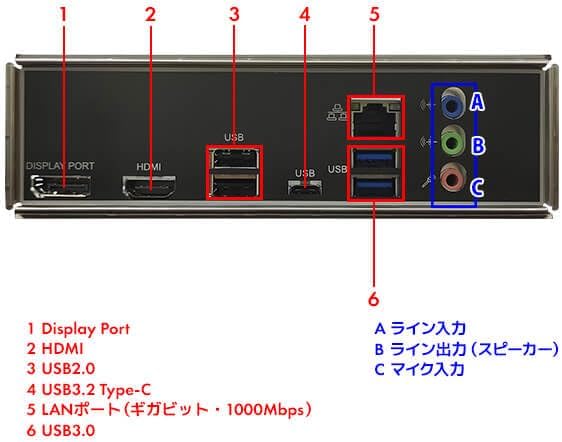
Figure 2: Rear Panel Ports Diagram
Bagpanelet inkluderer:
- 1 DisplayPort: Til tilslutning af en skærm.
- 2 HDMI: For connecting a monitor or TV.
- 3 USB 2.0: To porte til tilslutning af eksterne enheder.
- 4 USB 3.2 Type-C: One port for high-speed data transfer and compatible devices.
- 5 LAN Port (Gigabit - 1000Mbps): Til kabelbaseret netværksforbindelse.
- 6 USB 3.0: To porte til højhastigheds dataoverførsel.
- A Line In: Lydindgang.
- B Line Out (Speaker): Audio output for speakers or headphones.
- C Mic In: Mikrofonindgang.
Frontpanelet indeholder:
- Hovedtelefonstik x1
- Microphone jack x1
- USB 3.0 x2
- USB 2.0 x2

Figure 3: Front Panel with USB and Audio Ports
1.3 Strømtilslutning
Connect the provided power cable to the power input on the rear of the PC and then to a wall outlet. Ensure the power supply is rated for your region's voltage.
1.4 Indledende tænding
Press the power button located on the front panel of the PC. The system will boot up and guide you through the initial Windows 11 setup process.
2. Betjeningsvejledning
2.1 Windows 11 Home
Your PC comes pre-installed with Windows 11 Home. Follow the on-screen instructions for initial setup, including language selection, network connection, and user account creation.
2.2 Grundlæggende betjening
- Tænd/sluk: Tryk på tænd/sluk-knappen for at tænde. Gå til Start > Strøm > Luk ned i Windows for at slukke.
- Genstart: Gå til Start > Strøm > Genstart.
- Sove mode: Go to Start > Power > Sleep.
- Tilslutning til netværk: The PC features a 1000BASE-T wired LAN port. Connect an Ethernet cable for internet access. Wireless connectivity requires a separate USB Wi-Fi adapter.
3. Vedligeholdelse
3.1 Rengøring
Regularly clean the exterior of the PC with a soft, dry cloth. Use compressed air to clear dust from vents and ports to ensure proper airflow and prevent overheating. Do not use liquid cleaners directly on the PC.
3.2 Softwareopdateringer
Keep your Windows operating system and drivers updated to ensure optimal performance and security. Windows Update can be accessed via Settings > Windows Update.
3.3 Interne komponenter
For advanced maintenance or upgrades, such as adding more RAM or storage, consult a qualified technician. The PC supports DDR5 memory and NVMe M.2 SSDs.
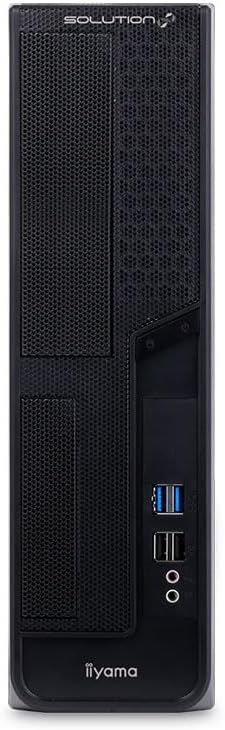
Figure 4: Motherboard Layout (Illustrative)
4. Fejlfinding
If you encounter issues with your PC, refer to the following common troubleshooting steps:
- Ingen strøm:
- Sørg for, at strømkablet er korrekt tilsluttet til både pc'en og stikkontakten.
- Kontroller, at stikkontakten fungerer ved at tilslutte en anden enhed.
- Ingen visning:
- Check that the monitor is powered on and connected correctly to the PC's DisplayPort or HDMI port.
- Sørg for, at den korrekte inputkilde er valgt på din skærm.
- Ingen internetforbindelse (kablet):
- Verify the Ethernet cable is securely connected to the LAN port on the PC and your router/modem.
- Check your router/modem status.
- Systemnedbremsning:
- Luk unødvendige applikationer.
- Søg efter og installer Windows-opdateringer.
- Sørg for tilstrækkelig ventilation for at forhindre overophedning.
For persistent issues, contact iiyama customer support or consult the official iiyama webwebsted for yderligere hjælp.
5. Specifikationer
| Feature | Detalje |
|---|---|
| Modelnavn | SOLUTION-S07M-144-UHX-M |
| Formfaktor | Slim Type / microATX |
| Operativsystem | Windows 11 Home |
| Processor | Intel Core i5-14400 (10 Cores, 16 Threads, up to 4.7GHz) |
| CPU køler | Top-flow air cooler |
| Grafik | Intel UHD Graphics 730 (Integreret) |
| Hukommelse | 8GB DDR5 (8GB x 1, 2 memory slots total) |
| Opbevaring | 500GB NVMe M.2 SSD |
| Optisk drev | Ikke inkluderet |
| Chipsæt | Intel B760 |
| Lyd | High Definition Audio subsystem |
| Kabelforbundet LAN | 1000BASE-T |
| Trådløs | None (Requires separate USB adapter) |
| Forreste porte | Headphone x1, Microphone x1, USB 3.0 x2, USB 2.0 x2 |
| Bageste porte | DisplayPort x1, HDMI x1, USB 3.2 Type-C x1, USB 3.0 x2, USB 2.0 x2, LAN x1, Analog Audio (Line Out, Line In, Mic In) |
| Interne terminaler | M.2 x2 (PCIe Gen4 x4), SATA 6Gbps x4, Internal USB 3.0 (x4 ports), Internal USB 2.0 (x4 ports) |
| Udvidelsesslots | PCI Express4.0 [x16] LowProfile x1, PCI Express4.0 [x1] LowProfile x1, PCI Express4.0 [x16] (x4 operation) LowProfile x1, Empty LowProfile x1 |
| Udvidelsespladser | 5.25 inch bay x1, 3.5 inch bay x1, 3.5 inch internal bay x2, 2.5 inch internal bay x1 |
| TPM | TPM2.0 (Intel PTT) |
| Strømforsyning | 400W 80PLUS BRONZE TFX |
| Dimensions (with stand/protrusions) | Ca. 187 mm (B) x 410 mm (D) x 346 mm (H) |
| Dimensions (excluding protrusions) | Ca. 96 mm (B) x 402 mm (D) x 330 mm (H) |
| Inkluderet tilbehør | Power cable, various manuals, warranty card, Japanese keyboard, optical mouse |
6. Garanti og support
6.1 Standardgaranti
Dette produkt leveres med en standard 1 års garanti from the date of purchase. Please retain your proof of purchase and the warranty card for any warranty claims.
6.2 Kundesupport
For technical assistance, service, or warranty inquiries, please contact iiyama customer support. Refer to the contact information provided in the included manuals or visit the official iiyama webwebsted.
Note: Monitor is not included and is sold separately.


