Indledning
This instruction manual provides essential information for the setup, operation, and maintenance of your LOUTOC Replacement Remote Control, model URMT26CND002. This remote is designed as a universal replacement for various Philips Android and Google Smart TV models. Please read this manual thoroughly before use to ensure optimal performance and longevity of your device.
Opsætning
1. Batteriinstallation
The remote control requires two (2) AAA batteries (not included). Follow these steps to install them:
- Find batterirummets dæksel på bagsiden af fjernbetjeningen.
- Skub dækslet nedad for at åbne rummet.
- Isæt to AAA-batterier, og sørg for, at de positive (+) og negative (-) poler er justeret korrekt med markeringerne inde i batterirummet.
- Skub batteridækslet tilbage på plads, indtil det klikker sikkert.
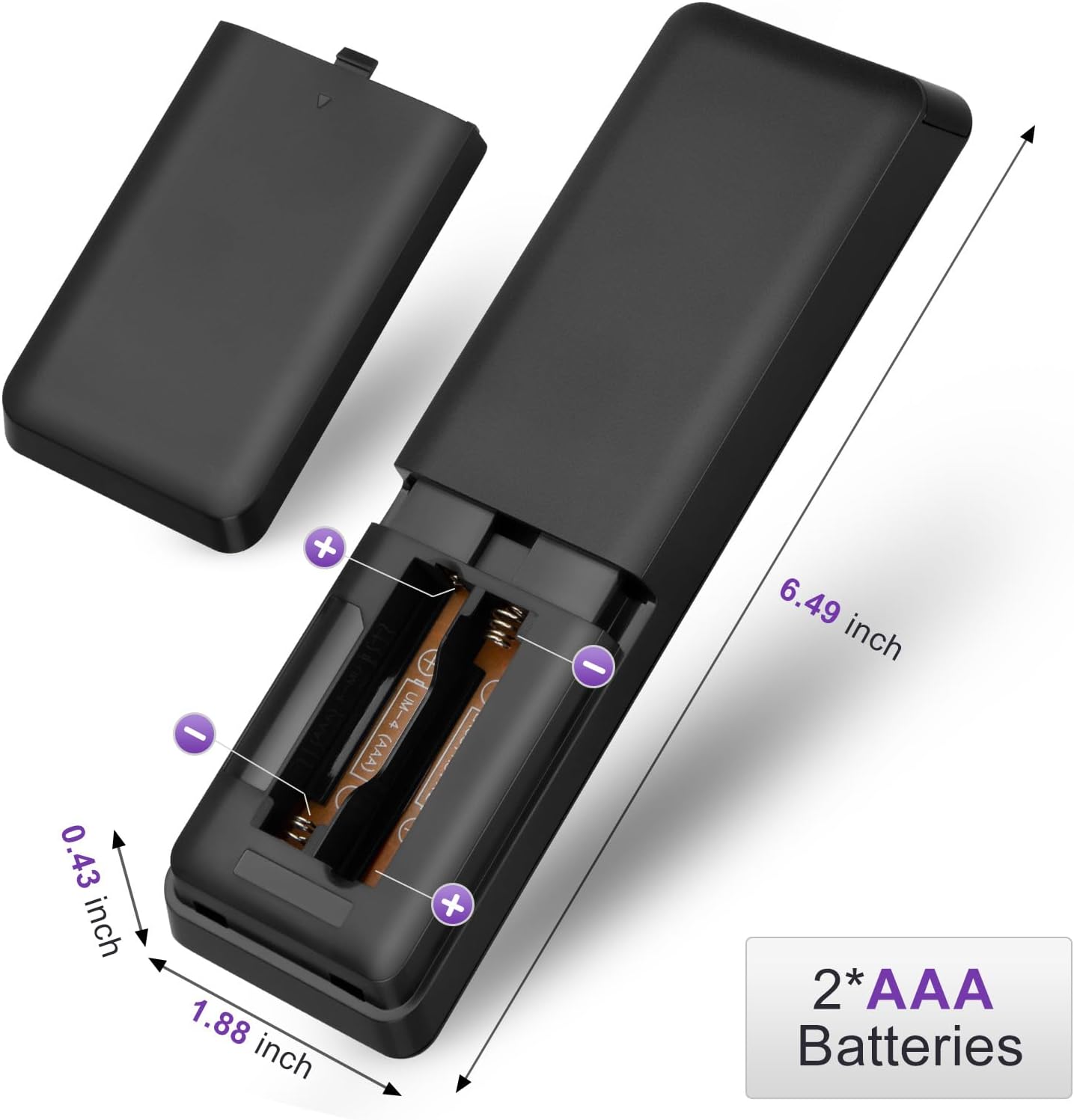
Figure 1: Battery installation for the LOUTOC remote control.
2. Førstegangsbrug
This LOUTOC remote control is pre-programmed and designed to work immediately with compatible Philips Smart TVs. No additional setup or pairing is required. Simply install the batteries, point the remote at your TV, and begin use.

Figure 2: Key features including no setup required and fast response time.
Betjeningsvejledning
The LOUTOC remote control features a standard layout for easy navigation and control of your Philips Smart TV. Below is a detailed description of each button's function.
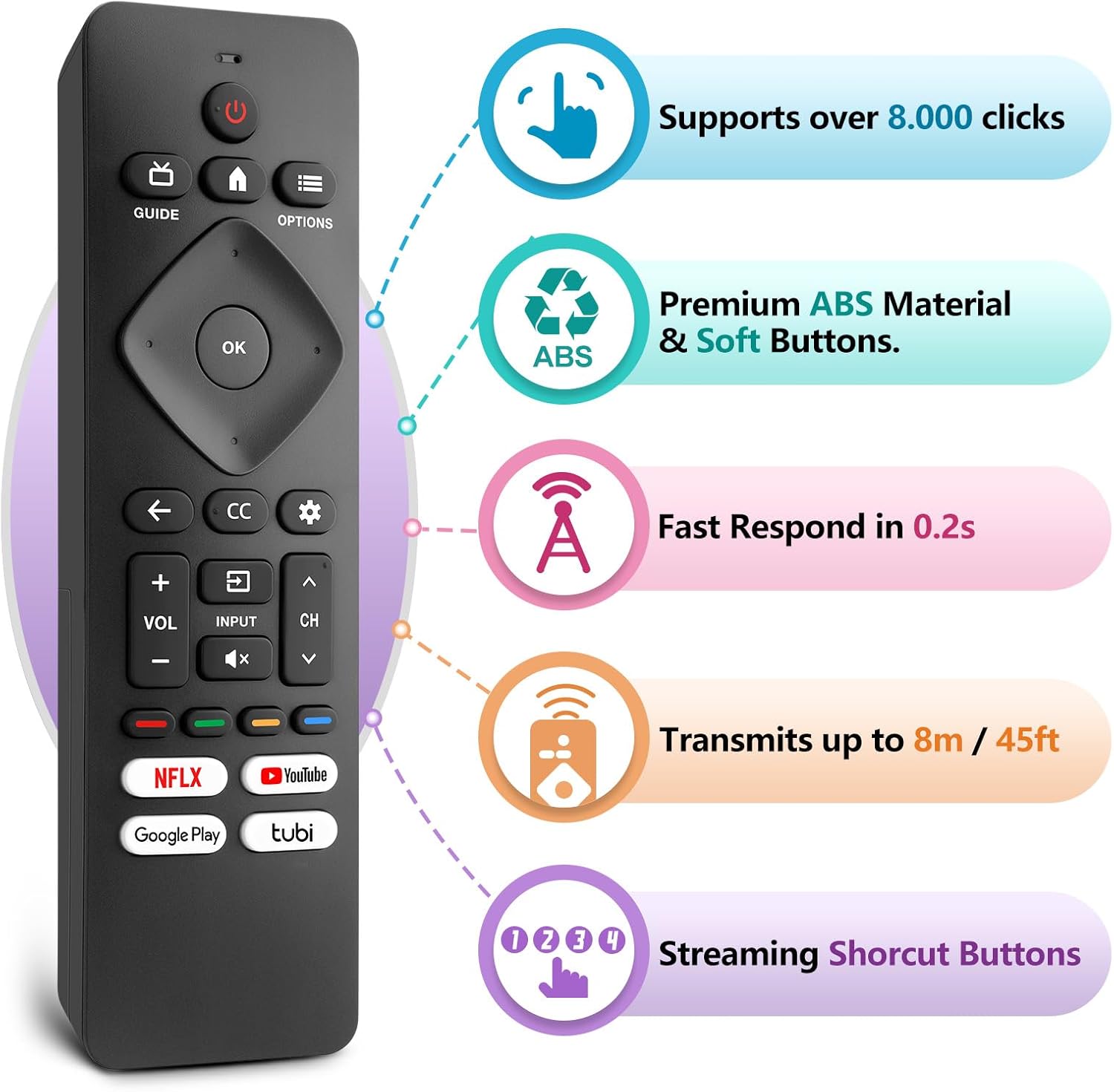
Figure 3: LOUTOC Remote Control Button Layout and Functions.
- MAGT: Turns the TV on or off. Press for less than 1 second for Quick Start Standby. Hold for 1 second or more for Low Power Standby.
- GUIDE: Displays the TV program guide (availability may vary by service provider and region).
- HJEM: Accesses your apps, Live TV, input devices, settings, and the Google Play Store.
- MULIGHEDER: Provides quick access to TV settings (settings vary depending on active screen).
- CURSOR (Up, Down, Left, Right) & OK: Moves to select an item and confirms selections on the menu.
- TILBAGE: Vender tilbage til den forrige skærm.
- CC (undertekster): Selects closed caption settings.
- DASHBOARD: Accesses the Google TV dashboard for user settings, notifications, and kids mode.
- INPUT: Selects the input source for connected devices.
- STUM: Toggles the sound on and off.
- VOL +/-: Justerer lydstyrken.
- CH +/-: Selects the next or previous channel.
- COLOR BUTTONS (Red, Green, Yellow, Blue): Works as direct access to user-specified net apps or functions.
Genvejsknapper
The remote includes dedicated shortcut buttons for popular streaming services:
- NETFLIX
- YouTube
- Google Play
- Tubi

Figure 4: Dedicated streaming service shortcut buttons.
Kompatibilitet
This LOUTOC remote control is compatible with a wide range of Philips Android and Google Smart TV models. It is designed to replace various original Philips remote controls.
Compatible Philips Google TV Models:
- 70PUL7553/F7, 75PUL7552/F7, 65PUL7552/F7, 55PUL7552/F7, 50PUL7552/F7
- 43PUL7672/F7, 43PUL7652/F7, 65PUL7672/F7, 55PUL7672/F7, 50PUL7672/F7
- Generally compatible with Philips Google TV 7000 and 7600 Series.
Compatible Philips Android TV Models:
- 65PFL5766/F7, 55PFL5766/F7, 50PFL5766/F7, 43PFL5766/F7, 50PFL5806/F7
- 75PFL5604/F7, 75PFL5604/F7A, 75PFL5604/F7E, 75PFL5704/F7A, 75PFL5704/F7
- 32PFL5505/F7, 65PFL5604/F7, 55PFL5604/F7, 50PFL5604/F7, 43PFL5604/F7
- 50PFL5604/F7A, 43PFL5766/F6, 50PFL5766/F6, 65PFL5766/F6, 55PFL5766/F6
- 55PFL5704/F7, 65PFL5704/F7, 50PFL5704/F7, 43PFL5704/F7, 65PFL5504/F7
- 65PFL5604/F7A, 55PFL5604/F7A, 55PFL5766/F7E
- Generally compatible with Philips Android TV 5000, 5500, 5700, 5704, and 5800 Series.

Figure 5: Compatibility with Philips Google TV and Android TV series.
Specifikationer
| Feature | Detalje |
|---|---|
| Modelnummer | URMT26CND002 |
| Dimensioner | 6 x 1.2 x 0.8 tommer (15.24 x 3.05 x 2.03 cm) |
| Varens vægt | 1.76 ounce (50 gram) |
| Batterier påkrævet | 2 x AAA batterier (medfølger ikke) |
| Transmissionsafstand | Cirka 6-8 meter (19-26 fod) |
| Svartid | Inden for 0.5 sekunder |
| Materiale | Premium ABS Material |
| Særlige funktioner | Ergonomic, Lightweight, No Programming Required, Pre-Programmed, Universal |
Fejlfinding
- Fjernbetjeningen svarer ikke:
- Sørg for, at batterierne er isat korrekt med den korrekte polaritet (+/-).
- Udskift gamle batterier med nye AAA-batterier.
- Kontroller, om der er forhindringer mellem fjernbetjeningen og tv'ets infrarøde modtager.
- Ensure you are within the effective operating range (6-8 meters) of the TV.
- Specifikke knapper virker ikke:
- Verify that the button is clean and not stuck.
- Some functions may be specific to certain TV models or require the TV to be in a particular mode (e.g., input selection).
- Ingen stemmestyring:
- This remote control does not support voice control functionality.
Opretholdelse
For at sikre din fjernbetjenings levetid og korrekte funktion, skal du følge disse vedligeholdelsesretningslinjer:
- Rensning: Brug en blød, tør klud til at rengøre fjernbetjeningen. Undgå at bruge flydende rengøringsmidler eller slibende materialer.
- Opbevaring: Opbevar fjernbetjeningen et køligt, tørt sted væk fra direkte sollys og ekstreme temperaturer.
- Batteripleje: Fjern batterierne, hvis fjernbetjeningen ikke skal bruges i længere tid, for at forhindre lækage.
- Undgå dråber: Beskyt fjernbetjeningen mod fysiske stød, da dette kan beskadige de interne komponenter.
Garanti og support
LOUTOC offers a 60-day replacement policy for this product. If you encounter any issues or have questions regarding your order, please contact LOUTOC customer support directly. Our team aims to respond within 12 hours during the work week to assist you.
For further assistance, please refer to the contact information provided with your purchase or visit the official LOUTOC store on Amazon: LOUTOC Store