1. Introduktion
The XSONIC ULooper is a compact and dedicated looper pedal designed for seamless integration with various guitar amplifiers. It enables musicians to record, playback, and overdub guitar phrases without affecting the amplifier's original tone or presets. This manual provides essential information for setting up, operating, maintaining, and troubleshooting your ULooper.
2. Produktet er slutview
Nøglefunktioner:
- Unaltered Loop Sound: Ensures recorded loops maintain their original sound quality, independent of amplifier indstillinger.
- Forlænget optagetid: Offers up to 180 minutes of recording capacity with standard looper functions.
- Exclusive Line Out Feature: Allows connection to external speakers, PA systems, or recording devices without muting the amplifier's built-in speaker.
- Portable and Flexible Power Options: Supports 5V USB input for power banks and is compatible with standard 9V pedal adapters.
- Bred Amplifier kompatibilitet: Currently supports Spark, KATANA, THR, Mustang, and other models, with future updates planned.
Komponenter:
The ULooper features a straightforward design for ease of use.

Billede: Forside view of the ULooper pedal.
- Fodkontakt: Controls recording, playback, overdubbing, and stopping loops.
- Niveauknap: Justerer afspilningslydstyrken for den optagede loop.
- LED-indikator: Provides visual feedback on the looper's status (e.g., recording, playing, overdubbing).
- 5V USB Input: For power supply via USB power banks or chargers.
- 9V DC indgang: For power supply via a standard 9V pedal adapter.
- AMP Produktion: Connects to your guitar amplivligere.
- Line Out: An auxiliary output for connecting to external audio systems.

Billede: Bagside view of the ULooper showing power and amp forbindelser.
3. Opsætning
Follow these steps to connect your XSONIC ULooper to your guitar amplivligere:
- Strømtilslutning: Connect a 5V USB power source (e.g., power bank, phone charger) to the 5V USB input, or a standard 9V DC pedal adapter to the 9V DC input.
- Guitar to ULooper: Connect your guitar to the input of the ULooper.
- ULooper to Amp: Connect the ULooper's AMP output to your guitar amplifers input.
- Optional Line Out: If using, connect the Line Out to an external speaker, PA system, or recording interface.

Image: Connection diagram for the ULooper.
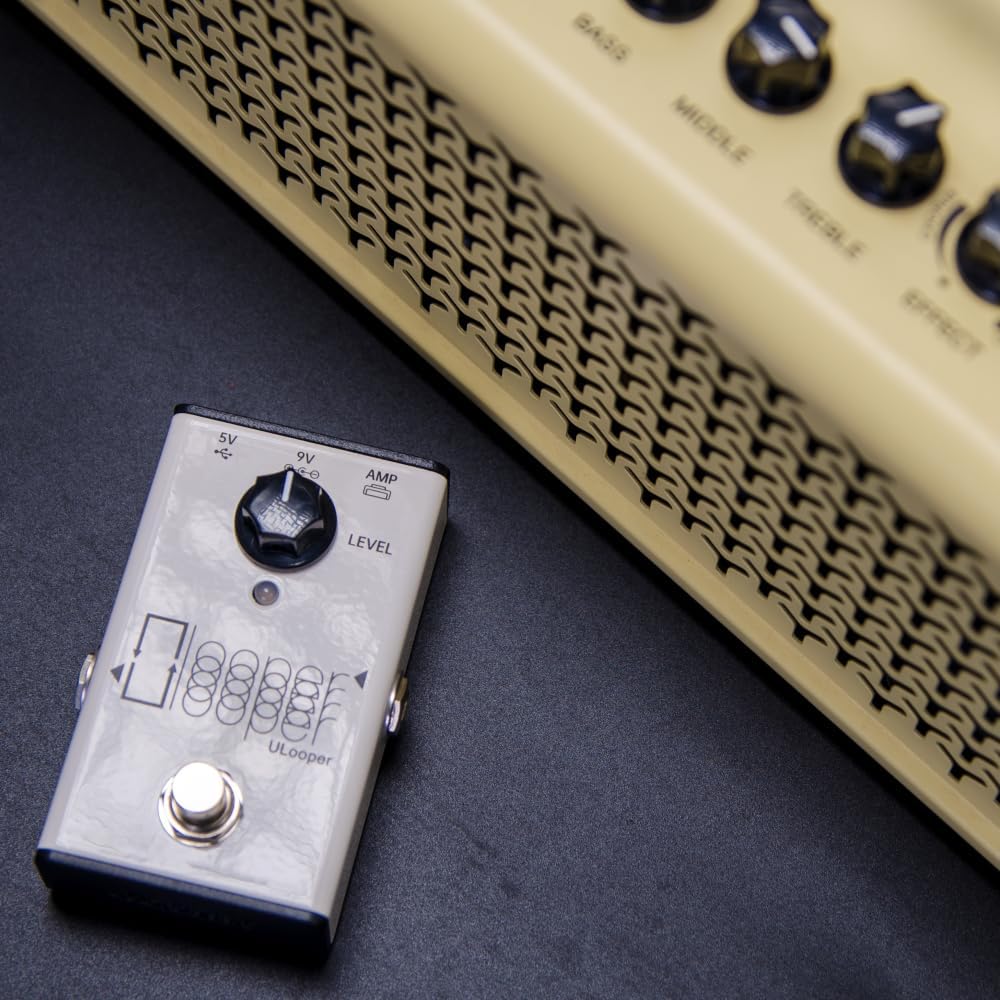
Image: ULooper connected to a guitar amplivligere.
4. Betjening
The ULooper provides essential looping functionalities controlled primarily by its footswitch and level knob.
Grundlæggende loopingfunktioner:
- Optage: Press the footswitch once to start recording your phrase. The LED indicator will change to show recording status.
- Afspilning: Press the footswitch again to stop recording and immediately begin playback of your recorded loop. The LED indicator will change to show playback status.
- Overdub: While a loop is playing, press the footswitch once to start overdubbing. This allows you to add new layers to your existing loop. Press again to stop overdubbing and continue playback.
- Stop: Dobbelttryk på fodkontakten for at stoppe afspilningen.
- Klar: Press and hold the footswitch for a few seconds to clear the current loop.
- Fortryd/Gentag: Specific footswitch actions for undoing or redoing overdubs may be available via firmware updates. Refer to the XSONIC support website for the latest firmware and detailed instructions.
Niveauknap:
Drej på NIVEAU knob to adjust the output volume of the playing loop. This allows you to balance the loop's volume with your live playing.
5. Strømstyring
The ULooper offers flexible power solutions for various scenarios:
- 5V USB-strøm: For portable use, connect a standard 5V USB power bank or a USB wall adapter to the 5V USB input. This is ideal for on-the-go practice.
- 9V DC strøm: For standard pedalboard setups, use a regulated 9V DC power supply (center negative) connected to the 9V DC input.

Image: ULooper powered by a portable power bank.
6. Line Out Feature
The ULooper's unique Line Out feature allows you to send your looped audio to external devices without silencing your amplifier's speaker. This is particularly useful for:
- Connecting to a larger PA system for live performance.
- Sending the loop to a recording interface for studio work.
- Using external speakers or headphones for monitoring.

Image: Diagram illustrating Line Out connection.
7. Amplivligere kompatibilitet
The XSONIC ULooper is designed to be compatible with a range of popular guitar amplifiers. Currently supported models include:
- Spark (e.g., Spark 40, Spark Mini)
- Boss KATANA series
- Yamaha THR series
- Fender Mustang series
XSONIC is committed to expanding compatibility through future firmware updates. For the most up-to-date list of supported amplifiers, please visit the official XSONIC webwebsted.
8. Firmwareopdateringer
To ensure optimal performance and access to new features, it is recommended to keep your ULooper's firmware updated. Firmware updates can address bugs, improve functionality, and expand compatibility.
- Visit the official XSONIC support website to check for the latest firmware versions and download instructions.
- Typically, firmware updates involve connecting the ULooper to a computer via USB and following specific software procedures.
9. Vedligeholdelse
Proper care will extend the life of your XSONIC ULooper:
- Rensning: Brug en blød, tør klud til at rengøre pedalens yderside. Undgå slibende rengøringsmidler eller opløsningsmidler.
- Opbevaring: Store the ULooper in a dry environment, away from extreme temperatures and direct sunlight.
- Håndtering: Avoid dropping the pedal or subjecting it to excessive force.
10. Fejlfinding
If you encounter issues with your ULooper, refer to the following common problems and solutions:
| Problem | Mulig årsag/løsning |
|---|---|
| ULooper does not power on or LED flashes once then off. | Ensure power supply is correctly connected and functional (5V USB or 9V DC). This behavior can also indicate outdated firmware; check the XSONIC support site for updates. |
| Ingen lyd fra amplifier when ULooper is connected. | Verify all cables (guitar to ULooper, ULooper to amp) are securely connected. Check the amplifier's input and volume settings. Ensure the ULooper's LEVEL knob is not set to minimum. |
| Loop sound is distorted or low quality. | Ensure input signal from guitar is not too hot, causing clipping. Check cable quality. For Spark amps, ensure no Bluetooth devices are connected and nothing is plugged into the amp's AUX port, as these can interfere. |
| Cannot connect to specific amplifier (e.g., Spark 40). | Nogle amplifiers, like the Spark 40, may require a specific USB cable type (e.g., USB-B) not always included. Ensure you have the correct cable for your amp's USB port. Update both ULooper and amplifier firmware to the latest versions. |
| Overdubbing erases previous layers. | The ULooper's undo feature, which allows removal of the last overdub, may require a specific firmware update. Check the XSONIC support site for the latest firmware that includes this functionality. |
11. Specifikationer
| Specifikation | Detalje |
|---|---|
| Modelnummer | ULooper |
| Varens vægt | 8.3 ounce (0.24 kilo) |
| Produktdimensioner | 5.59 x 3.91 x 9.70 cm (L x B x H) |
| Strømkilde | External Power Supply (5V USB or 9V DC) |
| Voltage | 9 volt (DC) |
| Hardware-interface | USB 2.0 Type B |
| Signalformat | Digital |
| Optagelsestid | Op til 180 minutter |
12. Garanti og support
For warranty information, technical support, and further assistance, please visit the official XSONIC webwebstedet eller kontakt deres kundeservice. Gem din købsbevis til garantikrav.


