1. Introduktion
Tak for købetasing the Aiwa AWS200BT Portable Bluetooth Speaker. This manual provides essential information for the safe and efficient operation of your device. Please read it thoroughly before use and retain it for future reference.
2. Sikkerhedsoplysninger
- Udsæt ikke højttaleren for ekstreme temperaturer eller direkte sollys i længere perioder.
- Undgå at tabe eller udsætte højttaleren for kraftige stød.
- Hold højttaleren væk fra medicinsk udstyr.
- Forsøg ikke at skille højttaleren ad eller ændre den. Dette vil ugyldiggøre garantien.
- Ensure all ports are securely closed when using the speaker near water to maintain its IPX5 water resistance.
- Brug kun det specificerede opladningskabel og den specificerede adapter.
3. Pakkens indhold
- Aiwa AWS200BT Portable Bluetooth Speaker
- USB opladningskabel
- Brugermanual
4. Produktet er slutview
Familiarize yourself with the various parts and controls of your Aiwa AWS200BT speaker.

Figur 4.1: Front view of the Aiwa AWS200BT speaker, showcasing the dual speaker grilles and illuminated RGB rings.
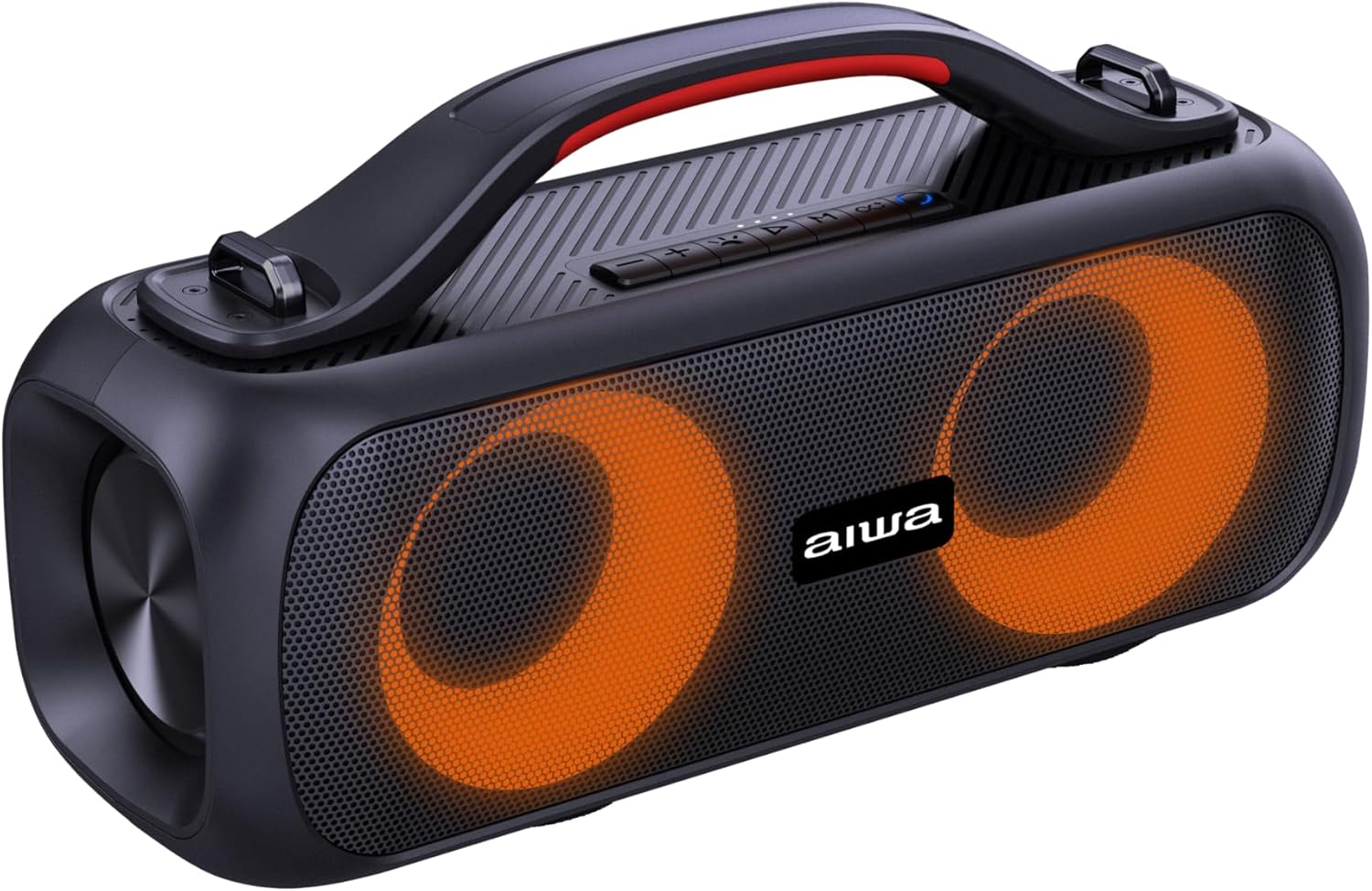
Figur 4.2: Vinklet view of the speaker, highlighting the integrated carrying handle and top-mounted control panel.

Figur 4.3: Top view of the speaker, detailing the control buttons for power, volume, playback, and mode selection.
Kontrolknapper:
- Power knap: Tryk og hold for at tænde/slukke.
- Lydstyrke op (+): Øg volumen.
- Skrue ned for lyden (-): Sænk volumen.
- Afspil/pause knap: Afspil eller sæt lyd på pause.
- Mode-knap (M): Switch between Bluetooth, FM Radio, USB, and AUX modes.
- RGB-lysknap: Skift mellem RGB-belysningstilstande.
- Previous Track/FM Scan Down: Short press for previous track, long press for FM scan down.
- Next Track/FM Scan Up: Short press for next track, long press for FM scan up.
Porte:

Figur 4.4: Bag view of the speaker, indicating the USB, DC 5V charging, and AUX input ports, protected by a cover.
- USB-port: Til afspilning fra USB-drev.
- DC 5V port: Til opladning af højttaleren.
- AUX-indgang: Til tilslutning af eksterne lydenheder via et 3.5 mm lydkabel.
5. Opsætning
5.1 Indledende opladning
- Oplad højttaleren helt før første brug.
- Tilslut det medfølgende USB-opladerkabel til DC 5V-porten på højttaleren.
- Tilslut den anden ende af USB-kablet til en kompatibel USB-strømadapter (medfølger ikke) eller en computers USB-port.
- The charging indicator light will illuminate. Once fully charged (approximately 4 hours), the light may change color or turn off.
5.2 Tænd/sluk
- To power on, press and hold the Power Button until you hear an audible prompt and the RGB lights illuminate.
- To power off, press and hold the Power Button again until you hear an audible prompt and the lights turn off.
6. Betjeningsvejledning
6.1 Bluetooth -parring
- Tænd højttaleren. Den vil automatisk gå i Bluetooth-parringstilstand, hvilket indikeres af en blinkende LED-lampe.
- Aktiver Bluetooth på din smartphone eller anden enhed.
- Søg efter "AWS200BT" in the list of available Bluetooth devices.
- Select "AWS200BT" to connect. Once connected, you will hear a confirmation sound, and the LED light will stop flashing.
- Du kan nu afspille lyd fra din enhed via højttaleren.

Figur 6.1: The Aiwa AWS200BT speaker highlighting its Bluetooth and TWS capabilities.
6.2 TWS (ægte trådløs stereo) funktion
The TWS function allows you to connect two AWS200BT speakers for a stereo sound experience.
- Ensure both AWS200BT speakers are powered on and not connected to any Bluetooth device.
- On one of the speakers (this will be the primary speaker), press and hold the TWS button (often integrated with the Play/Pause button or a dedicated button, refer to Figure 4.3 for specific button layout if available).
- Den primære højttaler vil søge efter den sekundære højttaler. Når den er tilsluttet, vil du høre en bekræftelseslyd.
- Tilslut nu din enhed til den primære højttaler via Bluetooth som beskrevet i afsnit 6.1. Lyden afspilles i stereo gennem begge højttalere.
6.3 FM radio
- Press the Mode Button (M) to switch to FM Radio mode.
- To automatically scan and save available stations, press and hold the Play/Pause button. The speaker will scan and store stations.
- Use the Previous Track and Next Track buttons to navigate between saved stations.
6.4 USB/AUX-indgang
- USB-afspilning: Sæt et USB-flashdrev i USB-porten. Højttaleren skifter automatisk til USB-tilstand og begynder at afspille lyd. files.
- AUX-indgang: Connect a 3.5mm audio cable from your external device to the AUX port on the speaker. Press the Mode Button (M) to switch to AUX mode.
6.5 Voice Assistant & Hands-free Calling
- When connected via Bluetooth, the speaker supports voice assistants like Google Assistant and Siri. Press the dedicated Voice Assistant button (if available, or a long press on Play/Pause) to activate.
- For hands-free calling, when a call comes in, press the Play/Pause button to answer. Press again to end the call.
6.6 RGB-lystilstande
The speaker features multiple RGB lighting modes that synchronize with your music.
- Press the RGB Light Button to cycle through the available lighting effects.
- Continue pressing to find your preferred mode or to turn the lights off.

Figur 6.2: The Aiwa AWS200BT speaker showcasing its dynamic RGB lighting feature.
7. Vedligeholdelse
- Rensning: Brug en blød, tør klud til at rengøre højttalerens yderside. Brug ikke slibende rengøringsmidler eller opløsningsmidler.
- Vandtæthed: Ensure the port cover is always securely closed to maintain IPX5 water resistance. Do not submerge the speaker.
- Opbevaring: Opbevar højttaleren et køligt, tørt sted væk fra direkte sollys og ekstreme temperaturer, når den ikke er i brug i længere perioder.
- Batteri: To prolong battery life, charge the speaker regularly, even if not in frequent use. Avoid fully discharging the battery for long periods.
8. Fejlfinding
| Problem | Mulig årsag | Løsning |
|---|---|---|
| Højttaleren tænder ikke. | Lavt batteri. | Oplad højttaleren helt. |
| Kan ikke parres via Bluetooth. | Højttaleren er ikke i parringstilstand; enhedens Bluetooth er slået fra; for langt fra højttaleren. | Sørg for, at højttaleren er i parringstilstand (blinkende LED). Tænd Bluetooth på din enhed. Flyt enheden tættere på højttaleren (inden for 10 meter). |
| Ingen lyd. | Lydstyrken er for lav; forkert tilstand valgt; enheden afspiller ikke. | Increase speaker and device volume. Press 'M' button to select correct input mode (Bluetooth, USB, AUX, FM). Ensure audio is playing on your connected device. |
| FM-radiomodtagelsen er dårlig. | Svagt signal. | Flyt højttaleren til et sted med bedre modtagelse. |
| TWS-parring mislykkes. | Speakers already paired to another device; speakers too far apart. | Disconnect both speakers from any Bluetooth devices. Ensure they are close to each other. Try pairing again. |
9. Specifikationer
| Feature | Detalje |
|---|---|
| Modelnavn | AWS200BT |
| Mærke | Ingen |
| Forbindelsesteknologi | Bluetooth |
| Højttaler type | Tweeter |
| Maksimal højttalerudgangseffekt | 30 watt |
| Frekvensrespons | 20 KHz |
| Konfiguration af lydkanal | 2.0 |
| Særlige funktioner | Bluetooth, Portable, RGB Lighting, FM Radio, TWS, USB, AUX, Voice Assistant, Hands-free |
| Vandtæt vurdering | IPX5 |
| Strømkilde | Batteri |
| Batterikapacitet | 3000 mAh (3E+3 Milli)amp timer) |
| Gennemsnitlig batterilevetid | 4 timer (ved 50 % volumen) |
| Batterisammensætning | Lithium Ion |
| Kontrolmetode | Stemme |
| Produktdimensioner | 20.7cm (depth) x 8.4cm (width) x 8.4cm (height) |
| Produktets vægt | 2 kilo |
10. Garanti og support
The Aiwa AWS200BT speaker comes with a limited warranty. For specific warranty terms and conditions, please refer to the warranty card included in your package or contact Aiwa customer support.
For technical support, troubleshooting assistance, or general inquiries, please visit the official Aiwa webwebsted eller kontakt deres kundeserviceafdeling.
- Garantitype: Begrænset


