Indledning
Tak for købetasing the S.M.S.L H400 Headphone Amplifier & PreampDenne manual indeholder vigtige oplysninger om korrekt opsætning, betjening og vedligeholdelse af din enhed. Læs den grundigt inden brug for at sikre optimal ydeevne og levetid.
Hvad er der i æsken
- SMSL H400 Hovedtelefoner Amplifier & Preamplifier x 1
- Fjernbetjening x 1
- Strømkabel x 1
- Brugervejledning x 1
- Mærkekort x 1
Produkt overview
Frontpanel
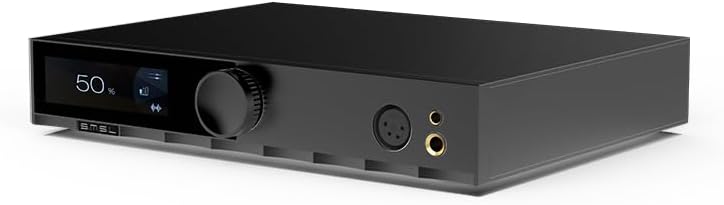
Billede: Front view of the S.M.S.L H400 Headphone Amplifier. The front panel features a digital display on the left, a large rotary volume knob in the center, and two headphone output jacks (one 4-pin XLR balanced, one 6.35mm unbalanced) on the right.
- Skærm: Shows current volume level, input source, and other operational information.
- Lydstyrkeknap: Controls the output volume. Can also be pressed to access menu options.
- Hovedtelefonudgange: Includes a balanced 4-pin XLR output and an unbalanced 6.35mm (1/4 inch) output for connecting headphones.
Bagpanel

Billede: Bag view of the S.M.S.L H400 Headphone Amplifier. From left to right, it features balanced XLR inputs, unbalanced RCA inputs, balanced XLR pre-outputs, unbalanced RCA pre-outputs, a USB-C update port, a ground switch (Floating/Grounded), and the AC power inlet with an integrated power switch.
- Balanced Inputs (XLR): For connecting balanced audio sources.
- Unbalanced Inputs (RCA): For connecting unbalanced audio sources.
- Balanced Pre-Outputs (XLR): Til tilslutning til ekstern strøm ampløftere eller aktive højttalere.
- Unbalanced Pre-Outputs (RCA): Til tilslutning til ekstern strøm ampløftere eller aktive højttalere.
- UPDATE Port (USB-C): Til firmwareopdateringer.
- Jordkontakt: Selects between Floating and Grounded modes to manage ground loops.
- AC strømindtag: Tilslutter det medfølgende strømkabel.
- Afbryderen: Tænder eller slukker for enheden.
Opsætning
- Placering: Place the H400 on a stable, flat surface, ensuring adequate ventilation around the unit. Avoid placing it near heat sources or in direct sunlight.
- Tilslut lydkilder:
- For balanced sources, connect XLR cables from your source to the H400's Balancerede indgange (XLR).
- For unbalanced sources, connect RCA cables from your source to the H400's Unbalanced Inputs (RCA).
- Tilslut hovedtelefoner: Tilslut dine hovedtelefoner til enten Balanceret 4-bens XLR or Unbalanced 6.35mm headphone output on the front panel.
- Tilslut til strøm Ampafdækning (valgfrit): If using the H400 as a preamplifier, tilslut Balanced Pre-Outputs (XLR) or Unbalanced Pre-Outputs (RCA) to your power amplifier eller aktive højttalere.
- Strømtilslutning: Connect the included power cable to the Vekselstrømsindgang on the rear panel, then plug the other end into a suitable AC power outlet (100-240V).
- Tænd: Vend Strømafbryder on the rear panel to the 'ON' position. The unit will power on, and the display will illuminate.
Betjeningsvejledning
Grundlæggende betjening
- Tænd/sluk: Use the rear panel switch for main power. The remote control can put the unit into standby.
- Lydstyrkekontrol: Drej på Volumenknap on the front panel or use the volume buttons on the remote control to adjust the output level.
- Valg af input: Tryk på Volumenknap briefly to cycle through available input sources (Balanced, Unbalanced). Alternatively, use the input selection buttons on the remote.
- Forstærkningsindstilling: The H400 offers High, Medium, and Low gain settings. These can be adjusted via the menu system, typically accessed by pressing and holding the volume knob or a dedicated button on the remote.
- Balanced Gain: Low (-5.8dB), Medium (6dB), High (20.4dB)
- Unbalanced Gain: Low (-11.8dB), Medium (0dB), High (14.4dB)
Fjernbetjening
The included remote control provides convenient access to all functions, including power, volume, input selection, and menu navigation. Ensure the remote has fresh batteries and an unobstructed line of sight to the H400's front panel sensor.
Opretholdelse
- Rensning: Brug en blød, tør klud til at rengøre enhedens yderside. Brug ikke flydende rengøringsmidler eller opløsningsmidler.
- Ventilation: Sørg for, at ventilationsåbningerne ikke er blokeret for at forhindre overophedning.
- Sluk: Always power off the unit using the rear switch when not in use for extended periods.
Fejlfinding
| Problem | Mulig årsag | Løsning |
|---|---|---|
| Ingen strøm | Power cable not connected; Rear power switch off; Power outlet faulty. | Check power cable connection; Ensure rear power switch is ON; Try a different power outlet. |
| Ingen lydudgang | Incorrect input selected; Volume too low; Headphones not connected properly; Source device not playing. | Select correct input; Increase volume; Reconnect headphones; Verify source device is playing audio. |
| Forvrænget lyd | Input signal too high; Gain setting too high; Faulty cables. | Reduce source volume; Adjust H400 gain setting; Check and replace cables if necessary. |
| Fjernbetjening virker ikke | Batterierne er opbrugt; Blokering mellem fjernbetjening og enhed; Fjernbetjeningssensor blokeret. | Replace batteries; Remove obstructions; Ensure clear line of sight to the unit's front panel. |
Specifikationer
| Parameter | Værdi |
|---|---|
| Preamp Outputmetode | Balanceret, ubalanceret |
| Output Power (16Ω) | 15W x 2 |
| Output Power (32Ω) | 7.5W x 2 |
| Output Power (300Ω) | 1000mW x 2 |
| Output Power (600Ω) | 550mW x 2 |
| SNR | 133dB |
| Dynamisk rækkevidde | 133dB |
| THD+N | -123dB, 0.00006% (1kHz, 32Ω) |
| Indgangsimpedans | 47kΩ |
| Udgangsimpedans for hovedtelefoner | Approximately 0Ω |
| Preamp Udgangsimpedans (balanceret) | 44Ω |
| Preamp Output Impedance (Unbalanced) | 22Ω |
| Frekvensrespons | 20Hz-100kHz (-0.5dB) |
| Gain (Balanced) | Low (-5.8dB), Medium (6dB), High (20.4dB) |
| Gain (Unbalanced) | Low (-11.8dB), Medium (0dB), High (14.4dB) |
| Consumption (EN60065) | <50W |
| Standby strømforbrug | <0.5W |
| Dimensioner (BxHxD) | 254x46x189 mm |
| Vægt | 2.03kg / 4.47lbs |
Garanti og support
For warranty information and technical support, please refer to the documentation provided with your purchase or visit the official S.M.S.L webwebsted. Gem din købsbevis til garantikrav.


