Indledning
Welcome to the user manual for your new boAt Stone 352 Pro Bluetooth Speaker. This guide provides detailed instructions on how to set up, operate, and maintain your speaker, ensuring you get the best audio experience. Please read this manual thoroughly before using the product.
Hvad er der i æsken
Upon unboxing your boAt Stone 352 Pro, you should find the following items:
- 1 x boAt Stone 352 Pro Bluetooth Speaker
- 1 x opladningskabel (Type-C)
- 1 x Brugermanual (dette dokument)
- 1 x garantikort
- 1 x katalog

Image: The boAt Stone 352 Pro speaker, a USB Type-C charging cable, and the warranty card/user manual are shown, representing the contents of the product box.
Video: An unboxing demonstration of the boAt Stone 352 Pro Bluetooth Speaker, showing the speaker, charging cable, and documentation included in the package.
Produkt overview
The boAt Stone 352 Pro is a portable Bluetooth speaker designed to deliver powerful audio with enhanced features. Key highlights include:
- 14W boAt Signature Sound: Experience clear and powerful audio output.
- Dynamic RGB LEDs: Enhance your listening experience with vibrant lighting effects.
- Up to 12 Hours Playback: Nyd længerevarende musikafspilning på en enkelt opladning.
- TWS funktion: Connect two Stone 352 Pro speakers for a stereo sound experience.
- Indbygget mikrofon: Facilitates hands-free calling.
- Bluetooth v5.3: Sikrer stabil og effektiv trådløs forbindelse.
- IPX5 vandtæthed: Giver beskyttelse mod stænk og sved.
- Flere tilslutningsmuligheder: Supports Bluetooth, AUX, and TF Card playback.
- Type-C opladning: Moderne og praktisk opladningsgrænseflade.

Image: A black boAt Stone 352 Pro speaker, showcasing its cylindrical design and the illuminated RGB LED strip on the front.
Kontroller og indikatorer
Familiarize yourself with the speaker's controls and indicators for optimal use.

Image: The side panel of the boAt Stone 352 Pro speaker, highlighting the power button, volume up/down buttons, and mode selection button.
- Power knap: Tryk og hold nede for at tænde/slukke. Tryk kort for at afspille/sætte musik på pause.
- Lydstyrke op (+): Kort tryk for at øge lydstyrken. Langt tryk for næste nummer.
- Skrue ned for lyden (-): Kort tryk for at sænke lydstyrken. Langt tryk for forrige nummer.
- Tilstandsknap (M): Tryk kort for at skifte mellem Bluetooth-, AUX- og TF-korttilstande.
- RGB LED Strip: Indicates power status, charging, and provides dynamic lighting effects.
Kom godt i gang
Opladning af højttaleren
Before first use, fully charge your speaker. The boAt Stone 352 Pro features a Type-C charging port.
- Connect the Type-C end of the charging cable to the speaker's charging port.
- Connect the USB-A end of the cable to a compatible USB power adapter (5V/1A recommended).
- The RGB LED strip will indicate charging status. It typically takes approximately 2 hours for a full charge.
- Når det er fuldt opladet, skal du frakoble ladekablet.

Billede: En detaljeret view of the boAt Stone 352 Pro's side panel, illustrating the Type-C charging interface and the various connectivity ports (Bluetooth, AUX, TF Card).
Tænd/sluk
- To power on, press and hold the Power button until you hear an audible prompt and the RGB LEDs illuminate.
- To power off, press and hold the Power button again until you hear an audible prompt and the RGB LEDs turn off.
Betjeningsvejledning
Bluetooth-forbindelse
- Ensure the speaker is powered on and in Bluetooth mode (indicated by a specific LED pattern or audible prompt).
- Aktiver Bluetooth på din smartphone eller lydenhed, og søg efter tilgængelige enheder.
- Select "boAt Stone 352 Pro" from the list of devices.
- Once paired, you will hear a confirmation tone, and the speaker's LED will indicate a successful connection.
- Højttaleren genopretter automatisk forbindelsen til den sidst parrede enhed, når den tændes, hvis enheden er inden for rækkevidde.
AUX-tilstand
For wired connections, use the AUX port.
- Connect one end of a 3.5mm AUX cable (not included) to the speaker's AUX port.
- Connect the other end to your audio device's 3.5mm audio output.
- Press the 'M' (Mode) button on the speaker to switch to AUX mode.
- Lyd vil nu afspilles via højttaleren fra din tilsluttede enhed.
TF-kortafspilning
Play music directly from a TF (microSD) card.
- Indsæt et TF-kort med MP3-lyd files into the speaker's TF card slot.
- Press the 'M' (Mode) button to switch to TF Card mode.
- The speaker will automatically begin playing music from the card.
TWS (True Wireless Stereo) -funktion
Connect two boAt Stone 352 Pro speakers wirelessly for a true stereo sound experience.
- Sørg for, at begge højttalere er tændt og ikke er forbundet til nogen anden Bluetooth-enhed.
- On one speaker (this will be the primary speaker), long press the 'M' (Mode) button until you hear a TWS pairing prompt.
- The two speakers will automatically search and pair with each other. A confirmation tone will indicate successful TWS pairing.
- Now, connect your audio device to the primary speaker via Bluetooth as described above.
- Both speakers will play audio in stereo.

Image: Two boAt Stone 352 Pro speakers, one black and one blue, operating in TWS mode, demonstrating synchronized audio playback from a connected smartphone.
Håndfri opkald
The built-in microphone allows for convenient hands-free calls when connected via Bluetooth.
- When an incoming call is received, press the Power button once to answer.
- To end a call, press the Power button once again.
- To reject an incoming call, long press the Power button.
RGB LED Functionality
The boAt Stone 352 Pro features dynamic RGB LEDs that add a visual element to your audio experience.

Billede: Et nærbillede view of the boAt Stone 352 Pro's RGB LED strip, displaying a gradient of colors from blue to green to orange, highlighting its dynamic lighting feature.
- The RGB LEDs automatically cycle through various colors, synchronizing with the music or providing ambient lighting.
- Specific button presses may allow for changing LED modes or turning them off (refer to product-specific quick start guide for advanced controls if available).
Vedligeholdelse og pleje
- Rensning: Brug en blød, tør klud til at rengøre højttaleren. Brug ikke slibende rengøringsmidler eller opløsningsmidler.
- Vandtæthed (IPX5): The speaker is IPX5 rated, meaning it is protected against low-pressure water jets from any direction. It is not designed for submersion in water. Ensure the charging port cover is securely closed to maintain water resistance.
- Opbevaring: Opbevar højttaleren et køligt, tørt sted væk fra direkte sollys og ekstreme temperaturer.
- Batteripleje: For at forlænge batteriets levetid bør du undgå at aflade højttaleren helt ofte. Oplad den regelmæssigt, selvom den ikke er i brug i længere perioder.

Image: The boAt Stone 352 Pro speaker with water droplets on its surface, emphasizing its IPX5 splash and sweat resistance feature.
Fejlfinding
| Problem | Mulig løsning |
|---|---|
| Højttaleren tænder ikke. | Sørg for, at højttaleren er opladet. Tilslut den til en strømkilde, og prøv igen. |
| Kan ikke parres via Bluetooth. |
|
| Ingen lyd eller lav lydstyrke. |
|
| TWS-parring mislykkedes. |
|
| Opkaldskvaliteten er dårlig. |
|
Specifikationer
| Feature | Detalje |
|---|---|
| Modelnavn | Stone 352 Pro |
| Højttaler type | Bærbar højttaler |
| Højttaler udgangseffekt | 14 watt |
| Bluetooth version | v5.3 |
| Bluetooth rækkevidde | 10 meter |
| Batteriets gennemsnitlige levetid | 12 timer |
| Opladningstid | 2 timer |
| Batterikapacitet | 3600 mioamp Timer |
| Vandmodstand | IPX5 |
| Forbindelsesteknologi | Bluetooth, USB, Wi-Fi (Note: While Wi-Fi is listed, primary connectivity is Bluetooth, AUX, and TF Card as per product features.) |
| Kontrolmetode | Tryk knap |
| Produktdimensioner | 15.8D x 9.4B x 9.4H Centimeter |
| Varens vægt | 20 gram |
| Inkluderede komponenter | Speaker, Cable, User Manual, Warranty Card, Catalogue |
Garanti og support
Your boAt Stone 352 Pro Bluetooth Speaker comes with a standard brand warranty. Please refer to the included Warranty Card for specific terms and conditions.
- Garantiperiode: Typisk 1 år fra købsdatoen.
- Kravproces: For warranty claims or technical support, please contact boAt customer service or visit their official website. Keep your purchase receipt and warranty card handy.
- Udvidet garanti: An optional 1 Year Extended Warranty by OneAssist is available for purchase.
For yderligere hjælp kan du også henvise til boAt Hearables App for additional user help guides and support resources.
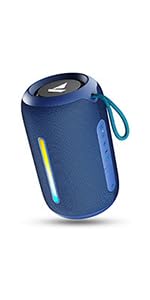
Image: A QR code for the boAt Hearables App, which provides additional support and features for the speaker.


