Produkt overview
The Thomson RC112A Android TV Remote Control is designed to provide seamless control over your Thomson Android TV. This official replacement remote offers a blend of sophisticated design and practical functionality, ensuring a comfortable and intuitive user experience. It features an ergonomic design, backlit buttons for low-light conditions, integrated voice control via Google Assistant, and a customizable favorite apps button.

Billede: Forside view of the Thomson Android TV Remote Control, showcasing its sleek black design and button layout.
Opsætning og førstegangsbrug
1. Batteriinstallation
Fjernbetjeningen kræver to (2) AAA-batterier for at fungere. Sørg for korrekt polaritet, når du isætter batterierne.
- Find batterirummets dæksel på bagsiden af fjernbetjeningen.
- Skub dækslet nedad eller i den retning, der er angivet med en pil, for at åbne det.
- Insert two AAA batteries, matching the positive (+) and negative (-) terminals as indicated inside the compartment.
- Sæt dækslet til batterirummet på igen, og sørg for, at det klikker sikkert på plads.
2. Pairing with your Android TV
This remote control connects to your Thomson Android TV via Bluetooth. The pairing process may vary slightly depending on your TV model. Generally, follow these steps:
- Ensure your Thomson Android TV is powered on.
- På dit tv skal du navigere til Indstillinger > Fjernbetjeninger og tilbehør or Bluetooth-indstillinger.
- Vælge Tilføj tilbehør or Par ny enhed.
- On the Thomson remote control, press and hold the Hjem knappen og Tilbage button simultaneously for a few seconds until the LED indicator on the remote starts blinking, indicating it's in pairing mode.
- On your TV screen, select "Thomson RC112A" or a similar name from the list of available devices.
- Confirm the pairing on your TV if prompted. The LED on the remote will stop blinking and remain solid for a moment, indicating successful pairing.
If pairing fails, ensure the remote is close to the TV and repeat the steps. Refer to your TV's user manual for specific pairing instructions if needed.
Betjening af fjernbetjeningen
The Thomson RC112A remote control features a comprehensive set of buttons for navigating your Android TV. Below are the primary functions:
- Tænd/sluk-knap (●): Tænder eller slukker for tv'et.
- Nummertastatur (0-9): Direct channel selection or input.
- Navigationstastatur (op, ned, venstre, højre, OK): Til menunavigation og valg.
- Tilbage knap (←): Vender tilbage til den forrige skærm eller menu.
- Hjemknappen (⌂): Åbner Android TV-startskærmen.
- Lydstyrke op/ned (V+/V-): Justerer tv-lydstyrken.
- Kanal op/ned (P+/P-): Skifter tv-kanaler.
- Mute knap (🔇): Slår lyden fra eller til for TV-lyden.
- Google Assistent-knap (🎤): Activates voice control. Press and hold to speak commands.
- Favorite Apps Button (⭐): Customizable button to quickly launch your preferred application. Refer to your TV's settings to assign an app to this button.
- Dedicated App Buttons (e.g., YouTube, Netflix, Prime Video, Disney+, Google Play): Direkte adgang til disse streamingtjenester.
Særlige funktioner
Ergonomisk design
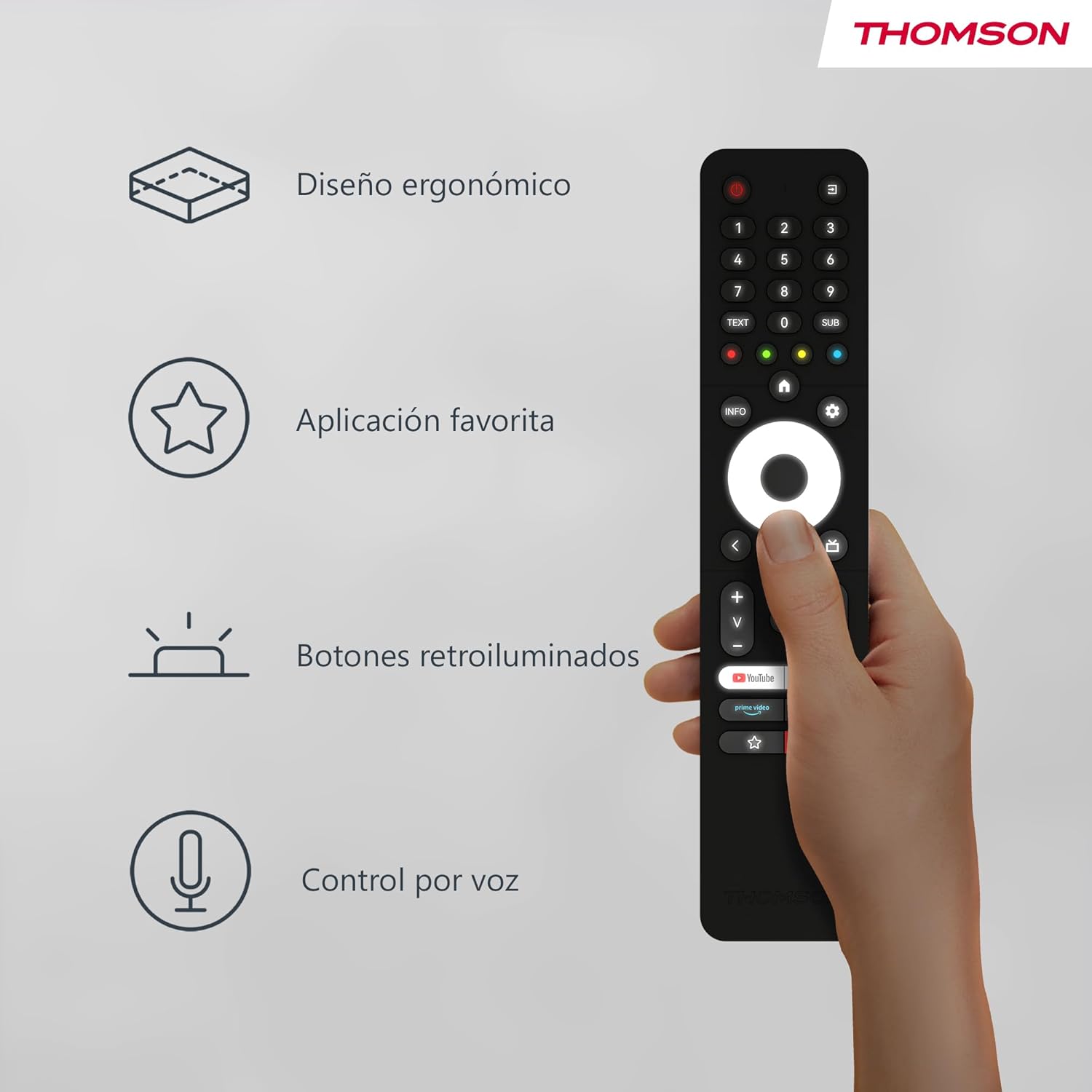
The remote control is designed to fit comfortably in your hand, making prolonged use easy and reducing fatigue. Its sleek profile and balanced weight contribute to a pleasant user experience.
Image: A hand holding the Thomson remote control, illustrating its comfortable ergonomic design and highlighting key features like voice control and favorite apps.
Baggrundsbelyste knapper

The buttons on the remote control illuminate, making it easy to locate and press the correct buttons in dimly lit environments. This feature prevents accidental key presses and enhances usability during night-time viewing.
Billede: To views of the Thomson remote control side-by-side, one showing the buttons unlit and the other showing them illuminated, demonstrating the backlit feature for low-light use.
Voice Control (Google Assistant)
With the integrated Google Assistant, you can control your TV using voice commands. Press and hold the Google Assistant button, then speak clearly into the remote. You can:
- Adjust volume (e.g., "Volume up", "Set volume to 20").
- Søg efter content (e.g., "Find action movies", "Play [Movie Title]").
- Open applications (e.g., "Open Netflix", "Launch YouTube").
- Ask questions (e.g., "What's the weather like?").
- Styr kompatible smart-hjem-enheder.
Opretholdelse
Udskiftning af batteri
Replace batteries when the remote's performance degrades or if the LED indicator does not light up during use. Always replace both batteries simultaneously with new AAA alkaline batteries.
Rensning
Brug en blød, tør klud til at rengøre fjernbetjeningen. Ved genstridigt snavs, tør letampen the cloth with water or a mild, non-abrasive cleaner. Do not use harsh chemicals or abrasive materials, as they may damage the remote's surface or internal components. Avoid getting moisture into the battery compartment or button crevices.
Opbevaring
Store the remote control in a cool, dry place away from direct sunlight, extreme temperatures, and high humidity. If the remote will not be used for an extended period, it is recommended to remove the batteries to prevent leakage and potential damage.
Fejlfinding
| Problem | Mulig årsag | Løsning |
|---|---|---|
| Fjernbetjeningen svarer ikke. | Low or dead batteries; Remote not paired; Obstruction between remote and TV. | Replace batteries; Re-pair the remote with the TV (see "Pairing" section); Ensure no objects are blocking the signal (though Bluetooth is less sensitive to this, direct line of sight can sometimes help with initial pairing). |
| Stemmestyring virker ikke. | Microphone blocked; Remote not properly paired for voice; Internet connection issue on TV. | Ensure nothing is covering the microphone hole; Re-pair the remote; Check TV's internet connection. |
| Backlight not illuminating. | Batteries are low; Feature is disabled (if applicable, though usually automatic). | Replace batteries. The backlight feature is typically automatic and activates when the remote is moved or a button is pressed. |
| Favorite app button not launching desired app. | App not assigned or incorrectly assigned. | Go to your TV's settings and re-assign the desired application to the favorite app button. |
Specifikationer
- Mærke: Thomson
- Modelnummer: RC112A
- Farve: Sort
- Særlige funktioner: Ergonomic, Backlit, Voice Search (Google Assistant)
- Kompatible enheder: Thomson Android TVs
- Batteritype: 2 x AAA batterier (medfølger ikke)
- Maks. Rækkevidde: 10 meter
- Forbindelse: Bluetooth
Garanti og support
Warranty information for your Thomson RC112A remote control is typically provided with your purchase documentation or can be found on the official Thomson webwebsted. Gem venligst din købsbevis til garantikrav.
For technical support, troubleshooting assistance beyond this manual, or to inquire about replacement parts, please visit the official Thomson support website or contact their customer service. Contact details are usually available on the manufacturer's official webwebstedet eller i din produktemballage.
Note: Availability of spare parts information is not provided in the product details.


