1. Introduktion
Welcome to the Blackstar ID:Core V4 Stereo 10 Digital Combo Amplifier user manual. This document provides essential information for the safe and effective operation of your new amplifier. The ID:Core V4 Stereo 10 is a versatile 10-watt, 2x3 inch digital combo amplifier featuring Bluetooth connectivity and a 4-channel USB-C output, designed for guitarists seeking a compact yet powerful practice and recording solution.
Please read this manual thoroughly before using the amplifier to ensure proper setup, operation, and to maximize your experience with its advanced features.
2. Sikkerhedsinstruktioner
- Strømforsyning: Only use the power adapter supplied with your ID:Core V4 Stereo 10 amplifier. Ensure the voltage matcher din lokale strømforsyning.
- Ventilation: Bloker ikke ventilationsåbninger. Sørg for tilstrækkelig luftgennemstrømning omkring ampfor at forhindre overophedning.
- Fugtighed: Udsæt ikke amplifier to rain, moisture, or any liquids. Avoid placing objects filled with liquids on or near the amplivligere.
- Varmekilder: Behold amplifier away from heat sources such as radiators, heat registers, stoves, or other apparatus that produce heat.
- Kabler: Beskyt netledningen mod at blive trådt på eller klemt, især ved stik, stikkontakter og det sted, hvor de kommer ud af apparatet.
- Service: Forsøg ikke selv at servicere dette produkt. Overlad al service til kvalificeret servicepersonale.
- Rensning: Tag stikket ud amplifier from the power outlet before cleaning. Use a dry cloth for cleaning.
3. Produktet er slutview
Kontrol og tilslutninger på frontpanelet
The front panel of the ID:Core V4 Stereo 10 provides access to all primary controls and input/output connections.
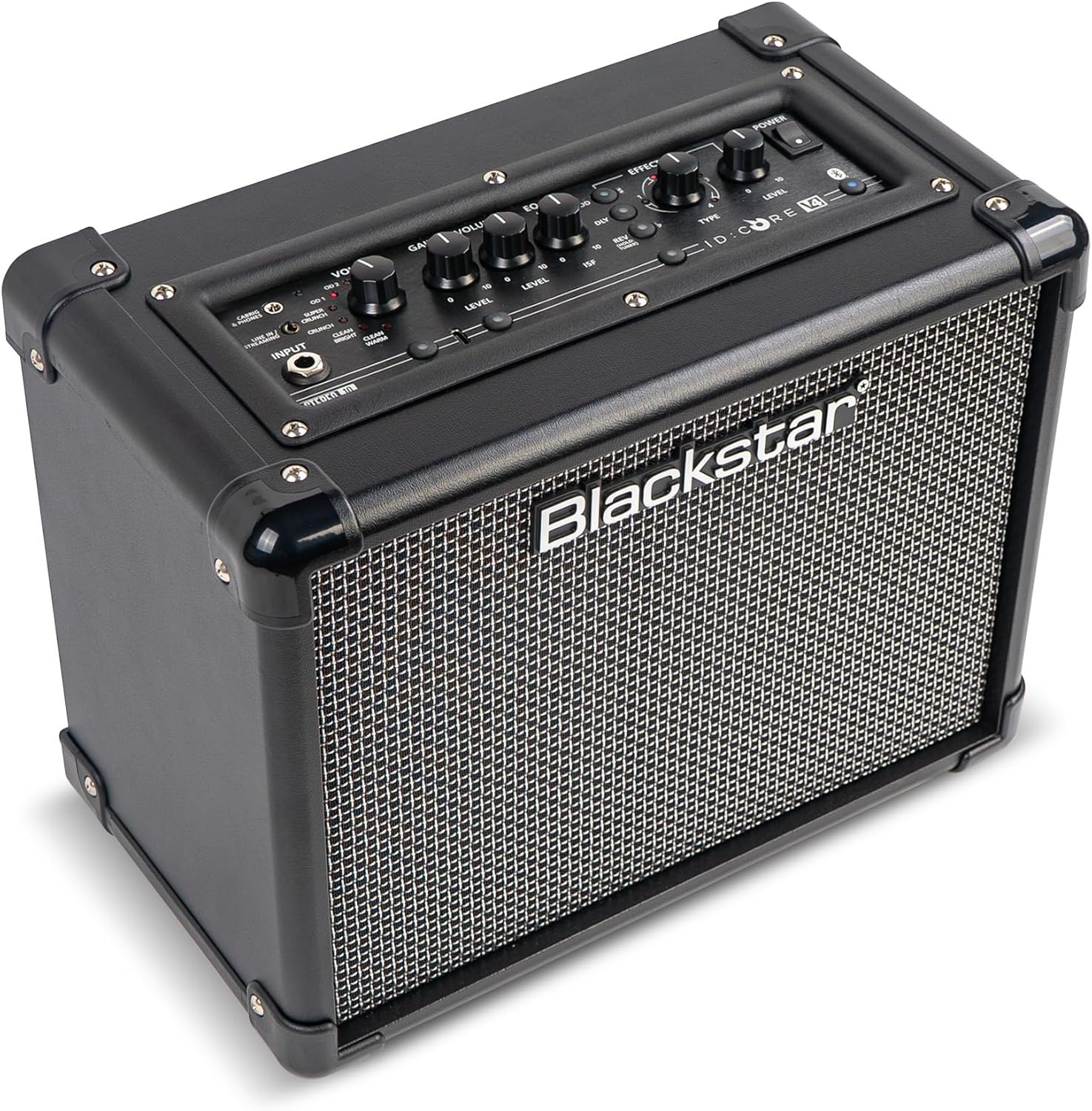
Billede: Forside view of the Blackstar ID:Core V4 Stereo 10 amplifier, highlighting the control layout and speaker grille.
- Indgangsstik: Tilslut din guitar her.
- Voice Selector: Rotary switch to select between six distinct amp voices: Clean Warm, Clean Bright, Crunch, Super Crunch, OD1, and OD2.
- Gain Control: Justerer mængden af overdrive eller distortion.
- Lydstyrkekontrol: Justerer den samlede udgangslydstyrke.
- EQ (ISF) Control: Blackstar's patented Infinite Shape Feature (ISF) control allows you to sweep between a 'British' and 'American' amplifier tone.
- Effektsektion: Includes controls for Modulation (Type, Level), Delay (Type, Level), and Reverb (Type, Level).
- Tap Button: Used to set the tempo for delay and modulation effects.
- Afbryderen: Drejer amplivligere til eller fra.
- Bluetooth knap: Aktiverer Bluetooth-parringstilstand.
- Line In / Streaming Input: 3.5mm jack for connecting external audio devices or streaming.
- CabRig & Phones Output: 3.5mm jack for headphones or direct recording with CabRig Lite emulation.
- USB-C-port: For direct recording to a computer and connection to Blackstar Architect software.
- Manuel knap: Saves current settings or recalls manual mode.
- 1W/10W Power Reduction: Button to switch between 1-watt and 10-watt output for practice at different volume levels.
Bagpaneltilslutninger
The rear panel houses the power input and product information.

Billede: Bagside view of the Blackstar ID:Core V4 Stereo 10 amplifier, displaying the DC power input and regulatory labels.
- DC-indgang: Tilslut den medfølgende 16V DC strømadapter her.
4. Opsætning
- Udpakning: Fjern forsigtigt amplifier from its packaging. Retain the packaging for future transport or storage.
- Strømtilslutning: Connect the supplied 16V DC power adapter to the DC Input on the rear panel of the amplifier. Plug the other end into a suitable power outlet.
- Guitarforbindelse: Plug your guitar into the Input Jack on the front panel using a standard 1/4-inch instrument cable.
- Første gang tændt: Ensure all volume controls are set to a low level. Press the Power Switch to turn on the amplifier. The power indicator LED will illuminate.
5. Betjeningsvejledning
5.1 Grundlæggende betjening
- Selecting a Voice: Rotate the Voice selector knob to choose from the six available amp voices. Experiment with each to find the desired tone.
- Adjusting Gain and Volume: Use the Gain control to adjust the amount of drive, and the Volume control for the overall output level.
- Using the ISF Control: Turn the ISF knob clockwise for a more 'American' sound with a tight bottom end and aggressive mids, or counter-clockwise for a 'British' sound with a woody, less aggressive response.
- Anvendelse af effekter: Select the desired effect type (Modulation, Delay, Reverb) and adjust its Level. Use the Tap button to set the tempo for time-based effects.
- Strømreduktion: Press the 1W/10W button to switch between full 10-watt output for louder playing or 1-watt output for quiet practice sessions.
5.2 Bluetooth-forbindelse
The ID:Core V4 Stereo 10 features Bluetooth for wireless audio streaming.
- Sørg for ampkøleren er tændt.
- Press and hold the Bluetooth button on the front panel until the Bluetooth indicator LED begins to flash. This indicates pairing mode.
- On your audio device (smartphone, tablet, computer), navigate to Bluetooth settings and select 'Blackstar ID:Core V4' from the list of available devices.
- Once paired, the Bluetooth indicator LED on the amplifier will glow solid. You can now stream audio wirelessly to the amplivligere.
5.3 USB-C Recording
The USB-C port allows for direct, high-quality recording to your computer.

Billede: Detaljeret view af amplifier's control panel, highlighting the USB-C port for recording and software connectivity.
- Connect a USB-C cable from the amplifier's USB-C port to your computer.
- De amplifier will be recognized as an audio interface.
- Utilize your preferred Digital Audio Workstation (DAW) to record the 4-channel output, which typically includes stereo emulated output and dry guitar signal.
5.4 Blackstar Architect Software
The Blackstar Architect software provides advanced control over your amplifiers indstillinger.
- Download and install the Blackstar Architect software from the official Blackstar webwebsted.
- Tilslut din amplifier to your computer via the USB-C port.
- The software allows for deep patch editing, creating custom presets, and sharing your tones with other users.
5.5 CabRig Lite Emulated Output
The CabRig Lite feature provides realistic cabinet and microphone emulation for direct recording or headphone use.
- Connect headphones or a recording device to the CabRig & Phones output.
- Use the Blackstar Architect software to customize cabinet types, microphone models, and microphone placement for a tailored emulated sound.
6. Vedligeholdelse
- Rensning: Brug en blød, tør klud til at rengøre ydersiden af ampBrug ikke slibende rengøringsmidler eller opløsningsmidler.
- Opbevaring: Når den ikke er i brug i længere perioder, skal den opbevares amplifier in a dry, cool place, away from direct sunlight and extreme temperatures.
- Transport: Ved transport af amplifier, ensure it is securely packed to prevent damage.
7. Fejlfinding
| Problem | Mulig årsag | Løsning |
|---|---|---|
| Ingen lyd fra amplivligere |
|
|
| Bluetooth ikke parring |
|
|
| USB-C recording issues |
|
|
8. Specifikationer
| Feature | Detalje |
|---|---|
| Model | IDCORE10V4BT |
| Output Wattage | 10 Watts (switchable to 1 Watt) |
| Højttalere | 2 x 3 tomme |
| Varens vægt | 8.15 pund (3.7 kg) |
| Produktdimensioner | 7.24" D x 10.51" B x 13.19" H (18.4 x 26.7 x 33.5 cm) |
| Kompatible enheder | Guitar |
| Connector Type | 3.5mm Jack (Line In/Streaming, CabRig & Phones), USB-C |
| Strømkilde | Ledningsbaseret elektrisk (16V DC) |
| Funktioner | 6 Amp Voices, ISF Control, Built-in Effects, Bluetooth, 4-channel USB-C Output, CabRig Lite, Architect Software Compatibility |
9. Garanti og support
Blackstar products are manufactured to high standards and are covered by a limited warranty. For detailed warranty information, registration, and technical support, please visit the official Blackstar Amplifikation website. You can also find FAQs, software downloads, and contact information for customer service.
Online ressourcer: For the latest software updates, additional guides, and community forums, please refer to the Blackstar Amplifikation webwebsted.


