Indledning
The YANZEO AR180E is a wireless RFID handheld pet microchip scanner designed for efficient and accurate identification of pet microchips. It supports EMID FDX-B (ISO11784/11785) pet tags and chips with a frequency of 134.2 kHz. Featuring a compact, portable design with an OLED display, this scanner is ideal for pet owners, veterinarians, animal shelters, and breeders.
Sikkerhedsoplysninger
Please read all safety instructions before using the device to ensure proper operation and to prevent damage or injury.
- Do not disassemble, impact, crush, or throw the device into fire.
- Hold enheden væk fra vand og overdreven fugt.
- Brug kun det angivne opladningstilbehør.
- This reader cannot read Avid chips.
- Only 15-digit international standard protocol chips can be recognized; 9-digit IDs cannot be recognized.

Image: Product label showing safety warnings and manufacturer details.
Produkt overview
The YANZEO AR180E scanner is designed for ease of use and portability. Key features include:
- Trådløs forbindelse: Effortlessly reads EMID FDX-B (ISO11784/11785) pet tags and chips.
- Alsidig kompatibilitet: Accurately and quickly identifies pet microchips with a frequency of 134.2 kHz.
- Håndholdt design: Compact and portable with an OLED display for clear and easy-to-read information.
- Datalagring: Capable of storing up to 500 pieces of data.
Billede: Overview of the YANZEO AR180E scanner highlighting its portability, HD OLED display, compatibility, and upgrade technology.

Image: The scanner's ability to identify various animal tags, including different frequencies and standards, along with its durable construction and IP65 rating.
Opsætning
Before first use, ensure the device is fully charged. Connect the scanner to a USB power source using the provided cable.
Opladning af enheden
- Locate the USB charging port on the scanner.
- Connect the USB cable to the scanner and a compatible USB power adapter or computer USB port.
- OLED-displayet viser opladningsstatus.
- Når det er fuldt opladet, skal du frakoble kablet.
Første gang tændt
Press and hold the power button (usually the central button) until the OLED display illuminates.
Betjeningsvejledning
Scanning Microchips
- Sørg for, at scanneren er tændt.
- Select the "Scan" option on the OLED display using the navigation buttons.
- Hold the scanner close to the animal's body where the microchip is typically located (e.g., between the shoulder blades).
- Move the scanner slowly over the area. The reading distance is typically 2-12mm for most tags. For glass labels, it's >8cm, and for 30mm ear tags, it's >20cm, depending on label performance.
- Once a microchip is detected, the ID number will be displayed on the screen.

Image: Demonstrates the effective reading distance of the scanner when used on an animal, showing the range for different tag typer.
Tilslutningsmuligheder
The YANZEO AR180E offers multiple ways to connect and transfer data:
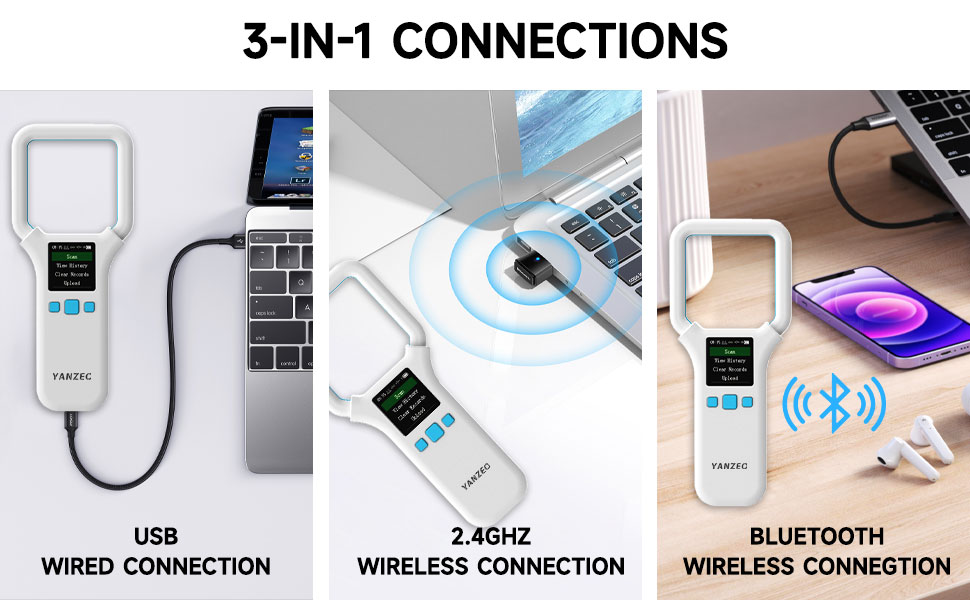
- USB kablet forbindelse: Connect directly to a computer using the USB cable for data transfer.
- 2.4 GHz trådløs forbindelse: Utilize a 2.4GHz dongle (if included) for wireless data transfer to a computer.
- Bluetooth trådløs forbindelse: Pair the scanner with a Bluetooth-enabled device (e.g., smartphone, tablet, laptop) for wireless data transfer. Refer to your device's Bluetooth pairing instructions.
Image: Illustrates the three primary connection methods: USB wired, 2.4GHz wireless, and Bluetooth wireless, for versatile data transfer.
Viewing and Managing Records
The scanner can store up to 500 records. You can view and manage these records directly on the device or by uploading them to a computer.
- View Historie: Naviger til "View History" option on the main menu to browse previously scanned microchip IDs.
- Ryd registreringer: Select "Clear Records" to erase all stored data from the device. Use with caution as this action is irreversible.
- Upload: Connect the scanner to a computer using one of the connectivity options and select "Upload" to transfer stored data.

Image: The scanner's menu showing options like "Scan," "View History," "Clear Records," and "Upload," with an illustration of data being transferred to a laptop.
Opretholdelse
- Rengør apparatet regelmæssigt med en blød, tør klud. Brug ikke slibende rengøringsmidler eller opløsningsmidler.
- Opbevar scanneren et køligt, tørt sted væk fra direkte sollys og ekstreme temperaturer.
- Sørg for, at opladningsporten er fri for støv og snavs.
- Charge the device periodically if not in use for extended periods to maintain battery health.
Fejlfinding
| Problem | Mulig årsag | Løsning |
|---|---|---|
| Enheden tænder ikke. | Lavt batteri. | Oplad enheden helt. |
| Cannot read microchip. | Chip is not FDX-B (ISO11784/11785) or is an Avid chip. Incorrect scanning technique. | Ensure the chip is compatible. Reposition the scanner and try again, moving slowly over the area. |
| Bluetooth-forbindelse mislykkes. | Scanner not in pairing mode. Device Bluetooth off. Interference. | Ensure scanner is in Bluetooth pairing mode. Check Bluetooth settings on your device. Move closer to the device. |
| Data upload issue. | Incorrect connection mode. Software not running. | Verify USB/wireless connection. Ensure necessary software (if any) is running on your computer. |
Specifikationer
| Feature | Detalje |
|---|---|
| Modelnummer | AR180E |
| Kompatible enheder | Stationær computer, bærbar computer, smartphone, tablet |
| Forbindelsesteknologi | Bluetooth |
| Strømkilde | Batteridrevet (1 Lithium Polymer batteri inkluderet) |
| Varens vægt | 4.6 ounce |
| Pakkedimensioner | 7.8 x 4.76 x 0.91 tommer |
| Understøttede frekvenser | 134.2 kHz |
| Understøttede standarder | EMID FDX-B (ISO11784/11785) |
| Datalagringskapacitet | Op til 500 poster |
| Display Type | OLED skærm |
Garanti og support
Garantioplysninger
This product comes with a standard manufacturer's warranty. Please refer to the product packaging or contact customer support for specific warranty terms and conditions.
Kundesupport
For technical assistance, troubleshooting, or warranty claims, please contact Yanzeo customer support through their official webwebstedet eller forhandleren, hvor produktet blev købt.
Manufacturer: YANZEO


