1. Produktet er slutview
This document provides instructions for the QIACHIP Ewelink WiFi Wireless Smart Relay Module, Model KR0548-4CH. This smart switch allows users to remotely control connected home appliances or devices via the eWeLink application. It supports third-party voice control systems such as Amazon Alexa and Google Home, and can also be controlled by a 2.4G remote. Key functions include timer on/off, scene linkage, power-on status settings, inching mode configuration, and sharing control.
The module features a signal indicator light and a relay pull-in indicator light. Its board power consumption is less than 1W, with a quiescent current of 80mA. The rated switching current is within 10A, and the switching voltage is within 250V. It utilizes a 10A relay with a life expectancy exceeding 1,000,000 operations. Electrical insulation resistance is 100M, and electric shock withstand voltage is 1000V. The maximum pull-in time of the relay is 15ms, and the maximum release time is 5ms. It operates within a temperature range of -40 to +70 degrees Celsius and a humidity range of 40% to 80% RH.

Image 1.1: QIACHIP Ewelink WiFi Wireless Smart Relay Modules with app interface.

Image 1.2: Key features and compatibility of the QIACHIP Smart Relay Module.
2. Opsætning og installation
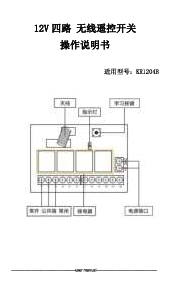
2.1 Komponentidentifikation
Familiarize yourself with the various components and connection points on the relay module.

Billede 2.1: Detaljeret view of the relay module with labeled components.
2.2 Strømforsyning
The module supports two power input options:
- USB 5V Input: Connect a standard USB 5V power source to the micro USB port.
- DC 7-48V indgang: Connect a DC power source within the 7V to 48V range to the designated positive and negative terminals.
Note: The power input (DC) is solely for the PCBA. Users must provide an additional power supply for the load as required, as the product provides dry contact passive output.
2.3 Ledningsdiagrammer
Nedenfor er example wiring configurations for common applications. Always ensure power is disconnected before wiring.

Image 2.2: Wiring for lights and various household appliances.

Image 2.3: Wiring for DC motors.

Image 2.4: Wiring for diverse applications including garage doors and other devices.
2.4 eWeLink App Setup
To control the module via your smartphone, follow these steps to set up the eWeLink app:
- Download eWeLink-appen: Søg efter "eWeLink" in your smartphone's app store (available for iOS and Android).
- Registrer/Log ind: Opret en konto eller log ind, hvis du allerede har en.
- Gå ind i parringstilstand: Power on the relay module. Observe the WiFi network indicator light. If it flashes two short blinks followed by one long blink, the device is in pairing mode. If not, press and hold the setting button on the module until this pattern appears.
- Tilføj enhed i appen: In the eWeLink app, tap the "+" icon or "Add Device" option. The app will search for nearby devices.
- Connect to 2.4G WiFi: Ensure your smartphone is connected to a 2.4G WiFi network. The module only supports 2.4G WiFi; 5G WiFi is not supported.
- Fuld parring: Follow the on-screen prompts in the eWeLink app to complete the pairing process. Once successfully added, you can rename the device and control its channels.
Video 2.1: Demonstration of the WiFi module switch's connection effect with a load light, showing app control and pairing process.
3. Betjening
3.1 Arbejdstilstande
The module supports different working modes, configurable within the eWeLink app:
- Self-locking Mode (Default): In this mode, each channel acts as a standard on/off switch. Once activated, it remains in that state until manually changed.
- Krybningstilstand: In this mode, the device turns on and automatically turns off after a set interval (e.g., 1 second). The interval time can be adjusted in the app. This mode is suitable for applications requiring momentary contact, such as garage door openers or pulse-triggered devices.
3.2 Stemmekontrol
The QIACHIP Smart Relay Module is compatible with Amazon Alexa and Google Assistant. To enable voice control:
- Ensure your eWeLink account is linked to your Amazon Alexa or Google Home account through their respective apps.
- Discover devices in your Alexa or Google Home app.
- Once discovered, you can use voice commands (e.g., "Alexa, turn on Channel 1" or "Hey Google, turn off the living room light").

Image 3.1: Smart home integration with voice control via Alexa and Google Home.
3.3 Timingfunktioner
The eWeLink app allows you to set schedules and timers for your connected devices:
- Scheduled On/Off: Set specific times for devices to turn on or off daily, weekly, or on custom days.
- Nedtællingstimer: Set a countdown for a device to turn on or off after a specified duration.
- Loop-timer: Configure devices to cycle on and off repeatedly for specific periods.
4. Tekniske specifikationer
| Specifikation | Værdi |
|---|---|
| Produktdimensioner | 3.15 x 1.18 x 2.76 tommer |
| Varemodelnummer | KR0548-4CH |
| Fabrikant | QIACHIP |
| Connector Type | Clamp |
| Kontaktmateriale | Plast |
| Kontakttype | Normalt åben |
| Nuværende vurdering | 10 Amps |
| Monteringstype | PCB-montering |
| Input bindtage | USB 5V / DC 7-48V |
| WiFi-standard | 2.4GHz (5GHz not supported) |

Image 4.1: Dimensions of the QIACHIP Smart Relay Module.
5. Sikkerhedsadvarsler
Please read and adhere to the following safety warnings to prevent damage to the product or personal injury:
- Always turn off the power before wiring to ensure correct power usage and prevent electrical hazards.
- When using wireless electronic products, be aware of potential interference from metal objects, large electronic equipment, electromagnetic fields, and strong sources of interference. These can reduce the remote control distance or cause malfunction.
- Do not use this electronic product abnormally. Abnormal use can shorten product lifespan, cause serious damage, and pose a danger to the user.
- This product is equipped with a battery that can cause serious injury if swallowed. Keep batteries away from children and pets.
- Please send waste products and batteries to designated recycling points or recycling centers for safe disposal to reduce environmental impact.

Image 5.1: Safety warnings and compliance information.
6. Support og kontakt
If you have any questions or require further guidance, please contact the manufacturer at the first instance. We are committed to helping you resolve any issues.
Fabrikant: Shenzhen Keshilian Electronic Technology Co., Ltd
Adresse: 208, Building 5, Hongguan Innovation Talent Industrial Park, Longzh!Community, Buji Street, Longgang District, Shenzhen, China
E-mail: qiai@qiachip.com, keshilian@qiachip.com
Importør i Europa: SC ENIF PEGASUS SRL
Adresse: Bucuresti sector 2. Strada RADOVANU Nr.7 Bloc 42. scara 1. Etaj 5 Ap29