1. Introduktion
This manual provides detailed instructions for the installation, operation, and maintenance of your ZUMIMALL ZS-GX2S 3MP Wireless Outdoor Security Camera. Please read this manual thoroughly before using the product to ensure proper functionality and safety.
The ZUMIMALL ZS-GX2S is a solar-powered, wireless outdoor security camera designed for comprehensive surveillance. It features 3MP resolution, 360° pan and tilt capabilities, AI detection, two-way audio, and IP66 weatherproofing, making it suitable for various outdoor environments.
2. Produktet er slutview
2.1 Pakkens indhold
Pakken indeholder følgende varer:
- ZUMIMALL ZS-GX2S 3MP Wireless Outdoor Security Camera (2 units)
- Solar Panel (2 units)
- Monteringsbeslag til kamera
- Monteringsbeslag til solpanel
- USB opladningskabel
- Screw Package (screws and wall anchors)
- Instruktionsmanual
- Tip Sticker ('Hey! YOU ARE ON CAMERA')
2.2 Kamerakomponenter
Familiarize yourself with the main parts of the camera:
- Kameraobjektiv: Optager video footage.
- Hvidt lys: Giver belysning til farvenatsyn.
- PIR sensor: Registrerer bevægelse.
- Mikrofon: Optager lyd til tovejskommunikation.
- Højttaler: Udsender lyd til tovejskommunikation og sirene.
- Wi-Fi antenne: Enhances wireless connectivity.
- Tilstandsindikator: Viser kamerastatus.
- Nulstil nøgle: Used to reset the camera.
- Power-tast: Tænder/slukker kameraet.
- SD-kortplads: Til lokal videolagring (understøtter op til 128 GB).
- Type-C ladeport: For connecting the solar panel or charging.

2.3 Nøglefunktioner
- 3MP Full Color Image: Delivers 2K resolution, 1.5 times sharper than standard 1080p, with 4X digital zoom.
- 360° View: Offers 355° horizontal and 120° vertical rotation for comprehensive coverage.
- Soldrevet og 100% trådløs: Equipped with a high-efficiency solar panel and large-capacity rechargeable battery for continuous operation.
- 2.4G WiFi-forbindelse: Features 4dBi dual antennas for stable wireless connection.
- Intelligent AI Detection: Advanced PIR sensor and AI algorithms identify persons, pets, vehicles, and parcels, reducing false alarms.
- Realtidsadvarsler: Sends instant notifications to your mobile app upon motion detection.
- Tovejs lyd: Muliggør kommunikation i realtid via kameraet.
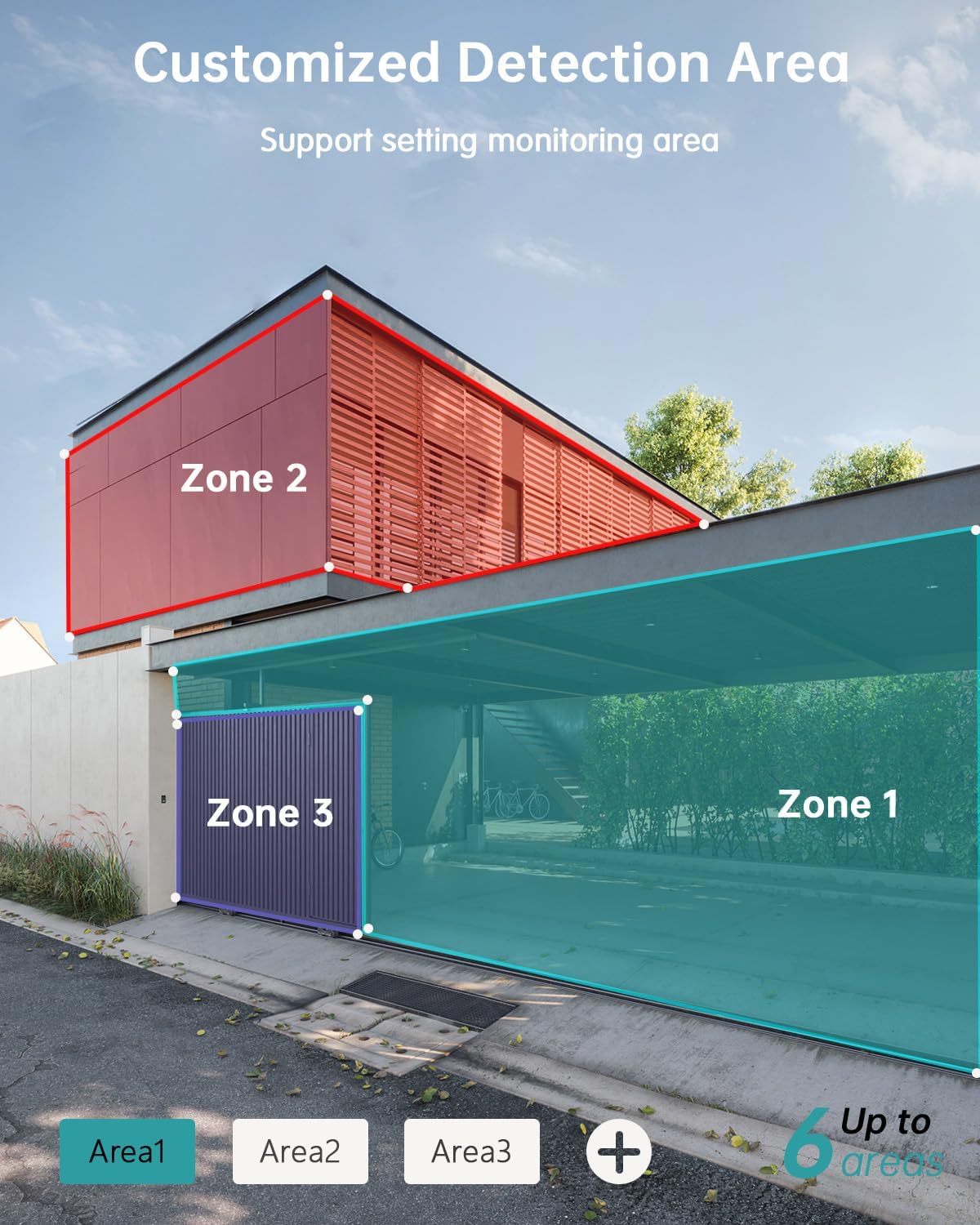
- Tilpassede detektionsområder: Set specific monitoring zones to focus on critical areas.
- IP66 Vejrbestandig: Designed to withstand various weather conditions, including rain, wind, and snow.
- Flere opbevaringsmuligheder: Supports local storage via Micro SD card (up to 128GB) and cloud storage.
- Arbejder med Alexa: Integrer med Amazon Alexa for stemmestyring og live view på kompatible enheder.
3. Opsætning
3.1 Fysisk installation
Before permanent installation, ensure the camera has a strong 2.4G Wi-Fi signal in the desired location. The camera can be mounted on various surfaces including wood, drywall, stucco, or even gutters using appropriate fasteners.
- Fastgør monteringsbase: Secure the camera's mounting base to your chosen surface using the provided screws and wall anchors.
- Tilslut solpanel: Attach the solar panel to its bracket and position it to receive maximum sunlight. Connect the solar panel's Type-C cable to the camera's charging port. Ensure the cable is neatly managed to prevent damage.
- Monter kamera: Align the camera with the mounting base and slide it down until it locks securely.

3.2 Appinstallation og parring
The ZUMIMALL app is required to operate your camera. Follow these steps to set up the app and pair your camera:
- Download appen: Scan the QR code provided in the manual or on the product packaging, or search for 'ZUMIMALL' in your device's app store.
- Registrer konto: Open the ZUMIMALL app and follow the on-screen instructions to register a new account or log in if you already have one.
- Tilføj enhed: In the app, select 'Add Device' or the '+' icon. Follow the prompts to select your camera model.
- Tænd kameraet: Sørg for, at dit kamera er tændt.
- Scan QR -kode: The app will display a QR code. Hold your camera's lens towards your phone screen to scan the QR code. You will hear a confirmation sound when successful.
- Opret forbindelse til Wi-Fi: Follow the app's instructions to connect the camera to your 2.4G Wi-Fi network.
- Opsætning fuldført: Once connected, you can name your camera and begin using it.

4. Betjening
4.1 Live View og afspilning
Access the live feed and review optaget footage directly from the ZUMIMALL app.
- Levende View: Åbn appen, og vælg dit kamera for at view realtidsfeedet.
- Afspilning: Navigate to the 'History' or 'Cloud' section in the app to review optagede begivenheder.

4.2 Bevægelsesdetektion og advarsler
The camera's AI detection system identifies specific objects and sends alerts.
- AI-detektion: The camera can distinguish between persons, pets, vehicles, and parcels.
- Custom Areas: Set specific detection zones within the app to monitor areas of interest and reduce unnecessary alerts.
- Notifikationer i realtid: Modtag øjeblikkelige advarsler på din telefon, når der registreres bevægelse.

4.3 Tovejslyd
Engage in real-time conversations through the camera using the app's two-way audio feature.
4.4 PTZ kontrol
Control the camera's pan (horizontal) and tilt (vertical) movements directly from the app to adjust your viewvinkel.
- Pande: 355° vandret rotation.
- Vip: 120° lodret rotation.

4.5 Lagringsmuligheder
Dit kamera tilbyder fleksible opbevaringsløsninger til optagede filmtage.
- Micro SD-kort: Indsæt et Micro SD-kort (op til 128 GB) i den angivne plads til lokal lagring.
- Cloud Storage: ZUMIMALL offers cloud storage services for convenient access and backup of your recordings.
4.6 Alexa-integration
The ZUMIMALL ZS-GX2S camera is compatible with Amazon Alexa. You can use voice commands to view livefeedet på kompatible Alexa-aktiverede enheder.
5. Vedligeholdelse
5.1 Battery and Solar Charging
The integrated solar panel is designed to keep your camera's battery charged, providing continuous operation.
- Ensure the solar panel is positioned in an area that receives direct sunlight for several hours daily.
- In periods of low sunlight or high usage, the camera's battery may require manual charging via the USB port.
5.2 Rengøring
Regelmæssig rengøring hjælper med at opretholde optimal ydeevne.
- Tør forsigtigt kameralinsen og solpanelet af med en blød kludamp klud til at fjerne støv og snavs.
- Undgå at bruge skrappe kemikalier eller slibende materialer, der kan beskadige kameraets overflade eller objektiv.
6. Fejlfinding
If you encounter issues with your ZUMIMALL ZS-GX2S camera, consider the following common solutions:
- Ingen strøm: Ensure the solar panel is receiving adequate sunlight or manually charge the camera using the USB cable.
- Problemer med Wi-Fi-forbindelse: Verify your Wi-Fi network is 2.4Ghz. Check the camera's proximity to the router and ensure a strong signal. Restart your router and camera if necessary.
- Falske alarmer: Adjust the motion detection sensitivity settings in the app. Utilize the custom detection area feature to exclude irrelevant zones.
- No Recordings: Check if the Micro SD card is properly inserted and formatted. Ensure cloud storage is active if you are using that service.
- Dårlig billedkvalitet: Rengør kameralinsen. Sørg for, at der ikke er nogen forhindringer i kameraets synsfelt. view.
- Problemer med tovejslyd: Tjek lydstyrkeindstillingerne på din telefon og i appen. Sørg for, at der ikke er nogen forhindringer, der blokerer kameraets mikrofon eller højttaler.
For further assistance, please refer to the ZUMIMALL app's help section or contact customer support.
7. Specifikationer
| Feature | Detalje |
|---|---|
| Modelnummer | ZS-GX2S |
| Opløsning | 3 MP (2K) |
| Strømkilde | Soldrevet (med genopladeligt litium-ion-batteri) |
| Forbindelse | 2.4G Wi-Fi |
| Pan/tilt rækkevidde | 355° vandret, 120° lodret |
| Vidvinkelobjektiv | 130° |
| Nattesyn | 3MP Color Night Vision (with 2 IR and 2 white lights) |
| Digital Zoom | 4X |
| AI-detektion | Person, Pet, Vehicle, Parcel |
| Lyd | To-vejs lyd |
| Opbevaring | Micro SD-kort (op til 128 GB), Cloud-lagring |
| Vejrbestandighed | IP66 |
| Driftstemperatur | -4°F til 120°F (-20°C til 50°C) |
| Kompatible enheder | Smartphone, Amazon Alexa |
| Produktdimensioner | 13.7 x 7.4 x 5.4 tommer |
| Varens vægt | 4.71 pund |
8. Garanti og support
ZUMIMALL is committed to providing high-quality products and customer satisfaction. For warranty information, technical support, or any inquiries regarding your ZS-GX2S camera, please refer to the ZUMIMALL app's support section or visit the official ZUMIMALL website. You can also contact ZUMIMALL customer service directly for assistance.


