1. Introduktion
The Phomemo M832 is a portable, inkless thermal printer designed for convenience and efficiency. This device utilizes advanced thermal technology to print documents, images, and various other content without the need for ink cartridges, toner, or ribbons. Its compact design makes it suitable for travel, business trips, and use in various environments such as small offices, vehicles, and educational settings. This manual provides detailed instructions for setting up, operating, maintaining, and troubleshooting your Phomemo M832 printer.
The Phomemo M832 printer supports multiple paper sizes and types, including 8.5" x 11" US Letter, A4, 2.08" (53mm), 3.15" (80mm), and 4.33" (110mm) thermal paper. It is compatible with thermal roll paper, folded thermal paper, and ordinary thermal paper.

Image: The Phomemo M832 printer demonstrating its ability to print on various paper sizes, including US Letter, A4, 110mm, 80mm, and 53mm, with a smartphone wirelessly connected.
2. Pakkens indhold
Kontroller venligst pakkens indhold ved udpakning for at sikre, at alle varer er til stede:
- Phomemo M832 bærbar termisk printer
- 3 Rolls of 110mm Thermal Printer Paper
- USB kabel
- Brugervejledning (dette dokument)
3. Produktfunktioner
The Phomemo M832 printer offers several key features:
- Bærbart design: Weighing approximately 1.5 lbs, the M832 is compact and easily fits into a backpack or briefcase, making it ideal for mobile use.
- Blækfrit tryk: Utilizes advanced thermal technology, eliminating the need for ink, toner, or ribbons, which reduces operational costs and maintenance.
- Integrated Paper Bin: Features a built-in roll paper bin, allowing for convenient paper storage and transport.
- Alsidig papirstøtte: Compatible with 8.5" x 11" US Letter, A4, 2.08" (53mm), 3.15" (80mm), and 4.33" (110mm) thermal paper. Supports thermal roll paper, folded thermal paper, and ordinary thermal paper.
- Bred kompatibilitet: Connects via Bluetooth to iPhone, Android phones, and iPad. Can also connect via USB cable to laptops and computers running Windows, macOS, Chrome OS, and Linux.
- Multi-purpose Printing: Suitable for printing office documents, receipts, contracts, resumes, invoices, drawings, school notes, shopping lists, labels, boarding passes, and DIY projects.

Image: The Phomemo M832 printer's compact dimensions (10.39in x 3.07in x 1.77in) are highlighted, demonstrating its portability for use anytime, anywhere.
4. Opsætningsvejledning
4.1. Opladning af printeren
Before initial use, fully charge the printer using the provided USB cable. Connect the USB cable to the printer's charging port and a compatible USB power adapter (not included) or computer USB port. The indicator light will show charging status.
4.2. Ilægning af termopapir
The Phomemo M832 supports various thermal paper types and sizes. Follow these steps to load paper:
- Åbn dækslet til papirrummet.
- Insert the thermal paper roll or folded paper stack into the compartment, ensuring the printable side faces the print head. For roll paper, ensure the paper feeds smoothly from the bottom of the roll.
- Adjust the paper guides to fit the width of your paper snugly.
- Close the paper compartment cover. Ensure a small portion of paper extends from the output slot.

Image: The Phomemo M832 printer demonstrating its flexibility with various paper types, including thermal roll paper, continuous thermal paper, and ordinary thermal paper, with an adjustable baffle for different widths.
4.3. Appinstallation (til mobile enheder)
To use the printer with your smartphone or tablet, download the official "Phomemo" app:
- Søg efter "Phomemo" in the Apple App Store (for iOS devices) or Google Play Store (for Android devices).
- Download og installer appen.
4.4. Driver Installation (for Computers)
For printing from a laptop or desktop computer via USB, you may need to install the appropriate driver:
- Besøg den officielle Phomemo webwebsted: M832.phomemo.com
- Download the driver compatible with your operating system (Windows, macOS, Chrome OS, Linux).
- Følg instruktionerne på skærmen for at fuldføre driverinstallationen.
5. Betjening
5.1. Forbindelse via Bluetooth (mobile enheder)
- Ensure the Phomemo M832 printer is powered on.
- Aktiver Bluetooth på din mobilenhed.
- Open the "Phomemo" app.
- Within the app, navigate to the device connection section and select your M832 printer from the list of available devices. The app will guide you through the pairing process.

Image: The Phomemo M832 printer demonstrating both Bluetooth connectivity with a mobile device (iOS, Android, iPad) and USB connectivity with a laptop (Windows, Mac OS, Chrome OS, Linux).
5.2. Connecting via USB (Computers)
- Ensure the Phomemo M832 printer is powered on.
- Slut printeren til din computer ved hjælp af det medfølgende USB-kabel.
- After driver installation (if required), your computer should recognize the printer.
- You can now print directly from your computer's applications.
5.3. Udskrivning af dokumenter
Once connected, you can print various types of content:
- From Mobile App: Use the Phomemo app to select documents (PDF, Word), images, web pages, or create custom content for printing. The app provides options for editing and previewing before printing.
- Fra computeren: Open the document or image you wish to print in your preferred application (e.g., Microsoft Word, Adobe Reader, web browser). Select the Phomemo M832 as your printer from the print dialog box and adjust settings as needed before initiating the print job.

Billede: Eksamples of practical applications for the Phomemo M832 printer, including printing photos, creating scrapbook elements, organizing study notes, and generating to-do lists.
6. Vedligeholdelse
6.1. Rengøring af printhovedet
For at sikre optimal udskriftskvalitet skal du rengøre printhovedet med jævne mellemrum:
- Sluk printeren, og afbryd den fra enhver strømkilde.
- Åbn dækslet til papirrummet.
- Gently wipe the print head with a soft, lint-free cloth lightly dampened with isopropyl alcohol. Do not use water or abrasive cleaners.
- Lad printhovedet tørre helt, før du lukker dækslet og tænder printeren.
6.2. Thermal Paper Storage
Thermal paper is sensitive to heat, light, and certain chemicals. Store thermal paper in a cool, dry place away from direct sunlight and heat sources to preserve its printability and image duration. The included 110mm thermal paper is designed for an image duration of up to 10 years under proper storage conditions.
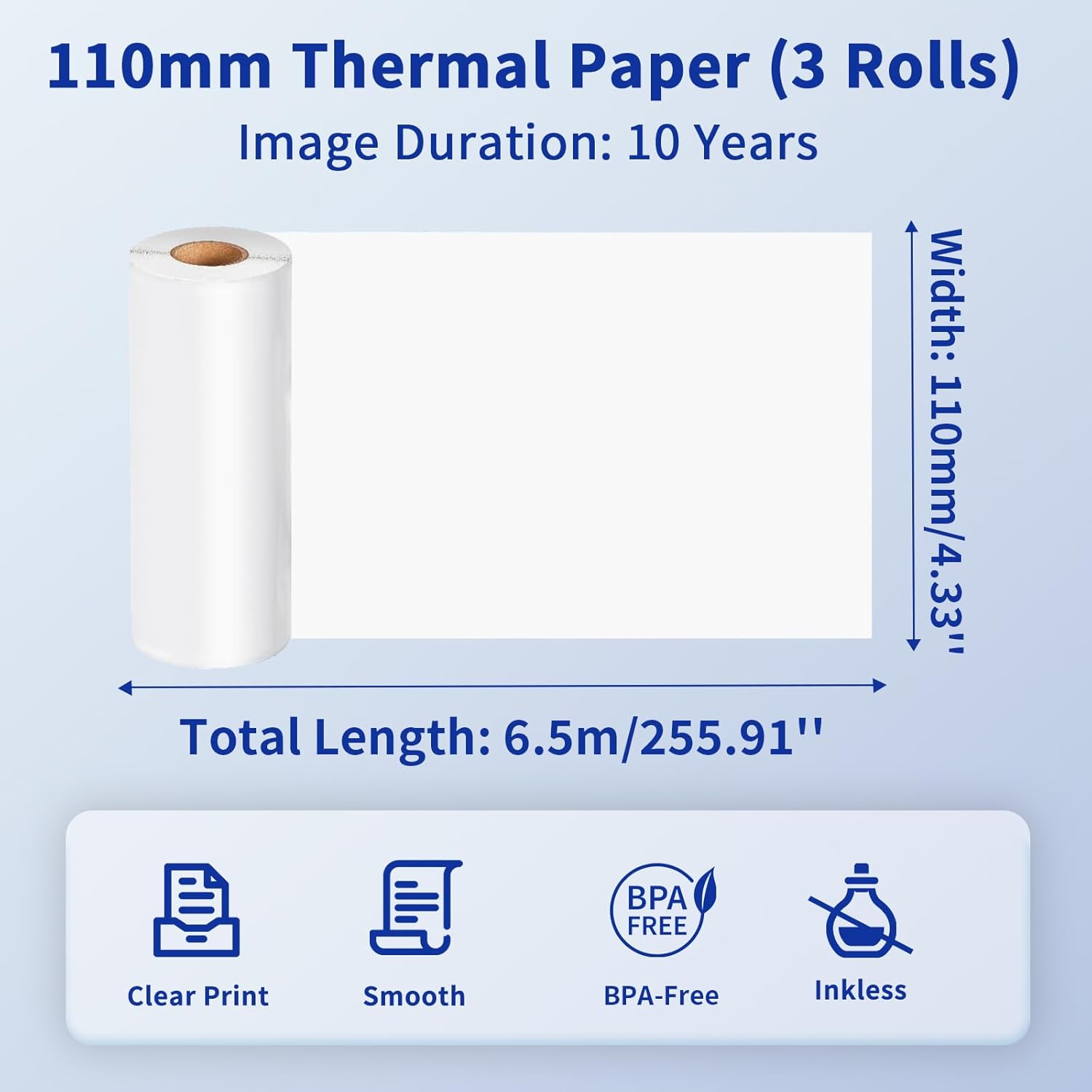
Image: Details of the 110mm thermal paper, including its dimensions (110mm width, 6.5m length) and key attributes such as clear print, smooth texture, BPA-free composition, and inkless operation, with an image duration of 10 years.
7. Fejlfinding
Hvis du støder på problemer med din Phomemo M832-printer, kan du se følgende almindelige problemer og løsninger:
| Problem | Mulig årsag | Løsning |
|---|---|---|
| Printeren tænder ikke | Problem med lavt batteri eller strøm | Charge the printer fully. Ensure the power button is pressed correctly. |
| Kan ikke oprette forbindelse via Bluetooth | Bluetooth is off, printer not discoverable, or app issue | Ensure Bluetooth is enabled on your device. Restart the printer and the app. Try re-pairing the device within the Phomemo app. |
| Poor print quality / Blank prints | Incorrect paper loading, dirty print head, or low battery | Ensure thermal paper is loaded correctly with the printable side facing up. Clean the print head as described in Section 6.1. Charge the printer. |
| Papirstop | Forkert papirilægning eller fremmedlegeme | Turn off the printer. Carefully open the paper compartment and remove any jammed paper or obstructions. Reload paper correctly. |
| Printeren genkendes ikke af computeren | Driver not installed or USB cable issue | Install the correct driver from M832.phomemo.comPrøv en anden USB-port eller et andet kabel. |
8. Specifikationer
Below are the technical specifications for the Phomemo M832 Portable Thermal Printer:
- Model: M832
- Udskrivningsteknologi: Termisk
- Forbindelse: Bluetooth, USB
- Printer output: Monokrom
- Kontrolmetode: App (Phomemo App)
- Kompatible enheder: Laptops, PCs, iPhone, Android Phone, iPad
- Understøttede operativsystemer: iOS, Android, iPadOS, Windows, macOS, Chrome OS, Linux
- Supported Print Media: Thermal Roll Paper, Folded Thermal Paper, Ordinary Thermal Paper
- Supported Sheet Sizes: 8.5" x 11" (US Letter), A4, 2.08" (53mm), 3.15" (80mm), 4.33" (110mm)
- Speciel funktion: Portable, Inkless
- Vægt: Cirka 1.5 lbs
- Første tilgængelige: 31. maj 2024

Image: The Phomemo M832 printer's broad compatibility across multiple operating systems, including iOS, Android, iPad, Mac OS, Windows, Chrome OS, and Linux.
9. Garanti og support
Phomemo products are designed for reliability and performance. For warranty information and customer support, please refer to the official Phomemo webwebstedet eller kontakt deres kundeservice direkte. Gem din købskvittering som købsbevis i tilfælde af garantikrav.
For additional resources and product information, visit the official Phomemo Store on Amazon: Phomemo Store


