1. Introduktion
This manual provides detailed instructions for the setup, operation, maintenance, and troubleshooting of your TouchWo 17.3-inch Touchscreen Industrial Computer Monitor. This versatile device is designed for various applications, including office, classroom, retail, and industrial environments, offering a responsive 10-point touch display with robust performance.

Figure 1.1: TouchWo 17.3-inch Touchscreen Industrial Computer Monitor in use, demonstrating its touch capabilities.
1.1 Produkt overview
The TouchWo TD173 is a 17.3-inch industrial-grade touchscreen monitor featuring a 1080P display, powered by a Core i7 processor with 8GB RAM and a 512GB SSD, running Windows 11 Pro. Its 10-point capacitive touch screen allows for intuitive interaction, similar to a tablet. The monitor is designed with a true flat seamless design and an IP65 standard touch screen, making it suitable for demanding environments. It supports various connectivity options including USB, VGA, HDMI, LAN, and WiFi, and includes built-in speakers.
1.2 Pakkens indhold
Kontroller venligst, at alle nedenstående varer er til stede i din pakke:
- 1 x Touchscreen Smart PC
- 1 x strømadapter
- 1 x Power Line (1.5m)
- 1 x Produktmanual (dette dokument)
- 1 x Wall-Mounted Bracket (standard)
- 1 x WiFi-antenne

Figure 1.2: Contents included in the product packaging.
1.3 Sikkerhedsoplysninger
For at sikre sikker drift og forhindre skader, bedes du læse og overholde følgende sikkerhedsretningslinjer:
- Udsæt ikke monitoren for ekstreme temperaturer eller fugt.
- Use only the provided power adapter and power line.
- Undgå at blokere ventilationsåbninger.
- Forsøg ikke selv at skille enheden ad eller reparere den. Kontakt kvalificeret servicepersonale.
- Rengør skærmen med en blød, fnugfri klud. Undgå slibende rengøringsmidler.
2. Opsætning
2.1 Installationsmetoder
The TouchWo TD173 monitor offers flexible installation options to suit various environments. The standard package includes a wall-mounted bracket. Other bracket types (Simple Bracket, VESA Bracket, Desktop Folding Bracket, Desktop Stand) may need to be purchased separately.
- Vægbeslag: Use the included wall-mounted bracket for secure installation on a vertical surface.
- VESA montering: The monitor features 100x100 VESA holes, allowing compatibility with various VESA-compliant arms and stands.
- Skrivebordsstativ: For desktop use, a compatible stand can be attached to the monitor.

Figure 2.1: Available installation methods for the monitor.
2.2 Tilslutning af eksterne enheder
The monitor is equipped with multiple interfaces for connecting external devices:
- USB-porte (4x): Connect keyboards, mice, external storage, or other USB devices.
- VGA & HDMI: For video input from external sources if using the monitor as a display only.
- LAN (Ethernet): Til kablet netværksforbindelse.
- WiFi og Bluetooth: Built-in wireless connectivity for internet access and pairing Bluetooth devices.
- 3.5mm Audio & Mic Jack: For connecting external headphones, speakers, or microphones.
To connect the WiFi antenna, screw it into the designated port on the back of the monitor until secure.
2.3 Indledende tænding
- Tilslut strømadapteren til skærmens strømindgang.
- Plug the power line into a suitable electrical outlet.
- Press the power button, usually located on the side or back of the monitor.
- The monitor will boot up, displaying the Windows 11 Pro operating system. Follow the on-screen prompts for initial Windows setup if this is the first use.
3. Betjeningsvejledning
3.1 Touchskærmens funktionalitet
The TouchWo monitor features advanced 10-point capacitive touch technology, allowing for precise and responsive interaction. No additional drivers are required for basic touch functionality.
- Enkelt tryk: Functions like a mouse click to select items or open applications.
- Dobbeltklik: Åbner files or folders, similar to a double-click.
- Træk: Touch and hold an item, then move your finger to drag it across the screen.
- Knib-for-at-zoome: Use two fingers to pinch in (zoom out) or spread out (zoom in) on images, maps, or documents.
- Flerfingerbevægelser: The 10-point touch supports various multi-finger gestures for navigation and control within Windows 11 and compatible applications.

Figure 3.1: Demonstrating 10-point touch screen interaction.

Figure 3.2: Common touchscreen gestures for interaction.
3.2 Brugsscenarier
The TouchWo TD173 is a versatile smart PC suitable for a wide range of applications:
- Industrial Control: Ideal for factory automation, monitoring systems, and interactive displays in industrial settings.
- Retail & POS: Can be integrated into Point-of-Sale (POS) systems, interactive kiosks, or menu screens in restaurants and bars.
- Office & Classroom: Functions as a smart board for presentations, collaborative work, or general computing tasks.
- Sikkerhedsovervågning: Can serve as a CCTV monitor for security camera systems.
- Self-Service Kiosks: Suitable for interactive information points or self-service terminals.

Figur 3.3: Eksamples of multiple usage scenarios for the monitor.

Figure 3.4: Diverse applications of the TouchWo monitor in different environments.
4. Vedligeholdelse
4.1 Rengøring af monitoren
Regular cleaning helps maintain the monitor's performance and appearance. The IP65 standard touch screen offers protection against dust and water splashes.
- Skærm: Tør forsigtigt skærmen af med en blød, fnugfri klud. Ved genstridige pletter, tør let afampRengør kluden med vand eller en skærmspecifik rengøringsopløsning. Sprøjt ikke væske direkte på skærmen.
- Legeme: Use a soft, dry cloth to wipe the aluminum alloy frame and back-shell.
- Undgå: Do not use abrasive cleaners, alcohol, ammonia, or benzene-based solvents, as these can damage the screen or finish.
4.2 Generel pleje
- Sørg for korrekt ventilation omkring skærmen for at forhindre overophedning.
- Undgå at placere tunge genstande på skærmen eller dens kabler.
- Protect the monitor from direct sunlight and heat sources.
- When moving the monitor, handle it carefully to avoid drops or impacts.
5. Fejlfinding
Dette afsnit indeholder løsninger på almindelige problemer, du kan støde på. Hvis problemet fortsætter, bedes du kontakte kundesupport.
| Problem | Mulig årsag | Løsning |
|---|---|---|
| Skærmen tænder ikke. | No power, faulty power adapter/cable, or power button issue. |
|
| Touchscreen is unresponsive or inaccurate. | Screen dirty, calibration needed, or software issue. |
|
| No display/black screen. | Power issue, input source not selected (if external), or system crash. |
|
| Ingen lyd fra højttalere. | Volume too low, muted, or audio driver issue. |
|
6. Specifikationer
Detailed technical specifications for the TouchWo 17.3-inch Touchscreen Industrial Computer Monitor (Model TD173):
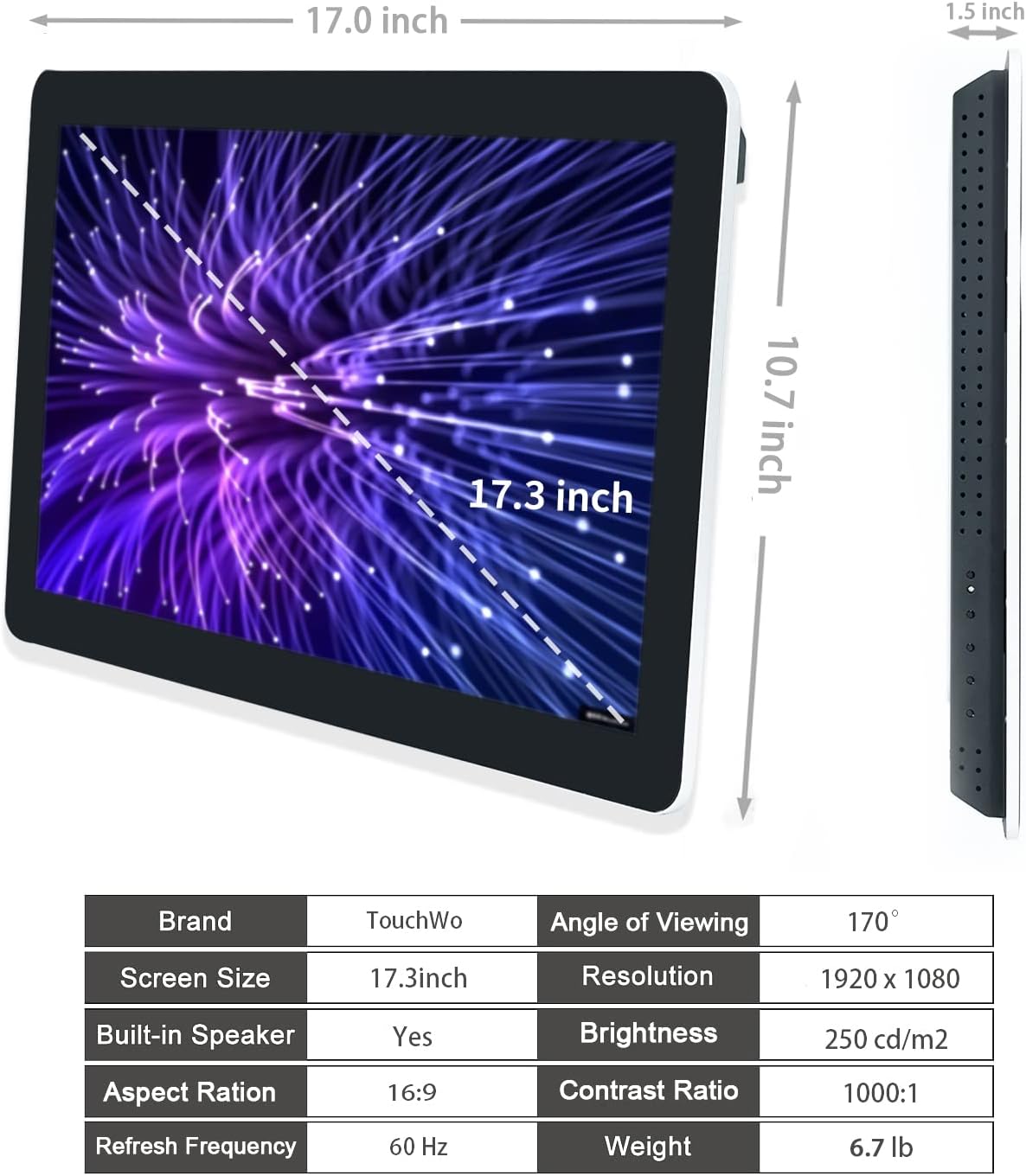
Figure 6.1: Dimensions and key specifications of the monitor.

Figur 6.2: Overview of TD Series Touchscreen HD Monitor features.

Figure 6.3: Performance and durability features of the monitor.
| Feature | Specifikation |
|---|---|
| Modelnummer | TD173 |
| Skærmstørrelse | 17.3 tommer |
| Opløsning | 1920 x 1080 pixels (FHD 1080p) |
| Aspektforhold | 16:9 |
| Lysstyrke | 250 cd/m² (250 lm) |
| Kontrastforhold | 1000:1 |
| Viewi vinkel | 178° |
| Touch-teknologi | 10 punkters kapacitiv berøring |
| Operativsystem | Windows 11 Pro (Core i7, 8GB RAM, 512GB SSD configuration) |
| Forbindelse | 4x USB, VGA, HDMI, LAN, WiFi, Bluetooth, 3.5mm Audio & Mic Jack |
| Indbyggede højtalere | Ja |
| IP-vurdering | IP65 (frontpanel) |
| Produktdimensioner | 1.5 x 17 x 10.7 tommer |
| Varens vægt | 6.7 pund |
| Voltage | 12 volt (DC) |
| Certificeringer | FCC, CE, RoHS |
7. Garanti og support
7.1 Garantipolitik
TouchWo offers a one-year warranty for this touchscreen monitor, covering manufacturing defects and malfunctions under normal use. The factory holds ISO9001 quality management certification, ensuring product quality.
For warranty claims, please retain your proof of purchase. The warranty does not cover damage caused by misuse, accidents, unauthorized repairs, or natural disasters.
7.2 Kundesupport
For any assistance, technical support, or inquiries, please feel free to reach out to TouchWo customer service. We are committed to providing 24/7 online customer support.
- Officiel e-mail: touchwoamz@outlook.com
- Amazon-sælgerside: For more information or to contact the seller directly, visit the TouchWo Seller Page on Amazon.
- Bulk or Custom Orders: Please reach out to the provided email for inquiries regarding bulk purchases or custom orders.

Figure 7.1: Contact information for customer assistance.


