1. Introduktion
Tak for købetasing the Peakeep Projection Alarm Clock. This device combines a digital alarm clock with a unique projection feature, a colorful nightlight, and a convenient USB charging port. Designed for ease of use and optimal visibility, it offers multiple brightness settings for both the main display and the projection, along with adjustable alarm volume to suit various preferences. Please read this manual carefully to ensure proper setup and operation.
2. Sikkerhedsoplysninger
- Udsæt ikke enheden for ekstreme temperaturer, direkte sollys eller høj luftfugtighed.
- Hold enheden væk fra vand eller andre væsker.
- Use only the provided AC/DC adapter.
- Forsøg ikke selv at skille enheden ad eller reparere den. Overlad al service til kvalificeret personale.
- Ensure proper ventilation around the clock.
- Bortskaf batterier ansvarligt i henhold til lokale regler.
3. Pakkens indhold
- Peakeep Projection Alarm Clock (Model MHP6050)
- AC/DC Power Adapter (60-inch cord)
- Brugermanual
4. Produktet er slutview

Figur 4.1: Forside view of the Peakeep Projection Alarm Clock, showing the main display, projection, and USB charging capability.

Figur 4.2: Bagside view of the Peakeep Projection Alarm Clock, highlighting the control buttons, USB IN/OUT ports, and focus wheel for the projector.
Kontrolknapper og porte:
- DIMMER: Adjusts the brightness of the main LED display.
- TID SET: Går i tidsindstillingstilstand.
- 12/24HR: Skifter mellem 12-timers og 24-timers tidsformater.
- BIND: Adjusts the alarm volume.
- ALARM SET ON/OFF: Sets and activates/deactivates the alarm.
- NIGHTLIGHT ON/OFF: Turns the RGB nightlight on or off.
- PROJECTION DIMMER: Adjusts the brightness of the projected time.
- PROJECTION ON/FLIP/OFF: Controls the projection (on, flip orientation, off).
- FOCUS Wheel: Justerer klarheden af det projicerede billede.
- 5V IN: Power input port for the AC/DC adapter.
- USB OUT: USB-opladningsport til eksterne enheder.
- Batterirum: For 2 AAA backup batteries (not included).
5. Opsætning
5.1 Strømtilslutning
Connect the provided AC/DC power adapter to the 5V IN port on the back of the clock and plug the adapter into a standard wall outlet. The clock display will illuminate.

Figure 5.1: Power connection and battery backup illustration.
5.2 Installation af batteribackup
For battery backup, open the battery compartment on the back of the clock and insert 2 AAA batteries (not included), observing the correct polarity (+/-). These batteries will preserve your time and alarm settings during a power outage and trigger the alarm if power is lost.
5.3 Indstilling af starttidspunkt
- Tryk og hold på TIDSINDSTILLING knappen. Timecifrene vil begynde at blinke.
- Brug BIND or ALARM SÆT knapper for at justere timen.
- Trykke TIDSINDSTILLING igen for at bekræfte timetallet og gå videre til minutindstilling. Minuttiffrene vil blinke.
- Brug BIND or ALARM SÆT knapper for at justere minutterne.
- Trykke TIDSINDSTILLING én gang til for at gemme tiden og afslutte tidsindstillingstilstanden.
- For at skifte mellem 12-timers og 24-timers format skal du trykke på 12/24 timer button. In 12-hour format, 'AM' or 'PM' indicators will be displayed.
6. Betjeningsvejledning
6.1 Indstilling af alarmen
- Tryk og hold på ALARM SÆT knappen. Alarmtimecifrene blinker.
- Brug BIND or ALARM SÆT knapper for at justere alarmtiden.
- Trykke ALARM SÆT igen for at bekræfte alarmens time og gå videre til indstilling af alarmminutter. Alarmminutcifrene blinker.
- Brug BIND or ALARM SÆT knapper til at justere alarmens minutter.
- Trykke ALARM SÆT én gang til for at gemme alarmtidspunktet.
- To activate or deactivate the alarm, short press the ALARM SÆT knappen. Et alarmikon vises på displayet, når den er aktiveret.
6.2 Justering af alarmlydstyrke
The alarm volume can be set to 5 levels, ranging from 60dB to 108dB. While the alarm is sounding or in standby mode, press the BIND button repeatedly to cycle through the 5 volume levels (U01 to U05). Select the desired volume.

Figure 6.1: Alarm volume levels.
6.3 Snooze -funktion
Når alarmen lyder, skal du trykke på den store SLUM button on top of the clock to temporarily silence the alarm for 9 minutes. The alarm will sound again after 9 minutes. To turn off the alarm completely, press any other button.
6.4 Projektionsfunktioner
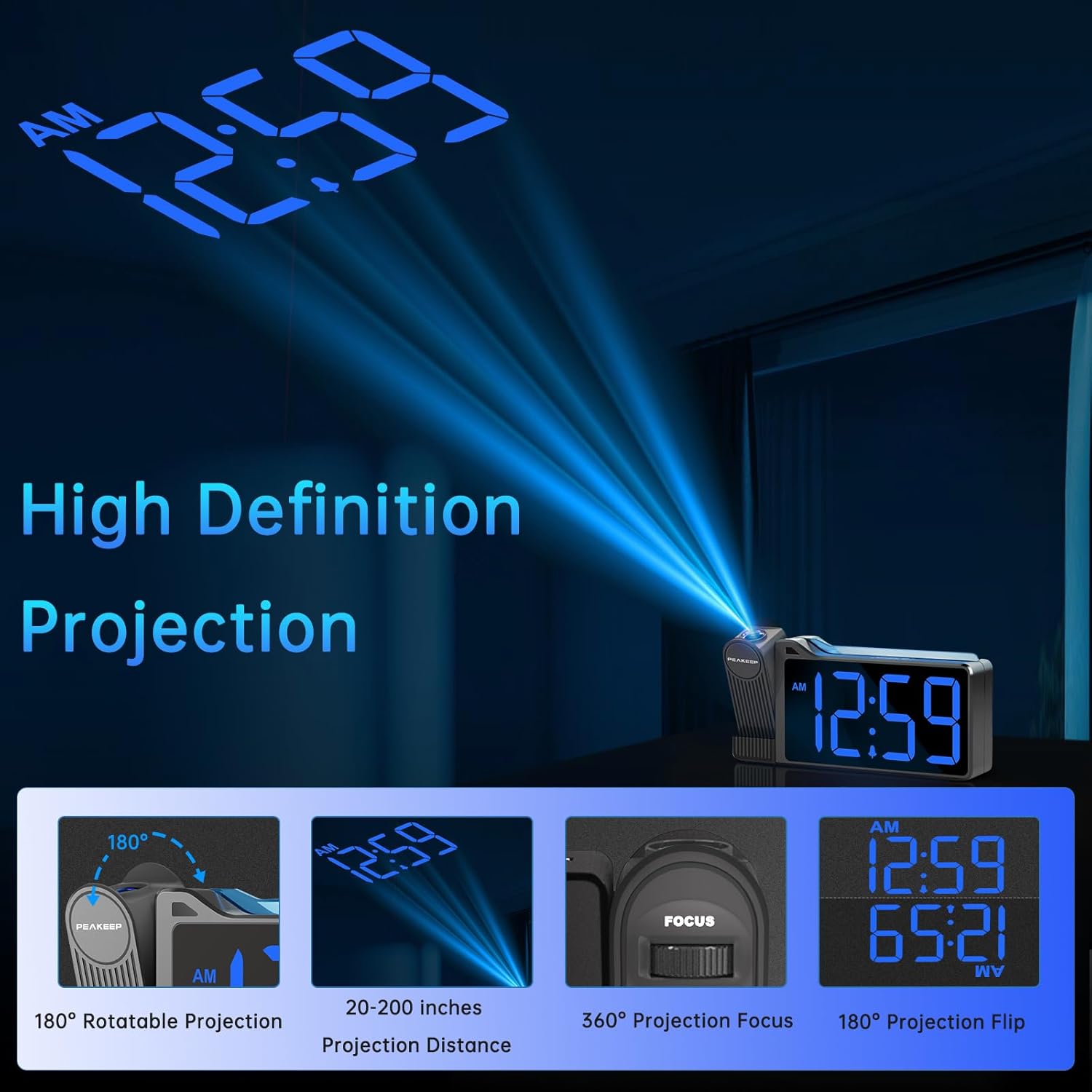
Figure 6.2: High Definition Projection capabilities.
- 180° roterbar projektion: The projector arm can be rotated 180 degrees to project the time onto a ceiling or wall.
- Projektionsafstand: The optimal projection distance ranges from 20 inches to 200 inches.
- Adjusting Projection Brightness: Tryk på PROJEKTIONSDIMMER button repeatedly to cycle through 5 brightness levels (L01 to L05) for the projected time.
- Projection ON/FLIP/OFF: Tryk på PROJEKTION ON/FLIP/OFF button to turn the projection on, flip its orientation (180 degrees), or turn it off.
- Fokusjustering: Brug FOKUS wheel on the side of the projector to sharpen the clarity of the projected time.

Figure 6.3: Adjustable Projection Brightness levels.
6.5 Farverigt natlys
The clock features an RGB color-changing nightlight on its top surface. Press the NATLYS TIL/FRA button to turn the nightlight on or off. When on, it will cycle through various colors, providing a soothing ambiance.

Figure 6.4: RGB Color-changing Nightlight.
6.6 Justering af skærmens lysstyrke
The main LED display has 6 levels of adjustable brightness (L1 to L5, plus OFF). Press the DIMMER button repeatedly to cycle through these brightness levels to suit your preference and environment.

Figure 6.5: Main display brightness levels.
6.7 USB-opladningsport
The clock is equipped with a USB OUT port (5V) on its back, allowing you to charge your smartphone or other USB-powered devices conveniently at your bedside. Simply connect your device's USB charging cable to this port.
7. Vedligeholdelse
- Rengør urets overflade med en blød, tør klud. Brug ikke slibende rengøringsmidler eller opløsningsmidler.
- Keep the projection lens clean to ensure clear time projection. Use a soft, lint-free cloth.
- Hvis uret ikke skal bruges i en længere periode, skal backupbatterierne fjernes for at forhindre lækage.
8. Fejlfinding
| Problem | Mulig årsag | Løsning |
|---|---|---|
| Clock display is off / Clock not working. | Power adapter not connected or faulty; Power outage. | Ensure the power adapter is securely plugged into the clock and a working outlet. Check power supply. |
| Time/Alarm settings are lost after power disconnection. | Ingen backupbatterier installeret, eller batterierne er døde. | Sæt 2 nye AAA-batterier i batterirummet. |
| Det forventede tidspunkt er sløret eller uklart. | Fokus ikke justeret; Forkert projektionsafstand. | Juster FOKUS wheel on the projector. Ensure the clock is within the 20-200 inch projection range. |
| Projected time is not visible. | Projection is off or too dim. | Trykke PROJEKTION ON/FLIP/OFF to turn on. Adjust PROJEKTIONSDIMMER for at øge lysstyrken. |
| Alarmen er ikke høj nok. | Alarm volume set too low. | Tryk på BIND button to increase the alarm volume level (U01-U05). |
| USB-opladning er langsom eller virker ikke. | Device requires higher charging current; Cable issue. | Ensure your device is compatible with 5V USB charging. Try a different USB cable. Note: This port is for charging, not data transfer. |
9. Specifikationer
| Feature | Detalje |
|---|---|
| Modelnummer | MHP6050 |
| Display Type | Digital LED |
| Display farve | Blå cifre |
| Produktdimensioner | 6.9 cm B x 3.5 cm H |
| Varens vægt | 8.8 ounce |
| Strømkilde | Corded Electric (AC/DC Adapter included) |
| Batteri backup | 2 x AAA batterier (medfølger ikke) |
| Projektionsrotation | 180° |
| Projektionslysstyrke | 5 niveauer |
| Displayets lysstyrke | 6 levels (including OFF) |
| Natlys | RGB Color-changing |
| Alarm Volume Range | 60-108 dB (5 levels) |
| USB udgang | 5V (for charging devices) |
| Materiale | Plast |
10. Garanti og support
Peakeep products are manufactured with high-quality materials and craftsmanship. For any questions, technical support, or warranty claims, please contact Peakeep customer service through the retailer's platform or the official Peakeep webwebsted. Gem venligst din købsbevis af garantihensyn.


