1. Introduktion
Thank you for choosing the Mibro Earbuds AC1 Wireless Earbuds. These earbuds combine an elegant design with exceptional audio performance, offering clear, immersive sound for your favorite music. With stable Bluetooth connectivity and a comfortable ergonomic fit, they are designed for convenience and quality audio on the go. This manual provides detailed instructions to help you get the most out of your new earbuds.
2. Sikkerhedsoplysninger
Please read all safety instructions before using this product.
- Udsæt ikke ørepropperne eller opladningsetuiet for ekstreme temperaturer, fugtighed eller væsker.
- Undgå at tabe, udsætte stød for eller skille enheden ad.
- Holdes væk fra børn og kæledyr.
- Brug kun det medfølgende eller certificerede opladningskabel.
- Længerevarende lytning ved høje lydstyrker kan forårsage høreskader.
3. Pakkens indhold
Sørg for, at alle varer er til stede i din pakke:
- Mibro Earbuds AC1 (Left and Right)
- Opladningsetui
- Ladekabel
- Brugervejledning (dette dokument)
4. Produktet er slutview
Familiarize yourself with the components of your Mibro Earbuds AC1.

Figur 4.1: Mibro Earbuds AC1 removed from their open charging case, displaying the earbuds and the case.
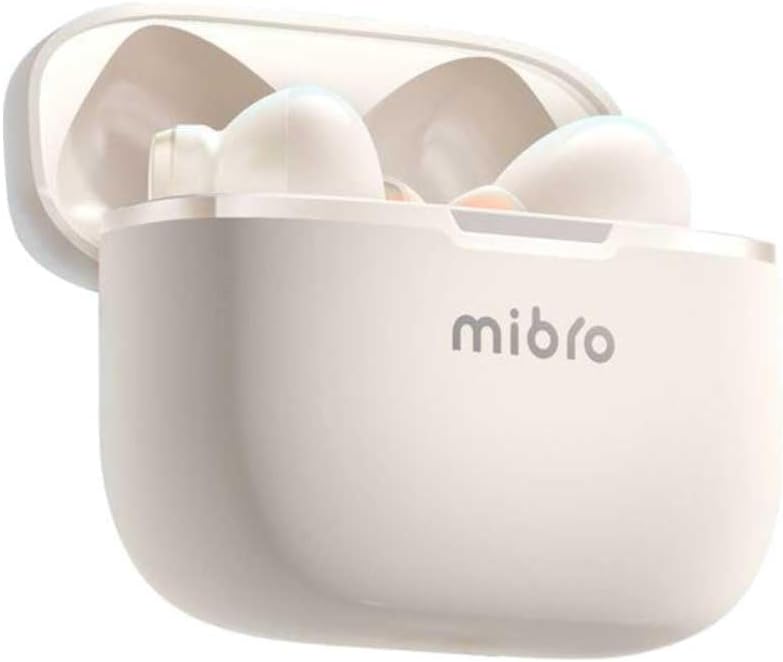
Figur 4.2: Mibro Earbuds AC1 placed inside their open charging case, showing the compact design.
The earbuds feature an ergonomic design for a secure and comfortable fit. The charging case protects the earbuds and recharges them on the go.
5. Opsætning
5.1 Opladning af øretelefoner og etuiet
Oplad ørepropperne og opladningsetuiet helt inden første brug.
- Placer øretelefonerne i opladningsetuiet.
- Connect the charging cable to the charging port on the case and to a USB power source.
- The indicator light on the case will show charging status. A full charge may take up to 1 day (Note: This is an unusual specification, typically measured in hours. Please refer to product packaging for precise charging time).
- Når det er fuldt opladet, skal du frakoble kablet.
5.2 Parring med en Bluetooth-enhed
To connect your Mibro Earbuds AC1 to your smartphone or other Bluetooth-enabled device:
- Sørg for, at ørepropperne er opladet og placeret i opladningsetuiet.
- Open the charging case lid. The earbuds will automatically enter pairing mode (indicator lights will flash).
- Gå til Bluetooth-indstillinger på din enhed, og slå Bluetooth til.
- Søg efter available devices and select "Mibro AC1" from the list.
- Når de er tilsluttet, holder indikatorlamperne på ørepropperne op med at blinke.
- Ørepropperne genopretter automatisk forbindelse til den sidst parrede enhed, når de tages ud af etuiet, hvis Bluetooth er aktiveret på enheden.
6. Betjeningsvejledning
6.1 Tænd/sluk
- Tænd: Åbn låget til opladningsetuiet, eller tag ørepropperne ud af etuiet. De tænder automatisk.
- Sluk: Sæt ørepropperne tilbage i opladningsetuiet, og luk låget. De slukker automatisk og begynder at oplade.
6.2 Musikafspilning
Use the touch controls on the earbuds to manage music:
- Afspil/pause: Et enkelt tryk på begge øretelefoner.
- Næste nummer: Dobbelttryk på den højre øreprop.
- Forrige nummer: Dobbelttryk på den venstre øreprop.
6.3 Opkaldshåndtering
Manage phone calls with the touch controls:
- Besvar/afslut opkald: Et enkelt tryk på begge øretelefoner.
- Afvis opkald: Tryk på en af øretelefonerne, og hold den nede i 2 sekunder.
6.4 Støjreduktion
The Mibro AC1 Earbuds feature noise cancellation. Specific controls for activating or deactivating this feature are typically managed via a long press or a specific tap sequence. Refer to the quick start guide included in your package for precise instructions, as these can vary.
7. Vedligeholdelse
7.1 Rengøring
- Tør ørepropperne og opladningsetuiet af med en blød, tør og fnugfri klud.
- Brug ikke slibende rengøringsmidler, alkohol eller kemiske opløsningsmidler.
- Ensure charging contacts are clean and dry.
7.2 Opbevaring
When not in use, store the earbuds in their charging case to protect them and keep them charged. Store in a cool, dry place away from direct sunlight.
8. Fejlfinding
If you encounter issues with your Mibro Earbuds AC1, try the following solutions:
| Problem | Løsning |
|---|---|
| Øretelefoner parrer ikke |
|
| Ingen lyd fra øretelefoner |
|
| Øretelefoner oplader ikke |
|
9. Specifikationer
| Feature | Detalje |
|---|---|
| Modelnavn | XPEJ010WW (AC1) |
| Mærke | Mikro |
| Forbindelsesteknologi | Trådløs (Bluetooth) |
| Særlige funktioner | Støjreduktion |
| Farve | Varm hvid |
| Formfaktor | In-Ear |
| Materiale | Plast |
| Vandmodstandsniveau | Ikke vandtæt |
| Opladningstid | Up to 1 day (Note: This is an unusual specification, typically measured in hours. Please refer to product packaging for precise charging time.) |
10. Garanti og support
Mibro products are designed and manufactured to the highest quality standards. For detailed warranty information, please refer to the warranty card included with your purchase or visit the official Mibro webwebsted.
For further assistance, technical support, or to explore other Mibro products, please visit the Mibro-butik på Amazon.


