Indledning
Welcome to your new Luqeeg 3-Lens Outdoor WiFi Security Camera. This manual provides detailed instructions for installation, operation, and maintenance to ensure optimal performance and security for your property.
This advanced surveillance camera features a unique three-lens system for comprehensive coverage, IP66 weather resistance, intelligent motion detection, and enhanced night vision capabilities. Please read this manual thoroughly before use and retain it for future reference.
Pakkens indhold
Kontroller venligst, at alle varer er til stede i din pakke:

Image description: The Luqeeg 3-Lens Outdoor WiFi Security Camera, power adapter, mounting screws, and waterproof connector.
- Luqeeg 3-Lens Outdoor WiFi Security Camera
- Power Adapter (US Plug, 110-240V)
- Monteringsskruer og vægdyvler
- Vandtæt stiksæt
- Brugervejledning (dette dokument)
Opsætningsvejledning
1. Fysisk installation
Choose a suitable outdoor location for mounting the camera, ensuring a clear view of the area you wish to monitor and within range of your WiFi network. Use the provided mounting screws and wall plugs to securely attach the camera to a wall or ceiling.
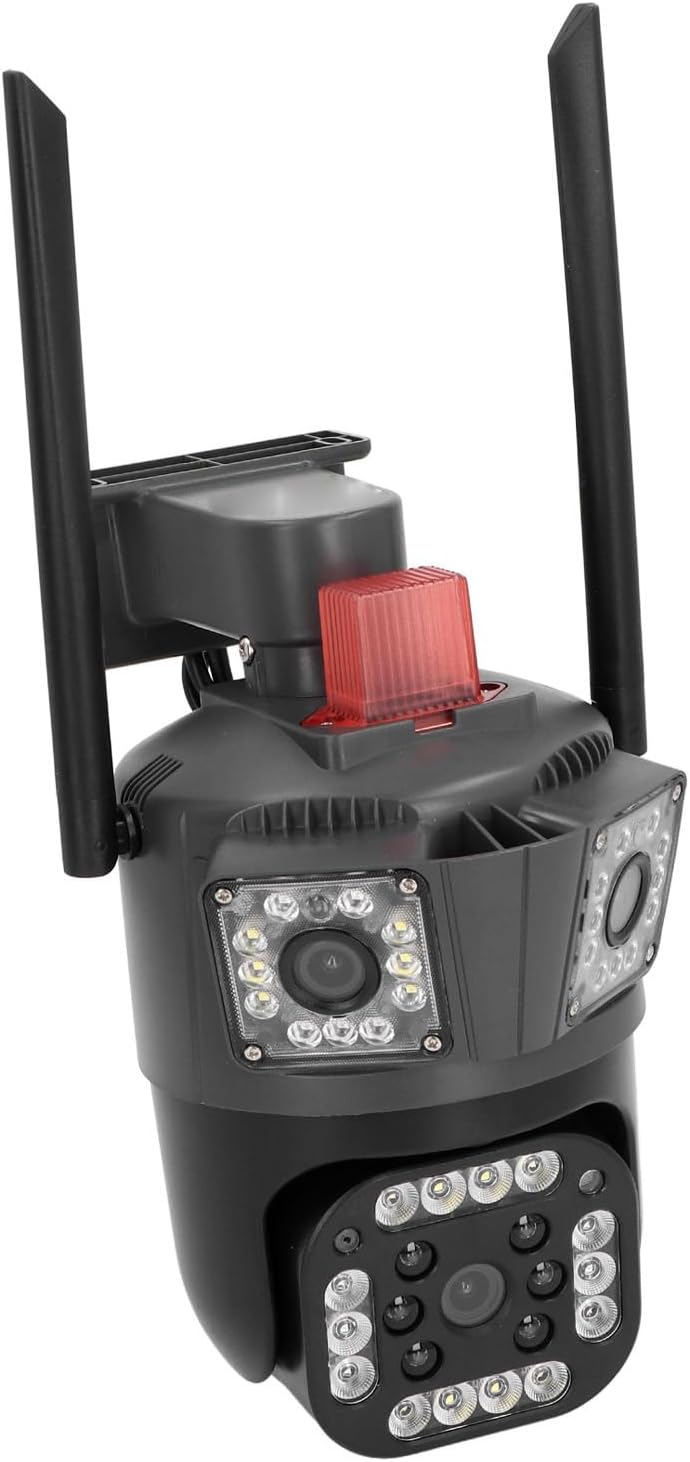
Image description: An example of the Luqeeg 3-Lens Outdoor WiFi Security Camera mounted on an exterior wall, providing a wide view af en ejendom.
2. Strømtilslutning
Connect the provided power adapter to the camera's power input port. Ensure the connection is secure and protected from moisture using the waterproof connector kit if necessary. Plug the power adapter into a standard 110-240V electrical outlet. The camera will power on automatically.
3. Installation af hukommelseskort (valgfrit)
For local video storage, insert a Micro SD card (up to 128GB, not included) into the designated card slot on the camera. Ensure the camera is powered off before inserting or removing the card. The card slot is typically located under a protective cover. Refer to the diagram below for location.

Billedbeskrivelse: Et nærbillede view of the camera's lower lens and surrounding LED lights, indicating the general area where a Micro SD card slot might be located under a protective cover.
4. Network Connection (WiFi/Wired)
Your camera supports both WiFi and wired network connections.
WiFi-forbindelse:
Download the dedicated mobile application (e.g., search for 'iCSee' or similar on your smartphone's app store). Follow the in-app instructions to add your camera. This typically involves scanning a QR code on the camera or connecting to a temporary WiFi hotspot created by the camera.
Kablet forbindelse:
Connect an Ethernet cable from your router to the camera's Ethernet port. The camera will automatically establish a wired network connection.
Betjeningsvejledning
1. Lev View and Multi-Lens Display
Open the mobile application to access the live feed from your camera. The unique 3-lens system allows you to view three different angles simultaneously on a single screen, providing comprehensive surveillance.

Image description: A graphical representation showing the three distinct fields of view from the camera's lenses displayed on a single screen, covering a wide area around a house.
2. Panorerings- og vippekontrol
The lower lens of the camera supports remote pan (horizontal) and tilt (vertical) adjustments. Use the controls within the mobile app to rotate the camera 355 degrees horizontally and 90 degrees vertically to adjust your viewing angle. The upper lenses have a fixed viewvinkel.
3. Tovejslyd
The camera features a built-in microphone and speaker for two-way audio communication. Use the intercom function in the app to speak to visitors or deter intruders.
4. Nattesyn
The camera automatically switches to night vision mode in low-light conditions. Equipped with high-brightness LED lights, it provides clear full-color night vision for enhanced visibility after dark.
5. Bevægelsesdetektion og advarsler
The camera's intelligent motion detection system identifies movement within its field of view. When motion is detected, the camera can trigger a light and sound alarm and send instant alerts to your mobile phone. You can customize motion detection zones and sensitivity settings within the app.

Image description: A visual representation of the camera detecting and tracking a person, highlighting the motion detection zone and automatic rotation tracking feature.
6. Flerbrugerdeling
Share access to your camera's live feed and recordings with up to 5 authorized users through the mobile application, allowing multiple family members or trusted individuals to monitor the property.
Opretholdelse
- Rensning: Regularly wipe the camera lenses and housing with a soft, damp cloth to remove dust and dirt. Do not use harsh chemicals or abrasive materials, as they may damage the camera's finish or lenses.
- Firmwareopdateringer: Check the mobile application periodically for available firmware updates. Installing updates ensures optimal performance, security, and access to new features.
- Lagerstyring: If using a Micro SD card, regularly review and back up important recordings to another device. Format the card periodically (e.g., monthly) through the app to maintain recording performance and prevent data corruption.
Fejlfinding
| Problem | Mulig årsag | Løsning |
|---|---|---|
| Kameraet tænder ikke | Ingen strømforsyning | Check power adapter connection and electrical outlet. Ensure voltage er 110-240V. |
| Kan ikke oprette forbindelse til WiFi | Incorrect WiFi password, camera too far from router, or network interference | Verify WiFi password. Move camera closer to router or use a WiFi extender. Ensure 2.4GHz WiFi is used. |
| Dårlig billedkvalitet | Dirty lens, low light, or network bandwidth | Clean the camera lenses. Ensure adequate lighting for optimal image. Check internet connection speed. |
| Bevægelsesdetektion virker ikke | Incorrect settings, detection zone not configured | Review motion detection settings in the app. Adjust sensitivity and detection zones. |
| Problemer med tovejslyd | Microphone/speaker blocked, app volume low | Ensure nothing is obstructing the microphone or speaker. Check volume settings in the app and on your phone. |
For further assistance, please refer to the in-app help section or contact customer support.
Specifikationer
- Model: Luqeeggz872qrpme-11
- Materiale: ABS Engineering Plast
- Voltage: 110-240 V
- Netværksforbindelse: WiFi / Wired Ethernet
- Pixels: 5 MP
- Opløsning: 2960*1655
- Billedsensor: CMOS
- Horizontal Clarity: 3K
- Linse: 3.6 mm (3 lenses)
- Panorering/vip: Lower lens: 355° Horizontal, 90° Vertical (Upper lenses fixed)
- Nattesyn: Dual-light Full Color (High-brightness LED)
- Vandtæt vurdering: IP66
- Opbevaring: Cloud Storage, Local Micro SD Card (up to 128GB, not included)
- Lyd: To-vejs intercom
- Monteringstype: Vægmontering
- Pakkedimensioner: 25 x 19 x 16 cm; 830 g
Sikkerhedsoplysninger
- Sørg for, at kameraet er installeret sikkert for at forhindre det i at falde ned.
- Brug kun den medfølgende strømadapter.
- Udsæt ikke kameraet for ekstreme temperaturer uden for dets driftsområde.
- Opbevares utilgængeligt for børn.
- Forsøg ikke at skille kameraet ad eller reparere det selv. Kontakt kvalificeret personale for service.
Garanti og support
For warranty information and technical support, please refer to the contact details provided with your purchase or visit the official Luqeeg website. Please have your model number (Luqeeggz872qrpme-11) ready when contacting support.


