Indledning
The Vortex Viper HD 5-25x50 First Focal Plane Rifle Scope is engineered for precision and durability, offering a 5x optical design and an illuminated first focal plane reticle. Its robust construction, featuring a 30mm main tube, ensures reliable performance in various conditions. This manual provides detailed instructions for setting up, operating, maintaining, and troubleshooting your Viper HD rifle scope to ensure optimal performance and longevity.

Figure 1: Vortex Viper HD 5-25x50 FFP Rifle Scope
Komponenter overview
Familiarize yourself with the key components of your Viper HD rifle scope:

Figure 2: Labeled components of the Viper HD Rifle Scope, including the Ocular Lens, Fast-Focus Eyepiece, Magnification Adjustment Ring, Elevation Turret, Windage Turret, Parallax Adjustment Knob, Battery Compartment, Illumination Control Button, RevStop Zero Ring, and Objective Lens.
- Okular linse: The lens closest to the shooter's eye.
- Fast-Focus Eyepiece: Used to quickly adjust the reticle focus.
- Forstørrelsesjusteringsring: Rotates to change the scope's magnification.
- Højdetårn: Justerer det lodrette anslagspunkt.
- Vindtårn: Justerer det vandrette anslagspunkt.
- Parallax Adjustment Knob: Eliminates parallax error at various distances.
- Batterirum: Houses the CR2032 battery for reticle illumination.
- Illumination Control Button: Activates and adjusts the reticle illumination.
- Objektiv linse: The large lens at the front of the scope, gathering light.
- RevStop Zero Ring: A component of the RevStop Zero System, used to set a hard zero stop.
Opsætning
Montering af omfanget
Proper mounting is crucial for accuracy. Ensure your scope rings and base are compatible with your rifle and the 30mm main tube of the Viper HD. Follow the manufacturer's instructions for your specific mounting system. Ensure the scope is level and eye relief is set correctly for your shooting position.
Eyepiece Focus (Diopter Adjustment)
The fast-focus eyepiece allows for quick and easy reticle focusing. Look through the scope at a plain, bright background (like a wall or the sky). Rotate the eyepiece until the reticle appears sharp and clear. Avoid looking at the reticle for too long to prevent eye fatigue. Once set, this adjustment typically does not need to be changed.

Figure 3: Illustration of rotating the fast-focus eyepiece to achieve a sharp reticle image.
Sigtemiddel belysning
The Viper HD features an illuminated reticle for enhanced visibility in low-light conditions. The illumination is controlled by a push-button on the side parallax knob. Press the button to cycle through brightness settings. Press and hold to turn off the illumination. The battery compartment is integrated into this knob and uses a CR2032 battery.

Figure 4: Close-up of the illumination control button on the side of the scope.
Zeroing and RevStop Zero System
Zeroing your scope is essential for accurate shooting. The Viper HD features exposed locking elevation turrets with the RevStop Zero System for a reliable return to zero. The capped windage turret prevents accidental adjustments.
- Initial Zero: Begin by bore-sighting your rifle. At the range, fire a group at your desired zero distance (e.g., 100 yards). Adjust the elevation and windage turrets to move the point of impact to the center of your target. Each click of the turret adjusts the point of impact by 1/4 MOA.
- Setting RevStop Zero: Once zeroed, remove the elevation turret cap. Install the RevStop Zero Ring according to the included instructions, ensuring it seats firmly against the base. This provides a hard stop at your zero point, allowing you to dial up for long shots and quickly return to your original zero without counting clicks.

Figure 5: Removing the elevation turret cap.

Figure 6: Installing the RevStop Zero Ring onto the elevation turret.

Figure 7: Securing the RevStop Zero Ring in place.

Figure 8: Replacing the elevation turret cap after setting the zero stop.
Parallax justering
The side parallax knob allows you to adjust for parallax error, ensuring the reticle and target are on the same focal plane. Rotate the knob until the target appears sharp and the reticle does not appear to shift relative to the target when you move your head slightly. The numerical markings on the knob indicate approximate distances.

Figure 9: Adjusting the side parallax knob for a clear target image and to eliminate parallax error.
Operating the Scope
Justering af forstørrelse
Rotate the magnification adjustment ring to change the scope's power. The Viper HD 5-25x50 offers a wide range of magnification suitable for various shooting distances. Since this is a First Focal Plane (FFP) scope, the reticle subtensions remain accurate across all magnification settings.
VMR-4 (MOA) Reticle Use
The VMR-4 (MOA) reticle is designed for precise aiming, ranging, holdovers, and windage corrections. The fine center crosshair subtensions provide a balance between precision aiming and low-light visibility. Refer to the detailed reticle manual included with your scope for specific subtension values and advanced usage techniques.
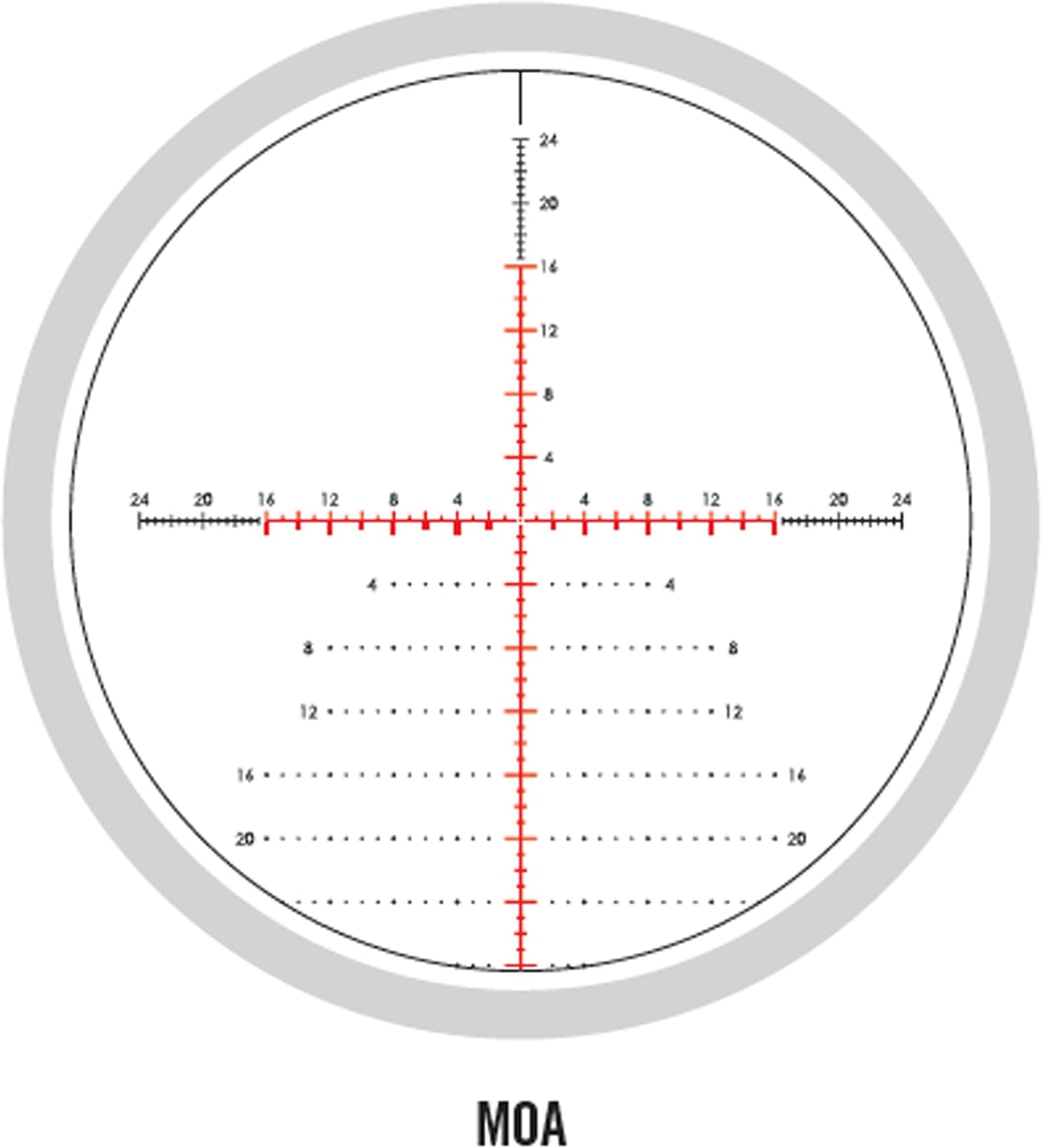
Figure 10: Diagram of the VMR-4 (MOA) reticle, showing its markings for precise aiming and holdovers.
Opretholdelse
Rengøring af linser
For best optical performance, keep the lenses clean. Use a soft brush or compressed air to remove loose debris. Then, use a clean microfiber cloth and a lens cleaning solution (specifically designed for optics) to gently wipe the lens surfaces. Avoid using harsh chemicals or abrasive materials.
Generel pleje og opbevaring
Wipe down the exterior of the scope with a clean, dry cloth after each use to remove dirt, dust, or moisture. Store the scope in a cool, dry place, preferably in its protective neoprene cover, away from direct sunlight and extreme temperatures. Ensure the turrets are capped and the illumination is off when storing.
Fejlfinding
If you encounter issues with your Viper HD scope, consider the following common troubleshooting steps:
- Blurry Image/Reticle: Re-adjust the fast-focus eyepiece (diopter) and parallax knob. Ensure lenses are clean.
- Point of Impact Shift: Check scope rings and mounts for tightness. Ensure proper torque settings. Verify zero.
- Belysning virker ikke: Check the CR2032 battery. Replace if necessary. Ensure the illumination button is pressed correctly.
- Tårne justerer sig ikke: Ensure turret caps are removed (for elevation) and turrets are not locked. Check for debris.
Ved vedvarende problemer eller komplekse problemer henvises til afsnittet Garanti og support for at få hjælp.
Specifikationer
| Feature | Specifikation |
|---|---|
| Mærke | Vortex |
| Modelnavn | Viper HD First Focal Plane Scope |
| Forstørrelse | 5-25x |
| Objektiv linsediameter | 50 mm |
| Tube Size | 30 mm |
| Sigtemiddel Type | VMR-4 (MOA) |
| Øjnehjælp | 3.4 tommer |
| Varens vægt | 1.56 pund |
| Materiale | Aluminium |
| Vandtæt | Yes (Argon purged) |
| Dugfri | Yes (Argon purged) |
| Inkluderede komponenter | Scope, Neoprene Cover, Sunshade, Lens Cloth, CR2032 Battery, Custom Turret Tool, RevStop Zero Ring |
Garanti & Support
Your Vortex Viper HD Rifle Scope is backed by the Vortex VIP Warranty. This is an unlimited, unconditional, lifetime warranty. Vortex will repair or replace the product absolutely free, no matter the cause. This warranty does not cover loss, theft, deliberate damage, or cosmetic damage that does not hinder the performance of the product.

Figure 11: Vortex VIP Warranty - Our Unconditional Promise To You.
For garantiservice eller teknisk support, kontakt venligst Vortex Optics direkte gennem deres officielle website or customer service channels. Have your model number (VPR-52501) ready for faster assistance.


