1. Introduktion
Thank you for choosing the Spacekey QIG-D01 Dehumidifier. This manual provides essential information for the safe and efficient operation of your new appliance. Please read it thoroughly before use and retain it for future reference. This dehumidifier is designed to reduce excess moisture in areas up to 850 square feet, such as basements, bedrooms, bathrooms, RVs, and closets, improving air quality and comfort.

Figur 1: Forside view of the Spacekey QIG-D01 Dehumidifier, showing its white and black design with a digital display and visible water tank.

Figure 2: Visual representation of the dehumidifier's effectiveness in reducing room humidity.

Figure 3: Common issues resolved by maintaining optimal humidity levels with the dehumidifier.
2. Vigtige sikkerhedsinstruktioner
For at mindske risikoen for brand, elektrisk stød eller personskade skal du altid følge disse grundlæggende forholdsregler:
- Læs alle instruktioner før brug af apparatet.
- Brug ikke affugteren med en beskadiget ledning eller stik.
- Sørg for, at stikkontakten er korrekt jordforbundet.
- Bloker ikke luftindtag eller -udtag.
- Hold apparatet væk fra vand og andre væsker.
- Tag stikket ud af affugteren, før du rengør eller udfører vedligeholdelse.
- Lad ikke børn betjene apparatet uden opsyn.
- This appliance is equipped with a 45° tip-over protection feature. If the unit is tilted beyond 45 degrees, it will automatically shut off to prevent damage or spills.

Figure 4: Illustration of the dehumidifier's 45° tip-over protection, demonstrating automatic shutdown for safety.
3. Produktet er slutview
3.1 Components and Design Features
- Hovedenhed med kontrolpanel
- Water Tank (3.0L / 106 oz capacity)
- Vaskbart luftfilter
- Strømledning
- Integrated Handles for portability
- Visual Water Tank for easy monitoring
- 45° Tip-over Protection
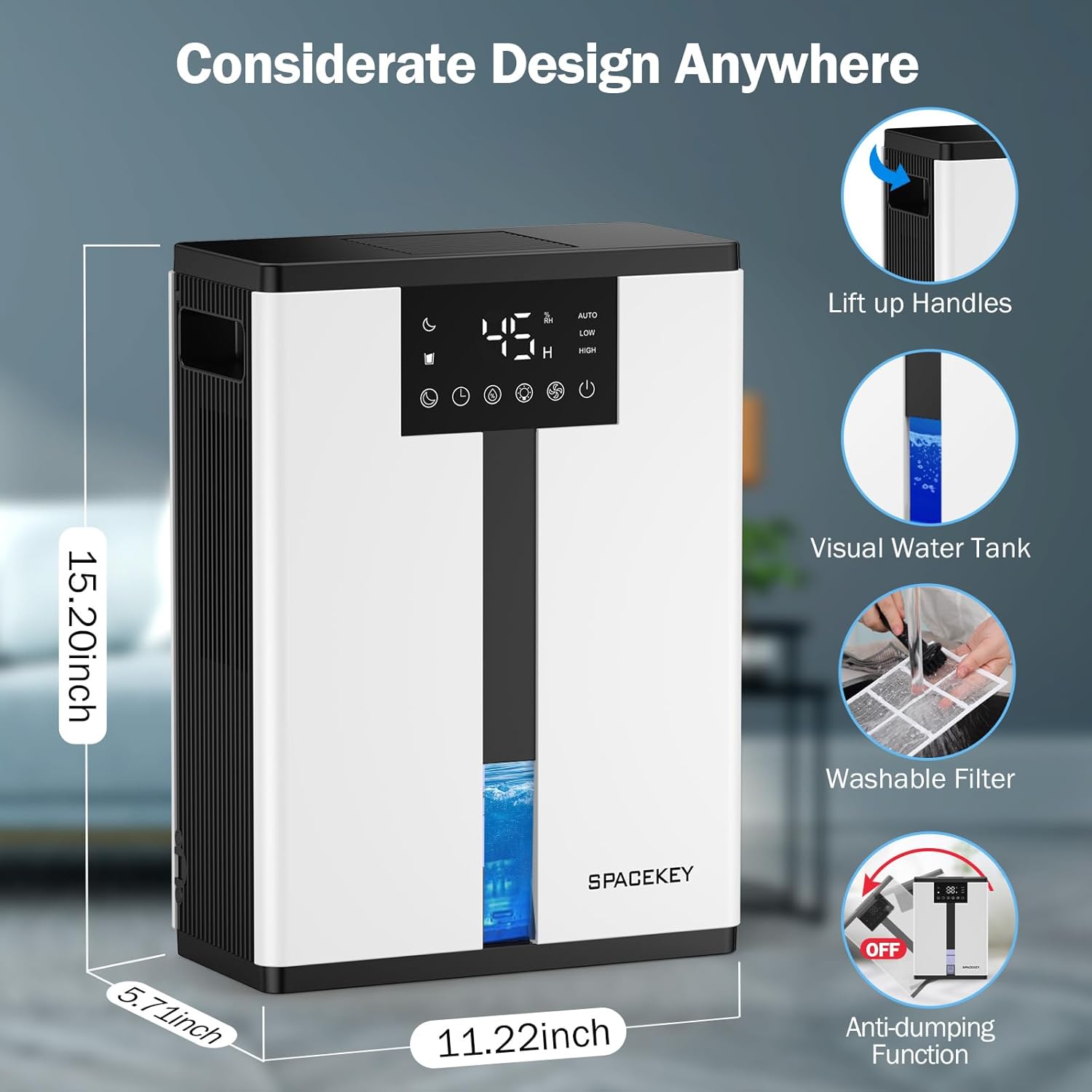
Figure 5: Key design elements and dimensions of the Spacekey QIG-D01 Dehumidifier.
3.2 Advanced Dehumidification Technology
The Spacekey QIG-D01 utilizes semiconductor condensation technology with dual fans and dual semiconductor condensers for enhanced efficiency in moisture removal.
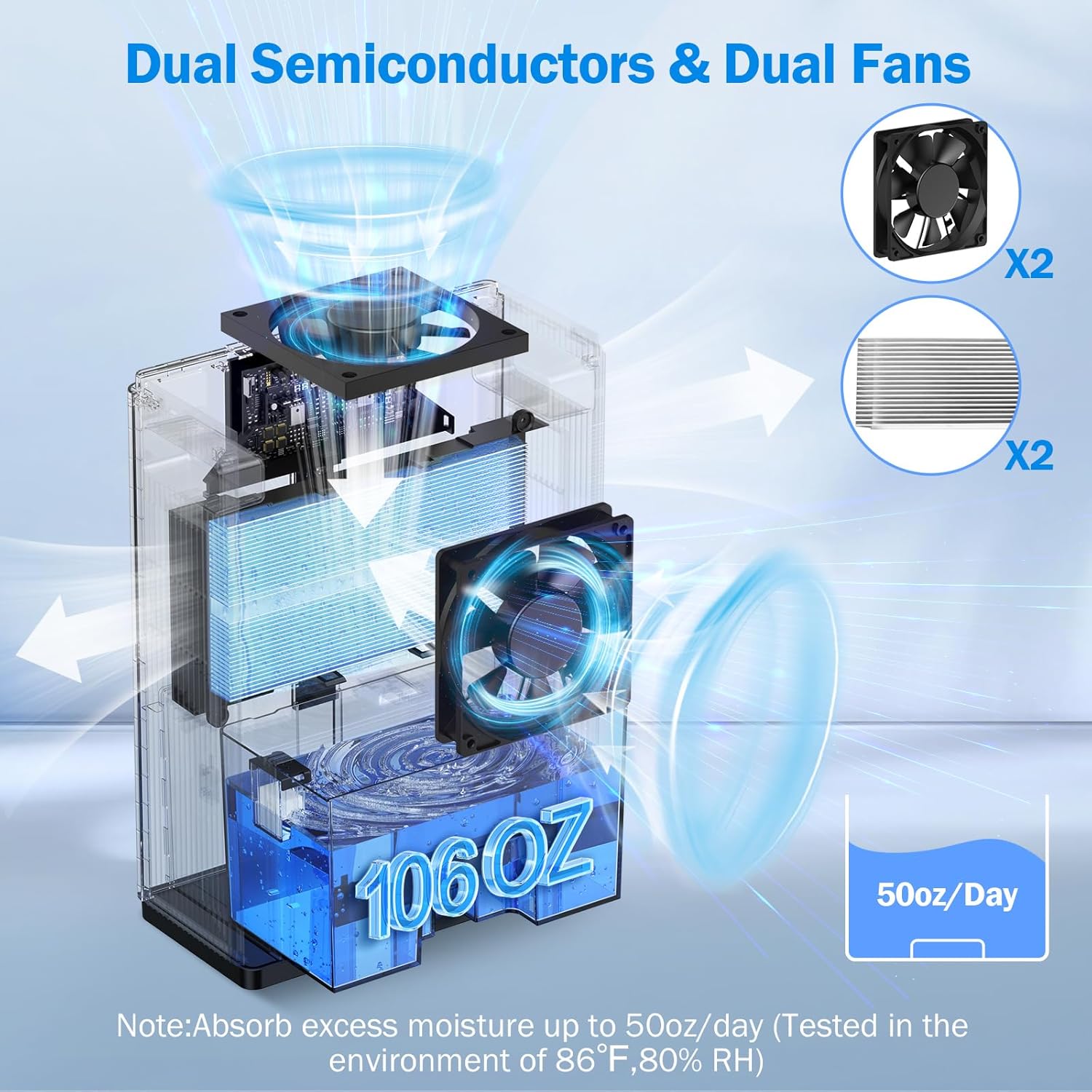
Figur 6: Intern view of the dual semiconductor and dual fan system for efficient dehumidification.
3.3 Kontrolpanel
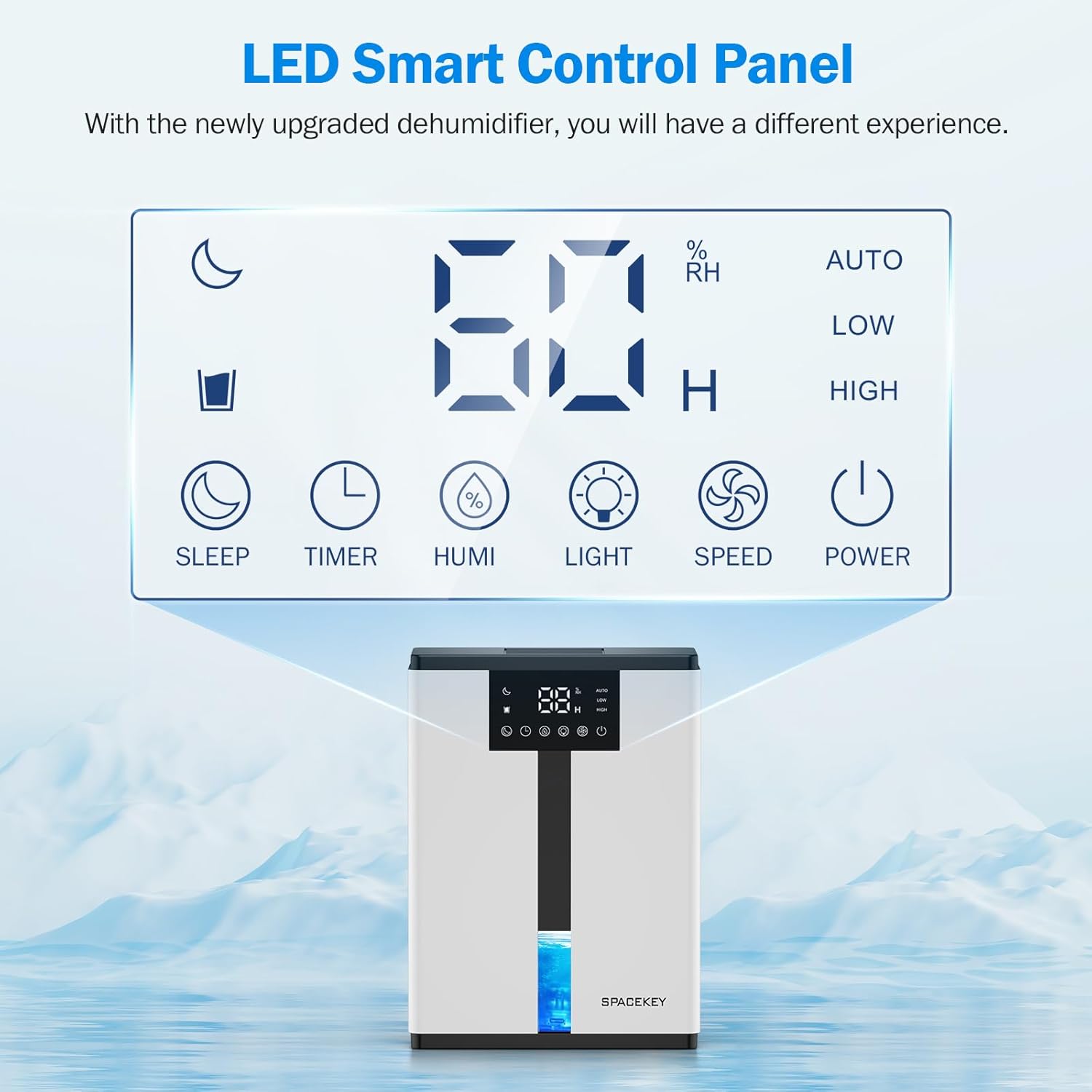
Figure 7: The LED Smart Control Panel, displaying current humidity and various function buttons.
The intuitive LED display shows real-time humidity. Buttons include:
- Sove mode: Activates quiet operation and can be used with colorful lights.
- Timer: Sets operating duration (2H, 4H, 6H, 8H, 12H).
- HUMI: Adjusts target humidity (45%, 55%, 65%, or continuous '00').
- LYS: Styrer det omgivende lys med 7 farver.
- HASTIGHED: Selects fan speed (Auto, Low, High).
- MAGT: Tænder/slukker enheden.
4. Opsætningsvejledning
- Pakker ud: Tag forsigtigt affugteren ud af emballagen.
- Placering: Place the unit on a flat, stable surface in the desired location. Ensure there is at least 8 inches (20 cm) of space around the air inlets and outlets for proper airflow.
- Strømtilslutning: Sæt netledningen i en jordet stikkontakt.
- Indledende kontrol: Ensure the water tank is correctly inserted and empty before starting operation.

Figure 8: Recommended placement areas for the dehumidifier, highlighting its suitability for various indoor environments.
5. Betjeningsvejledning
5.1 Tænd/sluk
Tryk på MAGT knappen for at tænde eller slukke for affugteren.
5.2 Indstilling af fugtighedsniveau
Tryk på HUMI button to cycle through desired humidity levels: 45%, 55%, 65%. The unit will operate until the set humidity is reached, then pause. If set to '00', the unit will operate continuously.

Figure 9: Setting the target humidity level using the HUMI button.
5.3 Justering af ventilatorhastighed
Tryk på HASTIGHED button to select between Auto, Low, and High fan speeds. Auto mode adjusts fan speed based on current humidity.
5.4 Timer funktion
Tryk på TIMER button to set an operating duration of 2, 4, 6, 8, or 12 hours. The unit will automatically turn off after the set time.

Figure 10: Using the Timer function to set the operating duration.
5.5 Sleep Mode & Colorful Lights
Tryk på SOVE button to activate sleep mode for ultra-quiet operation (approx. 30dB). Press the LYS button to cycle through 7 colorful ambient lights or select a static color. This feature can be used independently or in conjunction with sleep mode.
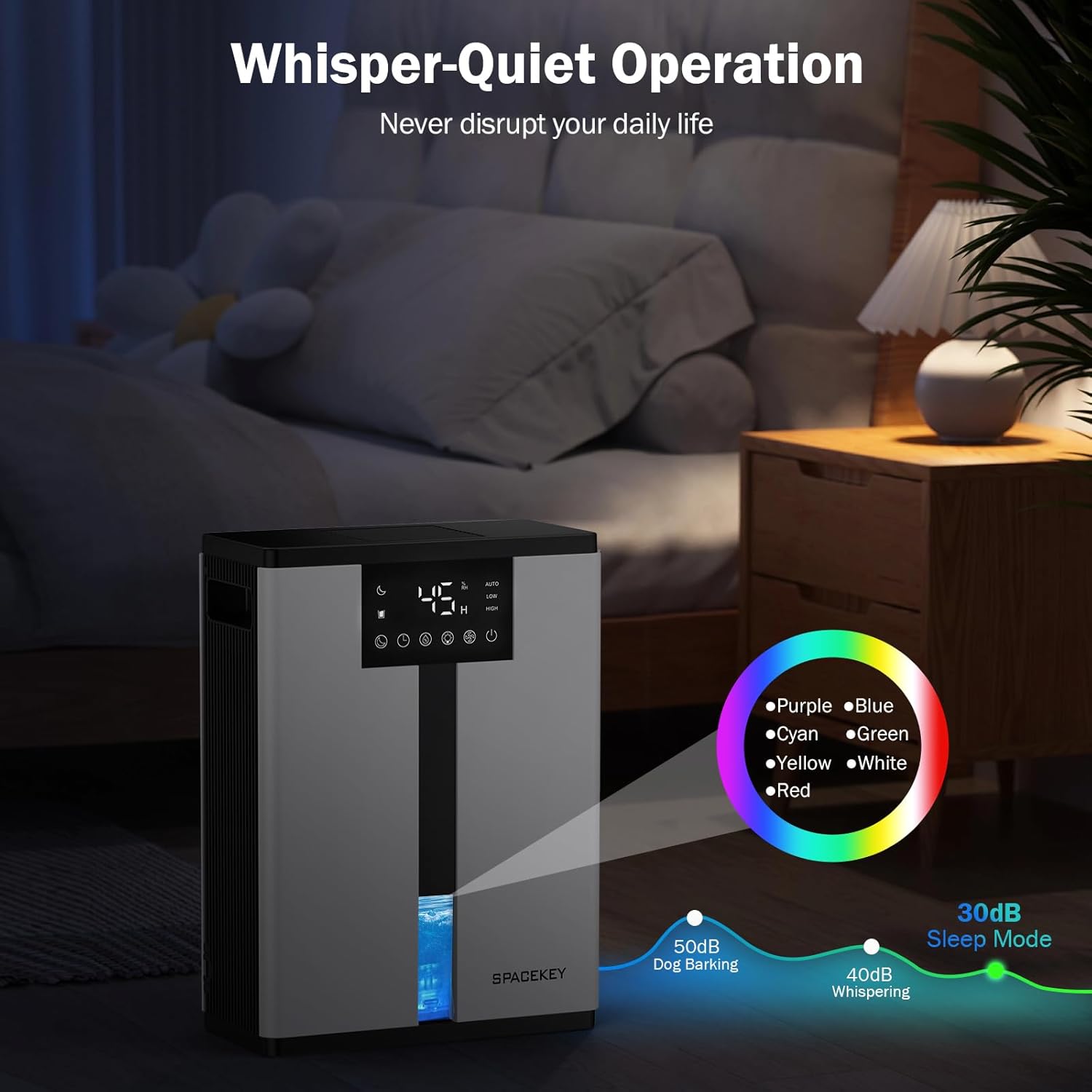
Figure 11: Dehumidifier in Sleep Mode with ambient lighting for a peaceful environment.
5.6 Automatisk slukning
The dehumidifier will automatically shut off and flash a red light with an audible beep when the water tank is full. Empty the water tank to resume operation.
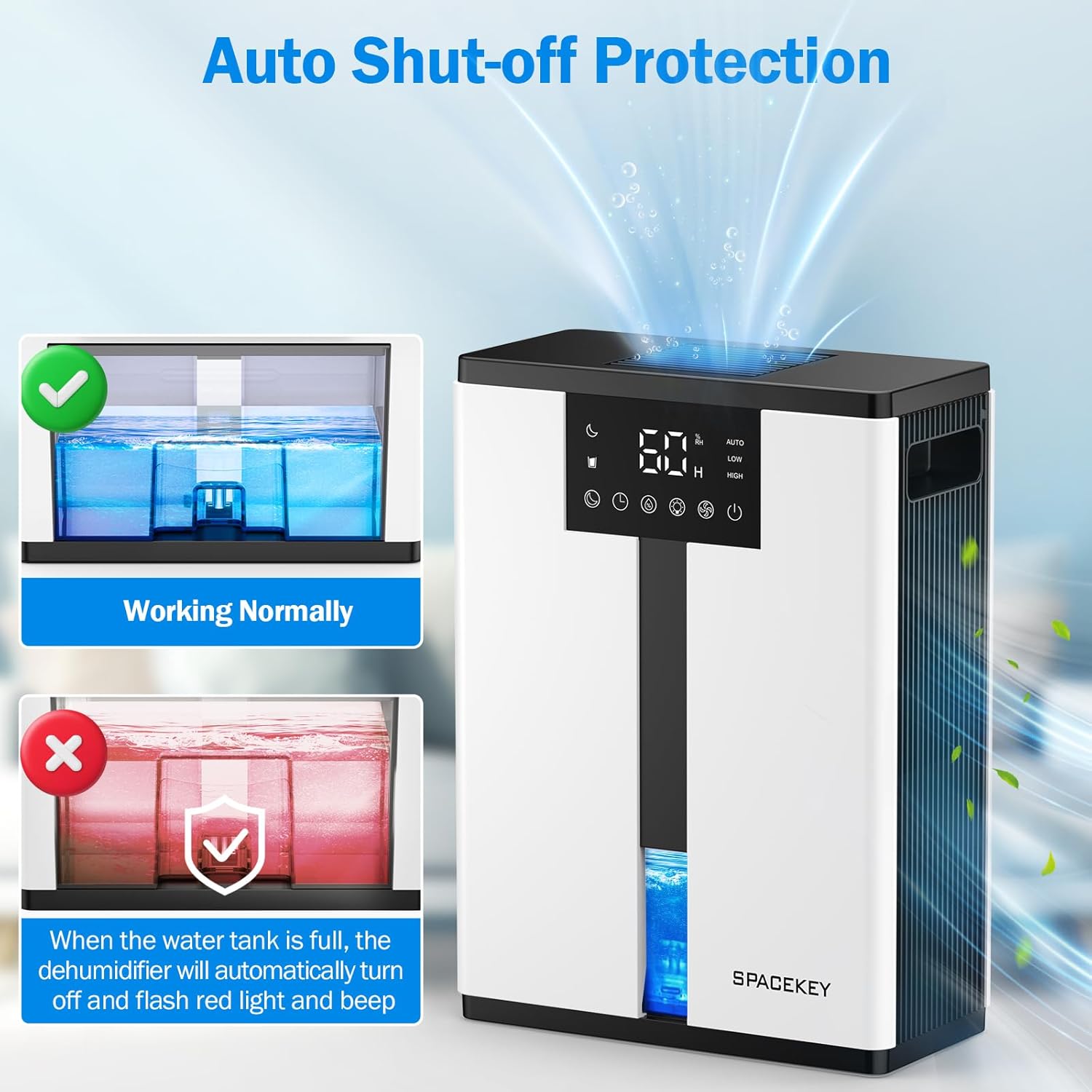
Figure 12: Automatic shut-off mechanism when the water tank is full.
6. Vedligeholdelse
6.1 Tømning af vandtanken
- Træk forsigtigt vandtanken ud fra enhedens forside.
- Fjern tanklåget.
- Hæld det opsamlede vand ud.
- Replace the lid and reinsert the water tank firmly into the dehumidifier.

Figure 13: Step-by-step guide to emptying the water tank.
6.2 Rengøring af luftfilteret
The washable filter should be cleaned regularly (every 2-4 weeks, depending on usage) to maintain optimal performance.
- Træk stikket ud af affugteren.
- Fjern filteret fra bagsiden af enheden.
- Skyl filteret under rindende vand for at fjerne støv og snavs.
- Lad filteret lufttørre helt, før du sætter det i igen.
- Betjen ikke affugteren uden filteret.

Figure 14: Instructions for removing and washing the air filter.
6.3 Rengøring af ydersiden
Tør ydersiden af affugteren af med en blød, damp klæde. Brug ikke slibende rengøringsmidler eller opløsningsmidler.
7. Fejlfinding
| Problem | Mulig årsag | Løsning |
|---|---|---|
| Affugteren tænder ikke. | No power; power cord not plugged in; water tank full or incorrectly inserted. | Kontrollér strømtilslutningen; tøm vandtanken og sæt den korrekt i igen. |
| Intet vand opsamles eller lav affugtning. | Room humidity is already low; air filter is clogged; ambient temperature is too low; unit size is too small for the space. | Ensure humidity is above target; clean air filter; operate in recommended temperature range; consider unit placement or additional units for larger spaces. |
| Enheden er støjende. | Fan speed is set to High; unit is not on a flat surface. | Switch to Low or Sleep mode; ensure unit is on a stable, flat surface. |
| Red light flashing and beeping. | Vandbeholderen er fuld. | Tøm vandtanken, og sæt den i igen. |
8. Specifikationer
| Feature | Detalje |
|---|---|
| Modelnavn | QIG-D01 |
| Mærke | Mellemrumstasten |
| Affugtningskapacitet | Up to 50 oz (approx. 3 pints) per 24 hours (at 86°F, 80% RH) |
| Vandtankkapacitet | 3.0 liter (106 væskeounces) |
| Dækningsområde | Op til 850 kvadratmeter |
| Strømforbrug | 70 Watts (not more than 1.68 kWh/Day) |
| Støjniveau | Approx. 30dB (in Sleep Mode) |
| Mål (D x B x H) | 5.71" D x 11.22" B x 15.2" H |
| Varens vægt | 8.91 pund |
| Særlige funktioner | Automatic Shutoff, Intelligent Humidity Control, 4 Fan Speeds, Timer, 7 Colorful Lights, 45° Tip-over Protection, Washable Filter |
9. Garanti og kundesupport
Spacekey offers the following support for your dehumidifier:
- 30-dages refusion: For any dissatisfaction.
- 2-årig udskiftning: Ved produktfejl eller funktionsfejl.
- Livsvarig kundeservice: Dedicated support for any questions or issues.
If you have any questions or require assistance, please do not hesitate to contact Spacekey customer support. We aim to reply within 24 hours.


Figur 15: Overview of Spacekey's customer support and warranty policies.


