Segway Ninebot F2 Pro Elektrisk Løbehjul & Kabellås Brugermanual
Model: F2 Pro
Indledning
This manual provides essential information for the safe operation, maintenance, and troubleshooting of your Segway Ninebot F2 Pro Electric KickScooter and the accompanying 5-Digit Combination Cable Lock. Please read this manual thoroughly before using the product to ensure proper usage and to maximize your riding experience.
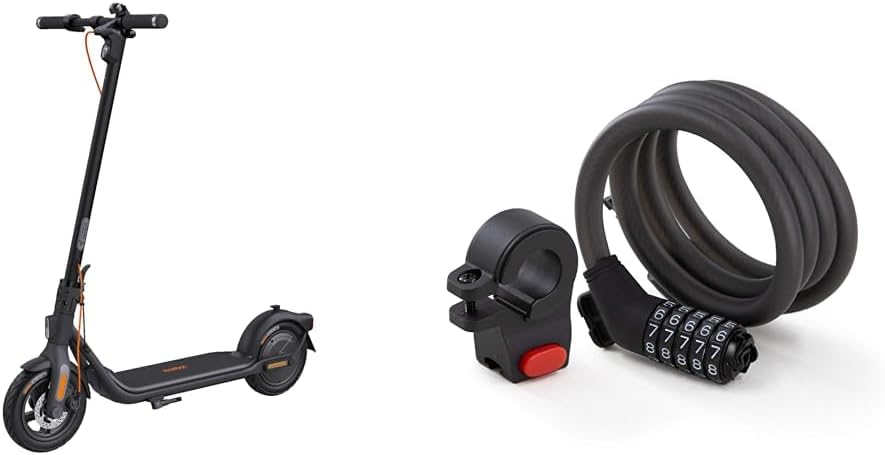
Image: The Segway Ninebot F2 Pro Electric KickScooter shown alongside the 5-Digit Combination Cable Lock, illustrating the complete product bundle.
Sikkerhedsoplysninger
Operating an electric kickscooter carries inherent risks. To reduce the risk of injury, it is crucial to follow all instructions and warnings in this manual. Always wear a helmet and other protective gear (knee pads, elbow pads) when riding. Ensure you are familiar with local laws and regulations regarding electric scooter usage.
- Always check the scooter before each ride for loose parts, tire pressure, and brake functionality.
- Kør ikke i vådt føre, på glatte overflader eller i kraftig regn.
- Avoid riding on uneven terrain, potholes, or over obstacles.
- Hold en sikker afstand til andre køretøjer og fodgængere.
- Udfør ikke stunts eller pludselige manøvrer.
- Ensure the kickscooter is fully charged before long rides.
- The cable lock is a deterrent and does not guarantee absolute security against theft.
Pakkens indhold
Bekræft at alle varer er til stede i din pakke:
- Segway Ninebot F2 Pro Electric KickScooter
- 5-Digit Combination Cable Lock
- Opladningsadapter
- Brugervejledning (dette dokument)
- Hurtig startvejledning
- Mounting Bracket for Cable Lock
- Necessary Screws and Hex Wrench
Opsætning
1. KickScooter Assembly
- Fold stilken ud: Carefully lift the stem until it locks into place.
- Fastgør styret: Connect the handlebar to the stem. Ensure the cables are not pinched. Secure it with the provided screws and hex wrench.
- Indledende opkrævning: Fully charge the scooter before its first use. Connect the charging adapter to the charging port on the scooter and then to a power outlet. The indicator light on the charger will change when fully charged.

Billede: En side view of the Segway Ninebot F2 Pro Electric KickScooter, illustrating its assembled form and overall design.
2. Cable Lock Setup
- Montering af monteringsbeslag: Attach the cable lock's mounting bracket to a suitable location on your scooter's stem or frame using the provided hardware.
- Indstilling af din kombination:
- Standardkoden er 00000.
- Align the default code with the indicator marks.
- With the keyhole facing up, turn the number setting knob 90 degrees clockwise.
- Set your desired 5-digit combination.
- Turn the knob back 90 degrees counter-clockwise to its original position. Your new combination is now set.

Image: The Segway 5-Digit Combination Cable Lock, showing its coiled cable and the combination dial mechanism.
Betjeningsvejledning
1. KickScooter Operation
- Tænd/sluk: Tryk og hold tænd/sluk-knappen på instrumentbrættet nede for at tænde eller slukke scooteren.
- Ridemåder: Short press the power button to cycle through riding modes (e.g., ECO, Drive, Sport). Each mode offers different speed and power characteristics.
- Acceleration: Push off with your foot to gain initial speed, then press the throttle lever to accelerate.
- Bremsning: Use the hand brake lever to slow down or stop. The scooter features a dual braking system for effective stopping.
- Lys: Double-press the power button to turn the headlight and taillight on or off.
- Smart Dashboard: The dashboard displays speed, battery level, riding mode, and light status.

Image: A close-up of the Segway Ninebot F2 Pro's smart dashboard and power button, highlighting indicators for speed, battery, speed mode, lights, and cruise control.

Image: An illustration detailing the Segway Ninebot F2 Pro's motor performance, showing 900W Max Output, 20 Mph Max Speed, and 22% Hill Grade capability.
2. Cable Lock Usage
- Låsning: Dial your personal combination to open the lock. Wrap the cable around your scooter and a secure fixed object (e.g., a bike rack, pole). Insert the locking head into the mechanism and scramble the numbers to secure.
- Oplåsning: Dial your personal combination to align with the indicator marks. The lock will open, allowing you to remove the cable.

Image: The Segway 5-Digit Combination Cable Lock shown attached to the handlebar of the KickScooter, demonstrating how it can be stored or used for security.

Billede: Et nærbillede view of the Segway 5-Digit Combination Cable Lock's dial mechanism while attached to the KickScooter's handlebar, showing the numbers.
Opretholdelse
Regular maintenance ensures the longevity and optimal performance of your Segway Ninebot F2 Pro KickScooter and Cable Lock.
- Rensning: Wipe the scooter and lock with a damp cloth. Do not use alcohol, gasoline, kerosene, or other corrosive chemical solvents. Do not wash with a high-pressure water jet.
- Dæktryk: Check tire pressure regularly and inflate to the recommended PSI (usually found on the tire sidewall).
- Bremser: Periodically inspect brake pads and cables for wear and tear. Adjust or replace as needed.
- Batteripleje: Store the scooter in a dry place between 0°C and 40°C (32°F and 104°F). Charge the battery at least once every 30 days if not in use to prevent over-discharge.
- Fastgørelsesmidler: Kontrollér regelmæssigt alle skruer og bolte for at sikre, at de er spændte.
- Kabellås: Keep the cable and locking mechanism clean. Lubricate the locking mechanism periodically with a silicone-based lubricant.
Fejlfinding
| Problem | Mulig årsag | Løsning |
|---|---|---|
| Scooteren tænder ikke | Lavt batteri; Løse forbindelser; Fejl på tænd/sluk-knappen | Oplad batteriet; Kontroller alle kabelforbindelser; Kontakt support, hvis problemet fortsætter. |
| Reduceret rækkevidde/hastighed | Lavt dæktryk; Overbelastning; Batterinedbrydning; Hyppig kørsel op ad bakke | Inflate tires to recommended pressure; Reduce load; Ensure full charge; Adjust riding style. |
| Bremserne føles svage | Slidte bremseklodser; Løst bremsekabel | Inspicer og udskift bremseklodser; Juster bremsekablets spænding. |
| Cable lock not opening | Incorrect combination; Mechanism jammed | Ensure correct combination is entered precisely; Apply light pressure while turning dials; Lubricate if stiff. |
Specifikationer
| Feature | Detalje |
|---|---|
| Modelnavn | F2 Pro |
| Mærke | Segway |
| Farve | Sort |
| Motor Power (Rated/Max) | 450W / 900W |
| Max hastighed | Op til 20 mph (32 km/t) |
| Max rækkevidde | Up to 34 miles (55 km) (in ECO mode) |
| Max hældning | Op til 22 % |
| Hjul materiale | Gummi |
| Rammemateriale | Legeret stål |
| Bremse stil | Hand brake (Dual braking system) |
| Særlige funktioner | Portable, App-Enabled, Smart Dashboard |
| Cable Lock Type | 5-Digit Combination Cable Lock |
| Cable Lock Material | Braided Steel with PVC coating |
Garanti & Support
Segway products come with a limited warranty. Please refer to the warranty card included in your package or visit the official Segway webwebstedet for detaljerede garantivilkår og -betingelser, der er specifikke for din region.
For technical support, spare parts, or service inquiries, please contact Segway customer service through their official website or the contact information provided in your product documentation. When contacting support, please have your product model number (F2 Pro) and purchase date ready.
Official Segway Webwebsted: www.segway.com


