Indledning
This manual provides detailed instructions for setting up, operating, and maintaining your AJAZZ A3060 Wireless Keyboard and Mouse Combo. Please read this manual carefully before use to ensure optimal performance and longevity of your product.
Pakkens indhold
- 1 x AJAZZ A3060 Wireless Keyboard
- 1 x AJAZZ A3060 Wireless Mouse
- 1 x USB 2.4G Receiver

Image: The AJAZZ A3060 wireless keyboard and mouse combo, shown with the compact USB receiver.
Opsætning
1. Batteriinstallation
- Til tastaturet: Locate the battery compartment on the underside of the keyboard. Insert two (2) AAA batteries, ensuring correct polarity.
- Til musen: Locate the battery compartment on the underside of the mouse. Insert one (1) AA battery, ensuring correct polarity.
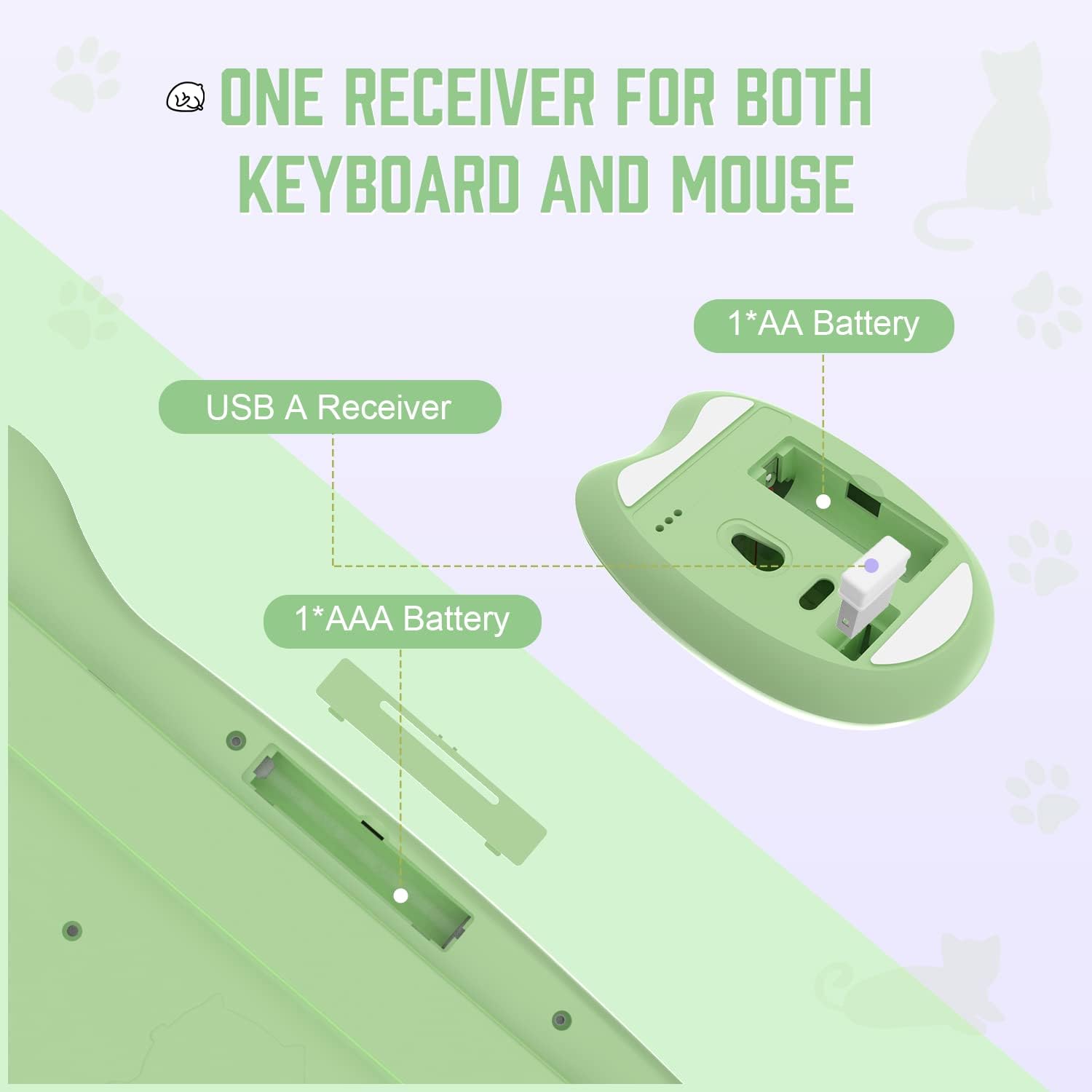
Image: Diagram illustrating the battery compartments for the keyboard (2x AAA) and mouse (1x AA), and the location of the USB receiver storage within the mouse.
2. Tilslutning af USB-modtageren
- Take out the USB receiver from its storage slot on the underside of the mouse.
- Plug the USB receiver into an available USB-A port on your computer or compatible device.
- Ensure the mouse power switch (located on the underside) is in the 'ON' position.
- The keyboard and mouse should automatically connect to your device. No additional drivers are required.

Image: Visual guide demonstrating the six steps for connecting the wireless keyboard and mouse to a USB-A device, including receiver removal, plugging in, battery insertion, and power activation.
Betjeningsvejledning
Tastatur funktioner
The AJAZZ A3060 keyboard features 84 keys with a retro round keycap design, providing a tactile and responsive typing experience. It includes dedicated media keys for enhanced control.
- Medietøgler: The function keys (F1-F12) have secondary media control functions. These can typically be accessed by pressing the 'Fn' key simultaneously with the desired F-key.
- Indikatorlys: Located in the upper right corner of the keyboard. One light indicates uppercase/lowercase switching (Caps Lock), and the other indicates low battery or 2.4G connection status.

Image: An illustration of the AJAZZ A3060 keyboard highlighting the media key functions (F1-F12) and the indicator lights for Caps Lock and battery/connection status.
Musefunktioner
The ergonomic cat-shaped mouse is designed for comfort and features adjustable DPI settings.
- DPI-justering: The mouse features a DPI button, typically located near the scroll wheel. Press this button to cycle through three adjustable DPI levels: 800, 1600, and 3200. This allows you to customize cursor sensitivity.
- Afbryderen: An ON/OFF switch is located on the underside of the mouse to conserve battery life when not in use.

Image: A visual representation of the AJAZZ A3060 mouse, highlighting its ergonomic design and the three adjustable DPI settings (800, 1600, 3200).
Strømbesparende tilstand
The combo is equipped with an intelligent power-saving feature. After a period of inactivity, the devices will automatically enter sleep mode to conserve battery. To wake them up, simply click any key on the keyboard or move/click the mouse.
A low battery indicator will alert you when it's time to replace the batteries.
Kompatibilitet
The AJAZZ A3060 Wireless Keyboard and Mouse Combo offers broad compatibility with various operating systems and devices, ensuring versatile use.
- Operativsystemer: Compatible with Windows XP, Windows 7, Windows 8, Windows 10, and macOS.
- Enheder: Suitable for use with PCs, laptops, Smart TVs, workstations, projectors, and tablets.

Billede: En overview showing the AJAZZ A3060 keyboard and mouse compatible with Smart TVs, PCs, Laptops, Macs, Workstations, and Projectors, and suitable for Windows operating systems.
Opretholdelse
To ensure the longevity and optimal performance of your AJAZZ A3060 combo, follow these maintenance guidelines:
- Rensning: Brug en blød, tør klud til at rengøre overfladerne på tastaturet og musen. Ved genstridigt snavs kan du bruge en let tør klud.amp En klud kan bruges, men sørg for, at der ikke trænger fugt ind i enheden.
- Udskiftning af batteri: Replace batteries promptly when the low battery indicator appears to avoid interruptions in use. Always use new, high-quality batteries of the specified type (AAA for keyboard, AA for mouse).
- Opbevaring: When not in use for extended periods, turn off the mouse using its power switch and store the USB receiver in its designated slot to prevent loss.
- Undgå væsker: Hold enhederne væk fra væsker for at forhindre beskadigelse af interne komponenter.
Fejlfinding
- No Connection/Unresponsive:
- Sørg for, at USB-modtageren er korrekt tilsluttet en fungerende USB-port.
- Check if the mouse power switch is in the 'ON' position.
- Replace the batteries in both the keyboard and mouse with fresh ones.
- Prøv at tilslutte USB-modtageren til en anden USB-port på din enhed.
- Move the keyboard and mouse closer to the USB receiver (within 10 meters).
- Lagging/Delayed Response:
- Ensure there are no other 2.4GHz wireless devices causing interference nearby.
- Kontroller batteriniveauet, og udskift det, hvis det er lavt.
- Mouse Cursor Movement Issues:
- Rengør den optiske sensor på undersiden af musen.
- Sørg for at bruge musen på en passende overflade (ikke meget reflekterende eller gennemsigtig).
- Adjust the DPI setting to your preference.
Specifikationer
| Model | A3060 |
| Tilslutningstype | 2.4 GHz trådløs (USB-modtager) |
| Wireless Range | Op til 10 meter (33 fod) |
| Tastaturlayout | 84 nøgler |
| Tastatur batteri | 2 x AAA batterier (medfølger ikke) |
| Mus batteri | 1 x AA batteri (medfølger ikke) |
| Mus DPI | 800 / 1600 / 3200 (Justerbar) |
| Tastaturmål | Ca. 13.6 tommer x 6 tommer x 1.1 tommer |
| Musens dimensioner | Ca. 4.1 cm x 2.7 cm |
| Produktets vægt | Approx. 730 grams (package weight) |
| Oprindelsesland | Kina |

Image: Detailed dimensions of the AJAZZ A3060 wireless keyboard and mouse, showing measurements in inches.
Garanti og support
For garantioplysninger og teknisk support henvises til den dokumentation, der fulgte med dit køb, eller kontakt forhandleren/producenten direkte. Gem din købsbevis til eventuelle garantikrav.


