Indledning
This manual provides essential instructions for the installation, operation, and maintenance of the HONITURE V8Pro Robot Vacuum Cleaner Accessory Set, model CPA1505. Proper use and maintenance of these accessories will ensure optimal performance and extend the lifespan of your HONITURE V8Pro robot vacuum cleaner.
Produkt overview
The CPA1505 accessory set is designed specifically for the HONITURE V8Pro Robot Vacuum Cleaner. It includes the following components:
- 2 x sidebørster
- 2 x HEPA-filtre
- 1 x rullebørste
- 4 x Washable Mops
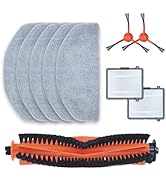
Image: The complete HONITURE V8Pro Robot Vacuum Cleaner Accessory Set, model CPA1505, showing two side brushes, two HEPA filters, one roller brush, and four washable mop pads.
Installationsvejledning
1. Side Brushes Installation
- Turn the robot vacuum cleaner over to access the underside.
- Locate the side brush slots.
- Align the new side brush with the corresponding slot and press down until it clicks into place. Ensure the brush is securely fastened.

Image: Underside of a robot vacuum cleaner, showing the location where a side brush is installed. The side brush is typically secured by pressing it into a designated slot.
2. HEPA Filters Installation
- Open the dustbin cover on your robot vacuum cleaner.
- Remove the old filter assembly from the dustbin.
- Insert the new HEPA filter into the designated slot within the dustbin. Ensure it fits snugly to prevent dust leakage.
- Luk låget til støvbeholderen forsvarligt.
3. Roller Brush Installation
- Turn the robot vacuum cleaner over.
- Locate the roller brush cover, usually secured by clips or latches. Open or remove the cover.
- Remove the old roller brush. Clean any debris from the brush compartment.
- Insert the new roller brush, ensuring its ends align with the corresponding slots.
- Close and secure the roller brush cover.
4. Washable Mops Installation
- Locate the mop pad attachment area on the robot vacuum cleaner, typically on the water tank or a dedicated mop module.
- Attach the new washable mop pad to the designated area, usually using Velcro or a sliding mechanism. Ensure it is flat and securely attached.
- If using a water tank, fill it with clean water before attaching the mop pad.
Operating Guidelines (Accessory Replacement Frequency)
To maintain optimal cleaning performance, it is recommended to replace accessories according to the following schedule. Actual replacement frequency may vary based on usage and environment.
- Sidebørster: Replace every 3-6 months, or when visibly worn or damaged.
- HEPA-filtre: Replace every 2-3 months, or when suction power decreases significantly.
- Rullebørste: Replace every 6-12 months, or when bristles are heavily worn or tangled.
- Washable Mops: Wash after each use. Replace every 1-3 months, or when cleaning effectiveness diminishes.
Vedligeholdelse og rengøring
1. Side Brushes Cleaning
- Kontroller regelmæssigt sidebørsterne for sammenfiltrede hår eller snavs.
- Remove any tangled material using scissors or a cleaning tool.
- If brushes are bent, soak them in warm water for a few minutes to help them regain their shape.
2. HEPA Filters Cleaning
- Tap the filter gently over a trash can to remove loose dust and debris.
- Do not wash HEPA filters with water unless explicitly stated as washable by the manufacturer. This accessory set includes washable mops, but filters are typically not washable.
- Use a small brush or vacuum cleaner to remove fine dust from the filter pleats.
3. Roller Brush Cleaning
- Remove the roller brush from the vacuum.
- Use the provided cleaning tool or scissors to cut and remove tangled hair and fibers from the brush.
- Clean the brush bearings and ends to ensure smooth rotation.
4. Washable Mops Cleaning
- Remove the mop pad from the robot vacuum.
- Hand wash the mop pad with mild detergent and warm water.
- Rinse thoroughly and air dry completely before reattaching to the robot vacuum. Do not tumble dry.
Fejlfinding
If you encounter issues related to the accessories, refer to the following common solutions:
| Problem | Mulig årsag | Løsning |
|---|---|---|
| Side brush not spinning or tangled. | Hair or debris tangled around the brush. Brush is worn. | Remove debris. If worn, replace the side brush. |
| Reduceret sugeevne. | HEPA filter is clogged with dust. | Rengør eller udskift HEPA-filteret. |
| Roller brush not rotating or making noise. | Hair or debris tangled around the brush or bearings. | Remove debris from the roller brush and its ends. Ensure it is installed correctly. |
| Moppepuden rengør ikke effektivt. | Moppepuden er snavset eller slidt. | Wash the mop pad. If heavily worn, replace it. |
Specifikationer
- Modelnavn: CPA1505
- Mærke: ÆRE
- Inkluderede komponenter: 2 x Side Brushes, 2 x HEPA Filters, 1 x Roller Brush, 4 x Washable Mops
- Filtertype: Patron (HEPA)
- Kompatibilitet: HONITURE V8Pro Robot Vacuum Cleaner
- Varens vægt: 11.7 ounce (ca. 331 gram)
- Produktdimensioner: 10"L x 5"W x 3"H (packaging dimensions, approximate)
Garanti og support
For warranty information or technical support regarding your HONITURE V8Pro Robot Vacuum Cleaner Accessory Set, please refer to the original product manual for your HONITURE V8Pro robot vacuum cleaner or contact HONITURE customer service directly. Contact details can typically be found on the official HONITURE webwebstedet eller på produktemballagen.
You can visit the official HONITURE store for more information: HONITURE Store