Indledning
This manual provides essential instructions for the safe and effective use of your Sony FX30 Digital Cinema Camera. The Sony FX30 is designed for content creators and filmmakers, featuring an APS-C sensor for cinematic capture. Please read this manual thoroughly before operating the camera and retain it for future reference.
Pakkens indhold
Bekræft, at alle nedenstående varer er inkluderet i din pakke. Hvis der mangler eller er beskadigede varer, bedes du kontakte din forhandler.

Image: The Sony FX30 Digital Cinema Camera body with various accessories including a memory card, LED light, microphone, and stabilization grip.
Sony Manufacturer Items:
- Sony FX30 Digital Cinema Camera Body
- Sony NP-FZ100 Rechargeable Lithium-Ion Battery
- Sony AC-adapter
- Sony ALC-B1EM kamerahusdæksel til E-mount-kameraer
- Sony Multi Interface-skodæksel
- USB-A til USB-C-kabel (USB 3.2)
Bundled Items:
- SanDisk 128GB High Speed Extreme Pro SD Memory Card
- High Power LED Light with Diffusers
- haglgevær mikrofon
- Padded Deluxe Camera Bag
- U-Stabilization Grip
- Extra Replacement Battery (Compatible with NP-FZ100)
- Pistol Hand Grip
- Photo & Video Editing Software (1 Year Digital Download)
- USB Memory Card Reader
- Camera Hand Grip Strap
- Lens Pen
- Linseblæser
- Camera Starter Kit (Microfiber Cloth, Memory Card Case, Buds)
Opsætning
1. Batteriinstallation
Insert the provided Sony NP-FZ100 battery into the battery compartment located at the bottom of the camera. Ensure it clicks into place securely. Charge the battery fully before first use using the supplied AC adapter and USB-A to USB-C cable.
2. Installation af hukommelseskort
The FX30 supports SD memory cards. Open the memory card slot cover, typically located on the side of the camera. Insert the SanDisk 128GB Extreme Pro SD card with the label facing the correct direction until it clicks into place. The camera features dual card slots for extended recording or backup.

Billede: Bagside view of the Sony FX30 showing the open memory card slots with two SD cards partially inserted.
3. Attaching the Body Cap
When no lens is attached, always keep the Sony ALC-B1EM Body Cap on the camera's E-mount to protect the sensor from dust and damage.
4. Første opstart
Press the power button to turn on the camera. Follow any on-screen prompts for initial setup, such as language selection and date/time settings.
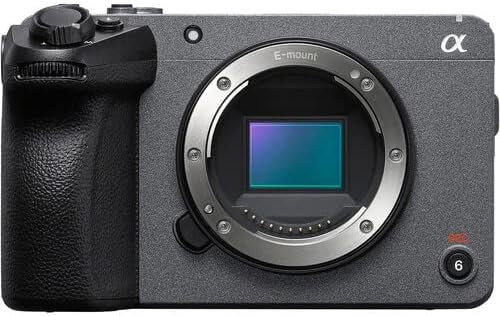
Billede: Forside view of the Sony FX30 camera body, showcasing the E-mount lens interface and grip.
5. Montering af tilbehør
Attach the U-Stabilization Grip, Shotgun Microphone, and LED Light as needed for your shooting requirements. The camera features a Multi Interface Shoe for compatible accessories.
Betjening af kameraet
Grundlæggende kontrol overview
Familiarize yourself with the camera's main controls for efficient operation.

Billede: Bagside view of the Sony FX30, highlighting the LCD screen, MODE dial, MENU button, and various control buttons and dials.
- MODE Dial: Selects shooting modes.
- MENU knap: Accesses camera settings and functions.
- FOCUS MAG: Magnifies the display for precise focusing.
- Fn (funktions)-knap: Giver hurtig adgang til ofte anvendte indstillinger.
- DISP (Display)-knap: Changes the information displayed on the screen.
- Kontrolhjul: Navigerer i menuer og justerer indstillinger.
- Zebra/Peaking: Assists with exposure and focus.

Billede: Top view of the Sony FX30, showing the Multi Interface Shoe, IRIS, WB, ISO buttons, and the REC button.
- IRIS Button: Adjusts aperture.
- WB (White Balance) Button: Sets white balance.
- ISO-knap: Adjusts ISO sensitivity.
- REC-knap: Starter og stopper videooptagelse.
Betjening af berøringsskærm
The FX30 features a touch-sensitive LCD screen for intuitive control. You can tap to select menu items, adjust focus, and navigate settings directly on the display.

Image: A hand interacting with the touch-sensitive LCD screen on the back of the Sony FX30 camera.
Optagelse af video
To begin recording, ensure a memory card is inserted and the battery is charged. Press the REC button to start recording. Press it again to stop. The camera supports video capture resolutions up to 4K and 1080p in MP4 format.
Forbindelse
The Sony FX30 supports Wi-Fi connectivity for remote control, file transfer, and other smart functions. Refer to the camera's on-screen menu for Wi-Fi setup instructions.
Opretholdelse
- Rengøring af kamerahuset: Brug en blød, tør klud til at tørre kamerahuset af. Ved genstridigt snavs, tør letampRengør kluden med vand. Undgå at bruge stærke rengøringsmidler.
- Rengøring af linsen og sensoren: Use a lens blower to remove dust from the lens and sensor. For smudges on the lens, use a lens pen or a specialized lens cleaning solution with a microfiber cloth. Sensor cleaning should be performed with extreme care or by a professional.
- Batteripleje: Opbevar batterier et køligt og tørt sted. Undgå at aflade batterier helt ofte for at forlænge deres levetid.
- Opbevaring: When not in use, store the camera in a dry, dust-free environment, preferably in the padded deluxe camera bag provided.
Fejlfinding
Dette afsnit omhandler almindelige problemer, du kan støde på. For mere detaljeret fejlfinding henvises til den officielle Sony-support. webwebsted.
- Camera Does Not Power On: Ensure the battery is fully charged and correctly inserted. Try using the extra replacement battery.
- Fejl på hukommelseskort: Reinsert the memory card. Ensure it is formatted correctly by the camera. Try a different memory card if the issue persists.
- Ingen videooptagelse: Check if the memory card has sufficient free space. Verify that the camera is in a video recording mode.
- Problemer med billedkvalitet: Check lens cleanliness. Ensure appropriate ISO, aperture, and shutter speed settings for your lighting conditions.
Specifikationer
| Feature | Detalje |
|---|---|
| Produktdimensioner | 3.3 x 3.1 x 3.3 tommer |
| Varens vægt | 8 pund |
| ASIN | B0D1RWMS36 |
| Varemodelnummer | CC-FX30BODY-41524 |
| Fabrikant | Sony |
| Mærke | Sony |
| Fotosensorteknologi | APS-C |
| Videooptagelsesopløsning | 1080p, 4K |
| Flash-hukommelsestype | SD |
| Videooptagelsesformat | MP4 |
| Understøttet lydformat | AAC, MP3 |
| Skærmstørrelse | 3 tommer |
| Forbindelsesteknologi | Wi-Fi |
| Farve | Sort |
| Speciel funktion | Trådløs |
Garanti og support
The Sony FX30 Digital Cinema Camera comes with a Limited 1-Year Manufacturer Warranty. Please retain your proof of purchase for warranty claims.
For technical support, service, or further information, please visit the official Sony support webwebstedet eller kontakt deres kundeservice. Du kan finde mere information på Sony support Webwebsted.


