Produkt overview
The SONRU Bluetooth 5.0 Receiver is a versatile audio adapter designed to bring wireless capabilities to non-Bluetooth devices, including car audio systems, home stereo systems, and wired headphones. It features advanced Bluetooth 5.0 for stable connectivity, hands-free calling with CVC8.0 noise cancellation, and dual fast-charging ports (PD 30W & QC3.0 18W) for convenient device charging on the go. This device allows for seamless music streaming, GPS audio, and hands-free phone calls, enhancing your audio experience in various environments.

Image: The SONRU Bluetooth 5.0 Receiver and its accompanying car charger unit, showcasing their compact design and connectivity options.
Pakkens indhold
Sørg venligst for, at alle varer er til stede i pakken:
- Bluetooth 5.0 Receiver Unit
- Car Charger with Dual USB Ports (PD 30W & QC3.0 18W)
- 3.5 mm lydkabel
- RCA Cable (if included with specific model)
- Brugermanual
Opsætning og installation
Bluetooth Receiver Setup (for Car/Home Audio)
- Oplad modtageren: Before first use, fully charge the Bluetooth receiver using a standard 5V USB charger. The receiver offers up to 12.8 hours of music/talking time and 250 hours of standby time on a full charge, which takes approximately 1.2 hours.

Image: Diagram illustrating the battery life of the Bluetooth receiver: 12.8 hours music/talking, 250 hours standby, 1.2 hours charging time.
- Tænd for modtageren: Press and hold the power button on the receiver until the LED indicator lights up.
- Tilslut til lydsystem: Plug the 3.5mm audio jack of the receiver into the AUX input of your car stereo, home audio system, or wired headphones. For home audio systems with RCA inputs, use the appropriate RCA cable.

Image: Step-by-step visual guide showing how to turn on the receiver, plug it into a stereo system, and connect with Bluetooth devices.

Image: The Bluetooth receiver connected to a wooden home audio speaker, demonstrating wireless music streaming from a smartphone.
- Par med din enhed:
- Aktiver Bluetooth på din smartphone, tablet eller bærbare computer.
- Søg efter "SONRU" or the device name displayed on the receiver's LED (if applicable) in your device's Bluetooth settings.
- Select the device to pair. Once paired, the LED indicator on the receiver will change, indicating a successful connection.

Image: Diagram showing the wide compatibility of the Bluetooth receiver with cellphones, tablets, laptops, home audio, car audio, and wired headphones, with a wireless range of 33 feet.
Car Charger Setup (FM Transmitter)
- Indsæt i bilens cigarettænder: Plug the car charger unit into your vehicle's 12V/24V cigarette lighter socket. The LED display will light up.
- Indstil FM-frekvens: Find an empty FM frequency on your car radio (one with no static or broadcast). Then, adjust the FM frequency on the SONRU car charger to match your car radio's frequency. Refer to the "Easy Button Control" diagram for FM tuning buttons.
- Par med din enhed: Enable Bluetooth on your smartphone and search for the car charger's Bluetooth name (e.g., "SONRU FM Transmitter"). Select to pair.
- Opladningsenheder: Use the PD 30W and QC3.0 18W USB ports to fast charge your compatible devices.

Image: Close-up of the car charger unit highlighting its dual USB ports (PD 30W and QC3.0 18W) for fast charging, showing a smartphone being charged.
Betjeningsvejledning
Musikafspilning
- Bluetooth-streaming: Once paired, open your music app on your device and start playing. Audio will be transmitted wirelessly to the connected receiver or car stereo.
- SD/TF Card & USB Disk Playback (Car Charger): Insert an SD/TF card or USB disk into the designated slot on the car charger. The device will automatically detect and play audio files (MP3, WMA, WAV, FLAC formats supported). Use the navigation buttons on the car charger to control playback (next/previous track, play/pause). Note: Only the right USB port can serve as a USB reader.
Håndfri opkald
Both the Bluetooth receiver and the car charger support hands-free calling with built-in microphones and CVC8.0 noise cancellation for clear conversations.
- Besvar/afslut opkald: Press the multi-function button (on receiver) or the call button (on car charger) once to answer an incoming call. Press again to end the call.
- Afvis opkald: Press and hold the multi-function/call button for 2 seconds to reject an incoming call.
- Genopkald sidste nummer: Double-press the multi-function/call button to redial the last dialed number.
- Skift opkald til telefon: During a call, press and hold the multi-function/call button to switch the call audio between the device and your phone.

Image: An in-car setup showing the Bluetooth receiver mounted, with a smartphone displaying an incoming call, emphasizing the hands-free calling feature.
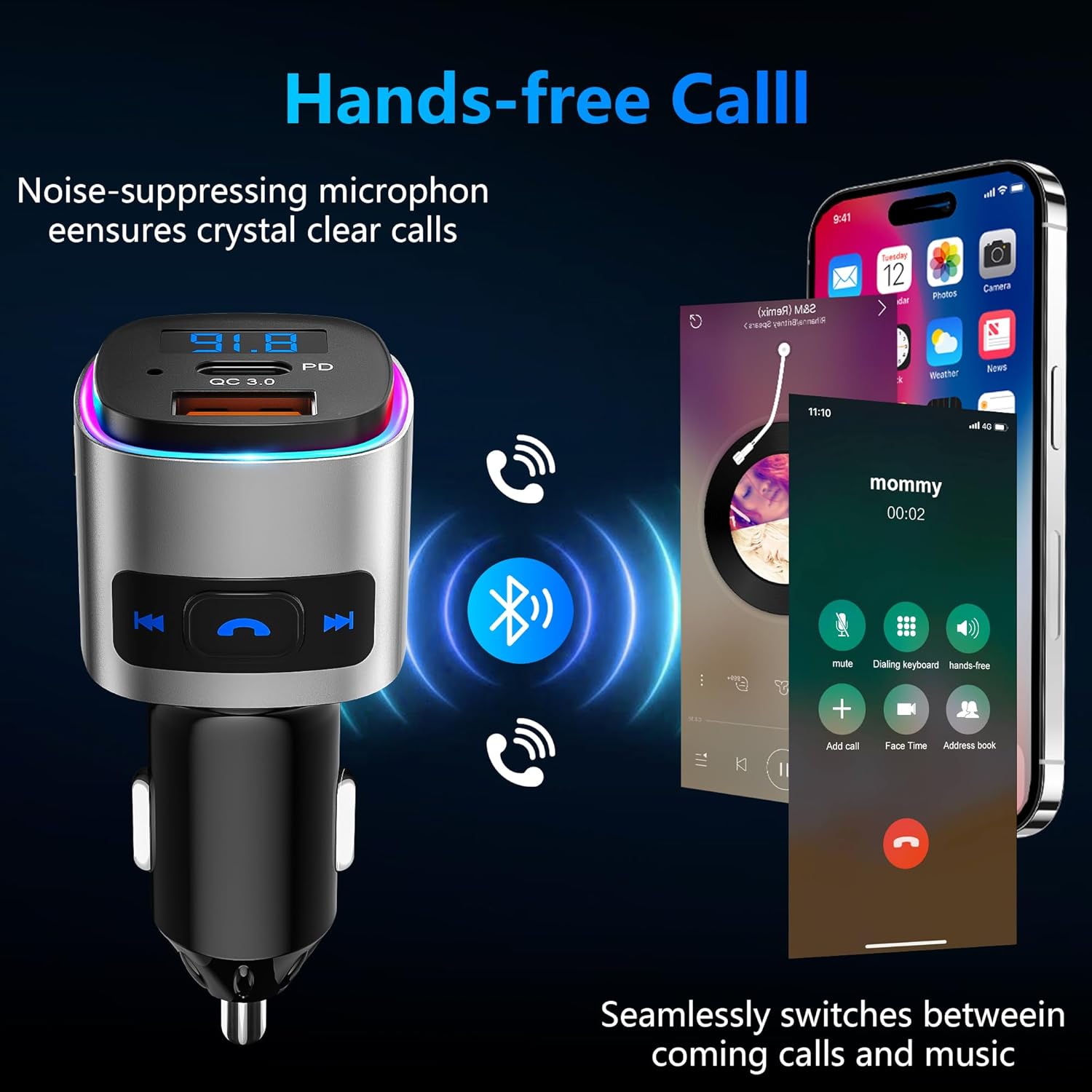
Image: The car charger unit with a smartphone showing a call interface, illustrating the noise-suppressing microphone for crystal clear calls and seamless switching between calls and music.
Button Controls (Car Charger)
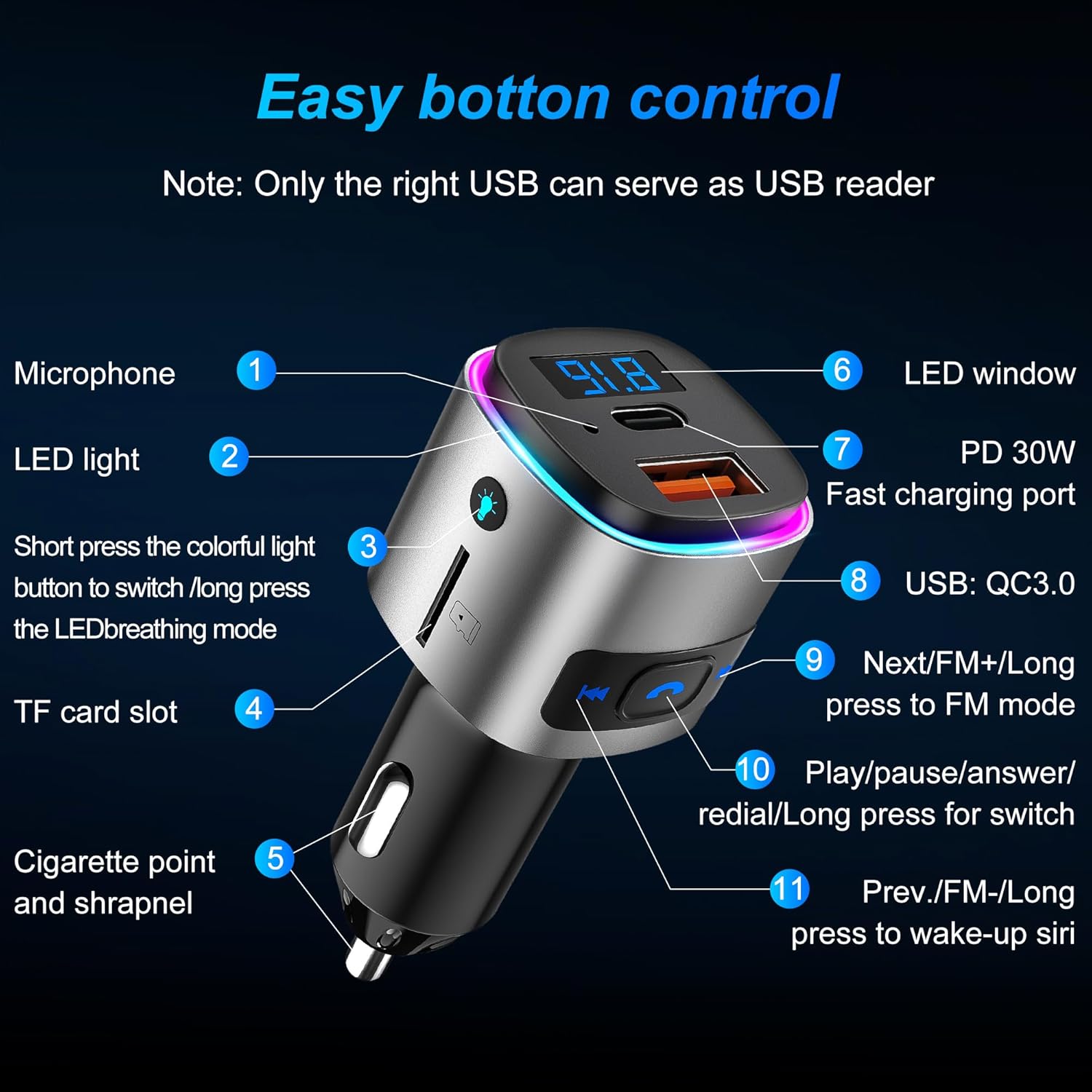
Image: Detailed diagram of the car charger unit, labeling its various components and buttons: Microphone, LED light, colorful light button, TF card slot, Cigarette point and shrapnel, LED window, PD 30W Fast charging port, USB: QC3.0, Next/FM+/Long press to FM mode, Play/pause/answer/redial/Long press for switch, Prev./FM-/Long press to wake-up Siri.
- Mikrofon (1): Til håndfri opkald.
- LED lys (2): Indikatorlys.
- Colorful Light Button (3): Short press to switch colorful light mode; long press for LED breathing mode.
- TF card slot (4): For TF card audio playback.
- Cigarette point and shrapnel (5): Strømforbindelse.
- LED window (6): Displays FM frequency and other information.
- PD 30W Fast charging port (7): Power Delivery fast charging.
- USB: QC3.0 (8): Quick Charge 3.0 fast charging.
- Next/FM+/Long press to FM mode (9): Short press for next track; long press to enter FM tuning mode (then short press to adjust frequency up).
- Play/pause/answer/redial/Long press for switch (10): Multi-function button for playback and calls.
- Prev./FM-/Long press to wake-up Siri (11): Short press for previous track; long press to enter FM tuning mode (then short press to adjust frequency down); long press to activate voice assistant (Siri/Google Assistant).
Vedligeholdelse og pleje
- Hold enheden tør. Undgå udsættelse for fugt eller væsker.
- Du må ikke selv skille enheden ad eller forsøge at reparere den. Dette vil ugyldiggøre garantien.
- Rengør enheden med en blød, tør klud. Brug ikke skrappe kemikalier eller slibende rengøringsmidler.
- Opbevar enheden på et køligt, tørt sted, når det ikke er i brug.
- Undgå ekstreme temperaturer.
Fejlfinding
| Problem | Mulig årsag | Løsning |
|---|---|---|
| Kan ikke parres med enheden. | Bluetooth not enabled; device too far; receiver not in pairing mode; interference. | Ensure Bluetooth is on; bring devices closer; restart receiver to enter pairing mode; turn off other Bluetooth devices. |
| Ingen lydudgang. | Volume too low; incorrect input selected on stereo; cables not connected properly. | Increase volume on both devices; select correct AUX/FM input; re-plug audio cables securely. |
| Poor FM signal/static (Car Charger). | FM frequency interference; weak signal. | Change to a different, clear FM frequency on both the car radio and the transmitter. |
| Charging slow or not working. | Cable issue; device not compatible with fast charging; port issue. | Try a different USB cable; ensure your device supports PD/QC3.0; try a different charging port. |
Specifikationer
- Mærke: SONRU
- Model: Bluetooth 5.0 Receiver (B0D1MMLXQ1)
- Forbindelse teknologi: Auxiliary, Bluetooth, USB
- Standard for trådløs kommunikation: Bluetooth 5.0
- Bluetooth Profiles Understøttet: A2DP, AVRCP, HSP, HFP
- Strømkilde: DC strømforsyning
- Opladningsporte: PD 30W, QC3.0 18W
- Receiver Play Time: Up to 12.8 hours (music/talking)
- Modtagerens standbytid: 250 timer
- Receiver Charging Time: Ca. 1.2 timer
- Trådløs rækkevidde: Op til 33 fod (10 meter)
- Speciel funktion: Bluetooth FM Transmitter, Hands Free Calls, CVC8.0 Noise Cancellation
- Fabrikant: SONRU
- Første tilgængelige dato: 1. august 2024
Garanti og support
SONRU provides a 12 måneders kvalitetsgaranti for this product from the date of purchase. Additionally, a one-month money-back guarantee is offered for any reason.
For technical support, warranty claims, or any inquiries regarding your SONRU Bluetooth 5.0 Receiver, please contact SONRU customer service through the retailer's platform or visit the official SONRU store page on Amazon:
Gem venligst din købskvittering som købsbevis af garantiårsager.


