Indledning
This manual provides detailed instructions for the setup, operation, and maintenance of your MageGee V560 Wireless Gaming Keyboard and Mouse Combo. Please read this manual thoroughly before use to ensure optimal performance and longevity of your device.

Image: The MageGee V560 Wireless Gaming Keyboard and Mouse Combo, featuring a blue, white, and purple color scheme, with the USB receiver visible.
Pakkens indhold
Kontroller venligst, at alle varer er til stede i pakken:
- MageGee V560 trådløst tastatur
- MageGee trådløs mus
- 2.4GHz USB Receiver (stored in mouse battery compartment)
- USB-C ladekabel
- Brugermanual

Image: Contents of the MageGee V560 package, including the keyboard, mouse, USB receiver, charging cable, and user manual.
Opsætningsinstruktioner
- Find USB-modtageren: Open the battery cover of the wireless mouse. The 2.4GHz USB receiver is stored inside the compartment next to the mouse battery slot.
- Tilslut modtageren: Sæt USB-modtageren i en ledig USB-port på din computer.
- Tænd enheder: Ensure both the keyboard and mouse are powered on. The devices are plug-and-play and should connect automatically.
- Indledende opkrævning: For optimal performance, it is recommended to fully charge both the keyboard and mouse before first use. Use the provided USB-C charging cable.

Image: Illustration showing the 2-in-1 USB receiver connecting the keyboard and mouse wirelessly to a laptop.
Betjeningsvejledning
Tastatur funktioner
- RGB-baggrundsbelysningskontrol:
- Trykke FN + INS for at tænde eller slukke for baggrundslyset.
- Trykke FN + PgUp or FN + PgDn to adjust the 3-level backlight brightness.
- Trykke FN + 1 / 2 / 3 / 4 / 5 to switch between different backlight modes. Note: Backlight settings are not saved after power off.
- Multimediegenveje: Brug FN key in combination with F1-F12 keys for quick access to multimedia functions such as volume control, media playback, and more.
- Ergonomisk design: The keyboard features a stepped layout and foldable brackets at the bottom, allowing you to adjust the typing angle for comfort during extended use.
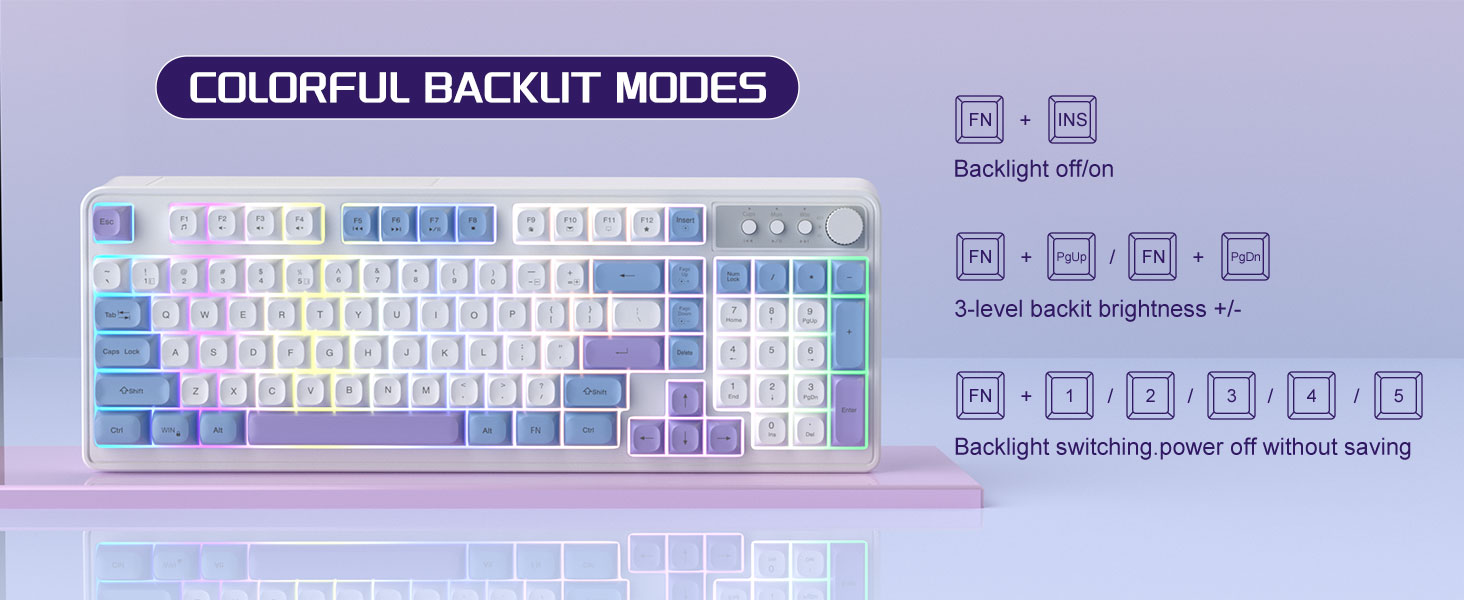
Image: The MageGee V560 keyboard displaying various colorful backlit modes, with instructions for controlling them.

Image: A visual representation of the 16 multimedia shortcuts available on the MageGee V560 keyboard, activated via the FN key.
Musefunktioner
- DPI-justering: The mouse supports 6 levels of DPI adjustment (600-3200 DPI). Press the DPI button (usually located below the scroll wheel) to cycle through the sensitivity settings. Internal indicator lights will show the current DPI level.
- Vejrtrækningsbaggrundsbelysning: The mouse features 7 dazzling color breathing backlights. This lighting is automatic and indicates mouse activity.

Image: The MageGee V560 mouse highlighting its DPI settings (1000, 1200, 1600 DPI) and showing the USB-C charging port.
Opladning og batterilevetid
- Both the keyboard and mouse are rechargeable. Use the provided USB-C charging cable to charge them.
- Keyboard Standby Time: Op til 365 dage.
- Mouse Standby Time: Op til 270 dage.
- Auto-sleep funktion: The devices automatically enter sleep mode after a period of inactivity to conserve battery power and extend battery life.

Image: An illustration demonstrating the intelligent auto-sleep feature of the MageGee V560 combo, which conserves battery life.
Kompatibilitet
The MageGee V560 Wireless Gaming Keyboard and Mouse Combo is compatible with the following operating systems:
- Win2000
- Vind XP
- Vind MIG
- Vista
- Win7
- Win8
- Win10
- Android
- Linux
- Mac OS
Fejlfinding
If you encounter issues with your MageGee V560 combo, please refer to the following common solutions:
- Enhed opretter ikke forbindelse:
- Sørg for, at USB-modtageren er korrekt tilsluttet en fungerende USB-port.
- Verify that both the keyboard and mouse are powered on.
- Check the battery levels of both devices and charge if necessary.
- Prøv at sætte USB-modtageren i en anden USB-port.
- Forsinkelse eller afbrydelse:
- Ensure the devices are within the 33 ft (10 meter) operating range of the USB receiver.
- Minimér interferens fra andre trådløse 2.4 GHz-enheder (f.eks. Wi-Fi-routere, trådløse telefoner).
- Charge the devices to ensure sufficient power.
- Keys Not Registering / Mouse Not Responding:
- Recharge the keyboard and mouse.
- Ensure the USB receiver is properly connected.
- Genstart din computer.
- Problemer med baggrundsbelysning:
- Sørg for, at tastaturet er opladet.
- Bruge FN + INS for at slå baggrundsbelysningen til/fra
- Juster lysstyrken med FN + Side op/side ned.
Specifikationer
| Mærke | MageGee |
| Model | V560 |
| Forbindelsesteknologi | 2.4GHz Wireless |
| Særlige funktioner | RGB lighting, rechargeable keyboard and mouse, ergonomic design |
| Kompatible enheder | Personal Computer (Win2000, Win XP, Win ME, Vista, Win7, Win8, Win10, Android, Linux, Mac OS) |
| Varens vægt | 1.87 pund |
| Pakkedimensioner | 16.61 x 9.21 x 1.73 tommer |
| Fabrikant | MAGEGE |
Opretholdelse
- Rensning: Brug en blød, tør klud til at rengøre tastatur og mus. Ved genstridigt snavs, gnid letamp en klud kan bruges, så det sikres, at der ikke kommer væske ind i enheden.
- Opbevaring: Opbevar enhederne et køligt, tørt sted væk fra direkte sollys og ekstreme temperaturer.
- Batteripleje: Undgå at aflade batterierne helt for ofte. Oplad dem regelmæssigt for at opretholde batteriets sundhed.
Garanti og support
Dette produkt leveres med en 1 års garanti fra købsdatoen.
For any questions or support needs, please contact MageGee customer service via Amazon email. We aim to respond within 12 hours and provide a satisfactory solution.


