Indledning
This manual provides essential information for setting up, operating, maintaining, and troubleshooting your Tecno CAMON 30 5G smartphone. Please read this manual carefully to ensure proper use and to maximize the device's capabilities.
1. Opsætning
1.1 Udpakning og første inspektion
Når du åbner pakken, skal du kontrollere, at alle komponenter er til stede og ubeskadigede. Standardpakkens indhold inkluderer:
- Tecno CAMON 30 5G Smartphone
- 70W Flash Charger
- USB kabel
- SIM-bakkeudkaster
- Beskyttende etui (kan variere fra region til region)
- Hurtig startvejledning
- Garantikort

Figure 1.1: Tecno CAMON 30 5G smartphone, showcasing dens frontskærm og bagkameramodul.
1.2 Isætning af SIM-kortet
To ensure network connectivity, insert your Nano-SIM card(s) into the device. The Tecno CAMON 30 5G supports dual SIM functionality.
- Find SIM-kortbakken på siden af enheden.
- Sæt det medfølgende SIM-kortbakkeudløserværktøj i det lille hul ved siden af bakken, og tryk forsigtigt, indtil bakken springer ud.
- Træk forsigtigt SIM-bakken ud.
- Place your Nano-SIM card(s) into the designated slots on the tray, ensuring the gold contacts face downwards and the cut corner aligns correctly.
- Skub forsigtigt SIM-kortbakken tilbage i enheden, indtil den klikker på plads.

Figure 1.2: The SIM tray ejector tool, used for accessing the SIM card slot.
1.3 Opladning af enheden
Before first use, it is recommended to fully charge your device. The Tecno CAMON 30 5G supports 70W Flash Charging.
- Connect the USB cable to the 70W Flash Charger.
- Sæt opladeren i en stikkontakt.
- Tilslut den anden ende af USB-kablet til USB-C-porten i bunden af din telefon.
- The charging indicator will appear on the screen. A full charge from 0-50% can be achieved in approximately 19 minutes.

Figure 1.3: The bottom of the Tecno CAMON 30 5G, featuring the USB-C port for charging and data transfer.
1.4 Tænding og første opsætning
Press and hold the Power button (located on the right side of the device) until the Tecno logo appears. Follow the on-screen instructions to complete the initial setup, which includes selecting your language, connecting to Wi-Fi, and setting up your Google account.
2. Betjening af enheden
2.1 Grundlæggende navigation
The Tecno CAMON 30 5G operates on Android 14 with HiOS. Navigation is primarily touch-based:
- Tryk på: Vælg et element, eller åbn et program.
- Stryg: Rul gennem skærme, lister eller indhold.
- Knib for at zoome: Forstør eller formindsk indholdet på skærmen.
- Langt tryk: Få adgang til kontekstmenuer eller flyt ikoner.
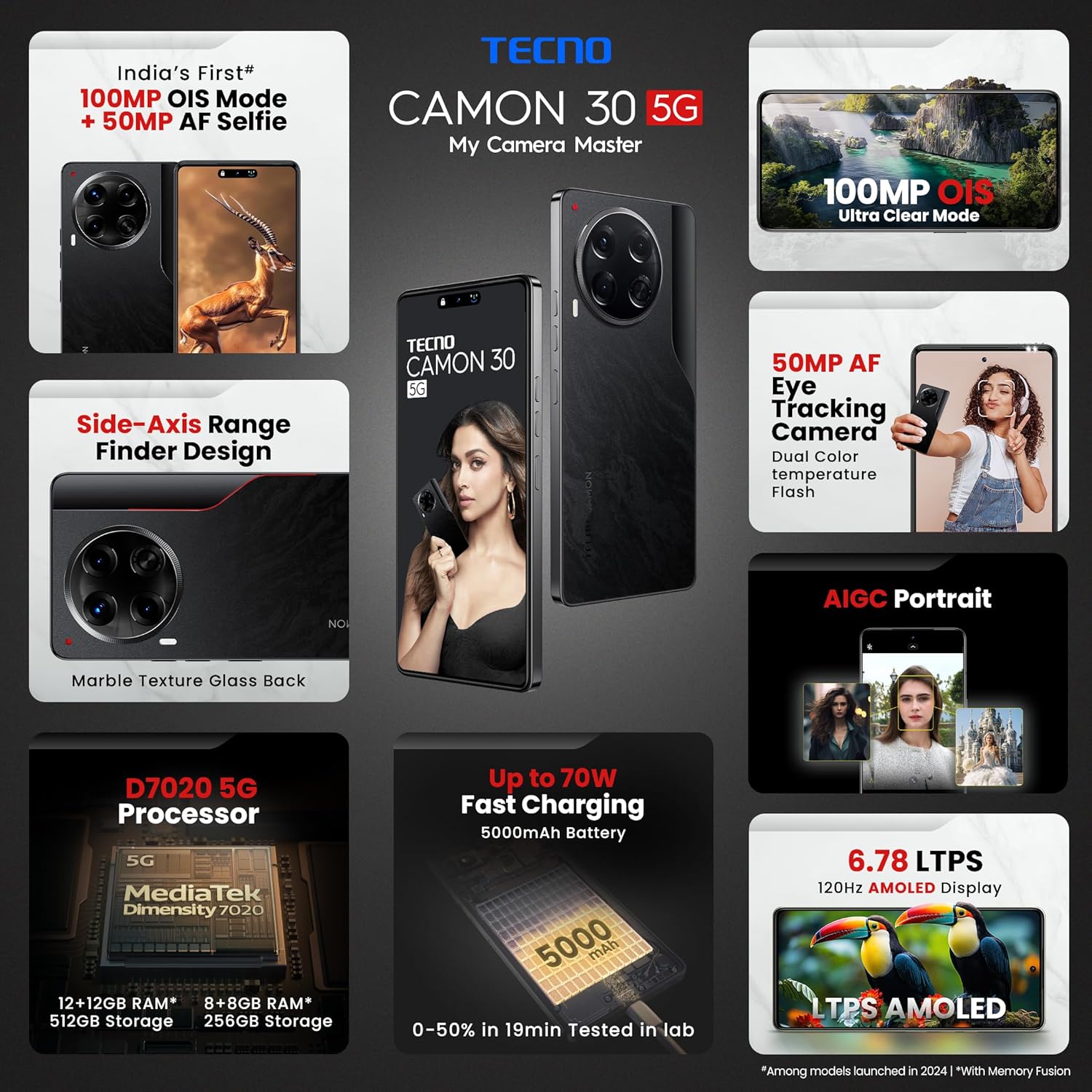
Figure 2.1: The Tecno CAMON 30 5G's vibrant LTPS AMOLED display.
2.2 Skærmfunktioner
The device features a 6.78-inch FHD+ LTPS AMOLED Dot-in display with a resolution of 1080 x 2436 pixels. Key display features include:
- 1300 nits Peak Brightness: Sikrer klar udsyn selv under lyse udendørsforhold.
- 120Hz adaptiv opdateringshastighed: Automatically adjusts between 120Hz, 90Hz, and 60Hz for smooth scrolling and power efficiency.
- 2160Hz High-Frequency PWM Dimming: Reducerer skærmflimmer for forbedret øjenkomfort.
- TÜV Rheinland Low Blue Light Emission Certified: Protects your eyes from harmful blue light.
- Wet Hand Touch Technology: Allows for smooth navigation even with wet hands.
2.3 Kamerasystem
The Tecno CAMON 30 5G is equipped with an advanced camera system for high-quality photography and videography.
- Bagkamera: 100MP OIS (Optical Image Stabilization) main sensor with a 2MP Depth Sensor. Features include Ultra Steady videos (OIS + EIS), 10X Zoom, Twinkle Portrait Filter, Super Night Photography Mode, Sky Shop, and Slow Motion Videos.
- Forreste kamera: 50MP Auto Focus Selfie camera with Dual Color Temperature Front Flash. Supports DSLR-level portrait system and Video HDR.
- AIGC Portrait (OTA): AI Generative Content for enhanced portrait photography.

Figure 2.2: The distinctive rear camera module of the Tecno CAMON 30 5G.
2.4 Ydeevne og lagring
Powered by the MediaTek Dimensity 7020 chipset with a 6nm processor, the device offers robust performance for gaming and multitasking.
- Processor: MediaTek Dimensity 7020 (6nm) for Ultra 5G Performance.
- VÆDDER: Up to 24GB* (12GB physical + 12GB Memory Fusion) LPDDR4x RAM.
- Intern opbevaring: 512GB UFS 3.1 Storage.
2.5 Audio and Smart Features
- Dolby Atmos: Giver en fordybende lydoplevelse.
- Ella with ChatGPT: Integrated AI assistant for various tasks.
- AI Eraser (OTA): Allows for intelligent object removal from photos.
- Infrarød fjernbetjening: Supports control of up to 15 types of home appliances.
- Dynamic Pet AOD: Customizable Always-On Display with dynamic pet animations.
3. Vedligeholdelse
3.1 Rengøring af din enhed
Sådan bevarer du din enheds udseende og funktionalitet:
- Brug en blød, fnugfri klud til at tørre skærmen og kabinettet af.
- Undgå at bruge skrappe kemikalier, slibende rengøringsmidler eller trykluft.
- Hold portene fri for støv og snavs.
3.2 Softwareopdateringer
Søg regelmæssigt efter og installer softwareopdateringer for at sikre optimal ydeevne, sikkerhed og adgang til nye funktioner. Gå til Indstillinger > System > Systemopdatering for at søge efter opdateringer.
3.3 Pleje af batterier
Enheden er udstyret med et 5000mAh batteri. For at forlænge batterilevetiden:
- Undgå ekstreme temperaturer.
- Use only the official Tecno charger and cable.
- Undgå at aflade batteriet helt ofte.
3.4 Lagerstyring
Regularly manage your device's storage to ensure smooth operation. Delete unnecessary files, ryd app-caches og afinstaller ubrugte apps. Du kan tjekke lagerforbruget i Indstillinger > Lager.
4. Fejlfinding
This section addresses common issues you might encounter with your Tecno CAMON 30 5G.
4.1 Enheden tænder ikke
- Sørg for, at batteriet er opladet. Tilslut opladeren, og vent et par minutter, før du forsøger at tænde.
- Tryk og hold tænd/sluk-knappen nede i mindst 10-15 sekunder for at fremtvinge en genstart.
4.2 Opladningsproblemer
- Kontroller, at opladeren og USB-kablet er korrekt tilsluttet til både telefonen og stikkontakten.
- Prøv at bruge en anden stikkontakt.
- Undersøg opladningsporten for snavs eller skader.
4.3 Problemer med netværksforbindelse
- Check if Airplane Mode is enabled (swipe down from the top of the screen to access Quick Settings).
- Sørg for, at dit SIM-kort er korrekt isat.
- Genstart enheden.
- Gå til Indstillinger > Netværk og internet > Mobilnetværk og sørg for, at mobildata er aktiveret.
4.4 Apps der går ned eller fryser
- Luk den problematiske app, og åbn den igen.
- Ryd appens cache (Indstillinger > Apps > [Appnavn] > Lagerplads og cache > Ryd cache).
- Sørg for, at appen er opdateret til den seneste version.
- Hvis problemet fortsætter, bør du overveje at afinstallere og geninstallere appen.
4.5 Fabriksindstilling
Hvis du oplever vedvarende softwareproblemer, kan en fabriksnulstilling muligvis løse dem. Advarsel: Dette vil slette alle data på din telefon. Sikkerhedskopier vigtige data, før du fortsætter.
- Gå til Indstillinger > System > Nulstillingsindstillinger.
- Vælge Slet alle data (gendan fabriksindstillinger).
- Bekræft din beslutning, og indtast din pinkode/mønster/adgangskode, hvis du bliver bedt om det.
5. Specifikationer
Below are the detailed technical specifications for the Tecno CAMON 30 5G (Model: CL7 512+12).
| Feature | Specifikation |
|---|---|
| Operativsystem | Android 14 (HiOS) |
| Processor | MediaTek Dimensity 7020 (6nm) |
| VÆDDER | 12GB (expandable up to 24GB with Memory Fusion) |
| Intern opbevaring | 512 GB UFS 3.1 |
| Vise | 6.78" FHD+ LTPS AMOLED Dot-in Display, 1080 x 2436 resolution, 120Hz Adaptive Refresh Rate, 1300 nits Peak Brightness, 2160Hz PWM Dimming |
| Bagkamera | 100MP OIS Main Camera + 2MP Depth Sensor |
| Forreste kamera | 50MP Auto Focus Selfie Camera |
| Batteri | 5000mAh |
| Opladning | 70W Flash Charging, 10W Reverse Charging |
| Dimensioner | 16.54 x 0.76 x 0.78 cm |
| Vægt | 199 g |
| Forbindelse | 5G, Wi-Fi, Bluetooth, USB Type-C |
| Sensorer | In-display Fingerprint Sensor, Accelerometer, Gyroscope, Proximity, Compass |
| Hvad er der i æsken | SIM Tray Ejector (other accessories like charger and cable are typically included but not explicitly listed in 'Whats in the box' field) |
6. Garanti og support
6.1 Garantioplysninger
Your Tecno CAMON 30 5G comes with a limited manufacturer's warranty. Please refer to the warranty card included in your product package for specific terms, conditions, and duration of coverage. Keep your proof of purchase for warranty claims.
6.2 Kundesupport
For technical assistance, service, or any inquiries regarding your device, please contact Tecno customer support:
- Gratis nummer: 18004190525
- E-mail: Service.india@carlcare.com
- Fabrikant: G mobiles, Ismartu India Private Limited, D-197 and 198, Sector 63, Noida, Gautam Buddha Nagar, Uttar Pradesh 201301, India.
Tecno provides a robust after-sales service network with over 1300 service centers across more than 1000 towns in India.


