1. Introduktion
This manual provides instructions for the ALLIMITY AH59-02146M and AH59-02146L replacement remote controls. These remotes are designed to be compatible with various Samsung Micro Component Multimedia Systems, offering a direct replacement without the need for complex setup or programming.
2. Sikkerhedsoplysninger
- Opbevar batterier utilgængeligt for børn.
- Bland ikke gamle og nye batterier eller forskellige typer batterier.
- Fjern batterierne, hvis fjernbetjeningen ikke skal bruges i længere tid.
- Avoid exposing the remote to extreme temperatures or direct sunlight.
3. Pakkens indhold
Din pakke skal indeholde følgende vare:
- 1 x ALLIMITY Replacement Remote Control (Model AH59-02146M or AH59-02146L)
Bemærk: AAA-batterier er ikke inkluderet og skal købes separat.
4. Opsætning
4.1 Batteriinstallation
- Find batterirummet på bagsiden af fjernbetjeningen.
- Slide the battery compartment cover downwards and remove it.
- Isæt to (2) AAA-batterier, og sørg for, at de positive (+) og negative (-) poler er korrekt justeret med markeringerne inde i batterirummet.
- Sæt batteridækslet på igen ved at skubbe det på plads, indtil det klikker sikkert.

Billede: Bagside view of the remote control with the battery cover removed, illustrating the battery insertion points for two AAA batteries.

Billede: Bagside view of the remote control with the battery cover securely closed.
The remote control is now ready for use. No programming or pairing is required.
5. Betjening
5.1 Grundlæggende funktionalitet
This replacement remote control functions identically to the original Samsung remote for compatible multimedia systems. Simply point the remote at your Samsung Micro Component Multimedia System and press the desired button.

Billede: Forside view of the ALLIMITY replacement remote control, displaying its full button layout.
5.2 Compatible Samsung Systems
The ALLIMITY AH59-02146M / AH59-02146L remote control is compatible with the following Samsung Micro Component Multimedia System models:
- MM-C530D
- MM-D530D
- MM-DG35-EUR
- MMC550D
- MMC430D
- MMC530D
- MM-D430D
- MM-DG351
- MM-DG35IRS
- MM-DG36
- MM-C330D
- MM-DG25
- MMC330D
- MMDG25
- MM-C550D
- MM-C430D
- MM-DG35
- MM-DG36l
- REMOCON-ASSY
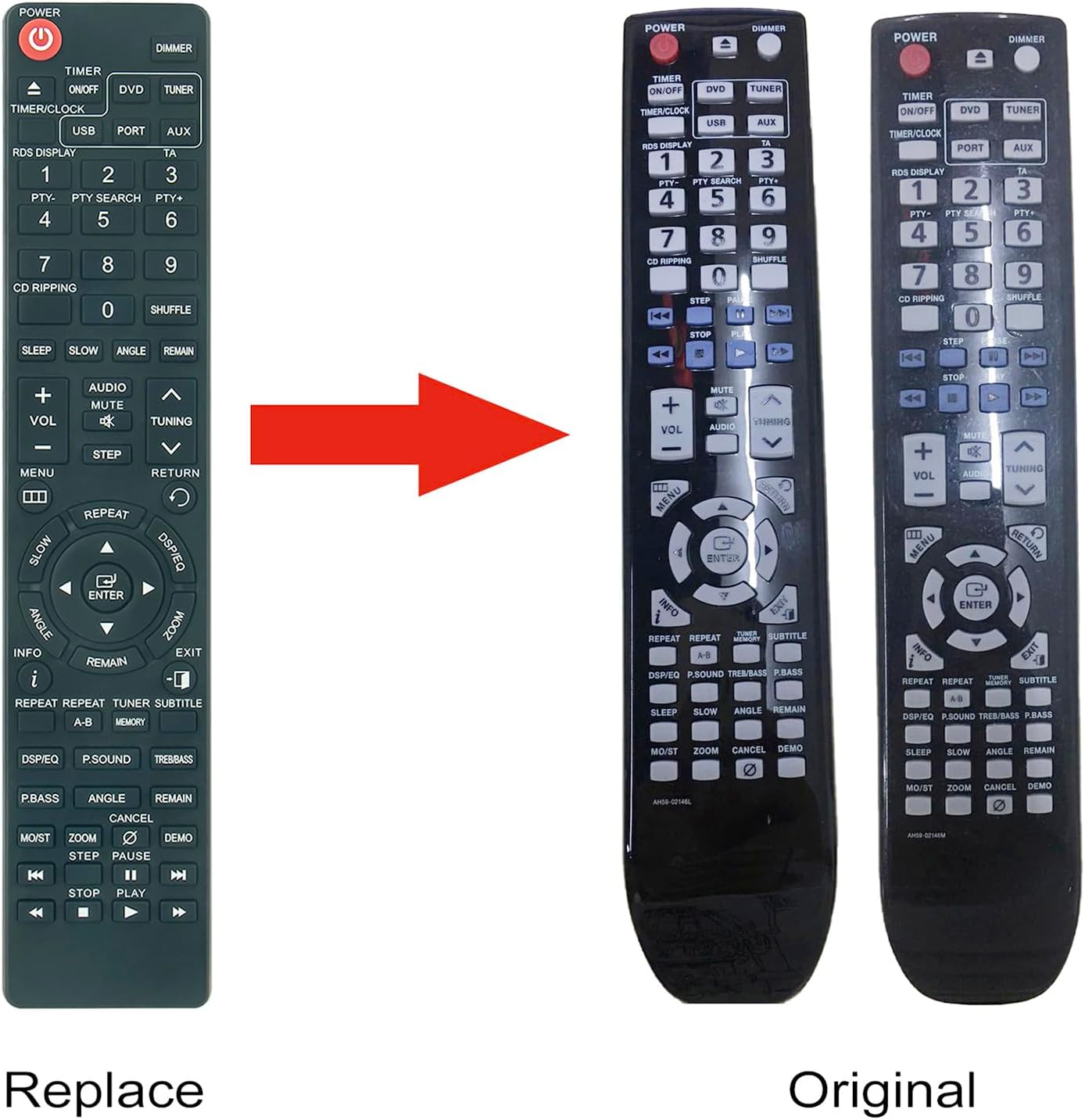
Image: A visual comparison between the ALLIMITY replacement remote and an original Samsung remote, demonstrating their similar design and button layout.
6. Vedligeholdelse
6.1 Rengøring
To clean the remote control, gently wipe it with a soft, dry cloth. Do not use liquid cleaners or abrasive materials, as these may damage the surface or internal components.
6.2 Udskiftning af batteri
If the remote control's performance degrades or it stops responding, replace the batteries. Follow the battery installation steps outlined in Section 4.1. Always replace both batteries at the same time with new AAA alkaline batteries.
7. Fejlfinding
| Problem | Mulig årsag | Løsning |
|---|---|---|
| Fjernbetjeningen svarer ikke | Døde eller forkert isatte batterier. | Udskift batterierne med nye AAA-batterier, og sørg for at polariteten vender korrekt. |
| Fjernbetjeningen har begrænset rækkevidde | Weak batteries or obstruction between remote and system. | Replace batteries. Ensure a clear line of sight to the multimedia system's IR receiver. |
| Specifikke knapper virker ikke | Button malfunction or system incompatibility. | Verify your Samsung system model is listed in the compatible models. If issues persist, contact customer support. |
8. Specifikationer
- Modelnumre: AH59-02146M, AH59-02146L
- Mærke: ALLIMITET
- Strømkilde: 2 x AAA batterier (medfølger ikke)
- Dimensioner: Cirka 6 x 2 x 0.6 tommer (15.24 x 5.08 x 1.52 cm)
- Varens vægt: Cirka 2 ounce (56.7 gram)
- Farve: Sort
- Speciel funktion: Ingen programmering påkrævet
- Kompatible enheder: Samsung Micro Component Multimedia Systems (refer to Section 5.2 for specific models)
9. Garanti og support
For warranty information or technical support, please refer to the seller's policy or contact the retailer from whom the product was purchased. Keep your purchase receipt as proof of purchase.


