1. Introduktion
This manual provides detailed instructions for the installation, operation, and maintenance of your Eonon M3BKX7 Android 14 Car Stereo. This unit is designed for specific Mazda 3 models manufactured between 2004 and 2009, offering an enhanced in-car entertainment and navigation experience.

Image: Eonon M3BKX7 Android 14 Car Stereo unit with external microphone and backup camera accessories.
1.1 Kompatibilitet
The Eonon M3BKX7 is compatible with Mazda 3 vehicles from model years 2004 to 2009. It integrates with existing vehicle systems, including steering wheel controls and reverse signals, via the included CANBUS module. Please note that the unit does not work with the factory car LCD screen of 2004-2005 Mazda 3 models. If your car dash matches the image for 2010-2013 Mazda 3, please refer to the Eonon 2010-2013 Mazda 3 car stereo manual.

Image: Visual guide for Mazda 3 dashboard compatibility, indicating which models are supported.
2. Pakkens indhold
Verify that all items listed below are present in your package before beginning installation:
- Eonon M3BKX7 Head Unit
- Backup Camera (A0125) *1
- Strømkabel * 1
- GPS-antenne *1
- USB-adapterkabel *2
- Audio/Video-adapterkabel *2
- Bakkamera videoindgangskabel *1
- 15A Fuse *1
- Ekstern mikrofon *1
- CAN Bus *1
- Brugervejledning *1
- Klæbende pude *1
- Radioantenneadapterkabel *1
- Højttaler * 1

Image: Diagram illustrating all components included in the Eonon M3BKX7 package.
3. Opsætning og installation
The Eonon M3BKX7 is designed for plug-and-play installation in compatible Mazda 3 vehicles (2004-2009). No additional kits or cable modifications are typically required. Professional installation is recommended if you are unfamiliar with car audio system wiring.
3.1 Tjekliste før installation
- Sørg for, at køretøjets tænding er slukket, og at batteriet er frakoblet.
- Bekræft at alt indhold i pakken er til stede.
- Review the wiring diagram thoroughly.
3.2 Installationstrin (generelt)
- Carefully remove the factory car stereo and trim panels.
- Connect the provided power cable, CAN Bus, and other necessary adapters to the vehicle's wiring harness.
- Connect the GPS antenna and external microphone, routing cables appropriately.
- If installing the backup camera, route its video input cable to the head unit and connect the camera to the vehicle's reverse light power source.
- Mount the Eonon M3BKX7 head unit into the dashboard opening.
- Reconnect the vehicle battery and test the unit's functionality before reassembling the trim panels.
3.3 Ledningsdiagram
Refer to the detailed wiring diagram for specific connections. The CAN Bus supports most original vehicle functions, including steering wheel controls and reverse signals (voice buttons are not supported).

Image: Comprehensive wiring diagram for the Eonon M3BKX7 car stereo, detailing all input and output connections.

Image: Illustration of plug-and-play features, highlighting compatibility with steering wheel controls, Bose audio system, and LCD screen (where applicable).
4. Betjeningsvejledning
4.1 Tænd/sluk
The unit powers on automatically with the vehicle's ignition. To manually power off or restart, press and hold the power button on the unit's front panel.
4.2 Trådløs CarPlay / Android Auto
Connect your smartphone wirelessly for access to navigation, music, calls, and messages through the car stereo interface.
4.2.1 Trådløs Apple CarPlay-forbindelse
- Open the 'Zlink5' application on the car stereo.
- On your iPhone, enable Wi-Fi and Bluetooth.
- In your iPhone's Bluetooth device list, locate and select 'EONON'. Enter the PIN '0000' to pair.
- Once connected, tap 'Use CarPlay' on your iPhone. The connection should complete within a few seconds.
4.2.2 Trådløs Android Auto-forbindelse
- Open the 'Zlink5' application on the car stereo.
- On your Android phone, enable Wi-Fi and Bluetooth.
- In your Android phone's Bluetooth device list, locate and select 'EONON'. Enter the PIN '0000' and confirm.
- The connection should complete within a few seconds.

Image: Step-by-step guide for connecting an iPhone to Wireless Apple CarPlay.

Image: Step-by-step guide for connecting an Android phone to Wireless Android Auto.
4.3 Bluetooth 5.4
The unit features Bluetooth 5.4 for quick and stable connections, noise reduction, clear call quality, and high-quality music streaming. Pair your phone via the Bluetooth settings on the head unit to enable hands-free calling and audio playback.

Image: Diagram highlighting the independent Bluetooth module and external antenna for enhanced connectivity.
4.4 DSP Audio Processor
Utilize the built-in 32-bit DSP audio processor with FFT acceleration and a 48-band equalizer to customize your audio experience. Select from preset EQ modes (Custom, Standard, Popular, Rock, Classical, Jazz) or create your own sound profile. The ST TDA7388 amplifier provides 4x45W surround sound output.

Image: Details on the DSP audio processor, including 32-bit DSP, 48-band EQ, and optimization for car acoustics.
4.5 Skærmspejling
Mirror your smartphone screen (iOS or Android) onto the car stereo display.
4.5.1 iOS Screen Mirroring
- Open the 'Zlink5' app on the car stereo and set it to iPhone wireless screen mirroring mode.
- Turn on your iPhone's personal hotspot and connect the car stereo to it.
- On your iPhone, enable the screen mirroring function and select 'zj-airplay'.
4.5.2 Android Screen Mirroring
- Open the 'Zlink5' app on the car stereo and set it to Android wireless screen mirroring mode.
- Turn on your Android phone's personal hotspot and connect the car stereo to it.
- Install the Zplus app on your phone. Open it and select 'wireless connection'.
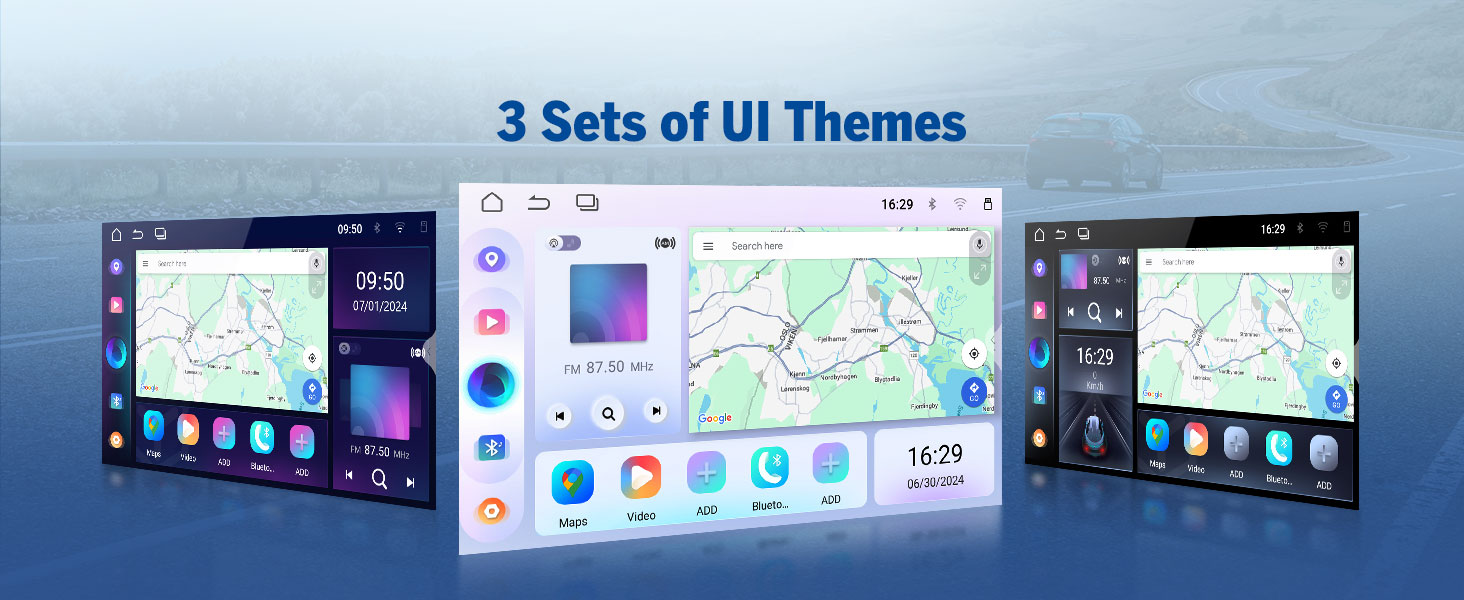
Image: Step-by-step instructions for setting up screen mirroring from an iOS device.

Image: Step-by-step instructions for setting up screen mirroring from an Android device.
4.6 Radio (AM/FM/RDS)
Access AM/FM radio stations. The unit supports RDS (Radio Data System) for displaying station information where available.
4.7 USB-afspilning
Connect USB storage devices (up to 512GB) to play audio and video files. The unit features multiple USB ports for convenience.
4.8 GPS-navigation
Utilize online or offline navigation applications. The included GPS antenna ensures accurate positioning.
4.9 kameraindgange
The unit supports both rear and front camera inputs. The included A0125 backup camera provides 1080P AHD resolution with a 140° rear viewing angle and reversing guidelines. An optional A100 dash cam (not included) can be connected for front recording.

Image: Features of the included A0125 backup camera, including reversing guidelines, 720P AHD, 140° viewing angle, and IP68 waterproof rating.
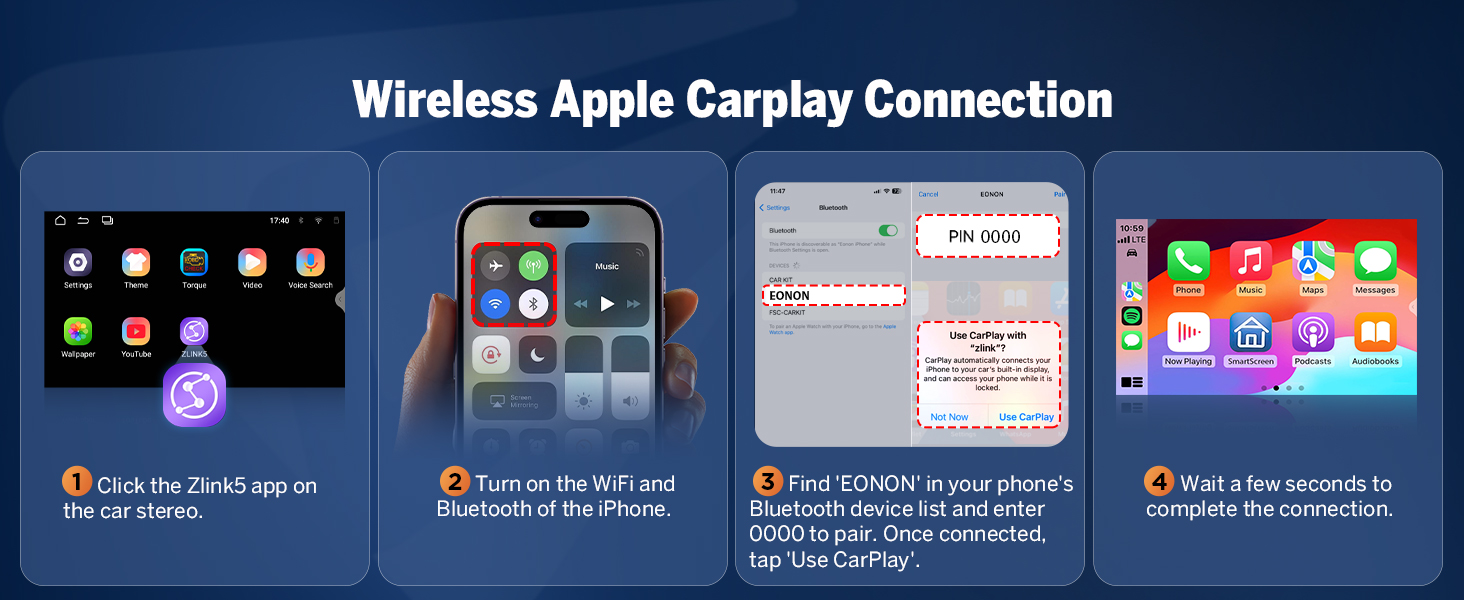
Image: Features of a compatible dash cam (A100, not included), showing 120° viewing angle and video playback capabilities.
4.10 OBD2 Functionality
The unit supports an optional V0056 OBD2 adapter (not included) for vehicle fault diagnosis and real-time status monitoring.
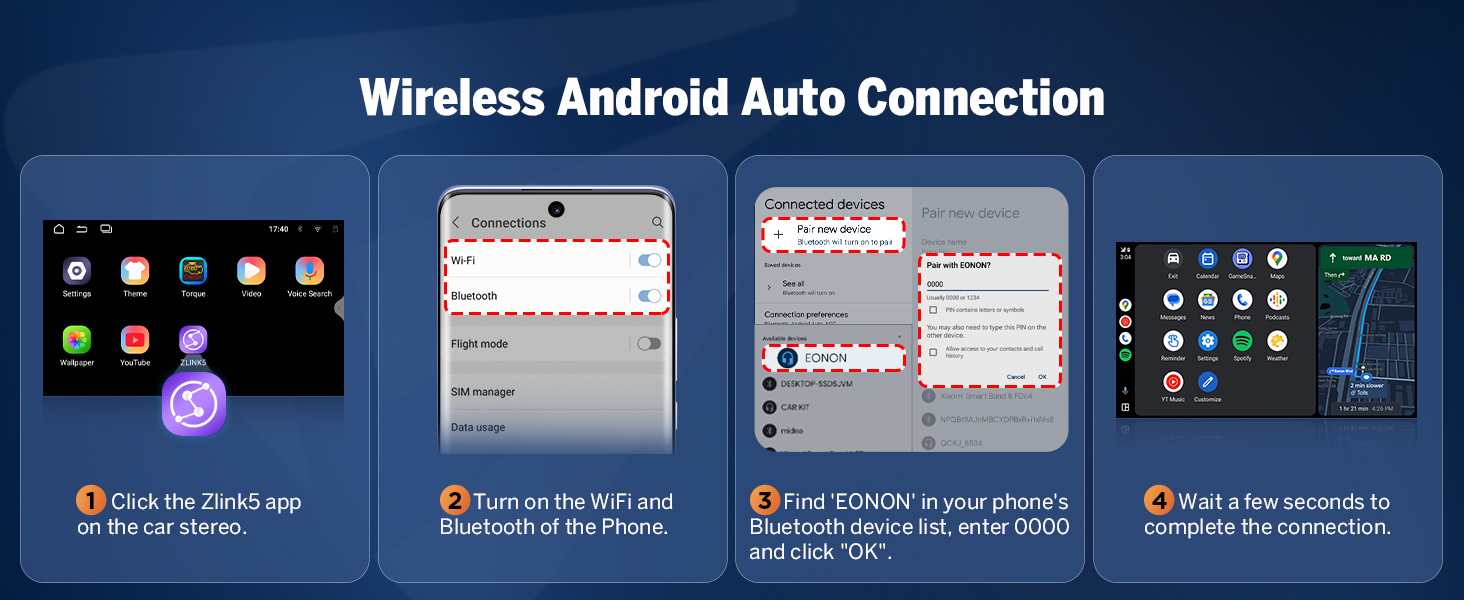
Image: Display showing vehicle fault diagnosis and real-time status via an optional OBD2 adapter.
4.11 User Interface Customization
Personalize your car stereo's appearance with customizable boot logos, button colors, and wallpapers. The unit also offers three distinct UI themes.

Billede: Eksamples of user interface customization, including boot logo, button color selection, and wallpaper options.
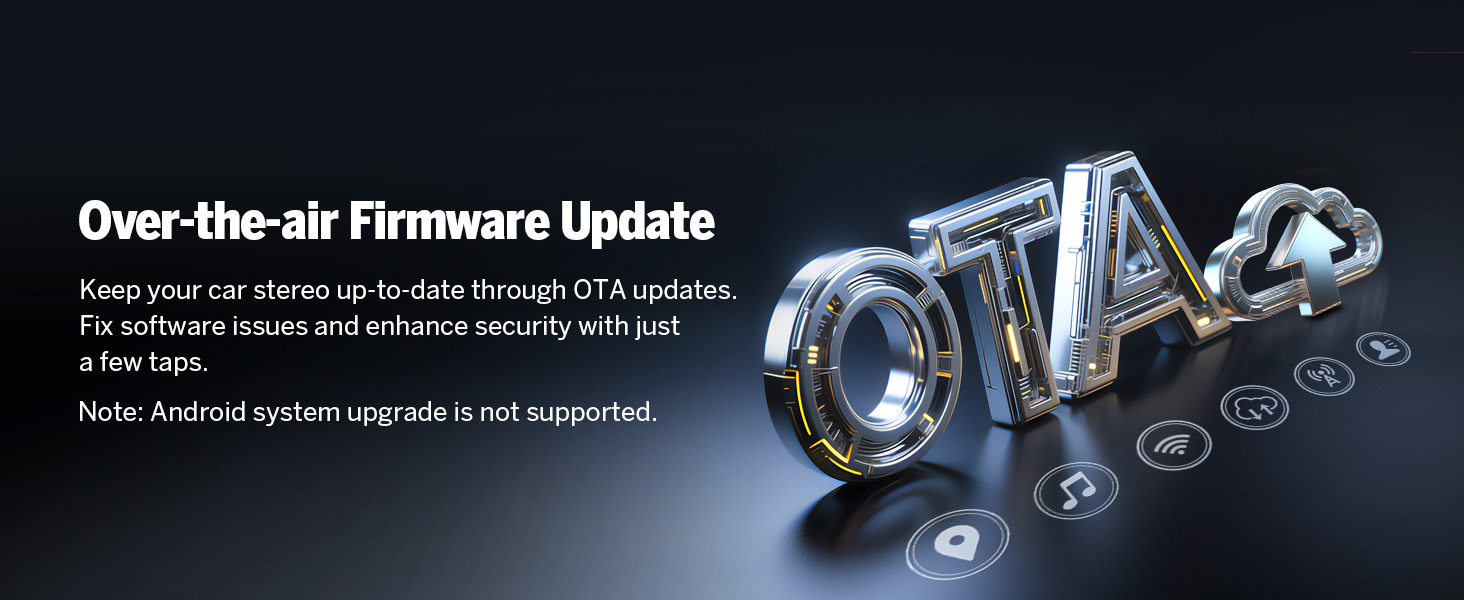
Image: Display of three different user interface themes available on the Eonon M3BKX7.
5. Vedligeholdelse
5.1 Over-the-Air (OTA) Firmware Updates
The Eonon M3BKX7 supports OTA firmware updates. These updates address software issues and enhance security. To update, navigate to the system settings and check for available updates. Note that these are firmware updates and do not upgrade the Android operating system version.

Image: Graphic illustrating the Over-the-Air (OTA) firmware update process.
5.2 Generel pleje
- Rengør skærmen med en blød, fnugfri klud. Undgå slibende rengøringsmidler.
- Keep the unit free from excessive dust and moisture.
- Sørg for korrekt ventilation omkring enheden for at forhindre overophedning.
6. Fejlfinding
If you encounter issues with your Eonon M3BKX7, refer to the following common solutions:
- Ingen strøm: Check all power connections and the 15A fuse. Ensure the vehicle battery is properly connected.
- Ingen lyd: Verify speaker connections and audio output settings. Check the volume level and ensure the mute function is not active.
- CarPlay/Android Auto Connectivity Issues: Ensure Wi-Fi and Bluetooth are enabled on both the head unit and your smartphone. Re-pair the devices if necessary. Check for any software updates for the Zlink5 app or your phone's operating system.
- Ratbetjening virker ikke: Confirm the CAN Bus module is correctly installed and connected. Some voice button functions may not be supported.
- Dårlig mikrofonkvalitet: Ensure the external microphone is properly connected and positioned. Check microphone settings within the unit's menu.
- GPS-signaltab: Sørg for, at GPS-antennen er korrekt tilsluttet og har en klar view af himlen.
- Skærmen reagerer ikke: Perform a soft reset by pressing the reset button (if available) or disconnecting and reconnecting the vehicle battery.
For persistent issues, contact Eonon customer support.
7. Specifikationer
| Feature | Detalje |
|---|---|
| Operativsystem | Real Android 14 |
| CPU | RK3562 Quad-core ARM Cortex-A53 @ 2.0 GHz |
| VÆDDER | 3 GB |
| ROM | 32 GB |
| Skærmstørrelse | 9 tommer |
| Opløsning | 1280 * 720 IPS |
| Touchskærm | 2.5D kapacitiv |
| Bluetooth | Bluetooth 5.4 |
| Wi-Fi | Wi-Fi 6 (5Ghz support) |
| Amplivligere | ST TDA7388 (4x45W) |
| DSP | 32-bit DSP, 48-band Equalizer |
| USB-porte | 3 |
| Max USB Storage | 512 GB |
| Forbindelse | Bluetooth, USB, Wi-Fi |
| Særlige funktioner | Android Auto, Apple CarPlay, GPS Navigation, Hands-Free Calling, Digital Display Screen |
| Varemodelnummer | M3BKX7 |
| Pakkedimensioner | 38.2 x 19.9 x 18.4 cm |
| Varens vægt | 1.91 kg |

Image: Diagram illustrating the internal components of the Eonon X7 Series, including the 4-layer automotive PCB, ST amplifier, Wi-Fi 6 & Bluetooth 5.4 module, Silicon Labs tuner, and memory.

Image: Close-up of the 9-inch IPS display, highlighting its 1280x720 resolution, 2.5D capacitive touchscreen, and 178° viewvinkel.

Image: Information on the Android 14 operating system and RK3562 processor, including AnTuTu running scores for performance comparison.
8. Garanti og support
8.1 Garantioplysninger
The Eonon M3BKX7 comes with a 2 års garanti fra købsdatoen. Denne garanti dækker fabrikationsfejl og funktionsfejl ved normal brug. Gem venligst din købsbevis til garantikrav.
8.2 Return and Replacement Policy
- 30 dages gratis returnering: Products can be returned for a full refund within 30 days of purchase.
- 90-dages erstatning: A replacement unit will be provided within 90 days of purchase for qualifying issues.
8.3 Kundesupport
Eonon is committed to providing lifelong after-sales service. For technical assistance, troubleshooting, or warranty inquiries, please contact our customer support team. We aim to provide a quick reply within 24 hours (excluding weekends).


