1. Introduktion
The Ferguson Regent i351S is a versatile internet radio designed to provide a rich audio experience with multiple connectivity options. This manual offers detailed instructions for setting up, operating, and maintaining your device, ensuring you can fully utilize its features including Wi-Fi, DAB+, FM radio, Bluetooth, Spotify Connect, and dual alarms. Please read this manual thoroughly before first use and keep it for future reference.
2. Sikkerhedsoplysninger
For at sikre sikker drift og forhindre skader, bedes du overholde følgende sikkerhedsforanstaltninger:
- Udsæt ikke enheden for regn, fugt eller ekstreme temperaturer.
- Undgå at placere enheden i nærheden af varmekilder såsom radiatorer, komfurer eller andre varmeproducerende apparater.
- Bloker ikke ventilationsåbninger. Sørg for tilstrækkelig plads omkring enheden for korrekt luftgennemstrømning.
- Brug kun tilbehør/tilbehør specificeret af producenten.
- Tag stikket ud af enheden under tordenvejr, eller når den ikke skal bruges i længere perioder.
- Åbn ikke c'enasing. Overlad al service til kvalificeret servicepersonale.
- Hold enheden væk fra stærke magnetiske felter.
3. Pakkens indhold
Kontroller venligst pakkens indhold ved udpakning. Hvis der mangler eller er beskadigede dele, skal du kontakte din forhandler.
- Ferguson Regent i351S Internet Radio
- Strømadapter
- Fjernbetjening
- Hurtig startvejledning
4. Produktet er slutview
Familiarize yourself with the main components and controls of your Ferguson Regent i351S.
4.1 Frontpanel og display
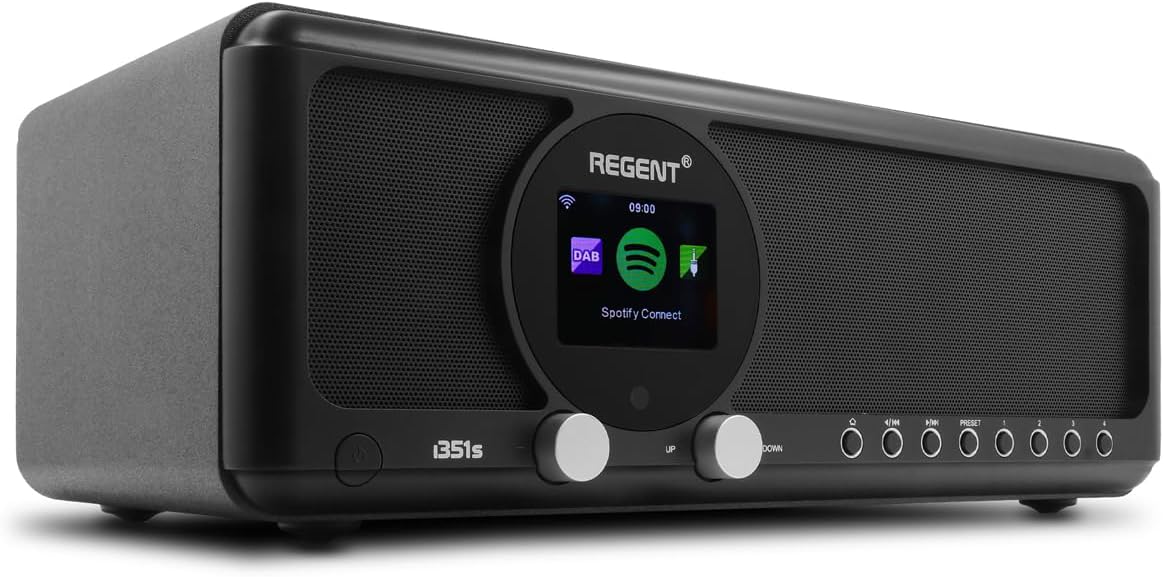
Billede: Forside view of the Ferguson Regent i351S Internet Radio, showcasing the central color display, dual speakers, and control knobs/buttons.
The front panel features a prominent 2.4-inch TFT color display, two main control knobs (Up/Down), and several function buttons for navigation and mode selection. The stereo speakers are located on either side of the central display.
4.2 Bagpanel og tilslutninger

Billede: Bagside view of the Ferguson Regent i351S Internet Radio, showing the telescopic antenna, USB port, power input, and bass reflex port.
The rear panel includes the telescopic antenna for DAB+/FM reception, a USB port for media playback, an AUX-in port for external audio sources, a 3.5mm headphone output, and the power adapter input.
4.3 Fjernbetjening

Image: The remote control unit for the Ferguson Regent i351S Internet Radio, featuring various buttons for power, volume, navigation, mode selection, and presets.
The included remote control allows convenient operation of all radio functions from a distance.
4.4 Produktdimensioner

Image: Diagram showing the dimensions of the Ferguson Regent i351S Internet Radio: 33 cm (length), 17.30 cm (depth), and 11.50 cm (height).
The radio measures approximately 41 cm (length) x 17 cm (width) x 22 cm (height).
5. Opsætningsvejledning
Follow these steps for initial setup of your internet radio.
- Strømtilslutning: Connect the supplied power adapter to the DC IN port on the rear of the radio and then plug it into a wall outlet.
- Første gang tændt: Tryk på tænd/sluk-knappen på frontpanelet eller fjernbetjeningen for at tænde radioen.
- Sprogvalg: The display will prompt you to select your preferred language. Use the navigation knobs or remote to select and confirm.
- Network Setup (Wi-Fi):
- Radioen vil søge efter tilgængelige Wi-Fi-netværk. Vælg dit netværk fra listen.
- Enter your Wi-Fi password using the on-screen keyboard and navigation controls.
- Alternatively, if your router supports WPS, you can select the WPS option on the radio and activate WPS on your router for a quick connection.
- Når der er oprettet forbindelse, vises Wi-Fi-ikonet på displayet.
- Tid og dato: The radio will automatically synchronize the time and date via the internet connection.
6. Betjeningsvejledning
Learn how to use the various audio modes and features of your Ferguson Regent i351S.
6.1 Internetradio
Access a vast selection of online radio stations from around the world.
- Vælg "Internetradio" i hovedmenuen.
- Du kan søge efter stationer efter placering, genre eller søge efter bestemte stationer.
- Vælg en station for at starte afspilningen.
- To save a station as a preset, press and hold the "Preset" button until the save menu appears.
6.2 DAB+ radio
Enjoy high-quality digital audio broadcasting.
- Træk teleskopantennen helt ud.
- Select "DAB+" from the main menu. The radio will automatically scan for available DAB+ stations.
- Use the navigation controls to select a station from the list.
6.3 FM radio
Tune into traditional FM radio broadcasts with RDS information.
- Træk teleskopantennen helt ud.
- Vælg "FM" i hovedmenuen.
- Use the tuning controls to manually scan or auto-scan for stations.
- RDS-oplysninger (Radio Data System), såsom stationsnavn, vises, hvis de er tilgængelige.
6.4 Bluetooth Connectivity (Two-Way BT Transmitter)
The Regent i351S features unique two-way Bluetooth 5.0 capabilities, allowing both transmission and reception of high-quality audio.
- Receiving Audio (Bluetooth Speaker Mode):
- Select "Bluetooth" from the main menu. The radio will enter pairing mode.
- On your smartphone or other Bluetooth device, search for "Regent i351S" and pair.
- Når den er tilsluttet, kan du streame lyd fra din enhed til radioen.
- Transmitting Audio (Bluetooth Transmitter Mode):
- This mode allows the radio to send its audio output to Bluetooth headphones or speakers.
- Navigate to the Bluetooth settings on the radio and select "BT Transmitter" mode.
- Put your Bluetooth headphones/speaker into pairing mode.
- The radio will search for and connect to your Bluetooth audio device.
6.5 Spotify Connect
Stream your Spotify playlists directly through the Regent i351S without needing Bluetooth pairing.

Image: Close-up of the Ferguson Regent i351S display, showing the Spotify Connect logo and interface.
- Sørg for, at din radio er forbundet til det samme Wi-Fi-netværk som din smartphone eller tablet, der kører Spotify-appen.
- Åbn Spotify-appen på din enhed.
- Play a song and tap the "Devices Available" icon (usually a speaker or computer icon).
- Select "Regent i351S" from the list of available devices.
- The radio will begin streaming directly from Spotify.
6.6 USB/AUX-indgang
Connect external audio sources or play media from a USB drive.
- USB-afspilning: Insert a USB drive into the USB port on the rear panel. Select "USB" mode from the menu to browse and play audio files.
- AUX-indgang: Connect an external audio device (e.g., MP3 player) to the AUX IN port using a 3.5mm audio cable. Select "AUX In" mode to listen to audio from the connected device.
6.7 Dual Alarms
Set up two independent alarms with customizable sources and times.
- Access the "Alarm" settings from the main menu.
- Select Alarm 1 or Alarm 2 to configure.
- Set the alarm time, source (e.g., buzzer, FM, DAB+, Internet Radio), volume, and recurrence (daily, weekdays, weekends, once).
- Bekræft indstillingerne for at aktivere alarmen.
6.8 Fjernbetjening App
Control your radio using a dedicated mobile application for smartphones.
- Download the official Ferguson remote control app from your device's app store (e.g., Google Play Store for Android).
- Ensure your smartphone and the radio are connected to the same Wi-Fi network.
- Open the app and follow the on-screen instructions to connect to your Regent i351S.
- The app provides full control over radio functions, including mode selection, station browsing, volume, and presets.
7. Vedligeholdelse
Proper care will ensure the longevity of your Ferguson Regent i351S.
- Rensning: Brug en blød, tør klud til at rengøre radioens yderside. Brug ikke slibende rengøringsmidler, voks eller opløsningsmidler.
- Antenne: Håndter teleskopantennen forsigtigt for at undgå at den bøjer eller knækker.
- Opbevaring: If storing the radio for an extended period, unplug it from the power outlet and store it in a cool, dry place.
8. Fejlfinding
Se dette afsnit for løsninger på almindelige problemer, du kan støde på.
| Problem | Mulig årsag | Løsning |
|---|---|---|
| Ingen strøm | Strømadapteren er ikke tilsluttet; stikkontakten er defekt. | Ensure the power adapter is securely connected. Try a different power outlet. |
| Ingen lyd | Lydstyrken er for lav; Lydløs aktiveret; Forkert lydkilde valgt. | Increase volume. Check if mute is active. Select the correct audio source (e.g., Internet Radio, DAB+). |
| Wi-Fi-forbindelse ustabil eller mistet | Weak Wi-Fi signal; Incorrect password; Router issues. | Move the radio closer to the Wi-Fi router. Re-enter Wi-Fi password. Restart your Wi-Fi router. Ensure no interference from other devices. |
| Cannot find DAB+/FM stations | Antenna not extended; Poor signal area. | Fully extend the telescopic antenna. Try repositioning the radio for better reception. Perform a full scan for stations. |
| Bluetooth-parring mislykkes | Device not in pairing mode; Radio not in correct Bluetooth mode. | Ensure both the radio and your external device are in Bluetooth pairing mode. Check if the radio is set to BT Receiver or BT Transmitter mode as needed. |
| Fjernbetjening virker ikke | Dead batteries; Obstruction between remote and radio. | Replace batteries in the remote control. Ensure a clear line of sight to the radio's IR receiver. |
9. Specifikationer
| Mærke | Ferguson |
| Modelnummer | i351s |
| Farve | Sort |
| Forbindelsesteknologi | Hjælpestik, Bluetooth, USB, Wi-Fi |
| Særlige funktioner | Mobile app control, Built-In Clock, Weather alarm, Spotify Connect, DAB, DAB+ and FM tuner with RDS, Wi-Fi, Unique Two-Way Bluetooth IN/OUT Transmitter |
| Kompatible enheder | Speaker, Smartphone, Earphone |
| Produktmål (L x B x H) | 41 cm x 17 cm x 22 cm |
| Tuningteknologi | Spotify Connect, Internet Radio, DAB, DAB+ and FM tuner with RDS |
| Strømkilde | AC adapter powered |
| Understøttede radiobånd | 2 bånd |
| Inkluderede komponenter | Hurtig startvejledning |
10. Garantioplysninger
The Ferguson Regent i351S comes with a manufacturer's warranty. Please refer to the warranty card included in your package for specific terms and conditions.
- Tilgængelighed af reservedele: 2 år
- Softwareopdateringer garanteret indtil: Information ikke tilgængelig
Gem din købsbevis i tilfælde af garantikrav.
11. Support
For further assistance, technical support, or service inquiries, please contact Ferguson customer support through their official webwebstedet eller de kontaktoplysninger, der følger med din produktdokumentation.
Du kan også besøge produktside på Amazon for additional resources and FAQs.


