1. Introduktion
Tak for købetasing the FRONTECH Spark Series 60 Watt Tower Speaker (Model: SW-0163). This powerful audio system is designed to deliver immersive sound with versatile connectivity options, including Bluetooth 5.0, USB, AUX, and a wired microphone for karaoke. Please read this manual carefully before operating the device to ensure proper use, optimal performance, and safety.
2. Sikkerhedsoplysninger
For at forhindre brand, elektrisk stød eller produktskade skal du overholde følgende sikkerhedsforanstaltninger:
- Strømkilde: Use only the specified power supply. Ensure the voltage matches the requirements indicated on the speaker.
- Ventilation: Do not block any ventilation openings. Maintain adequate space around the speaker for proper airflow.
- Vand og fugt: Do not expose the speaker to rain, moisture, or dripping/splashing liquids. Do not place objects filled with liquids, such as vases, on the speaker.
- Varmekilder: Hold højttaleren væk fra varmekilder såsom radiatorer, varmeapparater, komfurer eller andre apparater (herunder ampløftere), der producerer varme.
- Rensning: Unplug the speaker from the power outlet before cleaning. Use a dry, soft cloth for cleaning. Do not use liquid cleaners or aerosol cleaners.
- Service: Do not attempt to service this product yourself. Refer all servicing to qualified service personnel. Opening or removing covers may expose you to dangerous voltage eller andre farer.
- Placering: Placer højttaleren på en stabil, flad overflade for at forhindre den i at falde.
- Børn: Hold emballagematerialer og små dele væk fra børn.
3. Pakkens indhold
Kontroller venligst, at alle nedenstående varer er inkluderet i din pakke:
- 1 Unit FRONTECH Spark Series Tower Speaker
- 1 Unit Wired Microphone
- 1 Unit Remote Control
- 1 Unit Audio Cable
- 1 Unit User Manual (this document)
4. Produktet er slutview
Familiarize yourself with the components and controls of your FRONTECH Spark Tower Speaker.

Figur 4.1: Forside view of the FRONTECH Spark Tower Speaker, showing the main unit, wired microphone, and remote control.

Figure 4.2: Close-up of the speaker's control panel, detailing the LED digital display, USB port, AUX input, mode selection, playback controls, volume knob, and microphone input.
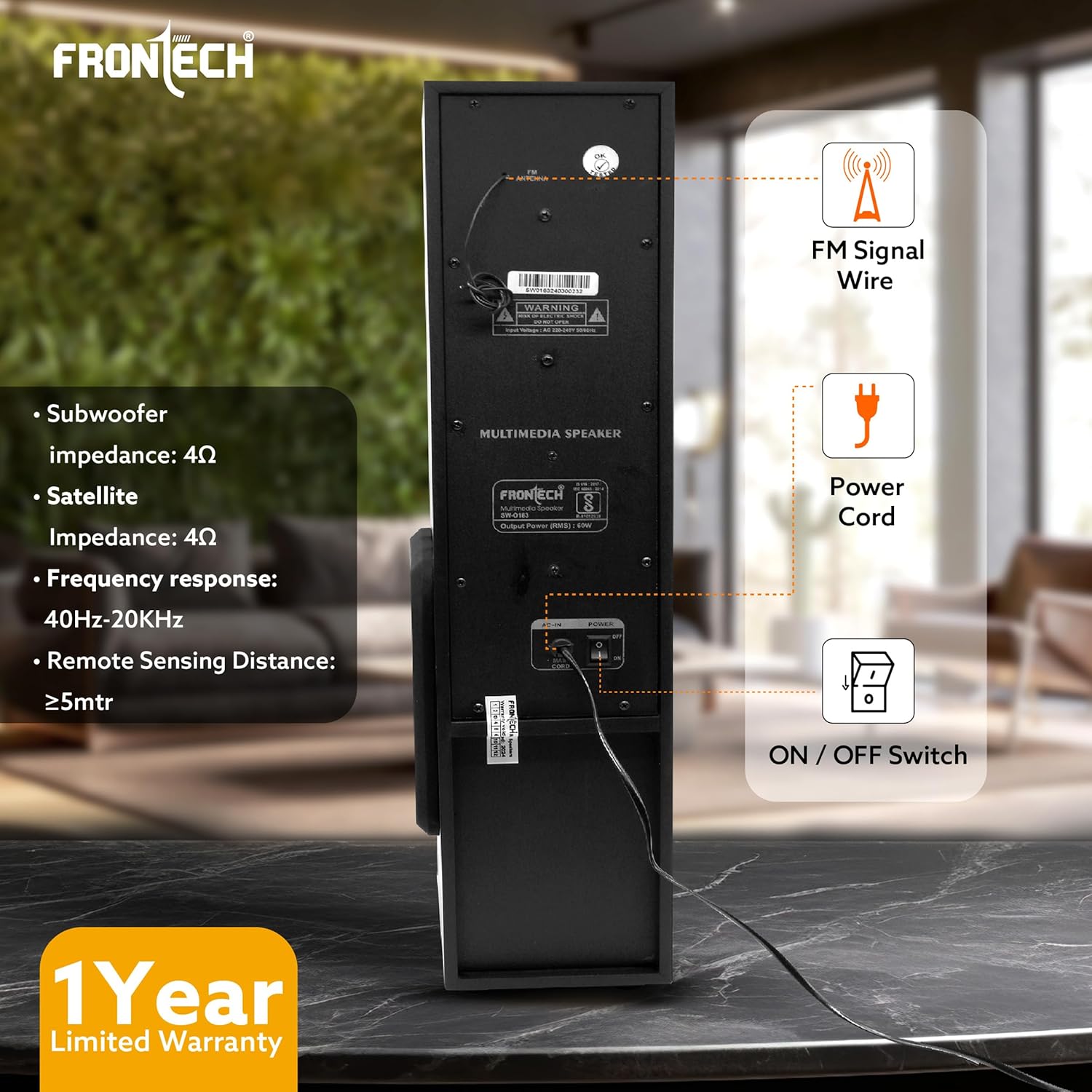
Figure 4.3: Rear panel of the speaker, illustrating the FM signal wire connection, power cord input, and the main ON/OFF switch.
Kontrol på frontpanelet:
- LED digitalt display: Shows current mode, track number, and other status indicators.
- USB-port: Til afspilning af lyd files from USB drives and charging devices.
- AUX-indgang: Til tilslutning af eksterne lydenheder via et 3.5 mm lydkabel.
- Mode knap: Cycles through input modes (Bluetooth, AUX, FM, USB).
- Afspil/pause knap: Styrer afspilning i USB- og Bluetooth-tilstande.
- Forrige/Næste knapper: Navigates tracks in USB and Bluetooth modes, or radio stations in FM mode.
- Volumenkontrolknap: Justerer masterlydstyrken.
- Wired Mic Input: Connect the included wired microphone for karaoke.
Betjening på bagsiden:
- FM Signal Wire: For forbedret FM-radiomodtagelse.
- Netledningsindgang: Tilslut strømkablet her.
- TÆND/SLUK -kontakt: Hovedafbryder til højttaleren.
5. Opsætning
- Placering: Place the tower speaker on a flat, stable surface. Ensure there is adequate space around the speaker for ventilation.
- Strømtilslutning: Connect the power cord to the power input on the rear of the speaker, then plug the other end into a standard wall outlet.
- Tænd: Flip the ON/OFF switch on the rear panel to the "ON" position. The LED digital display on the front will light up.
- FM Antenna (Optional): For better FM radio reception, extend the FM signal wire located at the back of the speaker.
- Mikrofontilslutning (valgfrit): If using the karaoke function, plug the wired microphone into the "MIC" input on the front panel.
6. Betjeningsvejledning
6.1. Tænd/sluk
- To turn on the speaker, flip the ON/OFF switch on the rear panel to "ON".
- To turn off the speaker, flip the ON/OFF switch on the rear panel to "OFF".
6.2. Valg af tilstand
Press the "MODE" button on the front panel or the remote control to cycle through the available input modes: Bluetooth (BT), AUX, FM, and USB.
6.3. Bluetooth-parring
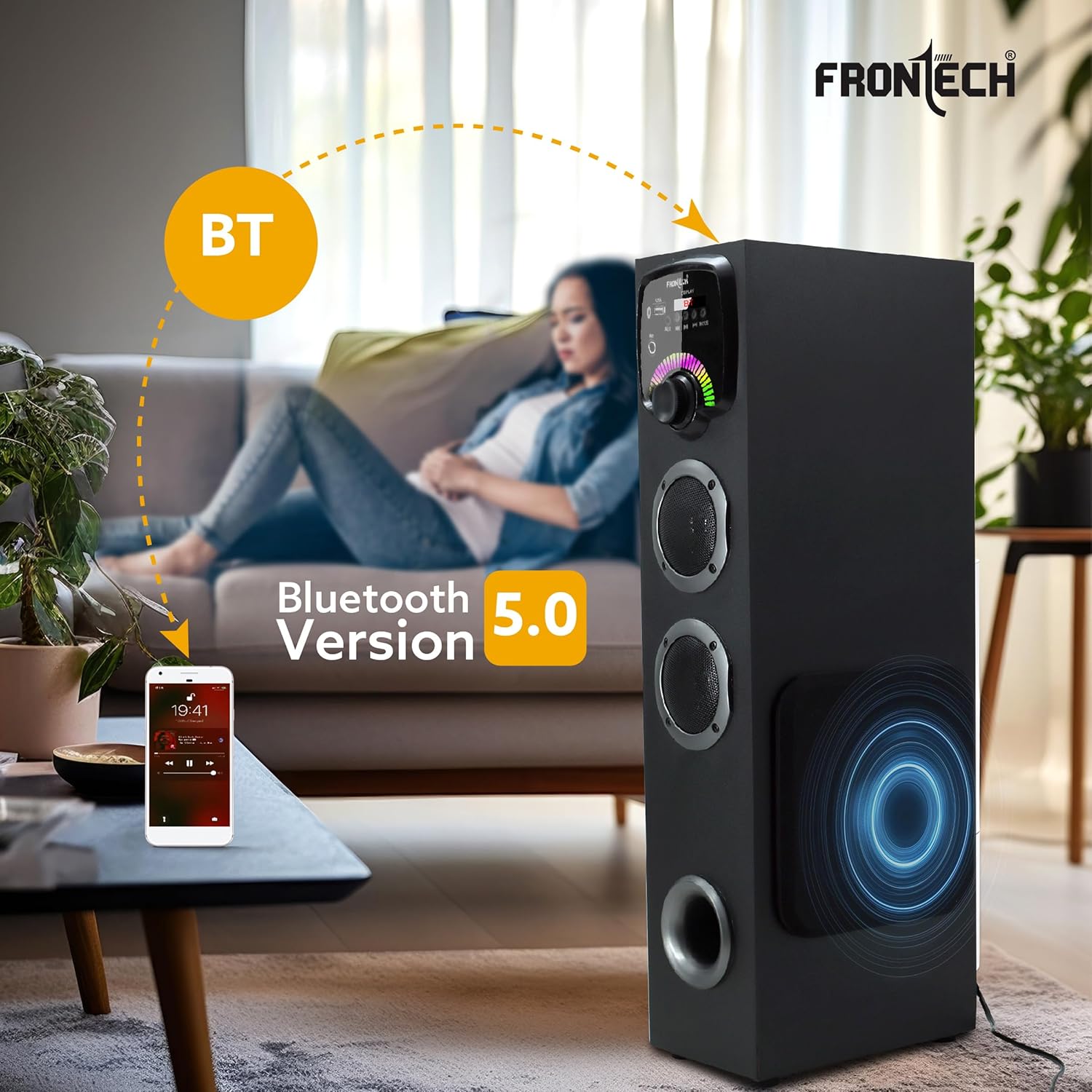
Figure 6.1: Illustration of Bluetooth 5.0 connectivity between a smartphone and the speaker.
- Turn on the speaker and select "BT" mode using the "MODE" button. The LED display will show "BT" and a pairing indicator may flash.
- Aktiver Bluetooth på din smartphone, tablet eller anden Bluetooth-aktiveret enhed.
- Søg efter available devices. You should find "FRONTECH SPARK" or a similar name in the list.
- Select "FRONTECH SPARK" to pair. Once connected, the speaker will emit a confirmation sound, and the "BT" indicator on the display will become steady.
- Du kan nu afspille lyd fra din enhed via højttaleren.
6.4. USB-afspilning
- Indsæt et USB-flashdrev med MP3-lyd files i USB-porten på frontpanelet.
- The speaker will automatically switch to "USB" mode and begin playing the audio files. If not, press the "MODE" button to select "USB" mode.
- Use the Play/Pause, Previous, and Next buttons on the speaker or remote to control playback.
6.5. AUX -indgang
- Connect one end of the included audio cable (3.5mm jack) to the AUX input on the front panel of the speaker.
- Connect the other end of the audio cable to the headphone jack or audio output of your external device (e.g., computer, DVD player, MP3 player).
- Press the "MODE" button to select "AUX" mode.
- Afspil lyd fra din eksterne enhed.
6.6. FM Radio
- Extend the FM signal wire on the rear of the speaker for optimal reception.
- Press the "MODE" button to select "FM" mode.
- Tryk og hold Afspil/Pause-knappen nede for at starte en automatisk søgning efter FM-stationer. Højttaleren gemmer alle fundne stationer.
- Brug knapperne Forrige/Næste til at navigere gennem de gemte FM-stationer.
6.7. Karaoke-funktion

Figure 6.2: The FRONTECH Spark Tower Speaker's karaoke function in use with the wired microphone.
- Plug the wired microphone into the "MIC" input on the front panel.
- Play music through any of the available input modes (Bluetooth, USB, AUX).
- Adjust the master volume using the volume control knob. The microphone volume is integrated with the main volume.
- Sing along with your favorite tunes.
7. Vedligeholdelse
- Rensning: Always unplug the speaker before cleaning. Use a soft, dry cloth to wipe the exterior surfaces. Do not use abrasive cleaners, waxes, or solvents.
- Opbevaring: If not in use for an extended period, store the speaker in a cool, dry place, away from direct sunlight and extreme temperatures.
- Ventilation: Ensure that the ventilation openings are not blocked by dust or debris. Periodically clean them gently with a soft brush or vacuum cleaner.
8. Fejlfinding
| Problem | Mulig årsag | Løsning |
|---|---|---|
| Ingen strøm | Netledning ikke tilsluttet; Strømafbryder slukket; Strømstik defekt. | Ensure power cord is securely plugged in; Turn ON the power switch on the rear panel; Try a different power outlet. |
| Ingen lyd | Volume too low; Incorrect input mode selected; Audio cable not connected properly (AUX mode); Device volume too low. | Increase volume; Press MODE button to select correct input; Check audio cable connections; Increase volume on connected device. |
| Bluetooth forbinder ikke | Speaker not in BT mode; Bluetooth on device is off; Device too far; Already connected to another device. | Select BT mode; Enable Bluetooth on your device; Move device closer to speaker; Disconnect from other devices and try pairing again. |
| USB-afspilning virker ikke | USB drive not inserted correctly; USB drive corrupted; Unsupported file format. | Re-insert USB drive; Try a different USB drive; Ensure files er i MP3-format. |
| Mikrofon virker ikke | Microphone not plugged in; Volume too low. | Ensure microphone is fully plugged into the MIC input; Increase the master volume. |
9. Specifikationer
| Feature | Detalje |
|---|---|
| Modelnavn | Spark- (60W) / SW-0163 |
| Udgangseffekt (RMS) | 60 watt |
| Højttaler type | Tårn |
| Subwoofer diameter | 5.25 tommer |
| Frekvensrespons | 40Hz - 20KHz |
| Trådløs teknologi | Bluetooth 5.1 |
| Forbindelse | Bluetooth, USB, AUX |
| Særlige funktioner | Bass Boost, Built-in Microphone (wired mic included), Hi-Res Audio, USB Port, LED Digital Display |
| Produktmål (D x B x H) | 25D x 13.5B x 60.2H Centimeter |
| Varens vægt | 7.5 kg (7500 gram) |
| Strømkilde | Elektrisk med ledning |
| Oprindelsesland | Kina |
10. Garanti og support
Your FRONTECH Spark Series Tower Speaker comes with a Begrænset garantiSe venligst garantikortet, der er inkluderet i din pakke, for specifikke vilkår og betingelser.
For technical support, service, or warranty claims, please contact FRONTECH customer service. You can also visit the official FRONTECH store for more information and product updates:
Visit the FRONTECH Store on Amazon.in
Fabrikant: Ecocentre, Unit-801, EM-4, Sector - V, Kolkata, West Bengal, 700283, Frontech Limited


