1. Introduktion
Thank you for choosing the Zapco ST-4XP-SQ-III 4-Channel Class AB 800W RMS Sound Quality AmpDenne manual indeholder vigtige oplysninger om korrekt installation, betjening og vedligeholdelse af din amplifier. Please read this manual thoroughly before attempting to install or operate the unit to ensure optimal performance and safety.
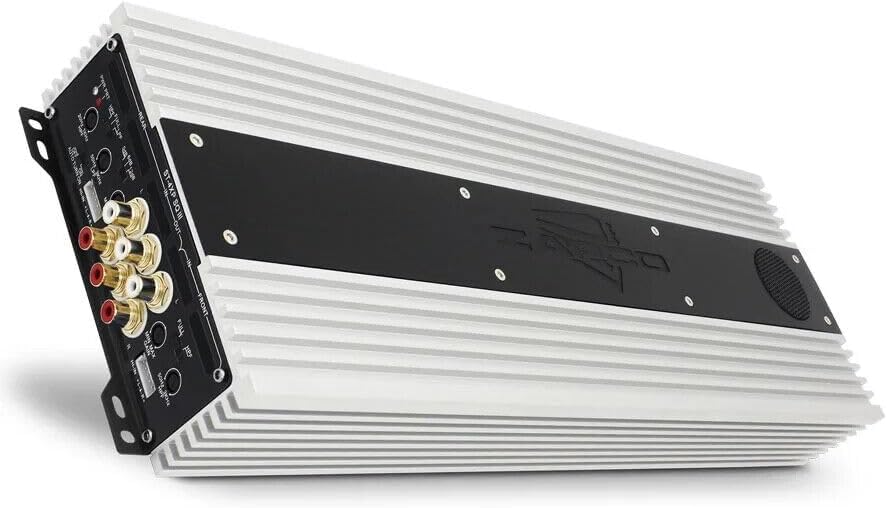
This image displays the Zapco ST-4XP-SQ-III ampløfter, showcasing its sleek design and heat sink fins. The main body is silver with a black central panel featuring the Zapco logo.
2. Sikkerhedsoplysninger
Overhold altid følgende sikkerhedsforanstaltninger under installation og drift:
- Disconnect the vehicle's negative battery terminal before any wiring.
- Sørg for, at alle ledninger er korrekt ført og fastgjort for at forhindre skader eller kortslutninger.
- Brug passende ledninger til strøm-, jord- og højttalertilslutninger som angivet.
- Monter ampOpbevar køleren sikkert på et sted, der giver tilstrækkelig ventilation og er beskyttet mod fugt og overdreven varme.
- Betjen ikke amplifier if it is damaged or malfunctioning. Refer to the troubleshooting section or contact support.
3. Produktet er slutview
The Zapco ST-4XP-SQ-III is a high-performance 4-channel Class AB amplifier designed for superior sound quality in automotive applications. Key features include:
- 4-Channel, Full Range, Class A/B operation
- Tiffany style Panel Mount RCA connectors
- Speaker Level Inputs with Auto-on functionality
- Variabel input gain -kontrol
- Variable electronic crossover (HPF/LPF)
- Variabel basforstærkningskontrol
- Robust new aluminum chassis for efficient heat dissipation
Kontrolpanellayout

This image shows the input and control panel of the Zapco ST-4XP-SQ-III amplifier. Visible controls include gain adjustments, high-pass filter (HPF), low-pass filter (LPF), bass boost, and RCA input jacks for front and rear channels. Speaker level inputs and an auto-on switch are also present.
The control panel provides access to input connections and sound tuning adjustments. This includes RCA inputs, speaker level inputs, gain controls, and crossover frequency adjustments for both front and rear channels.
Power and Speaker Output Terminals

This image details the power and speaker output terminals of the Zapco ST-4XP-SQ-III amplifier. It includes connections for Ground (GND), Remote (REM), +12V Battery (Bat), and speaker outputs for front and rear channels, with bridging options indicated.
The power and speaker output panel features robust terminals for secure connections. These include connections for the main power supply (+12V Bat), ground (GND), remote turn-on (REM), and speaker outputs for the front and rear channels, with clear markings for bridging configurations.
4. Opsætning og installation
Korrekt installation er afgørende for din ydeevne og levetid ampHvis du er usikker på nogle trin, skal du kontakte en professionel installatør.
4.1 Montering
- Choose a mounting location that is dry, well-ventilated, and away from direct sunlight or heat sources.
- Ensure sufficient space around the amplifier til luftcirkulation.
- Sikre den amplifier firmly using appropriate hardware to prevent movement during vehicle operation.
4.2 Ledningsforbindelser
Refer to the 'Power and Speaker Output Terminals' image for visual guidance.
- Power (BAT +12V): Connect a fused power cable directly from the vehicle's positive battery terminal to the +12V terminal on the amplifier. The fuse should be located within 18 inches of the battery.
- Jord (GND): Connect a ground cable of the same gauge as the power cable to a clean, unpainted metal surface on the vehicle chassis. Ensure a solid electrical connection.
- Fjernbetjening (REM): Tilslut en fjernbetjeningsledning fra din hovedenheds fjernbetjeningsudgang til REM-terminalen på amplifier. This turns the amplifier on and off with your head unit. If using speaker level inputs, the amplifier features an auto-on function.
- Input signal:
- RCA-indgange: Tilslut RCA-kabler fra din hovedenheds for-amp outputs to the corresponding RCA input jacks (Front IN, Rear IN) on the amplivligere.
- Indgange på højttalerniveau: If your head unit does not have RCA outputs, connect the speaker wires from the head unit to the amplifier's speaker level input terminals. Ensure correct polarity. The amplifier's auto-on feature will activate when a signal is detected.
- Højttalerudgange: Tilslut dine højttalere til amplifier's speaker output terminals (Front L/R, Rear L/R). Observe correct polarity (+ to + and - to -). For bridged operation, refer to the markings on the amplifier for the correct terminals.
5. Betjeningsvejledning
Når den er installeret, skal du justere ampLifier-indstillinger for optimal lydgengivelse.
5.1 Få kontrol
The variable input gain control (MIN MAX GAIN) matches the ampadapterens inputfølsomhed i forhold til udgangsniveauet på din hovedenhed. Start med forstærkningen indstillet til minimum. Afspil et velkendt nummer ved ca. 75 % af din hovedenheds maksimale lydstyrke. Øg langsomt ampforstærkningen, indtil du hører en let forvrængning, og sænk derefter lyden en smule. Dette sikrer maksimal ren lyd.
5.2 Delefiltreindstillinger
The ST-4XP-SQ-III features variable electronic crossovers for both High-Pass Filter (HPF) and Low-Pass Filter (LPF).
- HPF (højpasfilter): Tillader frekvenser over the set point to pass through. Use this for full-range speakers to prevent them from playing low bass, which can cause distortion and damage.
- LPF (lavpasfilter): Tillader frekvenser under the set point to pass through. Use this for subwoofers to ensure they only reproduce bass frequencies.
- FULD: Bypasses the crossover, allowing all frequencies to pass.
Adjust the HPF and LPF settings according to your speaker types and desired sound. Typical settings for full-range speakers might be an HPF between 80Hz-120Hz. For subwoofers, an LPF between 80Hz-100Hz is common.
5.3 basforstærkning
The variable bass boost control allows you to enhance low-frequency output. Use this feature sparingly, as excessive bass boost can lead to distortion and potential speaker damage. Adjust to taste, ensuring the sound remains clear.
5.4 Auto-on with Speaker Level Inputs
When using speaker level inputs, the amplifier can automatically detect an audio signal and power on. Ensure the 'AUTO TURN ON' switch is set to 'ON' if you wish to utilize this feature. If using a remote turn-on wire, set this switch to 'OFF'.
6. Vedligeholdelse
The Zapco ST-4XP-SQ-III ampLifier kræver minimal vedligeholdelse for at sikre langsigtet ydeevne.
- Rensning: Tør regelmæssigt af amplifier's exterior with a soft, dry cloth to remove dust and dirt. Do not use harsh chemicals or abrasive cleaners.
- Inspektion: Regularly check all wiring connections for tightness and signs of corrosion or damage. Ensure the amplifier's mounting remains secure.
- Ventilation: Sørg for, at amplifier's heat sink fins are not obstructed, allowing for proper airflow and cooling.
7. Fejlfinding
Hvis du oplever problemer med din ampLifier, se følgende tabel, før du kontakter support.
| Problem | Mulig årsag | Løsning |
|---|---|---|
| Ingen strøm / Ampkøleren tænder ikke |
|
|
| Ingen lydudgang |
|
|
| Forvrænget lyd |
|
|
| AmpOverophedning af væske |
|
|
8. Specifikationer
The following are the technical specifications for the Zapco ST-4XP-SQ-III amplivligere:
- Strøm @ 4Ω: 4 x 150 watt RMS
- Strøm @ 2Ω: 4 x 250 watt RMS
- Strøm brokoblet @ 4Ω: 2 x 500 W RMS
- THD @ nominel effekt: < 0.1 % THD
- Signal til støj-forhold: > 95dB
- Kanaladskillelse: >60dB
- Frekvensrespons: 15Hz til 30KHz ±1dB
- Input følsomhed: 0.25v til 5v
- Net Dimensions (W x H x L): 160 mm x 58 mm x 450 mm (6.3 x 2.28 x 17.72 tommer)
- Overall Dimensions (W x H x L): 160 mm x 58 mm x 475 mm (6.3 x 2.28 x 18.7 tommer)
- Varens vægt: Cirka 10 pund
9. Garanti og support
9.1 Garantioplysninger
The Zapco ST-4XP-SQ-III amplifier leveres med en 1-års garanti from the date of purchase. This warranty covers defects in materials and workmanship under normal use. It does not cover damage caused by improper installation, accident, misuse, abuse, neglect, unauthorized modification, or normal wear and tear. Please retain your proof of purchase for warranty claims.
9.2 Kundesupport
For technical assistance, warranty service, or general inquiries, please visit the official Zapco website or contact your authorized Zapco dealer. You can often find detailed FAQs, additional resources, and contact information on the manufacturer's webwebsted.
Zapco Official Webwebsted: Visit the Zapco Store on Amazon


