1. Introduktion
The MEILAN Navihood L1 is an advanced GPS bike computer designed to enhance your cycling experience with precise navigation, comprehensive data tracking, and extensive sensor compatibility. This manual provides detailed instructions for setting up, operating, and maintaining your device.
Nøglefunktioner omfatter:
- Fast and accurate GPS positioning with multi-system support (GPS, GLONASS, GALILEO, Beidou, QZSS).
- Offline waypoint navigation and dynamic road planning.
- Compatibility with ANT+ and Bluetooth sensors (speed, cadence, heart rate, power, core temperature, Shimano Di2).
- Customizable display pages with up to 121 cycling data points.
- Data upload and sharing with platforms like Komoot, Strava, and TrainingPeaks.
- IPX7 waterproof rating for reliable performance in various weather conditions.
2. Hvad er der i æsken
Upon unboxing your MEILAN Navihood L1, please ensure all components are present:
- GPS-cykelcomputer (1 enhed)
- Monteringsbeslag (1 enhed)
- Rubber Bands (4 units)
- Opladningskabel (1 enhed)
- Anti-lost Rope (1 unit)

Image: The MEILAN Navihood L1 GPS Bike Computer with its mounting bracket, rubber bands, charging cable, and anti-lost rope.
3. Opsætning
3.1 Opladning af enheden
Before first use, fully charge the MEILAN Navihood L1. Connect the provided charging cable to the device's USB-C port and to a USB power source. A full charge typically takes approximately 2-3 hours and provides up to 25 hours of battery life.

Billede: Et nærbillede view of the USB-C charging port, highlighting its modern design and ease of connection.
3.2 Montering af enheden
Attach the mounting bracket to your bicycle's handlebars or stem using the provided rubber bands. Ensure the bracket is securely fastened and the device clicks firmly into place when mounted. The device features an aluminum alloy base for enhanced stability and reliability.
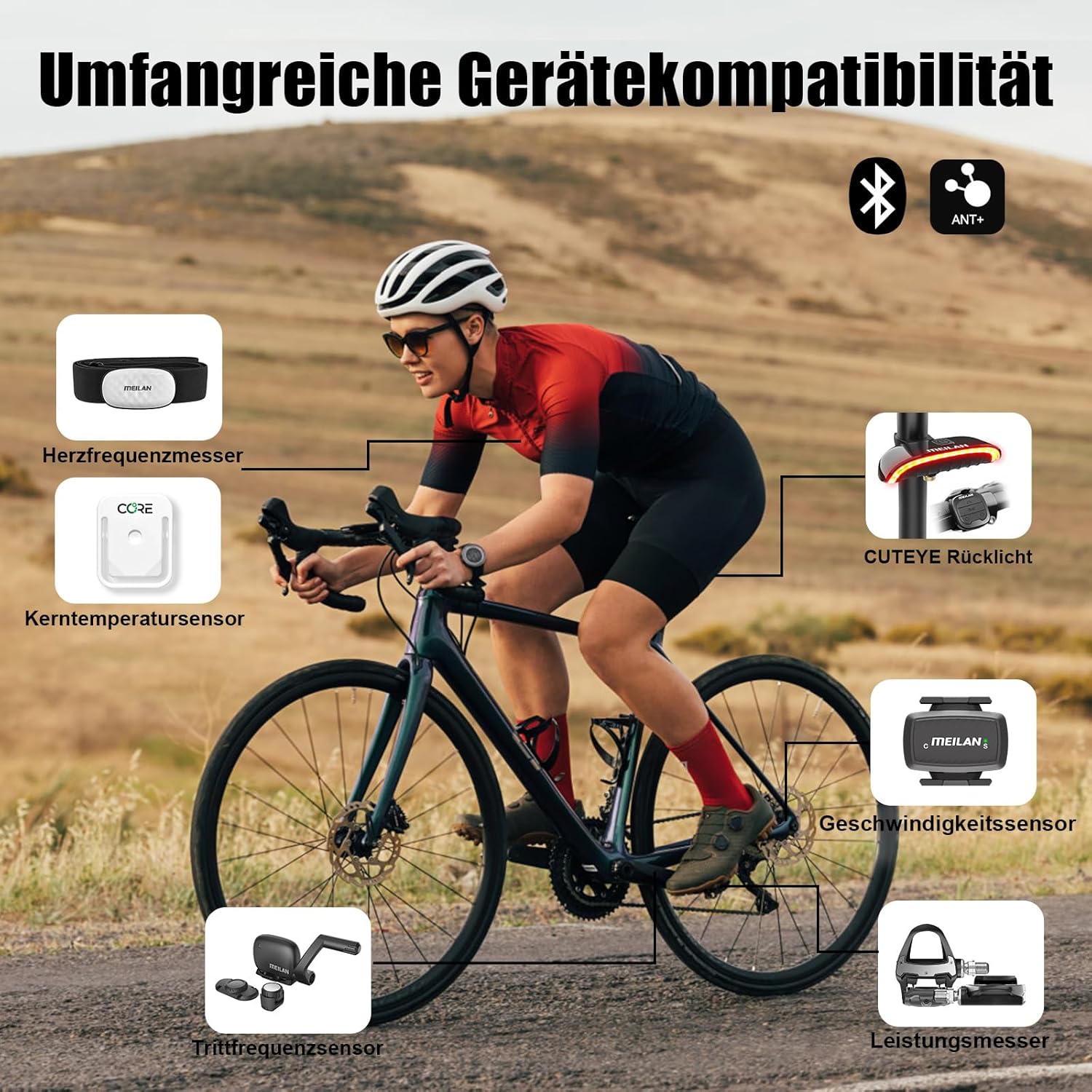
Image: The MEILAN Navihood L1 securely mounted on a bicycle handlebar, ready for use.

Image: A visual comparison illustrating the durability of the aluminum alloy mounting base compared to a plastic alternative, emphasizing its anti-drop feature.
3.3 Første opstart og sprogvalg
Press and hold the power button (usually located on the side or bottom) to turn on the device. Follow the on-screen prompts to select your preferred language and set the time zone.

Image: The device display showing general settings, including options for auto turn-off, time zone, time format, and language selection.
4. Betjeningsvejledning
4.1 GPS-positionering
The Navihood L1 features a dual-core chip processor and multi-module antenna, supporting GPS, GLONASS, GALILEO, Beidou, and QZSS for rapid and accurate positioning. Hot-start positioning can be achieved in as little as 5 seconds.

Image: The MEILAN Navihood L1 screen showing current speed and distance, with graphical representations of the multiple satellite systems it utilizes for fast and precise positioning.

Image: A cyclist using the MEILAN Navihood L1, which shows navigation details, illustrating the device's capability to connect to five fast and precise positioning systems for real-time data.
4.2 Navigationsfunktioner
The device supports offline waypoint navigation. You can create routes with up to 30 waypoints via the MEILAN app and send them to the L1. It provides dynamic road planning and real-time turn-by-turn directions.
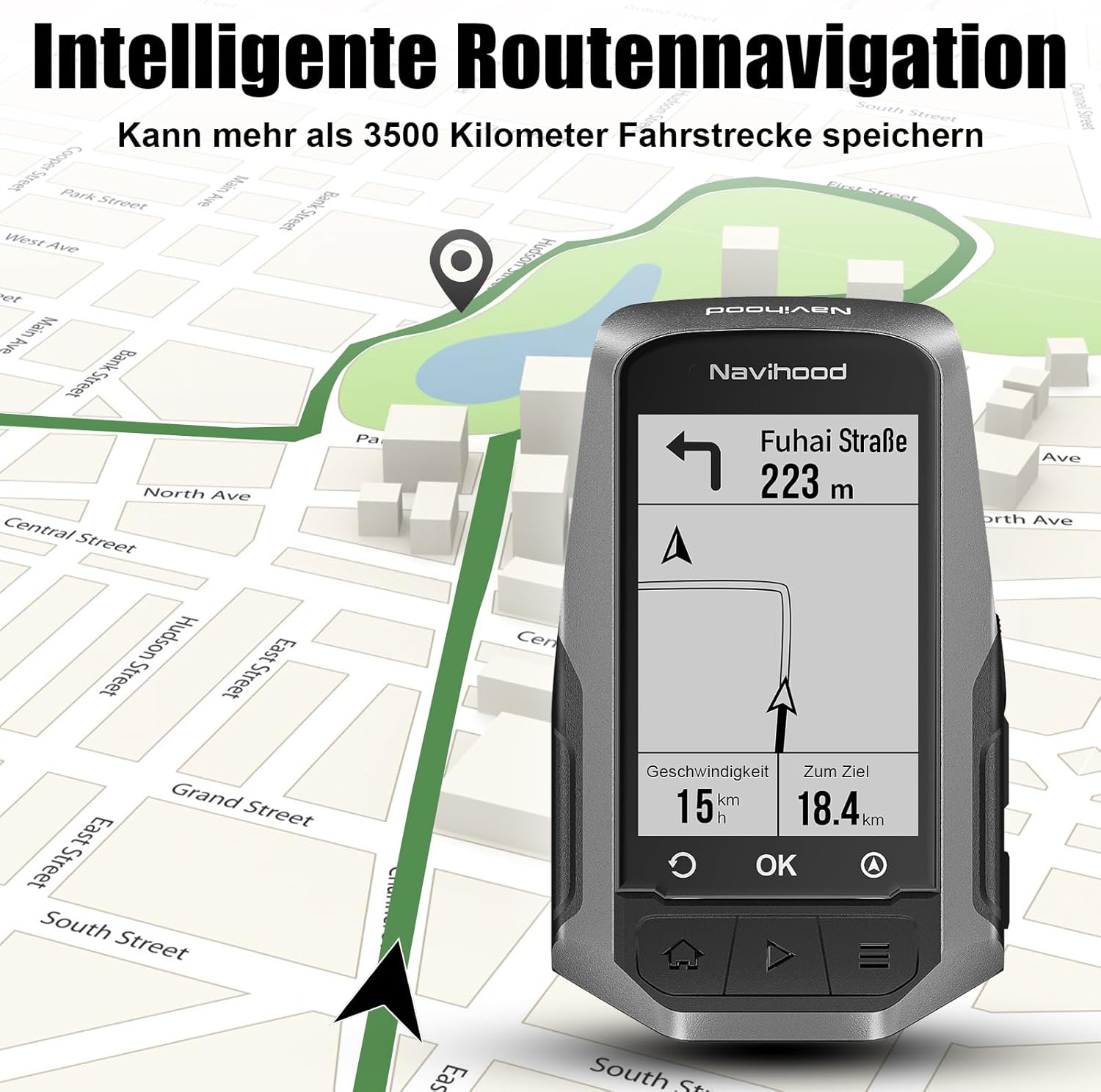
Image: The MEILAN Navihood L1 screen showing intelligent route navigation, with a map indicating the current position and upcoming turns, capable of storing over 3500 kilometers of cycling routes.

Image: The MEILAN Navihood L1 displaying a route deviation warning, indicating that the user is off course and providing a visual cue to return to the planned route.

Image: The MEILAN Navihood L1 displaying a map with a planned route, showing points A and B, and the current position, indicating active navigation.
4.3 Datavisning og tilpasning
The device allows for extensive customization of display pages, enabling you to select up to 121 different cycling data points. This includes speed, distance, time, cadence, heart rate, power, and more.

Image: The MEILAN Navihood L1 screen showing a user-defined display page with various cycling data points such as speed, time, distance, cadence, heart rate, and power, demonstrating the ability to customize up to 121 data fields.

Image: A smartphone screen displaying the MEILAN app interface, which allows users to sort and drag data fields to customize the display pages on the Navihood L1 device.
4.4 Sensorkompatibilitet
The Navihood L1 supports connection to a wide range of sensors via Bluetooth or ANT+, including speed sensors, cadence sensors, heart rate monitors, power meters, core temperature sensors, and Shimano Di2. It is also compatible with the CUTEYE taillight for real-time turn signals based on navigation direction.

Image: A diagram illustrating the extensive device compatibility of the MEILAN Navihood L1, showing connections to a heart rate monitor, core temperature sensor, CUTEYE taillight, speed sensor, cadence sensor, and power meter via Bluetooth and ANT+.

Image: A cyclist on a road bike, with various sensors (heart rate monitor, core temperature sensor, CUTEYE taillight, speed sensor, cadence sensor, power meter, and Shimano Di2) highlighted as compatible with the MEILAN Navihood L1.
4.5 Training Aids and Alerts
The L1 offers 7 riding modes, a drinking water reminder, automatic segmentation, automatic page turning, training goal setting, and virtual opponent features to optimize your training performance.

Image: The MEILAN Navihood L1 displaying an alarm menu, showing options to set alerts for maximum speed, cadence, heart rate, power, and a reminder to drink water, aiding in training and performance.

Image: The MEILAN Navihood L1 displaying a "You win it!" message after a virtual opponent race, indicating successful completion of a training goal.
4.6 MEILAN App Integration
The MEILAN app allows you to review and download your ride routes as 3D track videos, save them to your phone, or share them. Your cycling data can also be uploaded, synchronized, and shared with Komoot, Strava, TrainingPeaks, and the MEILAN community.
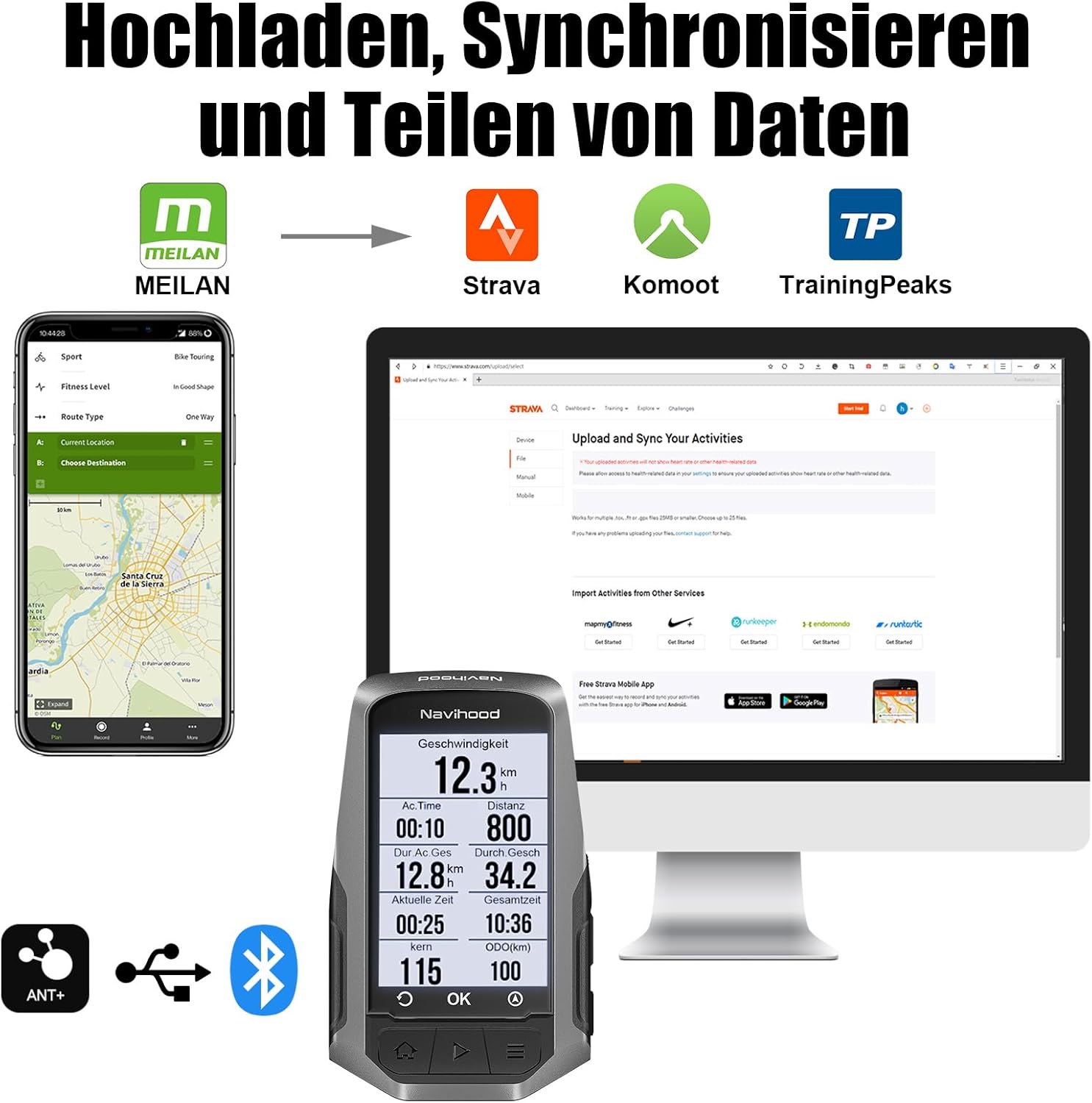
Image: A visual representation of data upload, synchronization, and sharing, showing the MEILAN app connecting to Strava, Komoot, and TrainingPeaks, with the Navihood L1 device and a computer display.

Image: Multiple smartphone screenshots showcasing the MEILAN app's functionalities, including device connection status, a community feed with cycling news, and options for authorizing data synchronization with third-party applications like Strava and TrainingPeaks.

Image: The MEILAN Navihood L1 displaying incoming call and message notifications from WhatsApp and Facebook, demonstrating its smart notification feature.

Image: The MEILAN Navihood L1 alongside a shield icon and the MEILAN app logo, symbolizing the security and protection features integrated with the device and its application.
5. Vedligeholdelse
To ensure the longevity and optimal performance of your MEILAN Navihood L1, follow these maintenance guidelines:
- Rensning: Tør enheden af med en blød, damp klæde. Undgå at bruge skrappe kemikalier eller slibende rengøringsmidler.
- Opbevaring: Opbevar enheden et køligt, tørt sted væk fra direkte sollys og ekstreme temperaturer, når den ikke er i brug.
- Opladning: Do not overcharge the device. Disconnect the charging cable once the battery is full.
- Vandtæthed: The device is IPX7 waterproof, meaning it can withstand immersion in up to 1 meter of water for 30 minutes. However, it is not designed for prolonged underwater use. Ensure the USB port cover is securely closed before exposure to water.
6. Fejlfinding
| Problem | Mulig årsag | Løsning |
|---|---|---|
| Enheden tænder ikke. | Lavt batteri; enheden er frosset. | Charge the device for at least 30 minutes. Press and hold the power button for 10-15 seconds to force a restart. |
| Intet GPS signal. | Hindret view of sky; device not acquiring satellites. | Gå til et åbent område med en klar view of the sky. Wait a few minutes for the device to acquire satellites. Ensure GPS is enabled in settings. |
| Sensor not connecting. | Sensor battery low; sensor out of range; incorrect pairing. | Check sensor battery. Ensure sensor is within range (a few meters). Re-pair the sensor through the device settings or MEILAN app. Ensure sensor type (ANT+/Bluetooth) matches device capability. |
| Data synkroniseres ikke med appen. | Bluetooth disconnected; app not open; internet connection issue. | Ensure Bluetooth is enabled on both device and phone. Open the MEILAN app. Check your phone's internet connection. Try restarting both the device and the app. |
| Skærmen reagerer ikke. | Enheden er frosset. | Tryk og hold tænd/sluk-knappen nede i 10-15 sekunder for at fremtvinge en genstart. |
7. Specifikationer
| Feature | Detalje |
|---|---|
| Modelnummer | L1_B_DE |
| Skærmstørrelse | 2.6 tommer LCD |
| Positioneringssystemer | GPS, GLONASS, GALILEO, Beidou, QZSS |
| Forbindelse | Bluetooth, ANT+ |
| Vandtæt vurdering | IPX7 |
| Batterilevetid | Op til 25 timer |
| Batteritype | 1 lithium-ion batteri (medfølger) |
| Monteringstype | Styrmontering |
| Dimensioner (emballage) | 18 x 10.5 x 4.8 cm |
| Vægt (emballage) | 110 gram |
8. Garanti og support
MEILAN is committed to providing high-quality products and excellent customer service. For any issues or inquiries, please refer to the following:
- Garanti: The MEILAN Navihood L1 comes with a 12-month warranty from the date of purchase. This warranty covers manufacturing defects.
- Returnering/ombytning: You may be eligible for a return or exchange within 30 days of purchase, subject to retailer policies.
- Kundeservice: MEILAN offers lifetime customer service and aims for a 24-hour fast response time for inquiries.


Image: Visual icons representing MEILAN's customer support commitments: 24-hour fast response, 30-day return/exchange, 12-month warranty, and lifetime customer service.


