1. Introduktion
The RainPoint WiFi Water Timer is designed to provide intelligent and efficient watering for your garden, lawn, and yard. Featuring dual programmable zones and remote control capabilities via the RainPoint Home APP, this smart irrigation system simplifies garden management and helps conserve water. Its robust design includes a brass inlet for enhanced durability and leak prevention.

Figure 1: RainPoint WiFi Water Timer, Smart Hub, and Mobile App Interface
2. Opsætning
2.1 Appinstallation og kontoregistrering
Download RainPoint Home App from your device's app store (iOS or Android). Register a new account using your email address and follow the on-screen prompts to set up your home location and preferences.
Video 1: How to connect to the internet and set up watering plans?
2.2 Smart Hub Pairing
- Plug the Smart Hub into an indoor power source.
- Open the RainPoint Home App and tap "Add Device" or the "+" icon.
- Select the Smart Hub model (HWG009WB) from the device list.
- Ensure your phone is connected to a 2.4 GHz WiFi network and enter the password when prompted.
- Press and hold the button on the Smart Hub until the indicator light flashes rapidly, then confirm in the app to pair.
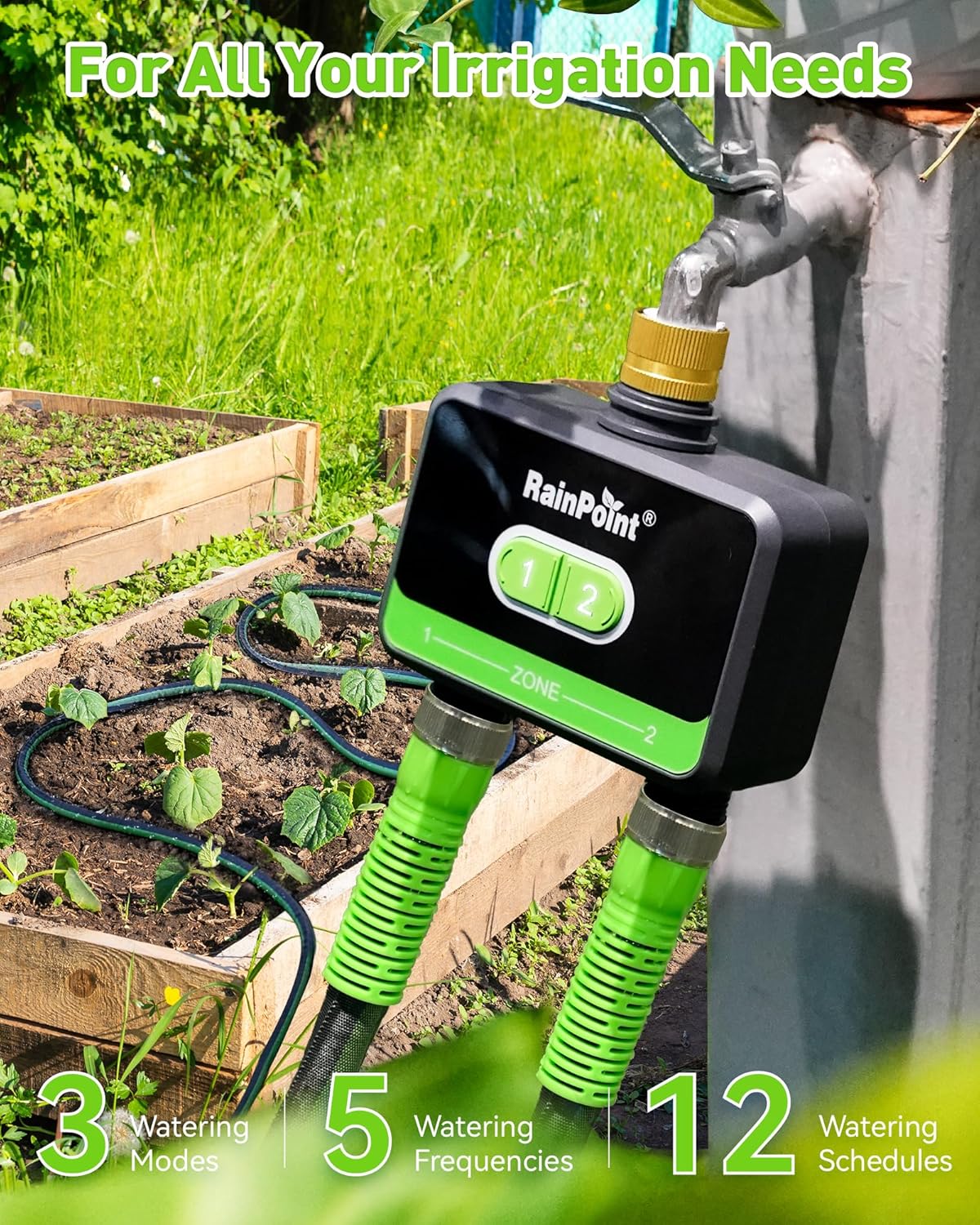
Figure 2: Smart Hub and App showing connection process
2.3 Water Timer Connection
- Insert 4 new AA alkaline batteries (not included) into the battery compartment of the water timer.
- Return to the Smart Hub's device page in the app and tap "Add Device" to find the water timer (HTV210B).
- Press and hold either button on the water timer until the light flashes red quickly.
- Click "Next" on the app to automatically search and pair the water timer.

Figure 3: Water Timer with brass inlet and battery compartment
2.4 Fysisk installation
- Screw the water timer's brass inlet to your outdoor garden faucet. Hand-tighten only.
- Screw your garden hoses to the timer's outlets (Zone 1 and Zone 2).

Figure 4: Water Timer installed on an outdoor faucet with two hoses connected
3. Betjeningsvejledning
3.1 Dual Programmable Zones
Each zone on the water timer operates independently, allowing for customized watering schedules. You can set up to 6 watering schedules per zone for efficient and intelligent watering.
3.2 Flexible Irrigation Modes and Frequencies
The WiFi water timer offers three primary watering modes:
- Normal vanding: Water for a set duration (1 minute to 12 hours).
- Intervalvanding: Water for a set duration (1 second to 60 minutes) with a specified interval between cycles.
- Cyklus og blød: Water for a set cycle duration, then pause for a soak duration, repeating the cycle.
Choose from 5 watering frequencies:
- Daglig
- Ugentlig
- Ulige dage
- Selv dage
- Every 2 to 30 Days (Custom)

Figure 5: Multiple Irrigation Modes for Plants

Figure 6: Water Wisely and Conserve Water with 5 Watering Frequencies
3.3 Smart Scenes and Seasonal Adjustment
Brug Smarte scener to automatically adjust your watering schedule based on real-time weather conditions (e.g., skip watering during heavy rain, turn off if humidity is high, extend watering in high temperatures). This feature also allows linkage between multiple RainPoint devices for a smarter garden system.
De Sæsonjustering feature automatically adjusts the watering duration by a percentage you set (10%-200%) each month, eliminating the need for manual adjustments throughout the year.

Figure 7: Navigating Seasonal Changes with Automatic Adjustment
3.4 Manual Watering and Rain Delay
You can manually activate watering directly from the timer using the physical buttons or through the app. The app allows you to set a specific duration for manual watering without interrupting your programmed schedules.
De Forsinket regn feature allows you to skip programmed watering for 24, 48, or 72 hours to avoid overwatering when rain is expected or has recently occurred.

Figure 8: 24/48/72 Hour Rain Delay Feature
3.5 Integration af stemmestyring
The smart water timer is compatible with Alexa og Google Assistant, enabling hands-free operation via voice commands for convenience.

Figure 9: Seamless Integration with Smart Home Voice Assistants
4. Vedligeholdelse
4.1 Udskiftning af batteri
The water timer requires 4 AA batteries. Replace them annually or when the low battery indicator appears in the app to ensure continuous operation throughout the watering season.
4.2 Cleaning and Winterization
Regularly check the brass inlet filter for debris and clean as needed. Before the first frost, disconnect the timer from the faucet, remove batteries, and store the unit indoors in a dry, protected area to prevent freezing damage.
5. Fejlfinding
5.1 Forbindelsesproblemer
- Timer not connecting to Hub: Ensure the Smart Hub is powered on and within range of the timer. Check that your phone is connected to a 2.4 GHz WiFi network. Re-pair the devices if necessary.
- Appen svarer ikke: Close and restart the RainPoint Home App. Check your phone's internet connection.
5.2 Watering Problems
- Ingen vandgennemstrømning: Ensure the faucet is fully open. Check that hoses are securely connected and not kinked. Verify that the timer's valves are open in the app.
- Lækager: Ensure all connections are hand-tightened. Use plumber's tape on threaded connections if leaks persist.
- Timer not running on schedule: Verify that schedules are correctly set in the app (start time, duration, frequency). Check battery level. Ensure Rain Delay is not active.
6. Specifikationer
| Feature | Detalje |
|---|---|
| Modelnummer | B-HTV210B009W-NH |
| Farve | Grøn |
| Materiale | Metal |
| Produktdimensioner | 7.7" D x 3.2" B x 6.3" H |
| Varens vægt | 1.5 pund |
| Antal indstillinger | 12 |
7. Garanti og support
For warranty information and technical support, please refer to the contact details provided on the product packaging or visit the official RainPoint webwebsted. Gem din købskvittering i tilfælde af garantikrav.


