Indledning
Thank you for choosing the ODK L-Shaped Gaming Desk. This manual provides essential information for the safe assembly, operation, and maintenance of your new desk. Please read these instructions carefully before beginning assembly and retain them for future reference.

Image: The ODK L-Shaped Gaming Desk, showcasing its carbon fiber texture, integrated LED strip, and power outlets, set up with gaming equipment.
Sikkerhedsoplysninger
- Sørg for, at alle komponenter er til stede og ubeskadigede før montering. Brug ikke beskadigede dele.
- Saml skrivebordet på en blød, ren overflade for at forhindre ridser.
- Hold små dele og emballagematerialer væk fra børn.
- Do not overtighten screws during initial assembly; tighten fully only when instructed.
- For electrical components (LEDs, power outlets), ensure proper connection to a suitable power source. Do not overload the power outlets.
- Undgå at placere væsker direkte på skrivebordets overflade, især i nærheden af elektriske komponenter.
- Stå eller sid ikke på skrivebordet.
Pakkens indhold
Please verify that all parts listed below are included in your package. All components are typically labeled for easy identification during assembly.
- L-Shaped Desktop Panels (Carbon Fiber Texture)
- Metalrammekomponenter (ben, støttebjælker)
- Integrated LED Strip with Controller
- Power Outlet Unit (2 AC, 2 USB) with Power Cord
- Høretelefonkrog
- Justerbare fodpuder
- Assembly Hardware (Screws, bolts, washers, etc.)
- Assembly Tools (Hex key, screwdriver, etc.)
- Instruktionsmanual
Monteringsvejledning
Assembly is designed to be straightforward. Follow the numbered steps and diagrams provided in the included physical instruction manual. Ensure all parts are correctly oriented before tightening screws.
- Udpak og identificer: Carefully unpack all components and lay them out on a protected surface. Identify each part using the labels and the parts list.
- Saml ramme: Attach the T-shaped leg frames to the main support beams. Do not fully tighten screws at this stage.
- Fastgør skrivebordspaneler: Secure the L-shaped desktop panels to the assembled frame. Ensure proper alignment.
- Installer LED-strimmel: The integrated LED strip is designed for easy installation. Follow the specific instructions for connecting and securing it to the desk.
- Mount Power Outlet Unit: Install the power outlet unit into its designated slot on the desktop.
- Fastgør hovedtelefonkrog: Secure the metal headphone hook to the underside of the desk as desired.
- Endelig stramning: Når alle komponenter er på plads og justeret, skal alle skruer og bolte systematisk strammes.
- Juster fodpuderne: Adjust the foot pads at the base of the legs to ensure the desk is level and stable on uneven surfaces.
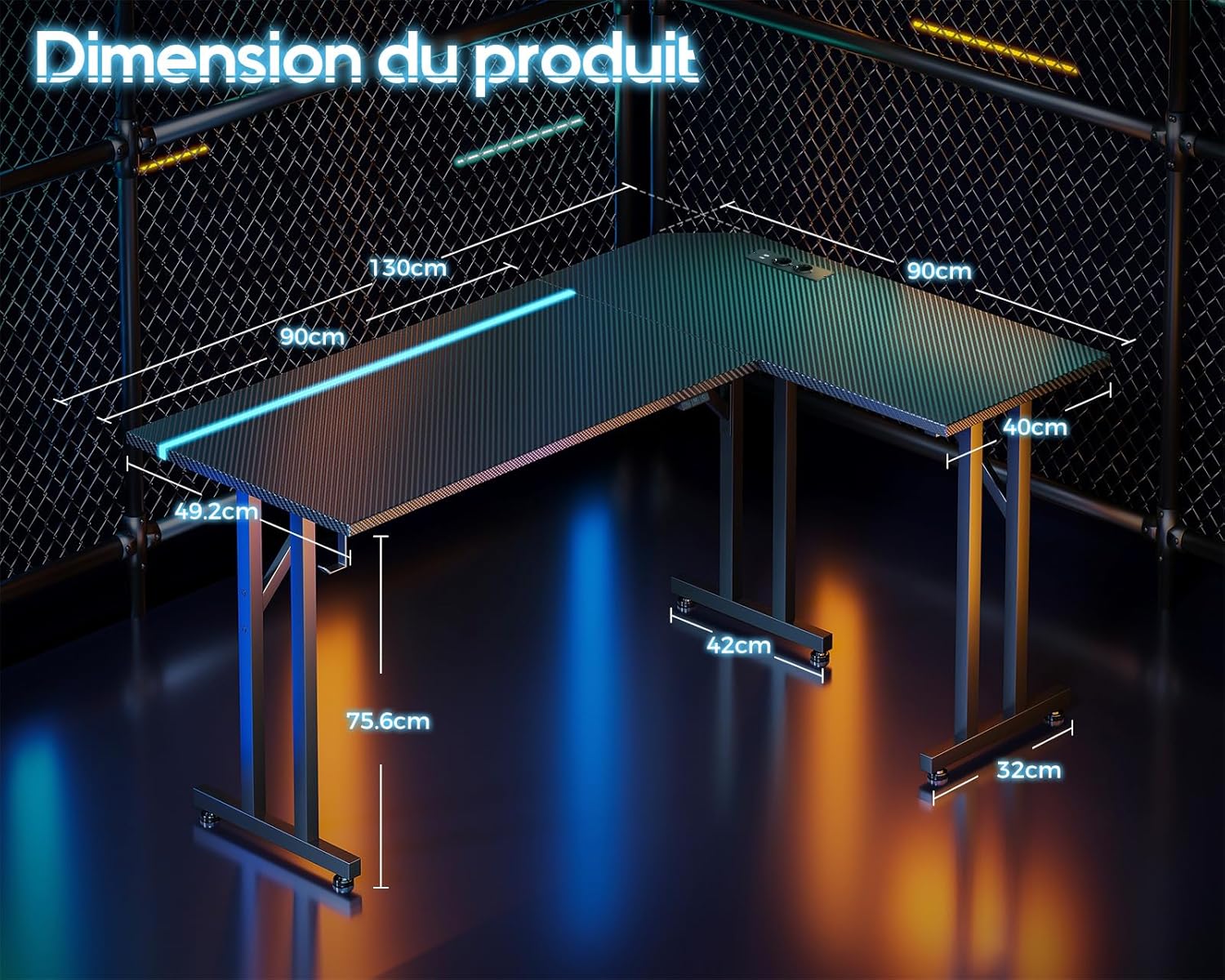
Image: A detailed diagram illustrating the dimensions of the L-shaped desk, including length, width, and height measurements.

Billede: Et nærbillede view of the desk's T-shaped leg design, highlighting its robust construction for enhanced stability.
Betjeningsvejledning
Integreret LED belysning
The desk features an integrated LED strip with various customization options to enhance your environment.
- Tænd/sluk: Use the designated button on the LED controller to turn the lights on or off.
- Farvevalg: Cycle through 10 static light colors using the 'Static Color' button.
- Dynamiske tilstande: Select from 20 dynamic lighting modes using the 'Dynamic Mode' button.
- Justering af hastighed/lysstyrke: Adjust the speed of dynamic modes or the brightness of static colors using the 'Speed/Brightness' control.

Billede: En detaljeret view of the integrated LED strip embedded along the edge of the desk, showing the various color options and the control buttons for static color, dynamic modes, and speed/brightness.
Strømudtag og USB-porte
The desk includes a convenient power outlet unit for your electronic devices.
- AC stikkontakter: Two (2) standard AC power outlets (110-240V/6A) are provided for devices such as monitors, laptops, or other peripherals.
- USB -opladningsporte: Two (2) USB charging ports (5V/2A) are available for charging smartphones, tablets, or other USB-powered devices.
- Strømledning: Connect the desk's power cord to a wall outlet to activate the LED lighting and power outlets.

Image: A close-up of the integrated power strip on the desk surface, featuring two AC outlets and two USB ports, with a smartphone connected for charging.
Høretelefonkrog
A sturdy metal hook is provided for convenient storage of your headphones or other cables, keeping your workspace tidy.
Opretholdelse
- Rensning: Tør skrivebordets overflade og ramme af med en blød, tør kludamp klud. Undgå slibende rengøringsmidler eller barske kemikalier, der kan beskadige overfladen.
- Spild: Immediately wipe up any spills to prevent damage to the carbon fiber texture or electrical components.
- Fastgørelsesmidler: Kontrollér regelmæssigt alle skruer og bolte for at sikre, at de forbliver stramme. Efterspænd om nødvendigt for at opretholde stabiliteten.
- Elektriske komponenter: Ensure the power cord and outlet unit are free from damage. Do not attempt to repair electrical components yourself.
Fejlfinding
- Desk is Unstable: Check that all assembly screws are fully tightened. Adjust the foot pads on the bottom of the legs to level the desk on uneven floors.
- LED-lys virker ikke: Ensure the power cord is securely plugged into a wall outlet and the desk's power unit. Check that the LED controller is properly connected and powered on.
- Strømudtag/USB-porte virker ikke: Verify the desk's power cord is plugged into a live wall outlet. Check for any tripped circuit breakers in your home. Do not exceed the maximum load capacity of the outlets.
- Manglende dele: If any parts are missing upon unboxing, please contact customer support immediately.
Specifikationer
| Mærke | ODK |
| Modelnummer | 021001001 |
| Dimensioner (L x B x H) | 130 x 90 x 74.5 cm (51.2 x 35.4 x 29.3 tommer) |
| Vægt | 14.8 kilo (32.6 lbs) |
| Materiale | Metal Frame, Carbon Fiber Texture Desktop |
| Særlige funktioner | Integrated LED Strip (10 colors, 20 dynamic modes), 2 AC Power Outlets (110-240V/6A), 2 USB Charging Ports (5V/2A), Headphone Hook, L-Shaped Design, Stable T-shaped Legs |
| Anbefalet brug | Gaming, Work, Study |
Garanti og support
ODK is committed to customer satisfaction. If you encounter any issues during assembly or use, or have questions regarding your product, our support team is available to assist you.
- Kundesupport: For assistance, please refer to the contact information provided in your product packaging or on the ODK official website. Our team aims to respond to inquiries within 24 hours.
- Garantioplysninger: Specifikke garantioplysninger er typisk inkluderet i din købsdokumentation. Gem venligst din købsbevis i tilfælde af garantikrav.


