1. Introduktion
Welcome to the user manual for your VGN N75 Gaming Keyboard. This manual provides essential information on setting up, operating, maintaining, and troubleshooting your new keyboard. The VGN N75 is a compact, numeric keyless mechanical keyboard designed for an optimal gaming and typing experience.

Figure 1.1: VGN N75 Gaming Keyboard with RGB lighting enabled.

Figur 1.2: Vinklet view of the VGN N75 keyboard, highlighting its compact form factor.
2. Sikkerhedsoplysninger
Please read the following safety guidelines carefully before using your VGN N75 keyboard:
- Hold tastaturet væk fra væsker og overdreven fugt for at forhindre skader.
- Undgå at udsætte tastaturet for ekstreme temperaturer (varme eller kolde).
- Do not attempt to disassemble or modify the keyboard. This may void your warranty and cause damage.
- Use only the provided USB-C cable for connection.
- Handle with care to prevent physical damage from drops or impacts.
3. Produktfunktioner
The VGN N75 keyboard is engineered with several features to enhance your typing and gaming experience:
- Kompakt 75% layout: The US82 key numeric keyless design offers a space-saving solution compared to full-size keyboards, providing more desk space for mouse movement.
- Advanced Internal Construction: Features multiple buffer layers and specially tuned stabilizers for a smooth, quiet, and consistent typing experience.
- VGN "Dynamic Silver" Mechanical Switches: Equipped with VGN's original linear mechanical switches, offering a responsive feel and vibrant RGB illumination.
- Karakteristisk design: The "Caribbean Blue" model features striking keycap colors, adding a unique aesthetic to your setup.
- Integrated Metal Volume Knob: A conveniently located metal rotary knob allows for quick and precise volume adjustments, useful for both work and gaming.
- RGB-belysning, der kan tilpasses: Enjoy dynamic and customizable RGB backlight options to personalize your keyboard's appearance.

Figure 3.1: The compact 75% layout of the VGN N75, demonstrating its space-saving advantage over a traditional full-size keyboard.

Figure 3.2: Detail of the VGN N75's unique "Dynamic Silver" mechanical switches, known for their linear feel and RGB compatibility.

Figure 3.3: An exploded diagram illustrating the multiple buffer layers and components within the VGN N75 keyboard, contributing to its smooth and quiet operation.

Figure 3.4: Close-up of the metal volume knob, providing convenient audio control.
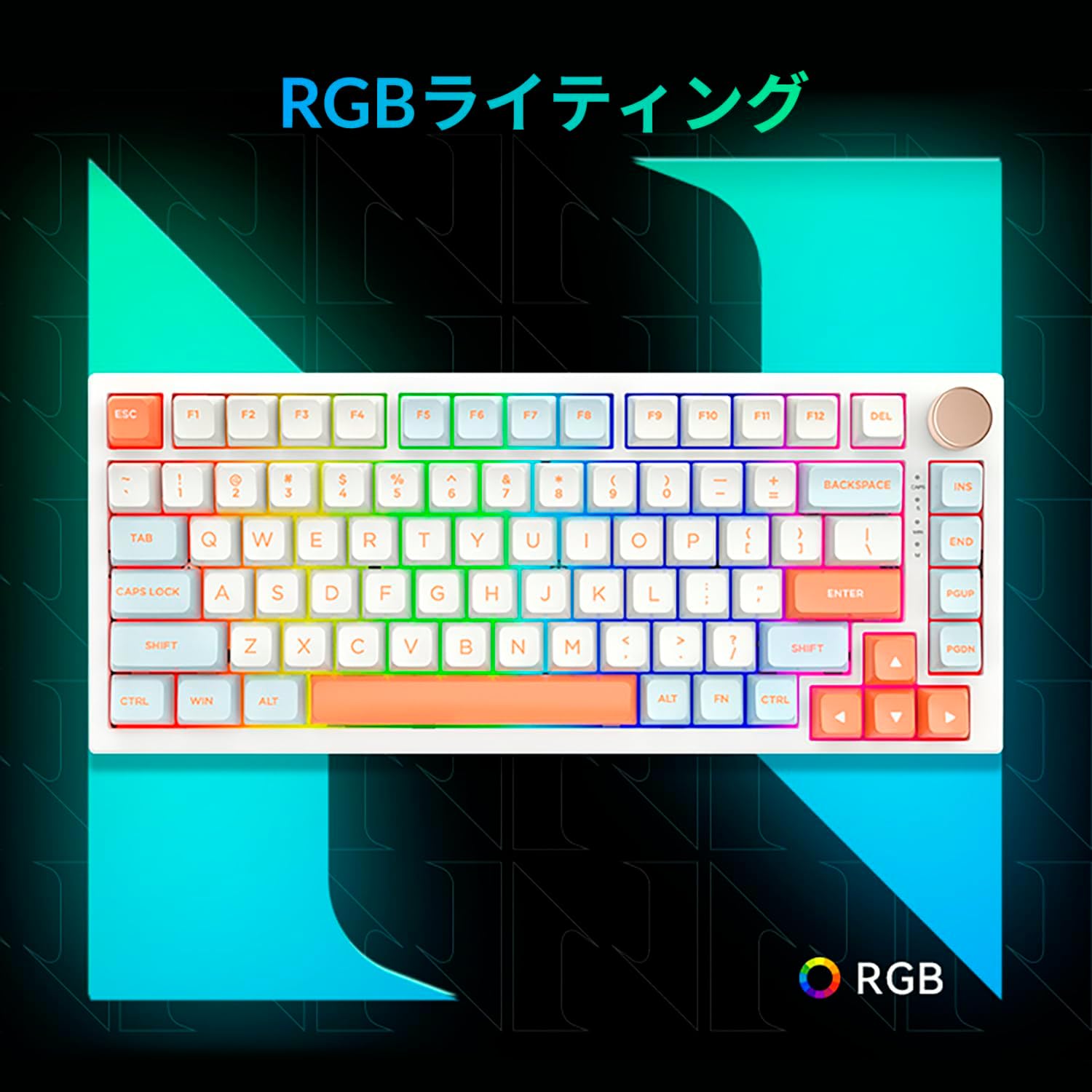
Figure 3.5: The VGN N75 keyboard displaying its customizable RGB lighting, enhancing the visual appeal.
4. Opsætningsvejledning
Follow these steps to set up your VGN N75 keyboard:
- Pak tastaturet ud: Carefully remove the keyboard and all included accessories (USB cable, keycap puller, replacement key) from the packaging.
- Tilslut USB-C-kablet: Insert one end of the provided USB-C cable into the USB-C port on the keyboard.
- Opret forbindelse til din enhed: Plug the other end of the USB-C cable into an available USB port on your computer or laptop.
- Driverinstallation (automatisk): Tastaturet er plug-and-play. Dit operativsystem burde automatisk registrere og installere de nødvendige drivere. Manuel driverinstallation er typisk ikke nødvendig.
- Indledende test: Open a text editor or any application to test the keys and ensure all functions are working correctly.
5. Betjeningsvejledning
This section details the basic operation of your VGN N75 keyboard:
5.1. Grundlæggende nøglefunktioner
The VGN N75 features a standard US82 key layout. All keys function as labeled. For specific key combinations or software-defined macros, refer to any accompanying software documentation (if applicable, not included in this manual).
5.2. Using the Rotary Knob
- Lydstyrkekontrol: Drej knappen med uret for at øge lydstyrken og mod uret for at sænke lydstyrken.
- Slå lyden fra/til: Tryk på knappen for at slå lyden til eller fra.
5.3. RGB-lysstyring
The VGN N75 supports RGB lighting. While specific key combinations for lighting modes are not provided in the product description, most RGB keyboards allow cycling through effects using function key combinations (e.g., Fn + F-keys or dedicated lighting keys). Experiment with the 'Fn' key in combination with other keys (like arrow keys or Ins/Del/Home/End/PgUp/PgDn) to discover lighting controls.
6. Vedligeholdelse
Korrekt vedligeholdelse vil forlænge levetiden på dit tastatur:
- Rensning:
- Frakobl tastaturet fra computeren, før du rengør det.
- Brug en blød, fnugfri klud lidt damprengøres med vand eller en mild rengøringsopløsning til at tørre tasterne og rammen af.
- Brug trykluft til støv og snavs mellem tasterne.
- Do not spray liquid directly onto the keyboard.
- Udskiftning af tastatur og kontakt:
- The keyboard comes with a keycap puller and a replacement key.
- To remove a keycap, gently use the keycap puller to grip the keycap and pull upwards.
- To replace a keycap, align it with the switch stem and press down firmly until it clicks into place.
- Note: The VGN N75 features hot-swappable switches, allowing for easy replacement without soldering. To remove a switch, use a switch puller (not explicitly listed as included, but implied by "hot-swappable") to gently pry it out. Align the new switch's pins with the sockets and press firmly until it seats correctly.
7. Fejlfinding
If you encounter issues with your VGN N75 keyboard, try the following solutions:
- Tastaturet reagerer ikke:
- Sørg for, at USB-C-kablet er korrekt tilsluttet til både tastaturet og din computer.
- Prøv at tilslutte tastaturet til en anden USB-port på din computer.
- Genstart din computer.
- Test tastaturet på en anden computer for at udelukke et systemspecifikt problem.
- Nøgler registreres ikke:
- Kontrollér for eventuelle fysiske forhindringer under tastaturet.
- If a specific key is not working, consider replacing its switch if you have a switch puller and replacement switches.
- Problemer med RGB-belysning:
- Sørg for, at tastaturet er korrekt strømforsynet.
- Try cycling through lighting modes using the keyboard's function key combinations.
- Rotary Knob Not Working:
- Check for any physical obstructions around the knob.
- Sørg for, at tastaturet er korrekt tilsluttet.
8. Specifikationer
| Attribut | Detalje |
|---|---|
| Mærke | VGN |
| Modelnummer | N75BLUE |
| Serie | N75 |
| Farve | Blå |
| Tastaturbeskrivelse | Mekanisk |
| Antal nøgler | 82 |
| Forbindelsesteknologi | USB-C |
| Strømkildetype | USB-strøm |
| Kompatible enheder | Laptop |
| Anbefalede produktanvendelser | Spil |
| Keyboard Backlight Colour Support | RGB |
| Materiale | Plast |
| Inkluderede komponenter | Keycap Puller, Replacement Key, USB Cable |
| Pakkedimensioner | 42.1 x 18.8 x 6.5 cm; 1.1 kg |
| Dato først tilgængelig | 22. marts 2024 |
9. Garanti og support
The VGN N75 Gaming Keyboard comes with a 1-year warranty from the date of purchase, as indicated in the product listing. This warranty covers manufacturing defects under normal use.
For warranty claims, technical support, or further inquiries, please contact your point of purchase or the official VGN support channels. Keep your proof of purchase for warranty validation.
Note: Uautoriseret adskillelse eller ændring af produktet kan ugyldiggøre garantien.


