Indledning
Thank you for choosing the WalkerFit M6 Ultra Smartwatch. This device combines robust military-grade durability with advanced smart features, making it an ideal companion for both daily life and extreme outdoor activities. This manual will guide you through the setup, operation, and maintenance of your new smartwatch, ensuring you get the most out of its extensive capabilities.

The WalkerFit M6 Ultra Smartwatch, featuring a vibrant display and robust design, capable of tracking activities and managing calls.
Nøglefunktioner
- Ekstrem holdbarhed: Built with a resistant metal casing, the M6 Ultra withstands extreme conditions, including salt fog, operational touches, wide temperature ranges (-40℉ to 158℉), 1-meter water resistance, and drops from up to 2 meters.
- Ultralang batterilevetid: Equipped with a 410 mAh pure cobalt battery, offering up to 2 weeks of normal use and an impressive 60 days in power-saving mode.
- 110+ træningstilstande: Supports a wide range of professional fitness modes, accurately monitoring data such as heart rate, steps, and calories burned.
- Vibrant AMOLED Display: Features a 1.43-inch HD AMOLED always-on color screen with 1000 NIT brightness and 466x466 resolution for clear and vivid visuals, even under direct sunlight.
- All-Day Health Monitoring: Integrated high-precision sensors provide 24-hour heart rate tracking, blood oxygen (SpO2) measurement, and advanced sleep tracking.

The M6 Ultra boasts an extended battery life, providing up to 60 days in power-saving mode.

Explore over 110 sports modes, including outdoor cycling, running, walking, and hiking.

Comprehensive health monitoring includes continuous heart rate, SpO2, and advanced sleep tracking.

The 1.43-inch AMOLED display offers superior clarity and an always-on feature.
Opsætningsvejledning
1. Opladning af dit smartwatch
Before first use, fully charge your WalkerFit M6 Ultra. Connect the included magnetic charging cable to the charging contacts on the back of the watch and plug the USB end into a standard USB power adapter (not included). A full charge typically takes approximately 2 hours.
2. App Installation
To unlock the full potential of your smartwatch, download the companion application to your smartphone. Søg efter "WalkerFit" in your device's app store (Google Play Store for Android or Apple App Store for iOS).
3. Parring af dit smartwatch
- Sørg for, at Bluetooth er aktiveret på din smartphone.
- Open the WalkerFit app and follow the on-screen instructions to create an account or log in.
- The app will guide you through the pairing process. Select "M6 Ultra" from the list of available devices.
- Bekræft parringsanmodningen på både din smartphone og smartwatch.
Betjeningsvejledning
Grundlæggende navigation
- Touchskærm: Swipe left/right to navigate between main functions, swipe up/down to access quick settings or notifications. Tap to select.
- Sideknapper: The top button typically acts as a power/back button. The bottom button can be customized for quick access to a specific function (e.g., workout modes).
Telefon funktionalitet
- Foretage opkald: Once paired, you can dial numbers directly from the watch or select contacts from your synced phonebook.
- Modtagelse af opkald: Answer or reject incoming calls directly from your wrist. The watch features a built-in speaker and microphone.
- AI Voice Commands: Utilize voice commands for hands-free control of calls, music playback, and other functions.
Fitness Tracking
Access the 'Workout' menu to select from over 110 professional sports modes. The watch will track duration, calories burned, heart rate, and other relevant metrics for your chosen activity.
Sundhedsovervågning
The M6 Ultra continuously monitors your heart rate. You can manually check your blood oxygen (SpO2) levels and view detailed sleep analysis reports through the companion app.
Tilpasning
Personalize your smartwatch by changing watch faces. Many options are available directly on the watch or can be downloaded via the WalkerFit app.
Opretholdelse
Rensning
Tør uret og remmen regelmæssigt af med en blød, tør klud. Brug om nødvendigt en let tør klud.amp kluden og tør den derefter grundigt. Undgå at bruge skrappe kemikalier eller slibende materialer.
Vandtæthed (IP68)
The M6 Ultra is IP68 water-resistant, meaning it can withstand immersion in water up to 1 meter for 30 minutes. It is suitable for daily use, hand washing, and light rain. However, it is not recommended for hot showers, saunas, or diving, as steam and hot water can compromise the seals.
Batteripleje
To prolong battery life, avoid exposing the watch to extreme temperatures. Charge the device regularly and avoid letting the battery completely drain for extended periods.
Fejlfinding
| Problem | Mulig løsning |
|---|---|
| Uret tænder ikke. | Sørg for, at uret er fuldt opladet. Tilslut det til opladeren i mindst 30 minutter. |
| Kan ikke parres med smartphone. | Ensure Bluetooth is enabled on your phone. Restart both the watch and your phone. Clear the app's cache or reinstall the app. Ensure the watch is not already paired with another device. |
| Unøjagtige sundhedsmålinger. | Ensure the watch is worn snugly on your wrist, not too tight or too loose. Clean the sensor on the back of the watch. Avoid excessive movement during readings. |
| Kort batterilevetid. | Reduce screen brightness. Disable continuous heart rate monitoring if not needed. Limit notifications. Use power-saving mode. |
| Notifikationer ikke modtaget. | Check app notification settings. Ensure the app is running in the background. Verify phone's notification permissions for the app. |
Specifikationer
| Feature | Detalje |
|---|---|
| Modelnavn | M6 Ultra |
| Mærke | WalkerFit |
| Display Type | AMOLED |
| Skærmstørrelse | 1.43 tommer |
| Opløsning | 466 x 466 pixels |
| Batterikapacitet | 410 mAh (Pure Cobalt) |
| Batterilevetid (normal brug) | Up to 2 weeks (10-15 days) |
| Batterilevetid (strømsparetilstand) | Op til 60 dage |
| Vandmodstandsniveau | IP68 |
| Kompatible enheder | Android devices, iOS devices |
| Særlige funktioner | Phone function, Fitness Tracker, Social Media Messages, Find My Phone, AI Voice Commands |
| Inkluderede komponenter | 1 Smartwatch, 1 User Manual, 1 Charging Cable, 1 Watch Box |
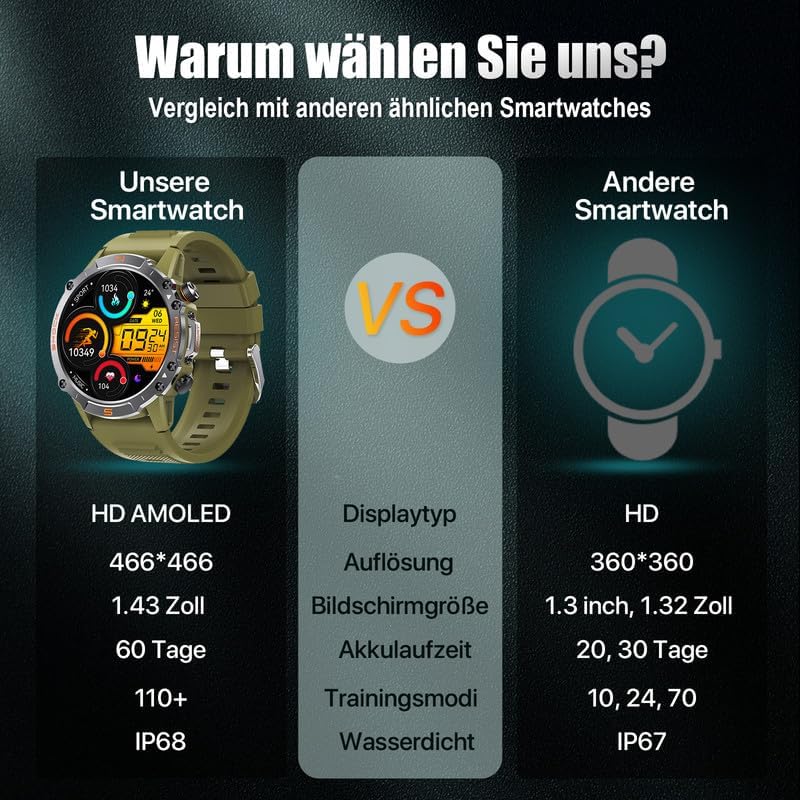
A comparison highlighting the superior specifications of the WalkerFit M6 Ultra.
Garanti og support
The WalkerFit M6 Ultra Smartwatch comes with a standard manufacturer's warranty. Please refer to the warranty card included in your product packaging for specific terms and conditions, including warranty duration and coverage details.
For technical support, troubleshooting assistance, or any inquiries regarding your WalkerFit M6 Ultra Smartwatch, please contact WalkerFit customer service through the contact information provided on the official WalkerFit webwebstedet eller i den tilhørende applikation.


