Indledning
Thank you for choosing the Digihome SMART 4K LED TV. This manual provides essential information for setting up, operating, and maintaining your new television. Featuring a 55-inch 4K Ultra HD display with HDR technology, built-in SMART apps, and Freeview Play, your TV offers a comprehensive entertainment experience. Please read this manual thoroughly before using your TV to ensure proper operation and safety.
1. Opsætning
1.1 Udpakning
Carefully remove the TV and all accessories from the packaging. Retain the packaging for future transport or if servicing is required. Ensure all components listed below are present:
- Digihome 55" 4K LED TV
- Fjernbetjening
- Strømkabel
- TV Stand Components (if not pre-assembled)
- Brugervejledning (dette dokument)
1.2 Montering af stativ (valgfrit)
Hvis dit TV kræver montering af stativ, skal du følge disse trin:
- Placer tv'et med forsiden nedad på en blød, flad overflade for at forhindre, at skærmen beskadiges.
- Juster stativets komponenter med monteringshullerne i bunden af tv'et.
- Fastgør stativet med de medfølgende skruer. Spænd ikke for hårdt.
Alternatively, the TV can be wall-mounted using a compatible VESA wall mount (sold separately). Refer to the wall mount's instructions for installation.
1.3 Tilslutning af strøm
Plug the power cable firmly into the TV's power input, then plug the other end into a suitable wall socket. The TV will enter standby mode.
1.4 Tilslutning af eksterne enheder
Your Digihome TV offers multiple connectivity options:
- HDMI: For connecting Blu-ray players, game consoles, set-top boxes, etc. Your TV supports multiple HDMI inputs.
- Antenna/Aerial: Connect a terrestrial antenna cable for Freeview kanaler.
- USB: Til tilslutning af USB-lagerenheder for at afspille medier.
- Ethernet (LAN): Til en kablet internetforbindelse.
- Optisk lydudgang: For connecting to a soundbar or home cinema system.
Sørg for, at alle kabler er korrekt tilsluttet, før du tænder for tv'et.
1.5 Guide til indledende opsætning
Når du tænder for tv'et første gang, vil det guide dig gennem en indledende opsætningsguide:
- Sprogvalg: Vælg dit foretrukne sprog.
- Region/land: Select your region for correct channel tuning.
- Netværksopsætning: Connect to your Wi-Fi network or use a wired Ethernet connection. This is essential for Smart TV features and Freeview Spil.
- Kanalscanning: The TV will automatically scan for available Freeview channels. This may take several minutes.
- Vilkår og betingelser: Accept the terms and conditions to proceed with Smart TV features.
2. Betjening af dit TV
2.1 Fjernbetjening overview
The included remote control allows full navigation and control of your Digihome TV. Familiarize yourself with the button layout for easy operation.
2.2 Grundlæggende funktioner
- Magt: Press the power button on the remote to turn the TV on or off (standby mode).
- Bind: Brug VOL +/- knapper for at justere lydstyrken.
- Kanal: Brug CH +/- knapper for at skifte kanal.
- Stum: Tryk på STUM knappen for midlertidigt at slå lyden fra.
- Kilde/Indgang: Tryk på KILDE button to select input sources (HDMI 1, HDMI 2, TV, etc.).
2.3 Smart TV Features and Freeview Spil
Your Digihome TV comes equipped with a range of Smart TV applications and Freeview Play functionality. To access these features, ensure your TV is connected to the internet.
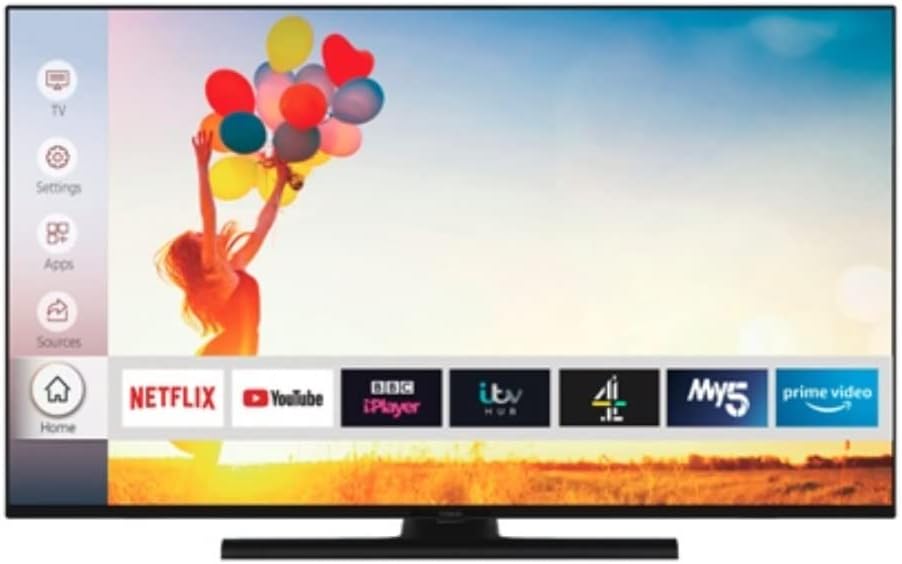
Image: The Digihome Smart TV home screen, displaying a user-friendly interface with quick access to popular streaming applications such as Netflix, YouTube, BBC iPlayer, ITV Hub, My5, and Prime Video. A navigation menu is visible on the left side, including options for TV, Settings, Apps, and Sources.
- Adgang til apps: Tryk på HJEM or SMART button on your remote to open the Smart TV portal. Here you can find pre-installed apps like Netflix, YouTube, BBC iPlayer, ITV Hub, My5, and Prime Video.
- Gratisview Spil: Gratisview Play combines live TV with catch-up services from BBC iPlayer, ITV Hub, All 4, My5, and UKTV Play. You can scroll back through the TV guide to watch programmes you've missed.
- Internet browsing: A web browser may be available for general internet surfing.
2.4 Indstillingsmenu
Tryk på MENU or INDSTILLINGER button on your remote to access the TV's settings. Here you can adjust:
- Billedindstillinger: Brightness, Contrast, Colour, Sharpness, Picture Mode (Standard, Dynamic, Movie, etc.), HDR settings.
- Lydindstillinger: Volume, Sound Mode (Standard, Music, Movie, etc.), Equalizer, Digital Audio Out.
- Kanalindstillinger: Channel Scan, Channel List, Parental Control.
- Netværksindstillinger: Wi-Fi connection, Wired connection, Network status.
- Systemindstillinger: Language, Time, Sleep Timer, Software Update, Factory Reset.
3. Vedligeholdelse
3.1 Rengøring af dit TV
Sådan bevarer du dit TV's udseende og ydeevne:
- Skærm: Tør forsigtigt skærmen af med en blød, tør og fnugfri klud. Ved genstridige mærker, tør letampen the cloth with water or a screen-specific cleaning solution (do not spray directly onto the screen). Avoid using abrasive cleaners or solvents.
- TV-krop: Tør tv-rammen og stativet af med en blød, tør klud.
- Tag altid stikket ud af stikkontakten før rengøring.
3.2 Softwareopdateringer
Your TV may receive software updates to improve performance and add new features. It is recommended to keep your TV connected to the internet to receive these updates automatically. You can also check for updates manually via the System Settings menu.
4. Fejlfinding
Hvis du støder på problemer med dit tv, bedes du læse følgende almindelige problemer og løsninger, før du kontakter support.
| Problem | Mulig årsag/løsning |
|---|---|
| Ingen strøm | Ensure the power cable is securely plugged into the TV and the wall outlet. Check if the wall outlet is working. Try pressing the power button on the TV itself. |
| Intet billede / Ingen lyd | Check the selected input source (e.g., HDMI 1, TV). Ensure external devices are powered on and connected correctly. For TV channels, perform a channel scan. Check volume levels and mute status. |
| Dårlig billedkvalitet | Check antenna connection for Freeview. For external devices, ensure high-quality cables are used. Adjust picture settings (brightness, contrast, sharpness). |
| Smart Features Not Working / No Internet | Check network cable or Wi-Fi connection. Restart your router/modem. Re-enter Wi-Fi password in TV settings. Ensure network settings are correct. |
| Fjernbetjeningen reagerer ikke | Kontrollér og udskift batterierne. Sørg for, at der ikke er nogen forhindringer mellem fjernbetjeningen og tv'ets IR-sensor. |
If the problem persists after trying these solutions, please refer to the Support section.
5. Specifikationer
Key technical specifications for the Digihome PTDR55UHDS7 55" 4K LED TV:
| Modelnavn | PTDR55UHDS7 |
| Skærmstørrelse | 55 tommer |
| Displayteknologi | LED |
| Opløsning | 4K Ultra HD (3840 x 2160) |
| HDR-understøttelse | Ja |
| Understøttede internettjenester | Gratisview Play, SMART apps (Netflix, YouTube, etc.) |
| Forbindelsesteknologi | HDMI, USB, Ethernet (LAN), Wi-Fi |
| Aspektforhold | 16:9 |
| Inkluderede komponenter | Fjernbetjening |
| Produktmål (B x D x H) | 124 x 24 x 75 cm (med stativ) |
| Fabrikant | Digihome |
6. Garanti og support
This product is sold as a "Renewed" item. For specific warranty information, please refer to the terms and conditions provided by the seller at the time of purchase. Typically, renewed products come with a limited warranty from the seller or a third-party refurbisher.
For technical support, troubleshooting assistance beyond this manual, or warranty claims, please contact the seller or the Amazon Renewed support channel through which you purchased this product. Have your purchase details and the TV's model number (PTDR55UHDS7) ready when contacting support.


