1. Vigtige sikkerhedsoplysninger
Læs alle sikkerhedsadvarsler og instruktioner omhyggeligt, inden du bruger dette apparat, for at forhindre personskade eller beskadigelse. Gem denne manual til senere brug.
- Elektrisk sikkerhed: Do not operate the cooler box with a damaged power cord or plug. Ensure the power source matches the appliance's requirements (12V/24V DC or 100-240V AC).
- Ventilation: Ensure adequate ventilation around the cooler box. Do not block ventilation openings. Maintain at least 10 cm clearance on all sides.
- Brandfarlige materialer: Opbevar ikke eksplosive stoffer såsom spraydåser med et brændbart drivmiddel i dette apparat.
- Vandeksponering: Do not expose the cooler box to rain or excessive moisture. Do not immerse it in water.
- Børn: Dette apparat er ikke beregnet til at blive brugt af personer (herunder børn) med nedsatte fysiske, sensoriske eller mentale evner eller manglende erfaring og viden, medmindre de har fået opsyn eller instruktion.
- Rensning: Afbryd altid strømforsyningen før rengøring.
2. Opsætning og første brug
Follow these steps for proper setup and first-time operation of your KROAK cooler box.
2.1 Udpakning
Carefully remove the cooler box from its packaging. Inspect for any damage during transit. Retain the packaging for future transport or storage.
2.2 Placering og ventilation
Place the cooler box on a flat, stable surface. Ensure there is sufficient space around the unit for proper air circulation. Avoid placing it in direct sunlight or near heat sources.

Figure 2.1: The KROAK 28L Compressor Cooler Box, showcasing its compact design and capacity for various beverages.
2.3 Strømtilslutning
The cooler box supports both DC (12V/24V) and AC (100-240V) power inputs.
- DC Power (Car/Truck/RV): Connect the DC power cable to the cooler box's DC input port and then to your vehicle's 12V or 24V power outlet (cigarette lighter socket).
- AC Power (Home/Camping): Connect the AC power adapter to the cooler box's AC input port and then to a standard 100-240V AC wall outlet.

Figure 2.2: Illustration of the versatile power supply options, including solar panel/power station, DC 12V/24V, and AC 100-240V, allowing use in various environments.
Vigtig: Before first use, it is recommended to leave the cooler box standing upright for at least 12 hours after transport to allow the refrigerant to settle.
3. Betjeningsvejledning
This section details how to operate your KROAK cooler box using its digital control panel.
3.1 Kontrolpanel overview
The cooler box features a touch-sensitive LCD display for easy control.
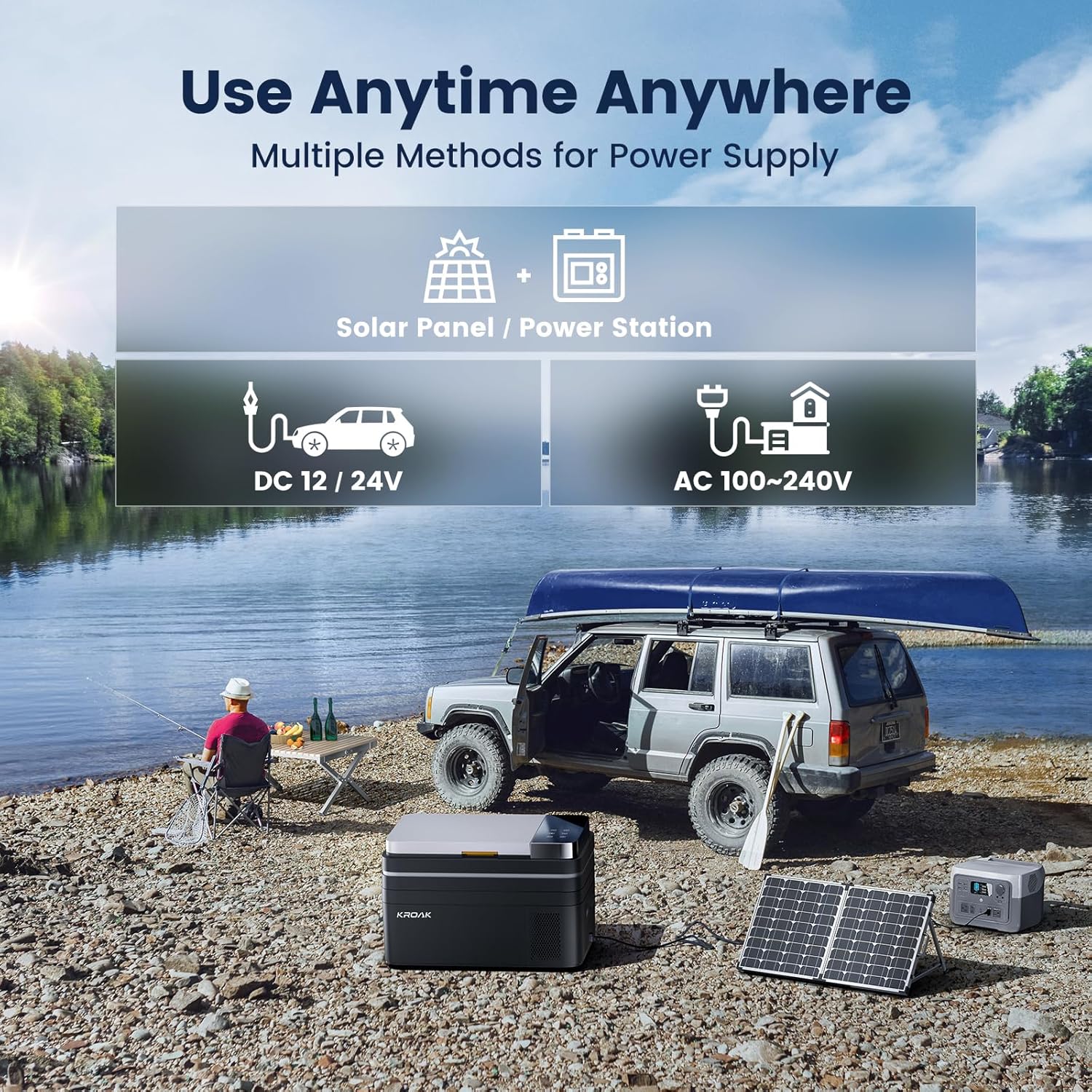
Figure 3.1: The touchable large digital display and its corresponding button functions: Mode, Induction Lighting/Child Lock, Temp Up, Temp Down, ON/OFF, and Set Key.
- M (tilstand) knap: Switches between MAX and ECO cooling modes.
- Light/Lock Button: Activates the internal LED light or engages/disengages the child lock.
- + (Temperature Up) Button: Øger den ønskede temperatur.
- - (Temperature Down) Button: Sænker måltemperaturen.
- Power knap: Turns the cooler box ON or OFF.
- Indstil nøgle: Used for advanced settings, such as battery protection levels.
3.2 Temperaturindstilling
The cooler box can maintain temperatures from -20°C to 20°C (-4°F to 68°F). Use the + og - buttons to adjust the desired temperature. The display will show the current internal temperature and the set target temperature.

Figure 3.2: The interior of the cooler box, demonstrating its ability to keep items frozen (e.g., ice cream) and fresh (e.g., fruits) simultaneously within its -20°C to 20°C temperature adjustment range.
3.3 MAX & ECO Modes
- MAX-tilstand: Provides rapid cooling, reaching 0°C in approximately 15 minutes and -20°C within 4 hours (when empty). This mode consumes more power.
- ØKO -tilstand: An energy-saving mode that optimizes power consumption, using less than 0.18 kWh per day. Ideal for extended use where rapid cooling is not critical.
The cooler box automatically starts and stops to maintain the set temperature, regardless of the mode selected.

Figure 3.3: A graph demonstrating the fast cooling capability, showing the temperature dropping from 25°C to 0°C in 15 minutes and to -20°C over 4 hours.
3.4 Batteribeskyttelse
The KROAK cooler box features three levels of battery protection (L, M, H) to prevent draining your vehicle's battery. You can adjust this setting via the Set Key.
- L (lav): Laveste grænsevolumentage, allows for maximum use of battery power.
- M (medium): Standard cut-off voltage, suitable for most situations. (Recommended for normal use)
- H (Høj): Højeste grænsevolumentage, provides maximum battery protection. (Recommended when connected to a car battery)
Når batteriet voltage drops below the selected cut-off level, the cooler box will automatically shut off to protect the battery.
3.5 Intern LED-lampe
The cooler box is equipped with an internal LED light for visibility in low-light conditions. Press the Light/Lock button to toggle the light on or off.
3.6 Kapacitet
The 28L capacity provides ample space for various items. External dimensions are 623 x 378 x 370 mm, and internal dimensions are 351.7 x 286.7 x 297 mm.

Figur 3.4: Detaljeret view of the cooler box's ample capacity, illustrating how it can hold approximately 50 cans (330ml), 15 bottles (550ml water), or 3 bottles (750ml beer), along with its internal and external dimensions.
4. Vedligeholdelse
Regular maintenance ensures optimal performance and longevity of your cooler box.
4.1 Rengøring
- Før rengøring: Always disconnect the cooler box from all power sources.
- Indre: Rengør det indvendige med en blød klud dampened with a mild detergent solution. Wipe dry thoroughly. Do not use abrasive cleaners or harsh chemicals.
- Ydre: Tør ydersiden af med en blød, damp klæde.
- Ventilationsgitre: Periodically clean the ventilation grilles to remove dust and debris, ensuring proper airflow. Use a soft brush or vacuum cleaner.
4.2 Optøning
If a thick layer of ice forms on the interior walls, defrost the unit. Turn off the cooler box and disconnect it from power. Leave the lid open to allow the ice to melt naturally. Wipe away melted water with a clean cloth. Do not use sharp objects to remove ice.
4.3 Opbevaring
When storing the cooler box for an extended period, ensure it is clean and dry. Leave the lid slightly ajar to prevent odors and mold growth. Store in a dry, well-ventilated area.
5. Fejlfinding
Dette afsnit indeholder løsninger på almindelige problemer, du kan støde på.
| Problem | Mulig årsag | Løsning |
|---|---|---|
| Cooler box does not turn on. | No power supply; loose connection; vehicle battery low (if using DC). | Check power cable connection. Ensure power outlet is functional. Check vehicle battery voltage and adjust battery protection setting (H for car battery). |
| Køleydelsen er dårlig. | Blocked ventilation; ambient temperature too high; lid not closed properly; too many items inside. | Ensure ventilation openings are clear. Avoid direct sunlight. Close lid tightly. Do not overfill. |
| Displayet viser en fejlkode. | Intern fejl; sensorproblem. | Turn off the unit, disconnect power for a few minutes, then restart. If the error persists, contact customer support. |
| Overdreven støj under drift. | Enhed ikke i vater; ventilatorblokering; normal kompressordrift. | Ensure the unit is on a flat surface. Check for any obstructions near the fan. A slight hum from the compressor is normal (approx. 45 dB). |
If the problem persists after attempting these solutions, please contact KROAK customer support.
6. Specifikationer
Detailed technical specifications for the KROAK 28L Compressor Cooler Box.
| Feature | Specifikation |
|---|---|
| Model | B0CXY23WF7 |
| Kapacitet | 28 liter |
| Udvendige mål (L x B x H) | 623 x 378 x 370 mm (24.52 x 14.88 x 14.57 tommer) |
| Indvendige mål (L x B x H) | 351.7 x 286.7 x 297 mm (13.85 x 11.29 x 11.69 tommer) |
| Vægt | 14.4 kg (31.7 lbs) |
| Temperaturområde | -20°C til 20°C (-4°F til 68°F) |
| Strømindgang | DC 12V/24V, AC 100-240V |
| Kølemiddel | R-600A |
| Støjniveau | ≤45 dB |
| Særlige funktioner | LED Display, Energy Efficient, Touch Control, Digital Temperature Control, Battery Protection (L/M/H) |
7. Garanti og support
KROAK products are designed for reliability and performance. For warranty information and customer support, please refer to the purchase platform or contact KROAK directly.
Garanti: For details regarding product warranty and return policies, please consult the terms provided at the point of purchase or on the official KROAK webwebsted.
Kundesupport: If you have any questions, require technical assistance, or need to report an issue, please reach out to KROAK customer service. Contact details can typically be found on the product packaging or the brand's official webwebsted.


