1. Introduktion
Thank you for choosing the Smart Tech 43UV01V 43-inch 4K UHD VIDAA Smart TV. This manual provides essential information for the safe and efficient operation of your television. Please read it thoroughly before using the product and retain it for future reference.

Image 1.1: The Smart Tech 43UV01V TV showcasing its 4K display and integrated VIDAA Smart TV features, including popular streaming services and Dolby Audio support.
2. Sikkerhedsoplysninger
Følg altid grundlæggende sikkerhedsforanstaltninger, når du bruger dette fjernsyn, for at mindske risikoen for brand, elektrisk stød og personskade.
- Udsæt ikke TV'et for regn eller fugt.
- Bloker ikke ventilationsåbninger.
- Sørg for korrekt jordforbindelse af strømstikket.
- Tag stikket ud af tv'et under tordenvejr eller når det ikke bruges i længere perioder.
- Overlad al service til kvalificeret servicepersonale.
- Opbevar batterier utilgængeligt for børn.
3. Pakkens indhold
Please check that all components are present and undamaged. If any items are missing or damaged, contact your retailer.
- Smart Tech 43UV01V 43-inch 4K UHD VIDAA Smart TV
- Fjernbetjening
- AAA-batterier (2x)
- TV-stativ (base og skruer)
- Strømledning
- Instruktionsmanual (dette dokument)
4. Opsætning
4.1 Montering af stativet
Place the TV face down on a soft, flat surface to prevent screen damage. Align the stand bases with the mounting holes on the bottom of the TV and secure them with the provided screws.

Image 4.1: Illustration of the TV's underside, indicating where the stand components attach.
4.2 Tilslutning af eksterne enheder
Your Smart Tech TV offers various connection ports for external devices. Ensure the TV is powered off before making any connections.
- HDMI-porte (3x): For connecting Blu-ray players, game consoles, set-top boxes, etc.
- USB-porte (2x): Til tilslutning af USB-lagerenheder for at afspille medier eller opdatere firmware.
- AV-indgang: For ældre enheder, der bruger kompositvideo og stereolyd.
- Optisk lydudgang: Til tilslutning til en soundbar eller et hjemmebiografsystem.
- Stik til øretelefoner: Til privat lytning.
- RJ45 (Ethernet) Port: Til en kablet internetforbindelse.
- CI slot: For Conditional Access Modules (CAMs) from your broadcast provider.
- Antenna/Cable Input (DVB-T2/DVB-S2): For connecting terrestrial or satellite antennas.
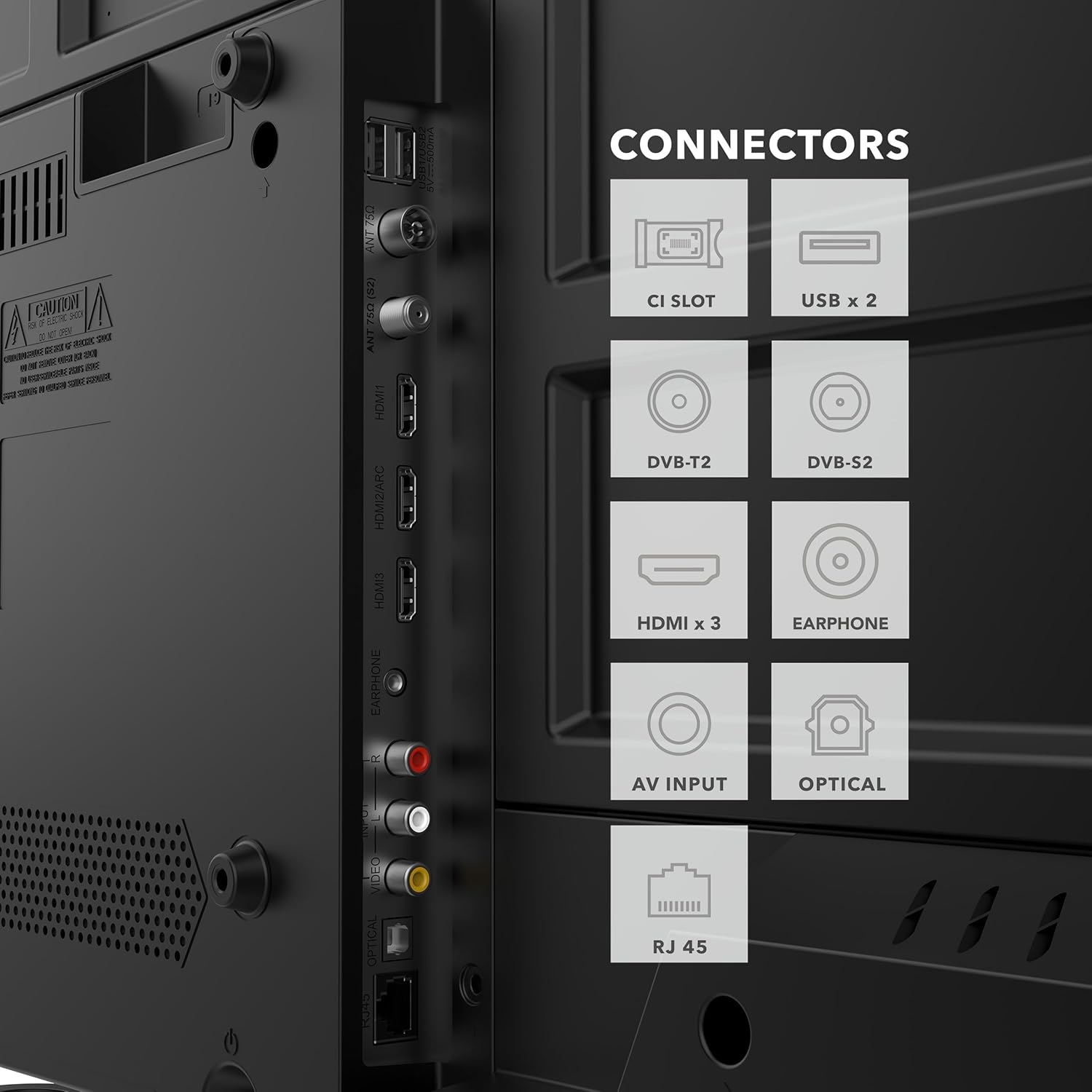
Billede 4.2: Detaljeret view of the TV's rear panel, highlighting the various input and output connectors for external devices.
4.3 Første opstart og netværksopsætning
After connecting all necessary cables, plug the power cord into an electrical outlet. Press the power button on the remote control or the TV. Follow the on-screen instructions to complete the initial setup, including language selection, time zone, and network connection (Wi-Fi or Ethernet).
5. Betjeningsvejledning
5.1 Fjernbetjeningsfunktioner
The included remote control allows you to navigate the TV's features and settings. Insert the two AAA batteries into the remote, ensuring correct polarity.

Image 5.1: The remote control features dedicated buttons for quick access to popular applications like Netflix, YouTube, Prime Video, and Disney+.
- Power knap: Tænder eller slukker for tv'et.
- Navigationstastatur (op/ned/venstre/højre/OK): Til menunavigation og valg.
- Lydstyrke op/ned: Justerer lydniveauet.
- Kanal op/ned: Skifter tv-kanaler.
- Hjemknappen: Accesses the VIDAA Smart TV home screen.
- App-knapper: Direct access to Netflix, YouTube, Prime Video, Disney+.
- Tilbage/Afslut: Går tilbage til den forrige skærm eller afslutter en menu.
5.2 VIDAA Smart TV Interface
The VIDAA operating system provides a user-friendly interface for accessing streaming services, live TV, and other smart features.
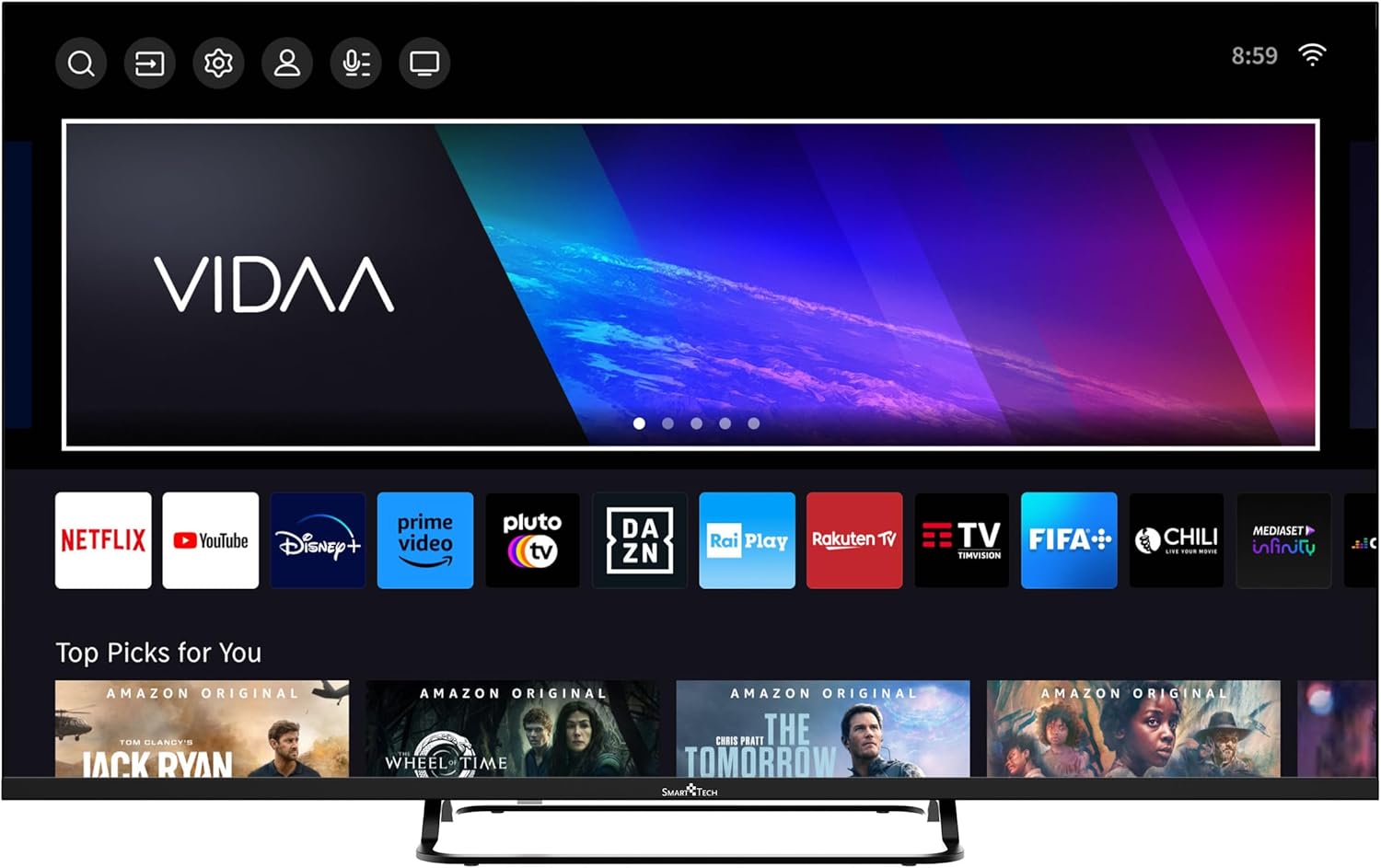
Image 5.2: The VIDAA Smart TV home screen, showing a selection of pre-installed applications and content recommendations.
- Adgang til apps: Use the navigation buttons on your remote to select and launch applications from the home screen.
- Indholdssøgning: Utilize the search function to find movies, shows, or other content across various platforms.
- Indstillingsmenu: Access picture, sound, network, and other system settings via the gear icon on the home screen.
5.3 Billed- og lydindstillinger
Tilpas din viewoplevelse via tv'ets indstillingsmenu.
- Billedtilstande: Select from Standard, Dynamic, Movie, Sport, or User modes to optimize picture quality for different content. Adjust brightness, contrast, color, and sharpness.
- Lydtilstande: Choose from Standard, Music, Movie, Speech, or User modes. The TV supports Dolby Audio for enhanced sound.
- Forældrekontrol: Enable parental control features to restrict access to certain channels or content based on ratings.
5.4 Hoteltilstand
The Hotel Mode feature allows for advanced control over TV settings, often used in hospitality environments. This mode can restrict certain functions, set default volumes, and manage input sources. Consult the advanced settings menu or contact customer support for detailed instructions on activating and configuring Hotel Mode.

Billede 5.3: Overview of key features, including the Hotel Mode functionality.
6. Vedligeholdelse
- Rengøring af skærmen: Tør forsigtigt skærmen af med en blød, fnugfri klud. Brug en skærmrens, der er specielt designet til tv'er, til genstridige pletter, og påfør den på kluden, ikke direkte på skærmen.
- Rengøring af kabinettet: Brug en blød, tør klud til at tørre tv-kabinettet af. Brug ikke slibende rengøringsmidler eller opløsningsmidler.
- Ventilation: Sørg for, at ventilationsåbningerne på bagsiden af tv'et ikke er blokerede for at forhindre overophedning.
7. Fejlfinding
| Problem | Mulig årsag | Løsning |
|---|---|---|
| Ingen strøm | Netledningen er ikke tilsluttet; der er ingen strøm fra stikkontakten. | Kontroller netledningens forbindelse; test stikkontakten med en anden enhed. |
| Intet billede, men der er lyd | Forkert indgangskilde valgt; løst videokabel. | Press the SOURCE button on the remote; check video cable connections. |
| Ingen lyd, men der er billede | Lydstyrken er slået fra eller for lav; forkert indstilling for lydudgang. | Unmute or increase volume; check audio settings in the menu. |
| Fjernbetjening virker ikke | Batteries are dead or incorrectly inserted; obstruction between remote and TV. | Replace batteries; ensure clear line of sight to the TV's IR sensor. |
| Kan ikke oprette forbindelse til Wi-Fi | Forkert adgangskode; routerproblemer; TV'et er for langt fra routeren. | Verify password; restart router; move TV closer or use wired connection. |
8. Specifikationer
| Modelnummer | 43UV01V |
| Mærke | Smart Tech |
| Skærmstørrelse | 43 tommer (109 cm) |
| Displayteknologi | LED |
| Opløsning | 4K UHD (3840 x 2160) |
| Operativsystem | VIDAA |
| Opdateringshastighed | 60 Hz |
| Lydteknologi | Dolby Audio |
| HDMI porte | 3 |
| USB-porte | 2 |
| Forbindelse | Wi-Fi, Bluetooth, Ethernet (RJ45) |
| Særlige funktioner | Parental Control, Hotel Mode |
| Farve | Sort |
| Produktmål (D x B x H) | 23 cm x 95 cm x 59 cm |

Image 8.1: Dimensional drawing of the Smart Tech 43UV01V TV, illustrating its width, height, and depth.
9. Garanti og support
Smart Tech products are designed for reliability and performance. For warranty information, please refer to the warranty card included with your purchase or visit the official Smart Tech webwebsted.
For technical support, troubleshooting assistance, or service inquiries, please contact Smart Tech customer support through their official channels. Keep your purchase receipt and model number (43UV01V) handy when contacting support.
Fabrikant: Udtryk held
Tilgængelighed af reservedele: 11 Years (as per product data)


