Indledning
This manual provides detailed instructions for setting up, operating, and maintaining your Samsung HW-Q6CC 3.1Ch 340W Soundbar System. This system is designed to enhance your audio experience with 340W of power, a dedicated wireless subwoofer, and support for Dolby Atmos and DTS. It also features built-in Bluetooth for streaming audio from your mobile devices.
Hvad er der i æsken
Bekræft at alle komponenter er til stede i pakken:
- Samsung 3.1Ch Soundbar with AC power cord
- Subwoofer with AC power cord
- HDMI kabel
- AC strømadapter
- Vægmonteringssæt
- Remote control with 2x AAA batteries

Figure 1: Contents of the Samsung HW-Q6CC Soundbar System box, showing the soundbar, wireless subwoofer, remote control, HDMI cable, power adapter, and wall mount kit.
Opsætning
1. Fysisk placering
Place the soundbar directly in front of your television, centered for optimal audio projection. Ensure there are no obstructions in front of the soundbar. The wireless subwoofer can be placed anywhere in the room, ideally near a power outlet and within range of the soundbar for a stable wireless connection. Consider placing it in a corner for enhanced bass response.

Figure 2: The Samsung HW-Q6CC Soundbar and its wireless subwoofer in a typical home setup.
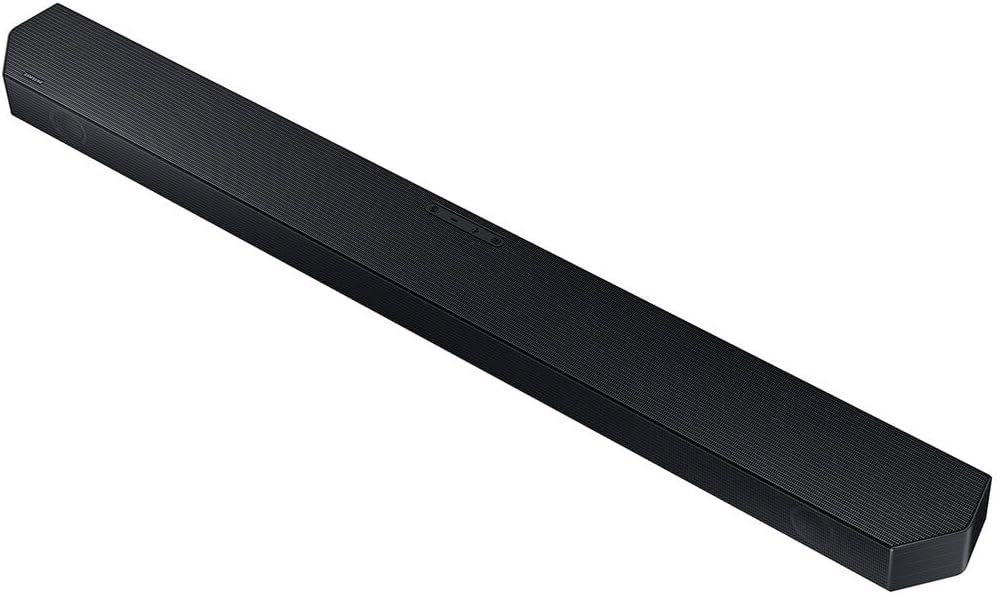
Figur 3: Detaljeret view of the Samsung HW-Q6CC Soundbar unit.

Figur 4: Detaljeret view of the Samsung HW-Q6CC Wireless Subwoofer unit.
2. Forbindelser
- Strømtilslutning: Connect the AC power cords to the soundbar and the wireless subwoofer, then plug them into a wall outlet.
- HDMI eARC-forbindelse: For the best audio quality and control, connect the soundbar to your TV's HDMI eARC port using the provided HDMI cable. This allows for high-quality audio transmission and control of the soundbar volume using your TV remote.
- Optisk forbindelse (alternativ): If your TV does not have an HDMI eARC port, you can use an optical cable (not included) to connect the soundbar to your TV's optical digital audio output.
3. Trådløs subwooferparring
The wireless subwoofer should automatically pair with the soundbar upon powering on. If the connection is not established, check the indicator light on the subwoofer. If it's blinking, press the 'ID SET' button on the back of the subwoofer, then press the 'PAIR' button on the soundbar remote control. The indicator light should turn solid blue once paired.
Betjeningsvejledning
1. Grundlæggende kontroller
The soundbar can be controlled using the buttons on the top panel or the included remote control.
- Knapper på øverste panel: Includes Power, Volume Up/Down, and Source Selection.
- Fjernbetjening: Provides comprehensive control over power, volume, sound modes, subwoofer level, and Bluetooth pairing.
2. Lydtilstande
Optimize your audio experience with various sound modes:
- Adaptiv lyd Lite: Automatically analyzes content and optimizes sound settings for clear dialogue.
- Dolby Atmos & DTS Surround: Provides an immersive, virtualized surround sound experience for compatible content.
- Spiltilstand: Synchronizes gaming audio for a more dynamic and responsive experience.
3. Bluetooth-streaming
Connect your mobile devices to the soundbar via Bluetooth to stream music, podcasts, and other audio content wirelessly. Use the 'Bluetooth Multi Connection' feature to switch between two connected devices effortlessly. For quick pairing, utilize the 'Tap Sound' feature by gently tapping your compatible Samsung mobile device to the soundbar.
Opretholdelse
For at sikre dit soundbar-systems levetid og optimale ydeevne:
- Keep the soundbar and subwoofer clean by wiping them with a soft, dry cloth.
- Undgå at bruge flydende rengøringsmidler eller slibende materialer.
- Sørg for tilstrækkelig ventilation omkring begge enheder for at forhindre overophedning.
- Do not expose the units to extreme temperatures, humidity, or direct sunlight.
Fejlfinding
If you encounter issues with your soundbar system, try the following:
- Ingen strøm: Check if the power cords are securely connected to both the soundbar, subwoofer, and the wall outlets.
- Ingen lyd: Verify the input source on the soundbar matches your TV's output. Check all cable connections. Ensure the TV's internal speakers are turned off or set to external audio.
- Subwooferen forbinder ikke: Follow the wireless subwoofer pairing instructions in the Setup section. Ensure the subwoofer is within range and not obstructed.
- Problemer med Bluetooth-forbindelse: Ensure Bluetooth is enabled on your mobile device and the soundbar is in Bluetooth pairing mode. Try unpairing and re-pairing the device.
- Fjernbetjeningen virker ikke: Check the batteries in the remote control. Ensure there are no obstructions between the remote and the soundbar.
Specifikationer
| Feature | Specifikation |
|---|---|
| Modelnavn | HW-Q6CC |
| Mærke | Samsung |
| Højttaler type | Soundbar |
| Surround Sound Kanalkonfiguration | 3.1 |
| Højttaler Maksimal udgangseffekt | 340 watt |
| Forbindelsesteknologi | Bluetooth, HDMI, Optisk |
| Lydudgangstilstand | Dolby Atmos, DTS Surround |
| Trådløs kommunikationsteknologi | Bluetooth, WiFi |
| Subwoofer tilslutningsteknologi | Trådløs |
| Produktdimensioner | 2.2" D x 40.6" B x 4.1" H |
| Varens vægt | 25.1 pund |
| Farve | Sort |
| Materiale | Metal, Plast |
| Monteringstype | Vægmontering |
| Kontrolmetode | Fjern |
Garanti og support
This Samsung Soundbar System comes with a Begrænset garantiFor specifikke vilkår og betingelser henvises til garantikortet, der følger med produktemballagen, eller besøg den officielle Samsung-support. webwebsted.
For further assistance, technical support, or service inquiries, please contact Samsung Customer Service through their official webwebstedet eller kontaktoplysningerne i din produktdokumentation.


