Indledning
Tak for købetasing the Konix Hello Kitty Wireless Bluetooth 5.3 Headphones. This manual provides essential information for setting up, operating, maintaining, and troubleshooting your new headphones. Please read this manual thoroughly before use to ensure optimal performance and longevity of your device.

Billede: Forside view of the Konix Hello Kitty Wireless Bluetooth 5.3 Headphones, showcasing the white and pink design with Hello Kitty graphics on the earcups.
Produktegenskaber
- Komfortabelt design: Lightweight construction with padded ear cushions and an adjustable headband for extended wear comfort.
- Trådløs forbindelse: Equipped with Bluetooth 5.3 for stable and efficient wireless connection to PC, smartphones, and tablets.
- Lang batterilevetid: Enjoy up to 30 hours of music playback on a single charge.
- Indbygget mikrofon: Facilitates clear communication for calls and voice commands.
- Alsidig tilslutning: Includes a 3.5mm jack cable for wired audio connection, offering flexibility when wireless is not preferred or battery is low.
- Lyd af høj kvalitet: Features 40mm speakers for an immersive listening experience.
- Integreret kontrol: Direct controls on the headphone for volume adjustment, voice assistant activation (Siri/Android compatible), and call management.

Image: A person wearing the Konix Hello Kitty headphones, with icons illustrating key features such as Bluetooth 5.3 connectivity, a built-in microphone, and the inclusion of a 3.5mm audio jack and Type-C charging cable.
Pakkens indhold
- Konix Hello Kitty Wireless Bluetooth 5.3 Headphones
- 3.5 mm Audio Jack-kabel
- USB Type-C opladerkabel
- Brugervejledning (dette dokument)

Image: The front of the retail packaging for the Konix Hello Kitty Bluetooth headset, showing the product image and key features.
Opsætning
1. Opladning af hovedtelefonerne
Before first use, fully charge your headphones. Connect the USB Type-C charging cable to the charging port on the headphones and the other end to a USB power source (e.g., computer USB port, wall adapter). The charging indicator light will show the charging status.
- Opladningstid: Cirka 2.5 timer.
- Battery Life: Up to 30 hours of playtime on a full charge.
- Standby Time: Up to 200 hours.

Image: The Konix Hello Kitty headphones with an overlay indicating a 30-hour playtime, 200-hour standby time, and 2.5-hour charging time.
2. Bluetooth-parring
- Sørg for, at hovedtelefonerne er opladet og slukket.
- Press and hold the Power button until the LED indicator light flashes, indicating pairing mode.
- Aktiver Bluetooth på din enhed (smartphone, tablet, pc), og søg efter tilgængelige enheder.
- Select "Konix Hello Kitty" (or similar name) from the list of found devices.
- Once paired, the LED indicator will change (e.g., solid blue) and you will hear an audible confirmation.
3. Kablet forbindelse (valgfrit)
If you prefer a wired connection or if the battery is depleted, you can use the included 3.5mm audio jack cable.
- Plug one end of the 3.5mm audio cable into the audio jack on the headphones.
- Plug the other end into the 3.5mm audio output port of your device.
- Hovedtelefonerne skifter automatisk til kablet tilstand.
Betjeningsvejledning
Tænd/sluk
- Tænd: Tryk og hold tænd/sluk-knappen nede i cirka 3 sekunder.
- Sluk: Tryk og hold tænd/sluk-knappen nede i cirka 5 sekunder.
Musikafspilning
- Afspil/pause: Tryk på multifunktionsknappen.
- Lydstyrke op: Tryk på knappen Lydstyrke op.
- Skrue ned for lyden: Tryk på knappen Lydstyrke ned.
- Næste nummer: Press and hold (or double-press, depending on model) the Volume Up button.
- Forrige nummer: Press and hold (or double-press, depending on model) the Volume Down button.
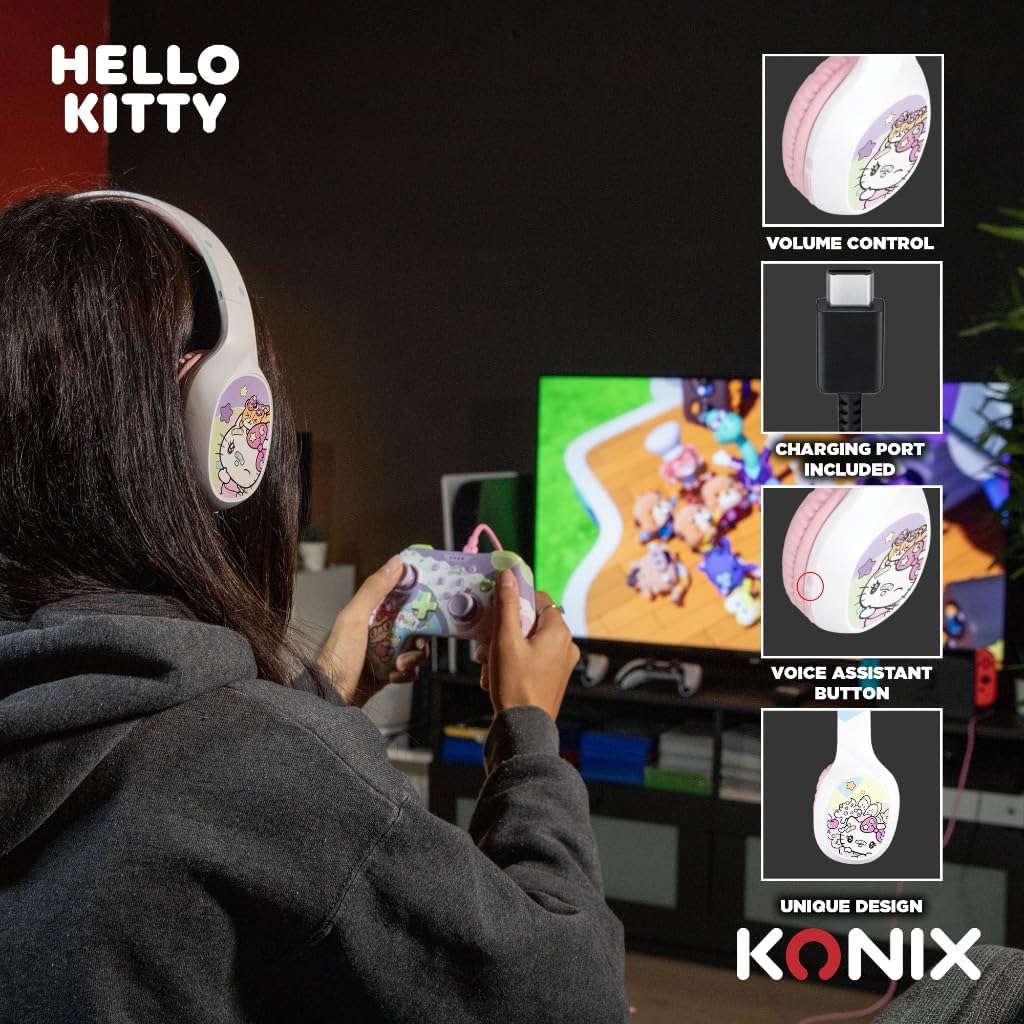
Image: A user interacting with the Konix Hello Kitty headphones, with insets highlighting the volume control, charging port, and voice assistant button located on the earcup.
Opkaldsstyring
- Besvar/afslut opkald: Tryk på multifunktionsknappen.
- Afvis opkald: Tryk og hold multifunktionsknappen nede.
- Genopkald sidste nummer: Tryk to gange på multifunktionsknappen.
Stemmeassistent
Activate your device's voice assistant (Siri, Google Assistant, etc.) directly from the headphones.
- Aktiver stemmeassistent: Press the dedicated Voice Assistant button.
Vedligeholdelse og pleje
- Rensning: Tør hovedtelefonerne af med en blød, tør klud. Brug ikke slibende rengøringsmidler eller opløsningsmidler.
- Opbevaring: Opbevar hovedtelefonerne et køligt, tørt sted væk fra direkte sollys og ekstreme temperaturer.
- Batteripleje: For at forlænge batteriets levetid bør du undgå at aflade batteriet helt ofte. Oplad hovedtelefonerne regelmæssigt, selvom de ikke er i brug i længere perioder.
- Vandtæthed: Disse hovedtelefoner er ikke vandtætte. Undgå udsættelse for vand eller overdreven fugt.
- Håndtering: Do not drop, disassemble, or attempt to repair the headphones yourself. This may void the warranty and cause damage.
Fejlfinding
| Problem | Mulig årsag | Løsning |
|---|---|---|
| Hovedtelefonerne tændes ikke. | Lavt batteri. | Oplad hovedtelefonerne helt. |
| Kan ikke parres via Bluetooth. | Headphones not in pairing mode; Device Bluetooth off; Too far from device. | Ensure headphones are in pairing mode; Turn on Bluetooth on your device; Move headphones closer to your device (within 10 meters). |
| Ingen lyd eller lav lydstyrke. | Volume too low on headphones or device; Incorrect audio output selected; Headphones not properly connected (wired). | Increase volume on both headphones and device; Check device's audio output settings; Ensure 3.5mm cable is fully inserted. |
| Mikrofon virker ikke. | Microphone muted on device; Incorrect input device selected. | Check microphone settings on your device; Ensure "Konix Hello Kitty" is selected as the input device. |
| Intermitterende forbindelse. | Interference; Too far from device; Obstacles between devices. | Move away from other wireless devices; Reduce distance to paired device; Remove obstacles. |
Specifikationer
| Feature | Detalje |
|---|---|
| Modelnummer | 3328170001175 |
| Forbindelse | Trådløs (Bluetooth 5.3), Kablet (3.5 mm jack) |
| Bluetooth version | 5.3 |
| Højttaler størrelse | 40 mm |
| Frekvensområde | 20 Hz - 20,000 Hz |
| Batterilevetid (spilletid) | Op til 30 timer |
| Standby tid | Op til 200 timer |
| Opladningstid | Ca. 2.5 timer |
| Mikrofon | Indbygget |
| Farve | Hvid, Pink |
| Vægt | 290 gram (ca.) |
| Dimensioner (pakke) | 20.1 x 18.8 x 8 cm |
| Støjkontrol | Hybrid støjreduktion |
Garanti og support
Konix products are designed and manufactured to the highest quality standards. For information regarding warranty coverage and customer support, please refer to the warranty card included with your product or visit the official Konix webwebsted. Gem venligst din købsbevis til garantikrav.
For technical assistance or inquiries, please contact Konix customer support through their official channels.


