1. Introduktion
This manual provides detailed instructions for the setup, operation, and maintenance of your MT-VIKI Gaming Audio Mixer, Model MT-LHY1. This device is designed to enhance audio for live streaming, recording, podcasting, and gaming on various platforms and devices, including PCs and mobile phones. Please read this manual thoroughly before use to ensure optimal performance and safety.
2. Sikkerhedsoplysninger
- Strømforsyning: Use only the specified power adapter (5V/1A) to prevent damage to the device.
- Vand og fugt: Do not expose the mixer to water or excessive moisture. Avoid using it in damp miljøer.
- Ventilation: Ensure proper ventilation around the device. Do not block ventilation openings.
- Rensning: Afbryd strømmen før rengøring. Brug en blød, tør klud. Brug ikke flydende rengøringsmidler eller aerosoler.
- Reparationer: Forsøg ikke at reparere enheden selv. Overlad al service til kvalificeret personale.
- Placering: Place the mixer on a stable, flat surface away from direct sunlight, heat sources, and strong electromagnetic fields.
3. Pakkens indhold
Bekræft at alle varer er til stede i pakken:
- MT-VIKI Gaming Audio Mixer (Model MT-LHY1)
- USB-C til USB-C opladerkabel
- USB-A til USB-C ladekabel
- 3.5 mm lydkabel

4. Produktet er slutview: Controls and Interfaces
4.1. Kontroller på frontpanelet
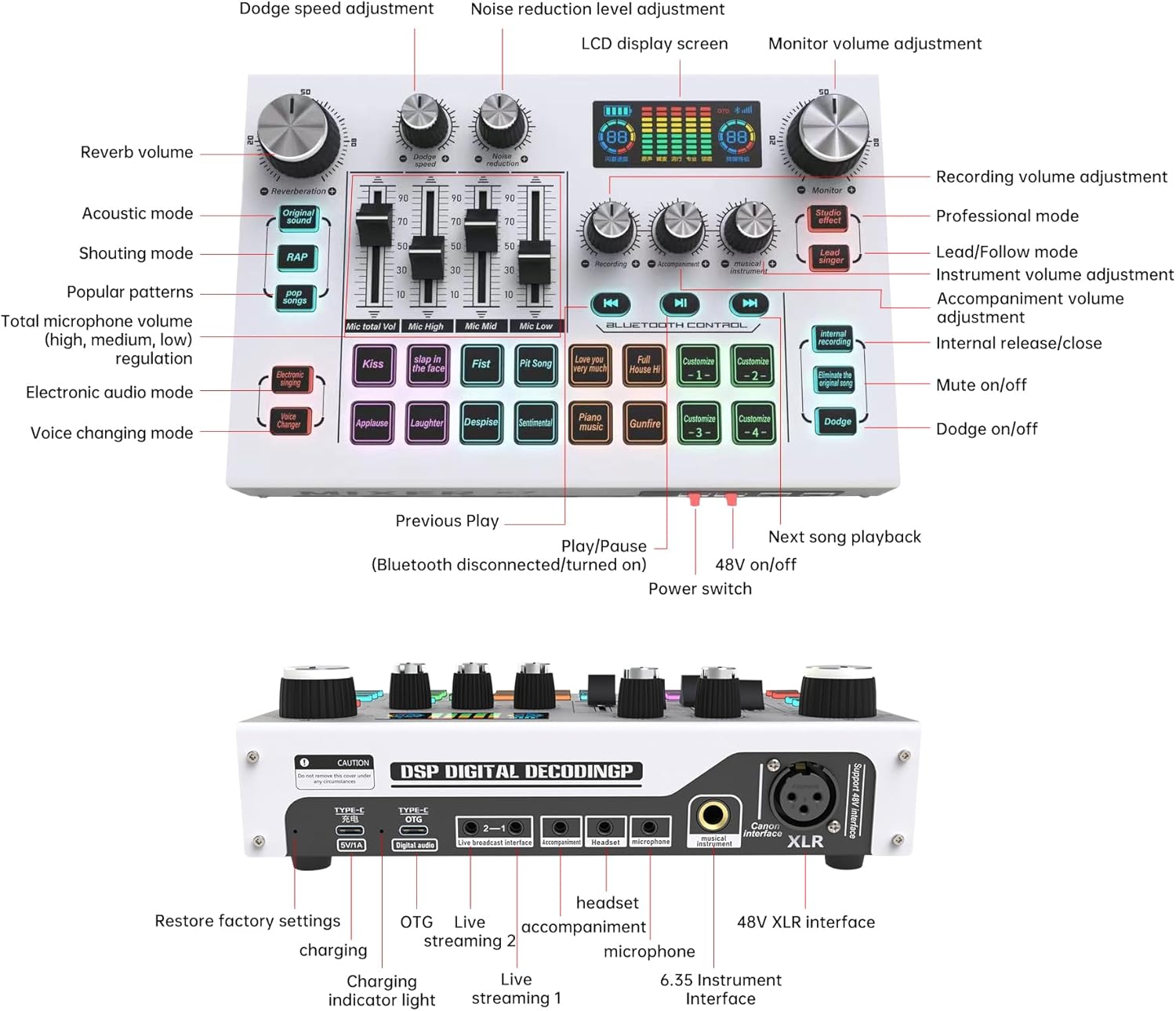
- Reverb Volume Knob: Adjusts the intensity of the reverb effect.
- Dodge Speed Adjustment Knob: Controls the speed of the 'Dodge' effect.
- Noise Reduction Level Adjustment Knob: Adjusts the level of ambient noise reduction.
- LCD skærm: Shows dynamic music spectrum, pitch adjustment, and real-time power storage.
- Monitor Volume Adjustment Knob: Controls the volume of the monitoring output (headphones).
- Recording Volume Adjustment Knob: Adjusts the output volume for recording.
- Instrument Volume Adjustment Knob: Controls the volume of connected musical instruments.
- Accompaniment Volume Adjustment Knob: Adjusts the volume of background music.
- Microphone Volume Faders (High, Mid, Low): Individual sliders for precise control over microphone equalization.
- Mode Buttons (Original Sound, Acoustic, Shouting, Popular Patterns, Electronic Audio, Voice Changing): Selects different audio modes and effects.
- Sound Effect Buttons (e.g., Kiss, Fist, Laughter, Gunfire): Triggers various pre-set sound effects.
- Custom Effect Buttons (1-4): Allows users to record and trigger custom sound effects.
- Control Buttons (Previous Play, Play/Pause, Next Song Playback): Til kontrol af medieafspilning.
- 48V On/Off Button: Activates/deactivates 48V phantom power for XLR microphones.
- Afbryderen: Tænder eller slukker for enheden.
- Mute On/Off Button: Slår lyden fra eller til.
- Dodge On/Off Button: Activates/deactivates the 'Dodge' effect, which lowers background audio when speaking.
4.2. Rear Panel Interfaces

- Type-C Power (5V/1A): USB-C-port til opladning af enheden.
- Type-C OTG (Digital Audio): USB-C port for digital audio connection to computers or mobile devices.
- Live Broadcast Interface (1 & 2): 3.5mm ports for connecting to mobile phones for live streaming.
- Akkompagnementsindgang: 3.5mm port for connecting an external audio source for background music.
- Headset Vocal Input & Monitoring: 3.5mm port for connecting a headset with a microphone.
- Mikrofonindgang: 3.5mm port for connecting a 3.5mm condenser microphone.
- Musical Instrument Interface: 6.35mm port for connecting dynamic microphones or musical instruments.
- XLR Interface (Canon Interface): XLR port for connecting professional XLR microphones, supporting 48V phantom power.
5. Opsætningsvejledning
5.1. Tænd og opladning
- Connect the provided USB-C charging cable to the Type-C Power (5V/1A) port on the rear of the mixer.
- Connect the other end of the USB cable to a 5V/1A USB power adapter (not included) or a computer USB port.
- Tryk på Strømafbryder on the front panel to turn on the mixer. The LCD screen will illuminate.
5.2. Tilslutning af mikrofoner
- XLR Microphone: Connect an XLR microphone to the XLR-interface. If your microphone requires phantom power, press the 48V On/Off knap.
- 6.35mm Dynamic Microphone/Instrument: Tilslut til Musical Instrument Interface.
- 3.5mm Condenser Microphone: Connect to the dedicated Mikrofonindgang.
- Headset mikrofon: Connect your headset (with microphone) to the Headset Vocal Input & Monitoring havn.
5.3. Connecting to Devices (PC/Phone)
- For PC/Computer (Digital Audio): Tilslut Type-C OTG (Digital Audio) port on the mixer to your computer using a USB-C cable. The computer should recognize the mixer as an audio device.
- For Mobile Phone Live Streaming: Brug det medfølgende 3.5 mm lydkabel til at tilslutte Live Broadcast Interface (1 or 2) on the mixer to the 3.5mm audio jack of your mobile phone. For phones without a 3.5mm jack, an appropriate adapter (not included) may be required.
- Bluetooth-akkompagnement: Activate Bluetooth on your mobile device and search for the mixer. Pair the devices to stream background music wirelessly.
6. Betjeningsvejledning
6.1. Basic Audio Adjustment
- Mikrofonlydstyrke: Use the individual Mic High, Mic Mid, Mic Low faders to adjust the equalization of your microphone input.
- Input Volumes: Juster Instrumentvolumen og Akkompagnementsvolumen knobs to balance your audio sources.
- Skærmvolumen: Brug Monitor Volume Adjustment knob to control the volume heard through your headphones.
- Optagelydstyrke: Juster Recording Volume Adjustment knob to set the output level for your recording or stream.
6.2. Special Effects and Modes
- rumklang: Drej på Reverb Volume Knob to add or reduce reverberation to your voice.
- Støjreduktion: Juster Noise Reduction Level Adjustment Knob to minimize background noise.
- Dodge Effect: Tryk på Dodge On/Off button to activate this feature, which automatically lowers background music when you speak. Adjust the Dodge Speed Adjustment Knob for desired response.
- Voice Changing Modes: Tryk på Voice Changing Mode button to cycle through different vocal effects.
- Lydeffekter: Press any of the pre-set Lydeffekt knapper (e.g., Kiss, Laughter) to trigger corresponding audio clips.
- Custom Sound Effects: To record a custom sound effect, press and hold one of the Custom Effect Buttons (1-4) until it blinks, then speak into the microphone. Press the button again to stop recording. Press briefly to play the recorded effect.
6.3. Bluetooth -kontrol
Once paired, you can control music playback from your Bluetooth-connected device using the Forrige spil, Afspil/pause, og Next Song Playback buttons on the mixer.
7. Vedligeholdelse
- Rensning: Use a soft, dry, lint-free cloth to clean the surface of the mixer. Do not use abrasive cleaners or solvents.
- Opbevaring: Når mixeren ikke er i brug, skal den opbevares køligt og tørt, væk fra direkte sollys og ekstreme temperaturer.
- Kabelpleje: Avoid bending or crimping cables excessively. Disconnect cables by pulling the plug, not the cable itself.
8. Fejlfinding
| Problem | Mulig årsag | Løsning |
|---|---|---|
| Ingen lydudgang | Volume levels too low; incorrect connections; muted output. | Check all volume knobs and faders. Ensure cables are securely connected. Verify the Mute On/Off button is not active. Check device audio settings on your computer/phone. |
| Mikrofon virker ikke | Incorrect microphone input; 48V phantom power off (for XLR); microphone volume too low. | Ensure the microphone is connected to the correct input. If using an XLR condenser mic, activate 48V On/Off. Adjust microphone volume faders. Test with another microphone if possible. |
| Problemer med Bluetooth-forbindelse | Mixer not in pairing mode; device too far; interference. | Ensure Bluetooth is enabled on both devices. Move devices closer. Restart both the mixer and the Bluetooth device. |
| Device not charging or powering on | Faulty cable; insufficient power source; battery depleted. | Ensure the charging cable is properly connected to the Type-C Power port. Use a reliable 5V/1A power source. Allow the device to charge for a period before attempting to power on. Try a different USB-C cable. |
| Lydkvaliteten er dårlig eller forvrænget | Input levels too high; incorrect EQ settings; cable issues. | Reduce input volume levels to prevent clipping. Adjust microphone EQ faders. Ensure all cables are in good condition and properly connected. |
9. Specifikationer
| Feature | Detalje |
|---|---|
| Modelnummer | MT-LHY1 |
| Mærke | MT-VIKI |
| Forbindelsesteknologi | USB, Bluetooth |
| Antal kanaler | 4 |
| Strømkilde | Corded Electric (USB 5V/1A) |
| Varens vægt | 14.1 ounce (0.4 kilo) |
| Pakkedimensioner | 10.83 x 6.69 x 3.03 tommer |
| Vise | 2.25 tommer LCD-skærm |
| Mikrofonindgange | XLR (with 48V Phantom Power), 6.35mm, 3.5mm, Headset Mic |
| Kompatibilitet | Mac OS, Windows, Mobile Devices |
10. Garanti og support
MT-VIKI products are designed for reliability and performance. For warranty information, please refer to the warranty card included with your product or visit the official MT-VIKI website. If you encounter any issues or require technical assistance, please contact MT-VIKI customer support through the contact information provided on their official webhjemmeside eller gennem din forhandler.


