Indledning
This manual provides essential information for the setup, operation, and maintenance of your amazon basics Wireless Bluetooth Keyboard. Designed for seamless multi-device connectivity, this keyboard allows you to effortlessly switch between up to three devices running on iOS, Windows, or Android operating systems. Its compact and lightweight design, combined with noiseless keys and a built-in rechargeable battery, makes it an ideal solution for versatile typing needs on the go.

Billede: Top-down view of the amazon basics Wireless Bluetooth Keyboard, showcasing its compact layout and grey and black color scheme.
Pakkens indhold
Når du åbner pakken, skal du sørge for, at alle følgende varer er til stede:
- 1 x amazon basics Wireless Bluetooth Keyboard
- 1 x USB Type-C opladningskabel
- 1 x Brugermanual (dette dokument)
Opsætning
1. Opladning af tastaturet
The keyboard features a built-in rechargeable battery. Before first use, it is recommended to fully charge the keyboard.
- Locate the Type-C charging port on the side of the keyboard.
- Connect one end of the provided USB Type-C charging cable to the keyboard's charging port.
- Tilslut den anden ende af kablet til en USB-strømkilde (f.eks. en computers USB-port eller en USB-vægadapter).
- Opladningsindikatorlampen lyser. Når den er fuldt opladet, kan lampen skifte farve eller slukke, afhængigt af modellen.

Billede: En nærbillede fra siden view of the keyboard, highlighting the Type-C charging port and the ON/OFF power switch.
2. Tænd/sluk
To power on the keyboard, slide the ON/OFF switch located on the side of the keyboard to the "ON" position. To power off, slide it to the "OFF" position.
3. Bluetooth-parring
The keyboard supports connection to up to three devices simultaneously. Follow these steps to pair your devices:
- Sørg for, at tastaturet er tændt.
- Tryk på Fn key simultaneously with one of the Bluetooth channel keys (BT1, BT2, eller BT3) for approximately 3-5 seconds until the corresponding indicator light flashes rapidly. This indicates the keyboard is in pairing mode.
- Gå til Bluetooth-indstillinger på din enhed (smartphone, tablet, bærbar computer), og aktiver Bluetooth.
- Søg efter available devices. The keyboard will appear as "amazon basics Keyboard" or similar.
- Select the keyboard from the list to connect. If prompted, enter the displayed code on the keyboard and press Indtast.
- Når den er tilsluttet, holder indikatorlampen op med at blinke og lyser konstant i et par sekunder, før den slukker.
- Repeat these steps for up to two additional devices using the other BT channel keys.

Image: The keyboard positioned between a laptop, tablet, and smartphone, visually representing its multi-device connectivity feature.
Betjening af tastaturet
1. Skift mellem enheder
After pairing multiple devices, you can easily switch between them:
- Tryk blot på Fn key simultaneously with the desired Bluetooth channel key (BT1, BT2, eller BT3) to switch to the corresponding paired device.
- The keyboard will automatically connect to the selected device.
2. Operativsystemkompatibilitet
The keyboard is designed to be compatible with various operating systems. Some keys may have dual functions or specific behaviors depending on the OS.
- iOS: Compatible with iPhones and iPads.
- Windows: Fully functional with Windows PCs and laptops.
- Android: Works seamlessly with Android smartphones and tablets.
- Mac OS: Compatible with MacBooks and iMacs.
- Chrome OS: Supports Chrome OS devices.
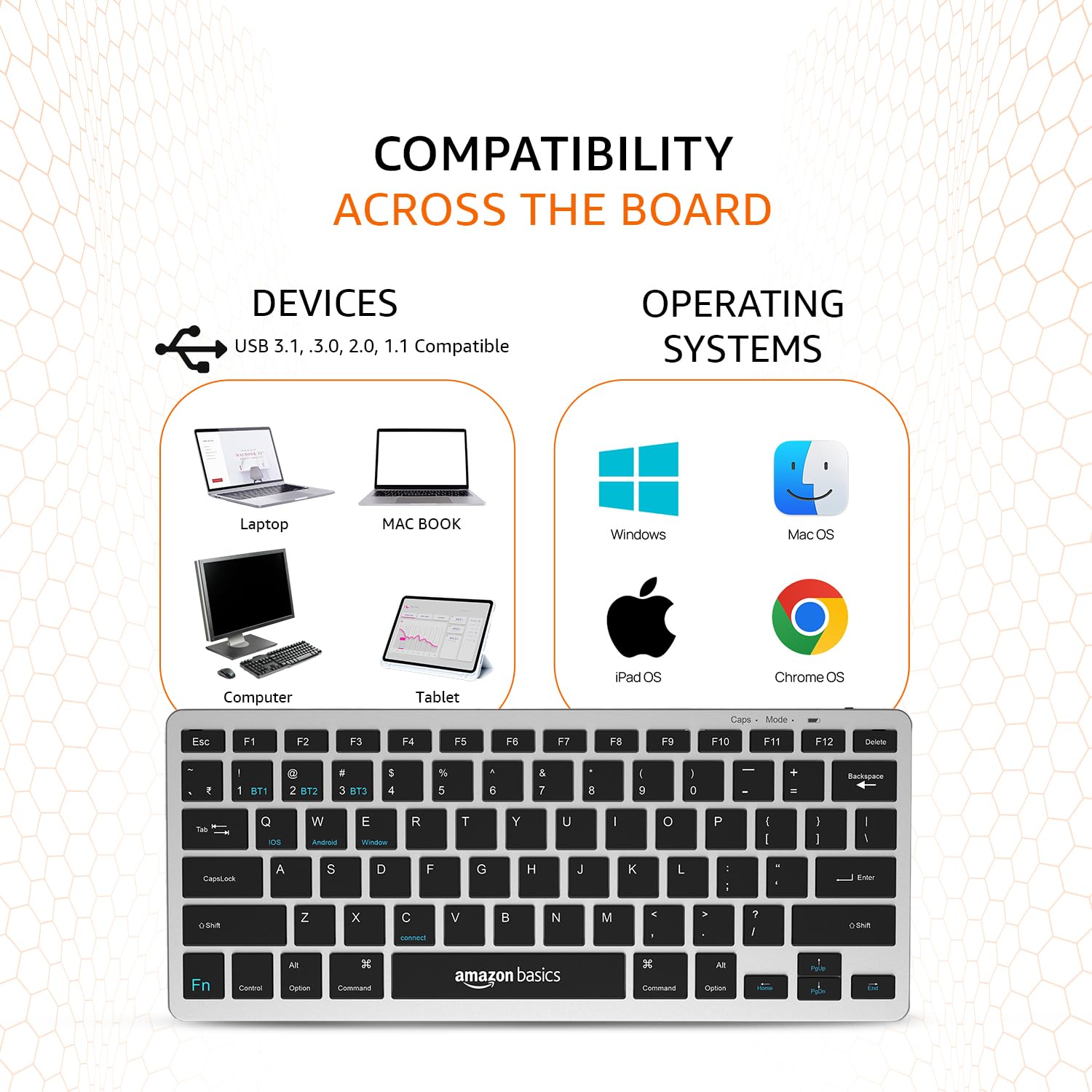
Image: A visual representation of the keyboard's broad compatibility, showing various device types and operating system logos it supports.
3. Specielle funktionstaster
The keyboard features a dedicated Fn key that, when pressed in combination with other keys, activates special functions. Refer to the keycap legends for specific functions (e.g., media controls, volume, screen brightness).
Opretholdelse
Korrekt vedligeholdelse sikrer dit tastaturs levetid og optimale ydeevne.
- Rensning: Brug en blød, tør og fnugfri klud til at tørre tastaturets overflade af. Tør tastaturet let af, hvis det er genstridigt snavs.ampRengør kluden med vand eller et mildt, ikke-slibende rengøringsmiddel. Undgå for meget fugt.
- Batteripleje: To preserve battery life, avoid fully discharging the keyboard frequently. If storing for an extended period, charge the battery to about 50% and power off the keyboard.
- Opbevaring: Store the keyboard in a cool, dry place away from direct sunlight, extreme temperatures, and corrosive materials.
- Håndtering: Avoid dropping the keyboard or subjecting it to strong impacts. Do not attempt to disassemble the keyboard, as this will void the warranty.
Fejlfinding
If you encounter issues with your amazon basics Wireless Bluetooth Keyboard, refer to the following common troubleshooting steps:
- Keyboard Not Connecting/Pairing:
- Sørg for, at tastaturet er tændt og fuldt opladet.
- Sørg for, at Bluetooth er aktiveret på din enhed.
- Move the keyboard closer to your device to ensure it's within range.
- Forget or remove the keyboard from your device's Bluetooth list and attempt to re-pair it.
- Try pairing with a different device to rule out an issue with your primary device's Bluetooth.
- Taster reagerer ikke eller dobbelttastning:
- Check the keyboard's battery level and recharge if low.
- Ensure the keyboard is properly connected to your device. Try switching to another BT channel and back.
- Clean the keys and surrounding areas to remove any debris that might be obstructing key presses.
- Restart both the keyboard (power off/on) and your connected device.
- Forsinket respons:
- Ensure there are no other strong wireless signals or devices interfering with the Bluetooth connection.
- Reducer afstanden mellem tastaturet og din enhed.
- Check for any pending software updates on your device that might improve Bluetooth performance.
- Opladningsproblemer:
- Verify that the Type-C cable is securely connected to both the keyboard and the power source.
- Prøv at bruge en anden USB-port eller strømadapter.
- Sørg for, at opladningskablet ikke er beskadiget.
If the issue persists after trying these steps, please contact amazon basics customer support for further assistance.
Specifikationer
| Feature | Detalje |
|---|---|
| Mærke | amazon grundlæggende |
| Model | Wireless Bluetooth Keyboard (B0CX226DLQ) |
| Forbindelsesteknologi | Bluetooth |
| Nøglelayout | Kompakt layout med 78 taster |
| Nøgletype | Noiseless Keys |
| Kompatible enheder | Laptop, tablet, smartphone |
| Operativsystemkompatibilitet | iOS, Windows, Android, Mac OS, Chrome OS |
| Batteritype | Built-in Rechargeable Lithium Polymer |
| Batteriets energiindhold | 1.48 wattimer |
| Opladningsport | USB Type-C |
| Materiale | ABS af høj kvalitet |
| Produktmål (LxBxH) | 28.5 cm x 12 cm x 1.45 cm |
| Varens vægt | 290 g |
| Oprindelsesland | Indien |
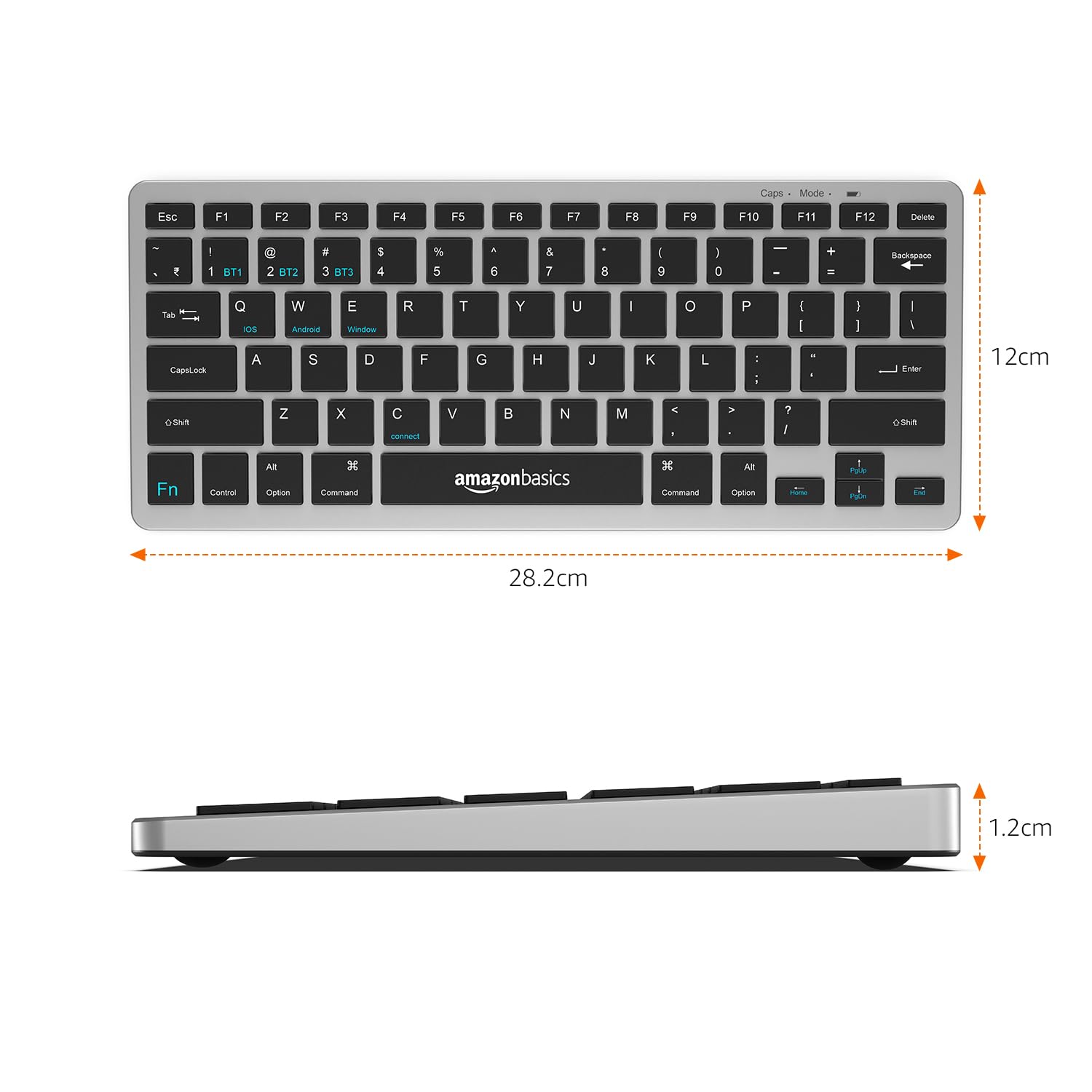
Image: The keyboard with overlaid measurements indicating its length (28.5 cm), width (12 cm), and thickness (1.2 cm).
Garanti og support
For information regarding the product warranty, please refer to the warranty card included in your package or contact amazon basics customer support directly. Warranty terms and conditions may vary by region and purchase date.
If you require further assistance, have questions, or need to report an issue that cannot be resolved using the troubleshooting guide, please contact amazon basics customer support through their official webwebstedet eller de kontaktoplysninger, der er angivet med dit køb.
For the latest support information and FAQs, visit the official amazon basics support page.


