1. Introduktion
Thank you for choosing the ARROWMAX Mini Electric Drill SDS MINI 22. This compact and powerful cordless drill is designed for precision tasks in various materials, making it ideal for DIY enthusiasts, model builders, and jewelers. This manual provides essential information for safe and efficient operation, maintenance, and troubleshooting.
Nøglefunktioner:
- Compact and powerful with a 500 mAh LiPo battery and 600 RPM rotation speed.
- Ergonomic aluminum alloy body for comfortable single-hand operation.
- Includes 10 precision HSS drill bits (0.6mm to 2.2mm) for diverse materials.
- Equipped with 4 shadowless LED lights for optimal visibility and LED battery indicators.
- Simple one-button operation for clockwise, counter-clockwise rotation, and power off.
- Durable aluminum CNC storage case for drill bits.
2. Sikkerhedsinstruktioner
Please read all safety warnings and instructions carefully before using this product to prevent electric shock, fire, and serious injury.
Generel sikkerhed
- Always wear appropriate personal protective equipment, including safety glasses, when operating the drill.
- Hold dit arbejdsområde rent og godt oplyst. Rodede eller mørke områder inviterer til ulykker.
- Brug ikke elværktøj i eksplosive atmosfærer, såsom i nærheden af brændbare væsker, gasser eller støv.
- Hold børn og omkringstående væk, mens du betjener et elværktøj. Distraktioner kan få dig til at miste kontrollen.
- Undgå utilsigtet start. Sørg for, at kontakten er i slukket position, før du tilslutter batteriet, løfter eller bærer værktøjet.
Elektrisk sikkerhed
- Udsæt ikke elværktøj for regn eller våde forhold. Vand, der trænger ind i et elværktøj, øger risikoen for elektrisk stød.
- Brug kun det specificerede opladningskabel og strømadapter.
Personlig sikkerhed
- Vær opmærksom, hold øje med, hvad du laver, og brug din sunde fornuft, når du betjener et elværktøj.
- Gå ikke for langt. Hold hele tiden ordentligt fodfæste og balance.
- Fastgør emnet. Brug clampeller en skruestik til at holde emnet.
- Always ensure the drill bit is securely fastened in the chuck before operation.
3. Pakkens indhold
Bekræft, at alle nedenstående varer er inkluderet i din pakke. Hvis der mangler eller er beskadigede varer, bedes du kontakte din forhandler.
- 1 x ARROWMAX Mini Electric Drill (SDS MINI 22)
- 10 x HSS Drill Bits (0.6mm, 0.8mm, 1.0mm, 1.2mm, 1.4mm, 1.5mm, 1.6mm, 1.8mm, 2.0mm, 2.2mm)
- 1 x Aluminum Drill Bit Storage Case
- 1 x USB-opladningskabel (Type-C)
- 1 x brugermanual
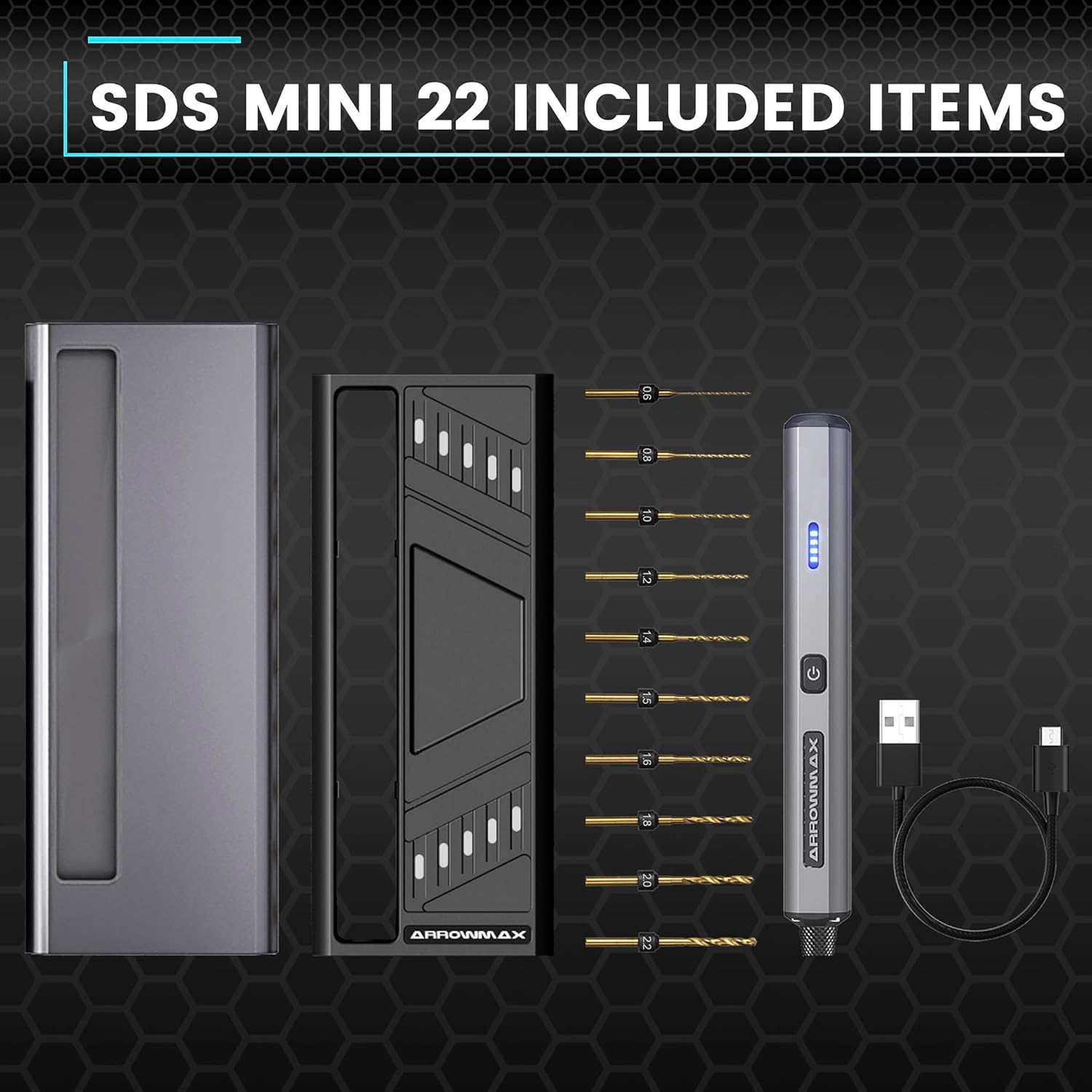
Figure 3.1: Complete package contents of the SDS MINI 22.
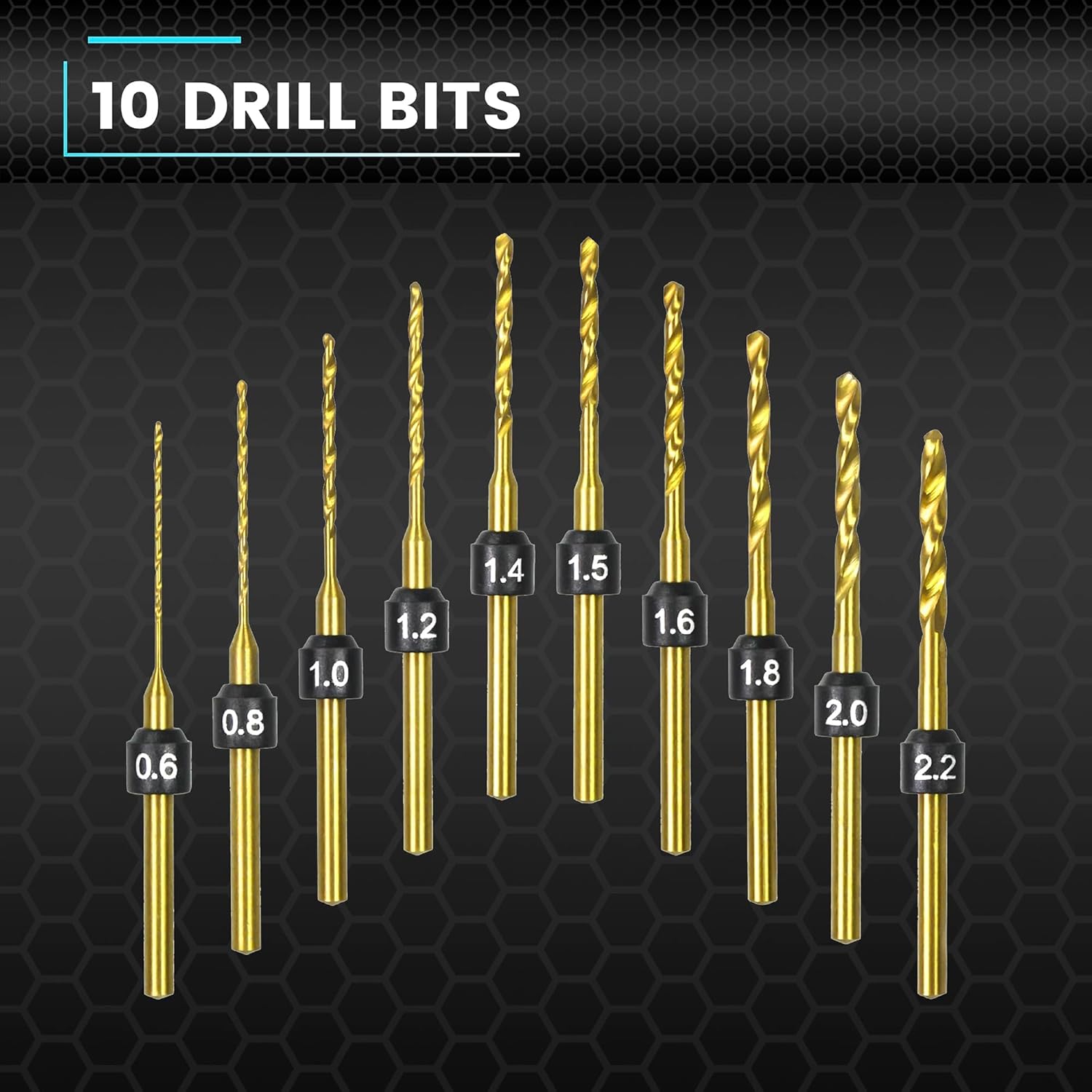
Figure 3.2: The 10 HSS drill bits included with the SDS MINI 22.
4. Produktet er slutview
Familiarize yourself with the components of your ARROWMAX Mini Electric Drill.
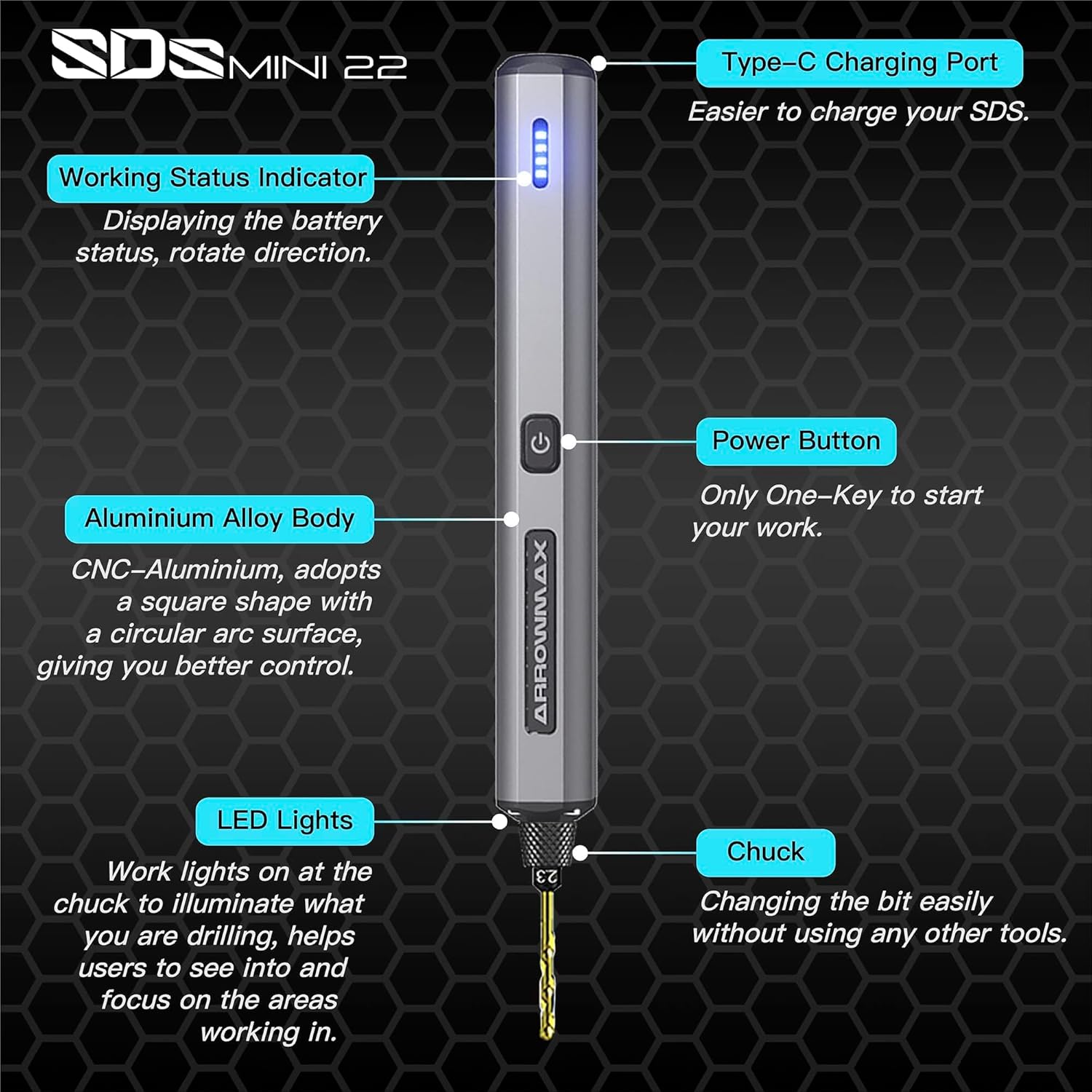
Figure 4.1: Labeled components of the SDS MINI 22.
- Type-C opladningsport: Til opladning af det interne batteri.
- Arbejdsstatusindikator: Displays battery status and rotation direction.
- Power knap: Controls power on/off and rotation direction.
- Aluminiumslegering krop: Provides durability and ergonomic grip.
- LED lys: Illuminates the drilling area for improved visibility.
- chuck: Holds the drill bits securely.
5. Opsætning
5.1 Opladning af enheden
- Locate the Type-C charging port on the top of the drill.
- Connect the provided USB Type-C cable to the drill and the other end to a compatible USB power source (e.g., computer, wall adapter).
- The Working Status Indicator LEDs will illuminate to show the charging progress. A full charge is indicated when all LEDs are solid.
- Allow approximately 60 minutes for a full charge.
5.2 Montering af borehoveder
- Ensure the drill is powered off before installing or removing bits.
- Gently pull the chuck downwards to open the jaws.
- Insert the desired drill bit into the chuck. Ensure the bit is inserted as far as it can go for maximum stability.
- Release the chuck to secure the drill bit. The chuck is designed for tool-free bit changes.
- To remove a bit, pull the chuck downwards and extract the bit.
6. Betjeningsvejledning
6.1 Power On/Off and Rotation Control
The SDS MINI 22 features a simple one-button control:
- Første tryk: The drill will power on and rotate in a clockwise direction. The LED indicator will show the direction.
- Andet tryk: The drill will switch to counter-clockwise rotation. The LED indicator will update to show the new direction.
- Tredje tryk: The drill will power off.
You do not need to continuously hold the button during operation.
6.2 Batteriindikator
The LED indicators on the drill body display the remaining battery power. Monitor these lights to know when recharging is necessary.
6.3 Working with Materials
The SDS MINI 22 is suitable for drilling various materials, including:
- Plast
- Skaller
- Træ
- Læder
- Soft metals (e.g., aluminum)
Always select the appropriate drill bit size for your task and material. Apply gentle, consistent pressure. Avoid excessive force, which can damage the bit or the material.
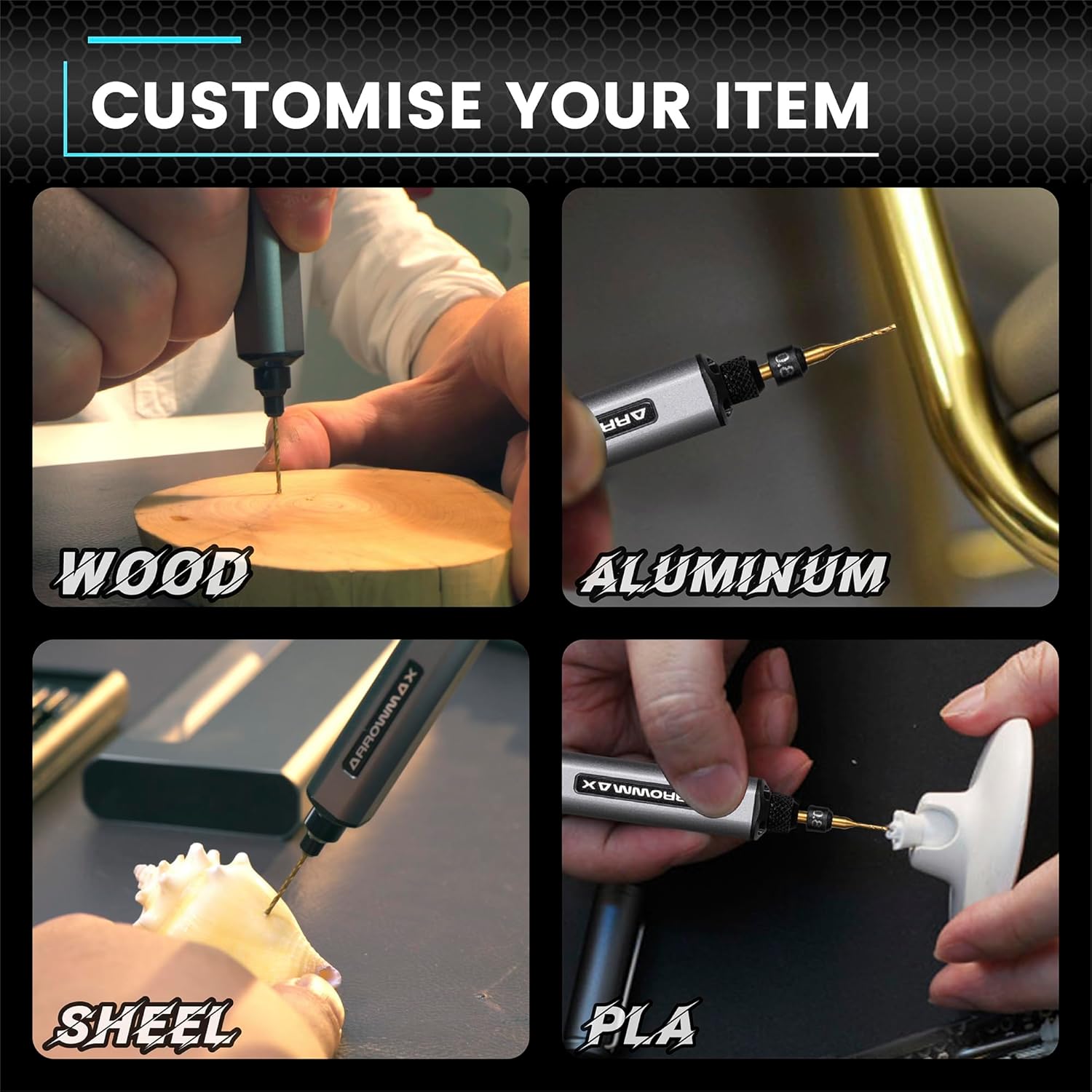
Figur 6.1: Eksamples of materials suitable for drilling with the SDS MINI 22.
7. Vedligeholdelse
7.1 Rengøring
- Ensure the drill is powered off and disconnected from any charging source before cleaning.
- Wipe the drill body with a soft, dry cloth. Do not use harsh chemicals or abrasive cleaners.
- Remove any dust or debris from the chuck and ventilation openings using a soft brush or compressed air.
7.2 Opbevaring
- Store the drill and its accessories in a cool, dry place, away from direct sunlight and moisture.
- Always store the drill bits in their provided aluminum case to protect them from damage and loss.
- For long-term storage, ensure the battery is partially charged (around 50%) to prolong its lifespan. Recharge every 3-6 months if not in use.
8. Fejlfinding
If you encounter issues with your ARROWMAX Mini Electric Drill, refer to the following common problems and solutions:
- Problem: The drill does not turn on.
Løsning: Check the battery level. If the battery is low or depleted, connect the drill to a power source using the USB-C cable and charge it fully. Ensure the power button is pressed correctly (first press for clockwise, second for counter-clockwise). - Problem: The drill is not charging.
Løsning: Verify that the USB-C cable is securely connected to both the drill and the power source. Try a different USB port or power adapter. Ensure the charging port on the drill is clean and free of debris. - Problem: The drill bit is loose or falls out.
Løsning: Ensure the drill bit is inserted correctly and fully into the chuck. Pull the chuck down, insert the bit, and release it to ensure it clamps securely. If the chuck mechanism appears damaged, discontinue use and contact support. - Problem: Reduced drilling performance or unusual noise.
Løsning: Check if the drill bit is dull or damaged; replace it if necessary. Ensure you are using the correct bit for the material. If the issue persists, contact customer support.
9. Specifikationer
| Feature | Specifikation |
|---|---|
| Model | SDS MINI 22 |
| Mærke | ARROWMAX |
| Fabrikant | Freemax Technology Company Limited (IMPORT) |
| Produktmål (L x B x H) | 18.5 x 7 x 3 cm |
| Vægt | 280 gram |
| Strømkilde | Batteridrevet |
| Batteritype | Lithium-polymer |
| Batterikapacitet | 500 mAh |
| Voltage | 5 volt |
| Ampslette | 2 A |
| Maksimal rotationshastighed | 600 RPM |
| Særlige funktioner | Compact, LED Lights, Battery Indicator |
| Farve | Sort |
| Inkluderede komponenter | 1 Electric Pen, 10 Drill Bits, 1 Manual, 1 USB Charging Cable |
10. Garanti og support
Specific warranty information for the ARROWMAX Mini Electric Drill SDS MINI 22 is not provided in the product details. For warranty claims, technical support, or inquiries regarding spare parts, please contact your retailer or the manufacturer directly. Keep your purchase receipt as proof of purchase.


