1. Introduktion
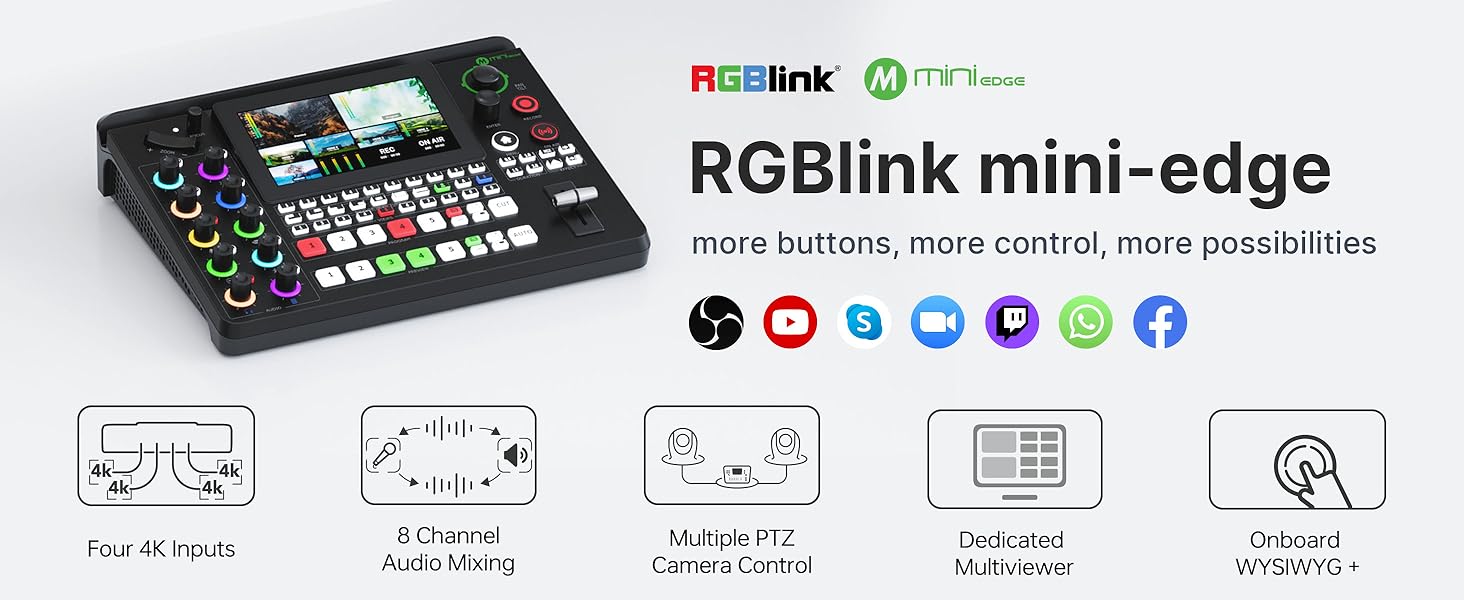
The RGBlink mini-Edge is a versatile all-in-one video mixer switcher designed for professional live streaming, podcasting, and content creation. It integrates multi-camera switching, advanced audio mixing, PTZ camera control, and direct streaming capabilities into a compact and intuitive device. This manual provides essential information for setting up, operating, and maintaining your mini-Edge to maximize its potential.

2. Opsætning
Proper setup is crucial for optimal performance. The mini-Edge offers comprehensive connectivity for various audio and video sources.
2.1. Fysiske forbindelser
- Videoindgange: Connect up to five video sources via HDMI. The device supports 4K input signals.
- Lydindgange: Utilize the XLR/TRS port for professional microphones (with 48V phantom power support) and 6.35mm (1/4") TRS jacks for line-level audio.
- Udgange: HDMI-A (2K60) for program output, HDMI-A (2K60) for multi-view monitoring. USB-C for UVC output (webcam emulation) and USB-C for recording.
- Netværk: RJ45 for communication and direct streaming.
- Magt: Connect the provided USB-C power adapter (12V 3A USB PD).


3. Betjening
The mini-Edge provides intuitive controls for seamless operation during live productions.
3.1. Video Switching and Control
The device features a 5.5-inch HD screen for multi-view monitoring, allowing you to see all your inputs, program, and preview feeds simultaneously. Use the dedicated program and preview buttons to switch between video sources. The bidirectional faders enable smooth transitions between scenes.

3.2. Advanced Audio Management
Control 8 audio input channels with precision. The dedicated audio control panel features magic color knobs for intuitive adjustments. The device supports 48V phantom power for condenser microphones, ensuring professional-grade audio quality for podcasts and music recordings.

3.3. PTZ Camera Control
Directly control up to four PTZ cameras using the integrated joystick and toggle. This feature allows for effortless camera movement, zoom, and focus adjustments, making it easy to follow action and capture dynamic shots.
3.4. Scene Composition and Effects
Transform your presentations with one-click Chroma Key integration for virtual environments. Create multi-layer scene compositions and recall them instantly. The device also offers smooth transition effects to enhance your production quality.


3.5. Live Streaming and Recording
Utilize H.265 encoding for superior streaming quality. Simultaneously broadcast to multiple platforms with RTMP(S) integration. Record up to 100 hours of 160Mbps high-definition video directly to a 2T hard drive via the USB 3.0 interface while streaming, ensuring you never miss a moment.
Video 1: En overview of the RGBlink mini-Edge's features and capabilities at a glance, provided by the seller.
4. Vedligeholdelse
To ensure the longevity and optimal performance of your RGBlink mini-Edge, regular maintenance is recommended.
- Firmwareopdateringer: RGBlink regularly releases firmware updates to enhance features and performance. Check the official RGBlink website for the latest updates and follow the provided instructions carefully.
- Rensning: Use a soft, dry cloth to clean the exterior of the device. Avoid using liquid cleaners or abrasive materials, which can damage the screen and control surface.
- Opbevaring: Når enheden ikke er i brug i længere perioder, skal den opbevares køligt og tørt, væk fra direkte sollys og ekstreme temperaturer.
5. Fejlfinding
If you encounter issues with your mini-Edge, refer to the following common troubleshooting steps:
| Problem | Mulig årsag/løsning |
|---|---|
| No video signal on output. | Check all HDMI cable connections. Ensure input sources are powered on and outputting a compatible signal. Verify correct input selection on the mini-Edge. Try power cycling the device. |
| Audio issues (no sound, distorted audio). | Check audio cable connections. Ensure microphone phantom power is enabled if required. Adjust individual audio channel levels. Verify correct audio input selection. |
| Device not recognized by computer (UVC). | Ensure the USB-C cable is connected to the correct UVC output port. Try a different USB port on your computer. Restart your computer and the mini-Edge. |
| Firmwareopdateringsfejl. | Ensure a stable power supply during the update process. Follow the official firmware update instructions precisely. If issues persist, contact RGBlink support. |
| Limited ISO recording / Software issues. | Some users have reported limitations with ISO recording or software compatibility with newer operating systems. Refer to the latest software documentation or contact RGBlink support for clarification and potential solutions. |
6. Specifikationer
- Produktdimensioner: 87.4 x 114.57 x 27.95 tommer
- Varens vægt: 3.26 pund
- Varemodelnummer: 230-0006-01-0
- Synlig skærmdiagonal: 5.5 tommer (ca. 14 cm)
- Videoindgange: 5-Ch HDMI (4K support)
- Lydindgange: 8-Ch (XLR/TRS, 6.35mm TRS, Bluetooth)
- Videooutput: HDMI-A (Program, Multi-View), USB-C (UVC)
- Indspilning: USB 3.0 to 2T hard drive (160Mbps)
- Streaming: RTMP(S), H.265 encoding
- PTZ kontrol: Integrated joystick, supports up to 4 PTZ cameras
- Fabrikant: RGBlink Science & Technology Co.,Ltd
- Oprindelsesland: Kina
7. Garanti og support
RGBlink products are backed by a manufacturer's warranty. For detailed warranty information, technical support, or service inquiries, please visit the official RGBlink webwebstedet eller kontakt deres kundeserviceafdeling. Gem din købskvittering som købsbevis i tilfælde af garantikrav.
Official RGBlink Store: Besøg butik


