1. Introduktion
Thank you for choosing the AVATTO WT410-BH-3A-B Smart Thermostat. This manual provides comprehensive instructions for the installation, operation, and maintenance of your new smart thermostat. Please read this manual carefully before installation and use to ensure proper functionality and safety. Keep this manual for future reference.
2. Produktet er slutview
The AVATTO WT410-BH-3A-B is a smart Wi-Fi enabled thermostat designed for controlling gas boilers with a maximum load of 3A. It allows you to manage your home's heating system remotely via a mobile application, integrate with popular voice assistants, and program heating schedules for optimal comfort and energy efficiency. The thermostat features a clear HD LED display for easy temperature monitoring and control.
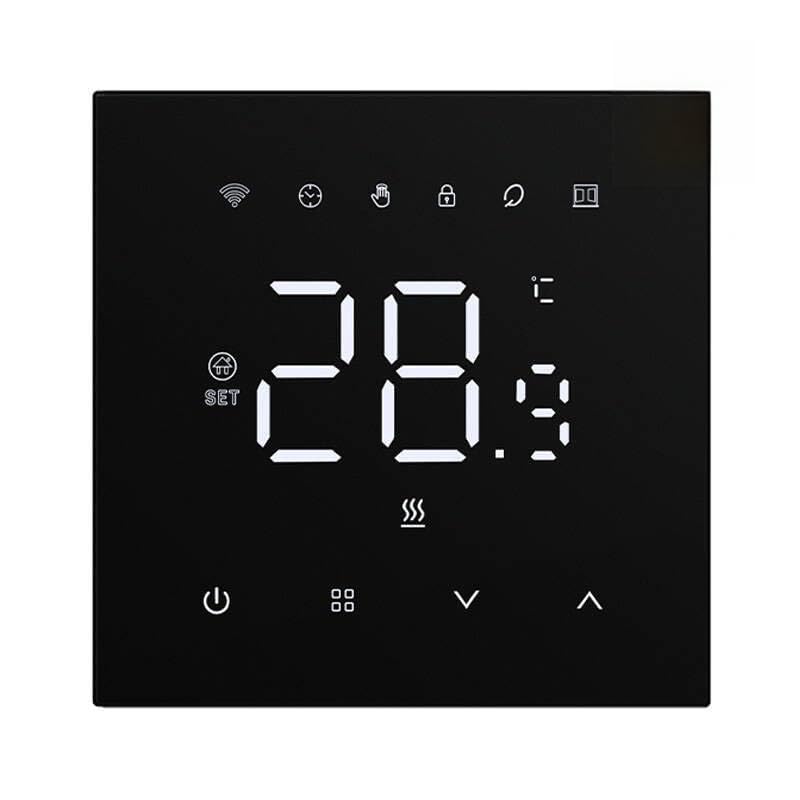
Dette billede viser forsiden view of the AVATTO WT410-BH-3A-B Smart Thermostat. It features a large, clear LED display showing '28.9' degrees Celsius. Above the temperature, several small icons are visible, including Wi-Fi signal, a clock, a hand, a padlock (likely for child lock), a magnifying glass, and a document icon. Below the temperature, there are three wavy lines indicating heating. At the bottom, from left to right, are icons for power, a grid (menu), a down arrow, and an up arrow, representing the control buttons.
3. Nøglefunktioner
- Wi-Fi-forbindelse: Fjernbetjening via smartphone-applikation.
- Voice Assistant-kompatibilitet: Works with popular voice control platforms.
- Advanced Scheduling: Weekly programming with different settings for weekdays and weekends (6 periods on weekdays, 2 on weekends).
- Adjustable HD LED Display: Customizable brightness, with an option to turn off lighting completely.
- High Precision Control: Temperature accuracy up to 0.5°C, displaying 0.1°C.
- Hysteresefunktion: Justerbart temperaturområde fra 0.5°C til 10°C.
- Flere driftstilstande: Supports Manual, Schedule, Temporary Schedule, and Absence modes.
- Børnelås funktion: Forhindrer utilsigtede ændringer af indstillinger.
4. Pakkens indhold
Når du åbner pakken, skal du kontrollere, at alle varer er til stede og i god stand:
- AVATTO WT410-BH-3A-B Smart Thermostat (1 unit)
- Brugervejledning (dette dokument)
- Mounting Screws (if applicable, typically included for wall mount)
5. Opsætning og installation
Vigtig: Installation should be performed by a qualified professional to ensure safety and compliance with local electrical codes. Disconnect power to the boiler before beginning installation.
- Strømafbrydelse: Sluk for hovedstrømforsyningen til dit varmesystem ved afbryderen.
- Montering: Mount the thermostat securely on a wall in a suitable location, away from direct sunlight, drafts, or heat sources that could affect temperature readings. Ensure proper wiring connections to your gas boiler according to the wiring diagram provided in the separate installation guide (if applicable) or by a professional electrician.
- Strømtilslutning: Connect the thermostat to the boiler's control wiring. This model is designed for 3A boiler systems.
- Strømgendannelse: Once wiring is complete and secure, restore power to the heating system.
- App-download: Download the compatible smart home application (e.g., Smart Life, Tuya Smart) from your device's app store.
- Enhedsparring: Follow the in-app instructions to add and pair your AVATTO WT410-BH-3A-B thermostat to your Wi-Fi network. This typically involves putting the thermostat into pairing mode (refer to the thermostat's display or a quick start guide for specific button presses).
6. Betjeningsvejledning
6.1 Grundlæggende betjening
- Tænd/sluk: Tryk på Magt button (circle with vertical line) to turn the thermostat on or off.
- Temperaturjustering: Brug Up (^) and Ned (v) arrow buttons to manually adjust the target temperature.
- Valg af tilstand: Tryk på Menu button (grid icon) to cycle through operating modes: Manual, Schedule, Temporary Schedule, and Absence.
6.2 Planlægning
The thermostat supports advanced weekly scheduling. You can set different temperatures for up to 6 time periods on weekdays and 2 time periods on weekends.
- Enter Schedule mode using the Menu knap.
- Brug Menu button again to navigate through the different time periods (P1-P6 for weekdays, P1-P2 for weekends).
- Brug Up (^) and Ned (v) buttons to set the desired temperature and time for each period.
- Confirm settings by waiting a few seconds or pressing a specific button if indicated on the display.
6.3 App kontrol
Once paired with the smart home application, you can control all thermostat functions remotely:
- Juster temperaturen hvor som helst.
- Indstil og rediger varmeplaner.
- Skift driftstilstande.
- Overvåg den aktuelle rumtemperatur.
- Access advanced settings like hysteresis and display brightness.
6.4 Displayets lysstyrke
The brightness of the HD LED display can be adjusted via the mobile application. There is also an option to completely turn off the display lighting, which can be useful during nighttime.
6.5 Børnelås
To prevent unauthorized changes, especially by children, activate the child lock function. This is typically done by pressing and holding a combination of buttons on the thermostat or through the mobile application. Look for the padlock icon on the display to confirm activation.
7. Vedligeholdelse
The AVATTO WT410-BH-3A-B Smart Thermostat requires minimal maintenance.
- Rensning: Wipe the thermostat's surface with a soft, dry cloth. Do not use abrasive cleaners, solvents, or chemical sprays, as these can damage the display or casing.
- Udskiftning af batteri: If the thermostat is battery-powered (as indicated in specifications), replace batteries when the low battery indicator appears on the display. Use the recommended battery type.
- Firmwareopdateringer: Periodically check the mobile application for available firmware updates to ensure optimal performance and access to new features.
8. Fejlfinding
Hvis du støder på problemer med din termostat, kan du se følgende almindelige problemer og løsninger:
| Problem | Mulig årsag | Løsning |
|---|---|---|
| Termostaten tænder ikke | No power supply; incorrect wiring; dead batteries (if applicable) | Check circuit breaker; verify wiring connections; replace batteries. |
| Kan ikke oprette forbindelse til Wi-Fi | Incorrect Wi-Fi password; weak Wi-Fi signal; thermostat too far from router; router issues | Ensure correct password; move thermostat closer to router; restart router; check router settings (2.4GHz network required). |
| Temperaturaflæsningen er unøjagtig | Thermostat exposed to direct sunlight, drafts, or heat sources | Relocate thermostat to a more suitable position; ensure no obstructions. |
| Boiler not responding | Incorrect wiring; boiler fault; thermostat not in heating mode | Verify wiring; check boiler status; ensure thermostat is set to a heating mode and target temperature is above current. |
| App kontrol virker ikke | No internet connection on phone or thermostat; app not updated | Check internet connection; ensure thermostat is connected to Wi-Fi; update app to latest version. |
Hvis problemet fortsætter efter at have prøvet disse løsninger, bedes du kontakte kundesupport.
9. Specifikationer
| Feature | Specifikation |
|---|---|
| Modelnummer | WT410-BH-3A-B |
| Mærke | AVATTO |
| Farve | Sort |
| Strømkilde | Batteridrevet |
| Forbindelsesteknologi | Wi-Fi |
| Controller type | Push Button, Application |
| Temperaturkontrol type | Smart/Fjernbetjening |
| Display Type | LED |
| Plug Profile | Vægmontering |
| Vare Pakke Antal | 1 |
| Nøjagtighed | 0.5°C |
| Hystereseområde | 0.5°C til 10°C |
10. Garanti og support
For warranty information and technical support, please refer to the warranty card included with your product or visit the official AVATTO website. If you require assistance with installation, troubleshooting, or have questions about product features, please contact AVATTO customer service.


