1. Introduktion
This manual provides detailed instructions for the assembly, operation, maintenance, and troubleshooting of your FLEXISPOT E6 MAX Electric Height Adjustable Standing Desk. Please read this manual thoroughly before assembly and use to ensure safe and efficient operation of your desk.
The FLEXISPOT E6 MAX features a durable bamboo desktop, a robust dual-motor system for smooth height adjustments, and a programmable control panel for personalized ergonomic settings. It is designed to support a healthy and productive workspace.

Image: The FLEXISPOT E6 MAX standing desk in an office setup, showcasing its bamboo desktop and black frame with integrated control panel.
2. Sikkerhedsoplysninger
Vigtige sikkerhedsinstruktioner:
Always use the height adjustment feature slowly and carefully to prevent injury. Do not exceed the weight capacity of 352 pounds to ensure stability and safety.
- Ensure all cables are properly managed and secured to prevent entanglement during height adjustments.
- Hold børn og kæledyr væk fra skrivebordet under drift.
- Sid eller stå ikke på skrivebordsrammen.
- Undgå at placere væsker direkte på kontrolpanelet eller i nærheden af elektriske komponenter.
- Kontroller regelmæssigt alle fastgørelseselementer og forbindelser for at sikre, at de er fastgjort.
- If any unusual noise or movement occurs, discontinue use and contact support.
3. Pakkens indhold
Verify that all components are present before beginning assembly. If any parts are missing or damaged, please contact FLEXISPOT customer support.
- Bamboo Desktop (48"x24" Whole-Piece)
- Black Frame (Dual Motor, 3-Stage Legs)
- Control Panel with Digital Display and Memory Presets
- Strømadapter og kabel
- Monteringshardware (skruer, bolte osv.)
- Assembly Tools (Hex keys, etc.)
- Complimentary Accessories:
- Velcro Straps (for cable management)
- Set of Wheels (casters)
- Cable Manager (under-desk clip)

Image: Complimentary accessories included with the desk, such as Velcro straps, a set of wheels, and a cable manager.
4. Opsætning og montering
Assembly typically requires 1-2 hours. While it is possible to assemble alone, having a second person can make the process easier due to the weight of the components.
- Udpak komponenter: Tag forsigtigt alle dele ud af emballagen, og læg dem på en ren, blød overflade for at forhindre ridser.
- Saml skrivebordsrammen: Follow the included assembly guide to connect the crossbar, side brackets, and lifting columns. Ensure all bolts are tightened securely.
- Attach Feet/Casters: Decide whether to install the included casters (wheels) or the standard leveling feet.
- If installing casters, note that the lowest desk height will be approximately 27.5 inches. Removing the casters can lower the minimum height by an additional 2.5 inches.
- Monter skrivebord: Carefully place the bamboo desktop upside down on a soft surface. Align the assembled frame with the pre-drilled holes on the desktop.
- Note: Some pre-drilled holes may not perfectly align, or some parts may require new holes. A power drill is highly recommended for securing all components firmly to the desktop.
- Installer kontrolpanel: Fastgør kontrolpanelet på undersiden af skrivebordet på det angivne sted.
- Connect Motors and Control Box: Connect the motor cables to the control box, and then connect the control box to the control panel. Ensure all connections are firm.
- Kabelstyring: Use the provided Velcro straps and cable manager to organize and secure all cables, preventing them from interfering with the desk's movement.
- Strømtilslutning: Connect the power adapter to the control box and then plug it into a wall outlet.

Image: Illustration of the desk's three-stage leg system, providing continuous height adjustment from 24.4 inches to 50 inches.
5. Betjeningsvejledning
The FLEXISPOT E6 MAX desk features a user-friendly control panel for easy height adjustments and memory settings.
5.1 Kontrolpanelfunktioner
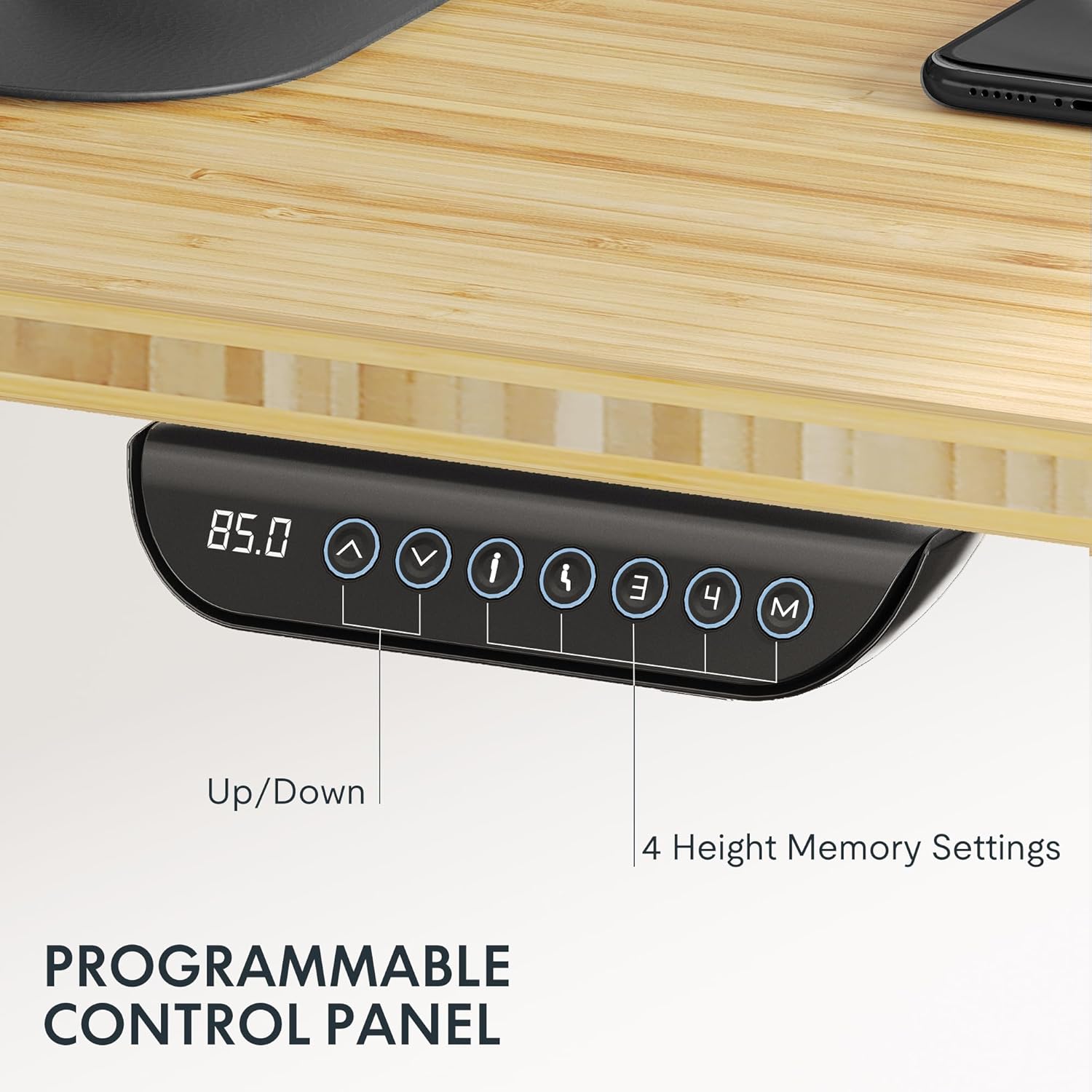
Image: The programmable control panel, featuring a digital height display, up/down buttons, and four memory preset buttons.
- Up/Down Arrows (↑ / ↓): Tryk og hold nede for at justere skrivebordets højde manuelt. Slip for at stoppe.
- Digital skærm: Shows the current desk height in inches or centimeters.
- Memory Buttons (1, 2, 3, 4): Disse knapper giver dig mulighed for at gemme og genkalde foretrukne højdeindstillinger.
- Sådan gemmer du en højde: Adjust the desk to your desired height. Press the "M" button, then immediately press one of the number buttons (1, 2, 3, or 4) until you hear a beep or see the display flash. The height is now saved.
- Sådan husker du en højde: Press the corresponding number button (1, 2, 3, or 4). The desk will automatically move to the saved height.
- Anti-kollisionsfunktion: The desk is equipped with an anti-collision system. If the desk encounters an obstacle during adjustment, it will automatically stop and reverse slightly to prevent damage or injury.
5.2 Vægtkapacitet
The FLEXISPOT E6 MAX desk has a maximum load capacity of 330 lbs (150 kg). Do not exceed this weight to ensure proper function and safety.

Image: The desk demonstrating its robust 330 lbs load capacity with heavy items placed on the desktop.
6. Vedligeholdelse
- Rensning: Tør skrivebordet og rammen af med en blød kludamp klud. Undgå skrappe kemikalier eller slibende rengøringsmidler.
- Kabelstyring: Periodically check that all cables are securely managed and not interfering with the desk's movement.
- Fastgørelseskontrol: Every few months, inspect all screws and bolts to ensure they remain tight. Tighten if necessary.
- Motorinspektion: Listen for any unusual noises during operation. If you notice anything abnormal, contact customer support.
7. Fejlfinding
If you encounter any issues with your FLEXISPOT E6 MAX desk, refer to the following common solutions. If the problem persists, contact customer support.
| Problem | Mulig årsag | Løsning |
|---|---|---|
| Skrivebordet bevæger sig ikke | Power cable disconnected, control panel cable loose, overload. | Check power connection. Ensure all cables are securely plugged in. Reduce weight on the desk. Perform a reset (refer to specific reset instructions in the full manual, if available). |
| Ujævn højdejustering | Obstruktion, ujævn vægtfordeling. | Fjern eventuelle forhindringer. Fordel vægten jævnt på skrivebordet. |
| Bordet stopper under justering | Anti-collision activated, motor overheating. | Check for obstructions. Allow motors to cool down if used continuously for an extended period. |
| Hukommelsesforudindstillinger virker ikke | Forudindstillingerne er ikke gemt korrekt. | Gem dine ønskede højdeindstillinger igen ved at følge instruktionerne i afsnit 5.1. |
8. Specifikationer
| Feature | Detalje |
|---|---|
| Mærke | FLEXISPOT |
| Modelnummer | E6 |
| Skrivebordsmateriale | Bamboo (Whole-Piece Board) |
| Rammemateriale | Metal |
| Desktop dimensioner | 48"W x 24"D (121.9 cm x 61 cm) |
| Højdejusteringsområde | 60 cm - 124 cm (24.4" - 50") |
| Motortype | Dobbelt motor |
| Stages | 3-Stage Lifting Columns |
| Belastningskapacitet | Op til 330 lbs (150 kg) |
| Støjniveau | Mindre end 50dB |
| Kontrolpanel | Programmable with 4 Memory Presets |
| Særlige funktioner | Anti-collision system, Includes assembly tools, Optional casters |
| UPC | 810072854940 |

Image: Detailed dimensions of the desktop and the adjustable height ranges of the desk frame.
9. Garantioplysninger
FLEXISPOT provides comprehensive warranty coverage for your E6 MAX Standing Desk:
- 10-årig dækning: Gælder for skrivebordsstellet og motorkomponenterne.
- 2-årig dækning: Applies to the control panel and other electronic components.
This warranty ensures peace of mind regarding the quality and durability of your product. For warranty claims or detailed terms and conditions, please contact FLEXISPOT customer support.
10. Kundesupport
For any questions, assistance with assembly, troubleshooting, or warranty inquiries, please contact FLEXISPOT customer support.
You can find more information and contact details by visiting the official FLEXISPOT store:


